Perkenalan
This manual provides comprehensive instructions for the Irfora Kid Alarm Clock LED Night with Digital Display, Model XR-MM-C2305. This device is designed to assist with time management for children, combining an alarm clock, night light, and various timer functions in a durable and child-friendly design.
Key features include a clear digital display, multiple alarm settings with selectable ringtones, a built-in night light, snooze function, and a countdown/count-up timer. The clock is portable, featuring a high-capacity rechargeable battery.
Pengaturan
Isi Paket
- Irfora Kid Alarm Clock (Model: XR-MM-C2305)
- Kabel Pengisian Tipe-C
- Panduan Pengguna
Mengisi Daya Perangkat
Before initial use, fully charge the alarm clock. Connect the provided Type-C charging cable to the charging port on the device and to a compatible USB power adapter (not included). A full charge takes approximately 4 hours and provides up to 30 days of battery life, depending on usage.
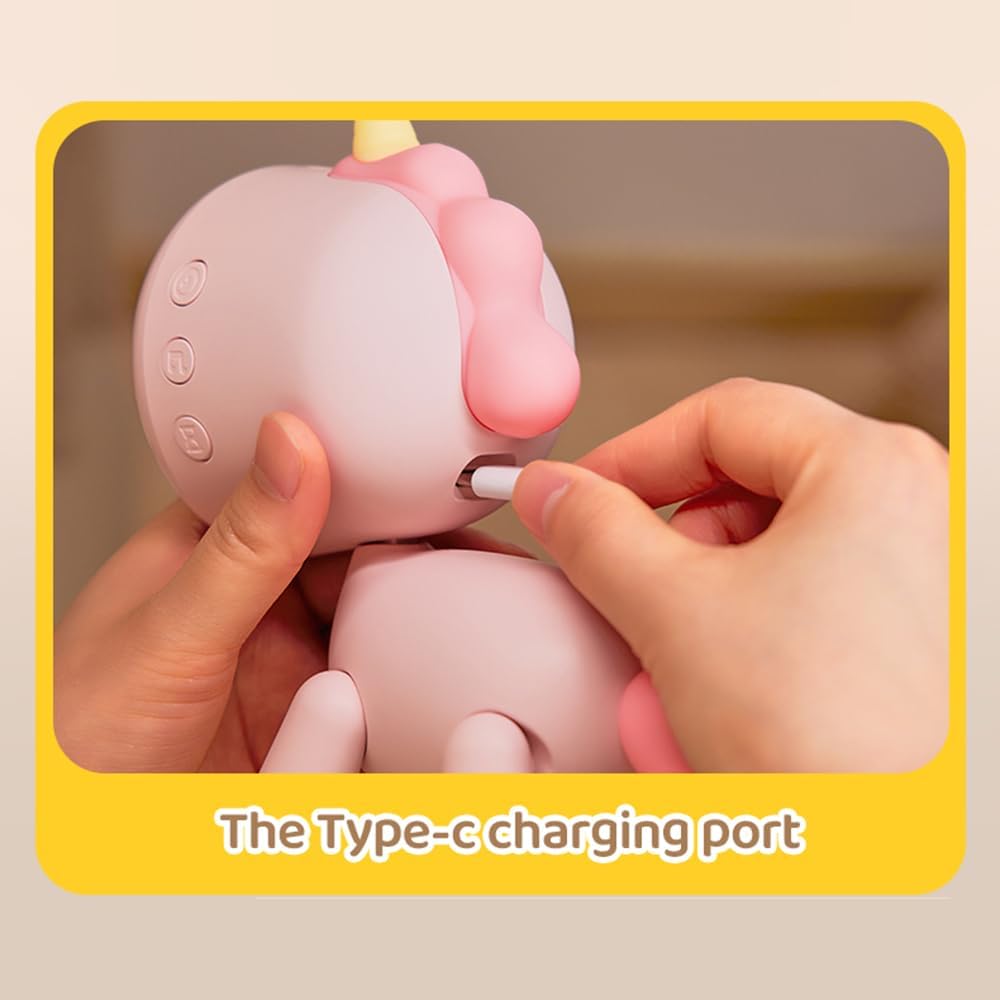
Image: Connecting the Type-C charging cable to the alarm clock.
Petunjuk Pengoperasian
Daya Hidup/Mati
Press and hold the power button (refer to the manual for exact button location) for 3 seconds to turn the device on or off. The digital display will illuminate upon powering on.
Mengatur Waktu
To set the current time, press the 'Set' button (or equivalent, refer to the detailed manual for button functions). Use the '+' and '-' buttons to adjust hours and minutes. Press 'Set' again to confirm each selection and move to the next setting. The large digital display ensures clear visibility of the time.

Image: The large, clear digital display of the alarm clock.
Pengaturan Alarm
The clock supports up to 3 independent alarm settings. To set an alarm, press the 'Alarm' button. Use the '+' and '-' buttons to adjust the alarm time. You can also select the alarm frequency (e.g., daily, weekdays only) and choose from 6 available ringtones. Confirm each setting with the 'Alarm' or 'Set' button.

Image: Illustrates the three customizable alarm settings for study and rest.

Image: The clock highlighting the selection of 6 different ringtones.
Fungsi Lampu Malam
The integrated night light provides a warm and soft illumination. To activate or adjust the night light, press the 'Light' button (or refer to the manual for specific controls). The brightness can typically be adjusted to suit preferences, creating a comforting ambiance for sleep.

Image: The night light feature providing a warm glow for sleep.
Fungsi Tunda
When an alarm sounds, press the designated 'Snooze' button to temporarily pause the alarm for a short period (e.g., 5-10 minutes). The alarm will sound again after the snooze interval.
Timer (Count Up/Down)
The clock includes a versatile timer function suitable for various activities such as studying, cooking, or playtime. To activate the timer, press the 'Timer' button. Use the '+' and '-' buttons to set the desired countdown duration or to start a count-up timer. Refer to the manual for specific timer modes and controls.
Pemeliharaan
Pembersihan
To clean the alarm clock, gently wipe the surface with a soft, dry, or slightly damp cloth. Do not use abrasive cleaners, solvents, or immerse the device in water, as this can damage the electronics and finish.
Perawatan Baterai
To maximize the lifespan of the built-in rechargeable battery, avoid exposing the device to extreme temperatures. If the clock will not be used for an extended period, it is recommended to fully charge it periodically (e.g., every 3 months) to prevent deep discharge.
Penyelesaian Masalah
- Jam tidak menyala: Ensure the device is fully charged. Connect the Type-C charging cable and allow it to charge for at least 15 minutes before attempting to power on again.
- Alarm tidak berbunyi: Verify that the alarm is enabled in the settings and that the volume is set to an audible level. Double-check that the alarm time is correctly configured for the desired day(s).
- Display issues (dim or flickering): A low battery can cause display problems. Recharge the device fully. If the issue persists after charging, contact customer support.
- Tombol tidak responsif: Try resetting the device (if a reset button is available, refer to the manual). Ensure the device is not in a locked mode.
Spesifikasi
| Model | XR-MM-C2305 |
| Bahan Produk | ABS + PC + Silica Gel |
| Berat Produk | 213.8 gram |
| Peringkat Daya | 0.76W |
| Kapasitas Baterai | 1200 mAh |
| Daya Tahan Baterai | Hingga 30 hari (kurang lebih) |
| Waktu Pengisian Daya | Sekitar 4 jam |
| Ukuran Produk | Ukuran 126.28x80.3x154.08 mm |
| ASIN | B0DBYKJTHT |
| Pabrikan | Irfora |
Garansi dan Dukungan
This product is covered by a standard manufacturer's warranty. For detailed information regarding warranty terms, duration, and claims, please refer to the product packaging or contact Irfora customer support directly.
For technical assistance, troubleshooting not covered in this manual, or any other inquiries, please reach out to Irfora customer support through their official channels. Contact information can typically be found on the product packaging or the manufacturer's weblokasi.


