1. Produk Lebihview
The ProtoArc EM11 NL is an ergonomic vertical mouse designed to provide a more natural and comfortable hand position, reducing wrist strain during extended computer use. It offers versatile connectivity options, including Bluetooth 5.0 and 2.4GHz USB-A, allowing connection to up to three devices simultaneously. Featuring a built-in rechargeable battery and adjustable DPI settings, this mouse is engineered for productivity and user well-being.
2. Apa yang ada di dalam kotak
- 1 x Mouse Ergonomis Bluetooth Isi Ulang ProtoArc
- 1 x 2.4G USB-A Receiver
- 1 x Type-C Charging Cable (for charging only)
- 1 x Panduan Pengguna

3. Fitur Produk
3.1 Ergonomic Vertical Design
The EM11 NL mouse features a unique ergonomic vertical design that positions your hand in a natural handshake posture. This design helps to keep your wrist straight, reducing discomfort and strain often associated with traditional horizontal mice. It promotes a relaxed forearm and wrist position, which can improve productivity and minimize the risk of repetitive strain injuries.


3.2 Konektivitas Multi-Perangkat
The mouse supports dual Bluetooth 5.0 and 2.4G USB-A connectivity modes, enabling simultaneous connection to up to three different devices. This allows for seamless switching between a computer, PC, or laptop, enhancing workflow efficiency.

Baterai Isi Ulang 3.3
Equipped with a built-in 500mAh Li-Ion battery, the EM11 NL mouse can be conveniently recharged using the included Type-C cable. A single charge provides long-lasting battery life, supporting months of use on standby.

3.4 Adjustable DPI & High Performance
The mouse offers 1000/1600/2400 DPI levels, providing higher sensitivity and precise optical tracking. It includes back and forward buttons for easy navigation, though these are not programmable and not compatible with Mac OS systems.

3.5 Quiet Clicking
The left and right mouse buttons feature a silent click design, allowing you to focus on your work without disruptive noise. Note that the middle scroll wheel and the back/forward buttons do not have silent clicks.
4. Pengaturan dan Instalasi
4.1 Menghubungkan melalui Penerima USB-A 2.4G
- Locate the 2.4G USB-A receiver stored in the compartment on the bottom of the mouse.
- Colokkan penerima USB-A ke port USB-A yang tersedia di komputer Anda.
- Turn on the mouse using the power switch located on the bottom. The mouse should automatically connect to your computer.
4.2 Menghubungkan melalui Bluetooth
- Nyalakan mouse menggunakan sakelar daya di bagian bawah.
- Press the 'Switch Button' on the bottom of the mouse to select either Bluetooth 1 (B1) or Bluetooth 2 (B2) mode. The corresponding indicator light will flash.
- Di komputer atau perangkat Anda, buka pengaturan Bluetooth dan cari perangkat baru.
- Select 'ProtoArc EM11 NL' from the list of available devices to pair.
- Setelah dipasangkan, lampu indikator akan berhenti berkedip dan tetap menyala.
5. Petunjuk Pengoperasian
5.1 Fungsi Tombol
The ProtoArc EM11 NL mouse is equipped with several buttons for intuitive control:
- Tombol Kiri: Fungsi klik kiri standar.
- Tombol Kanan: Fungsi klik kanan standar.
- Roda Gulir: Untuk pengguliran vertikal.
- Tombol DPI: Beralih melalui pengaturan DPI (1000/1600/2400).
- Tombol Maju: Navigasi maju dalam web browser/aplikasi (tidak kompatibel dengan Mac OS).
- Tombol Mundur: Navigasi mundur di web browser/aplikasi (tidak kompatibel dengan Mac OS).
- Tombol Beralih: Toggles between 2.4G, Bluetooth 1, and Bluetooth 2 connections.
- Saklar daya: Turns the mouse On/Off.

5.2 Penyesuaian DPI
Press the DPI button (located near the scroll wheel) to cycle through the available sensitivity settings: 1000 DPI, 1600 DPI, and 2400 DPI. Select the setting that best suits your preference for cursor speed and precision.
5.3 Beralih Antar Perangkat
To switch between connected devices, press the 'Switch Button' on the bottom of the mouse. The indicator light will change to reflect the currently active connection (2.4G, B1, or B2).
6. Pengisian daya
When the battery is low, the low-battery indicator light on the mouse will illuminate. Connect the included Type-C charging cable to the Type-C port on the front of the mouse and plug the other end into a USB power source (e.g., computer USB port, USB wall adapter). The Type-C cable is for charging only and does not support data transfer.

7. Hand Size Guide
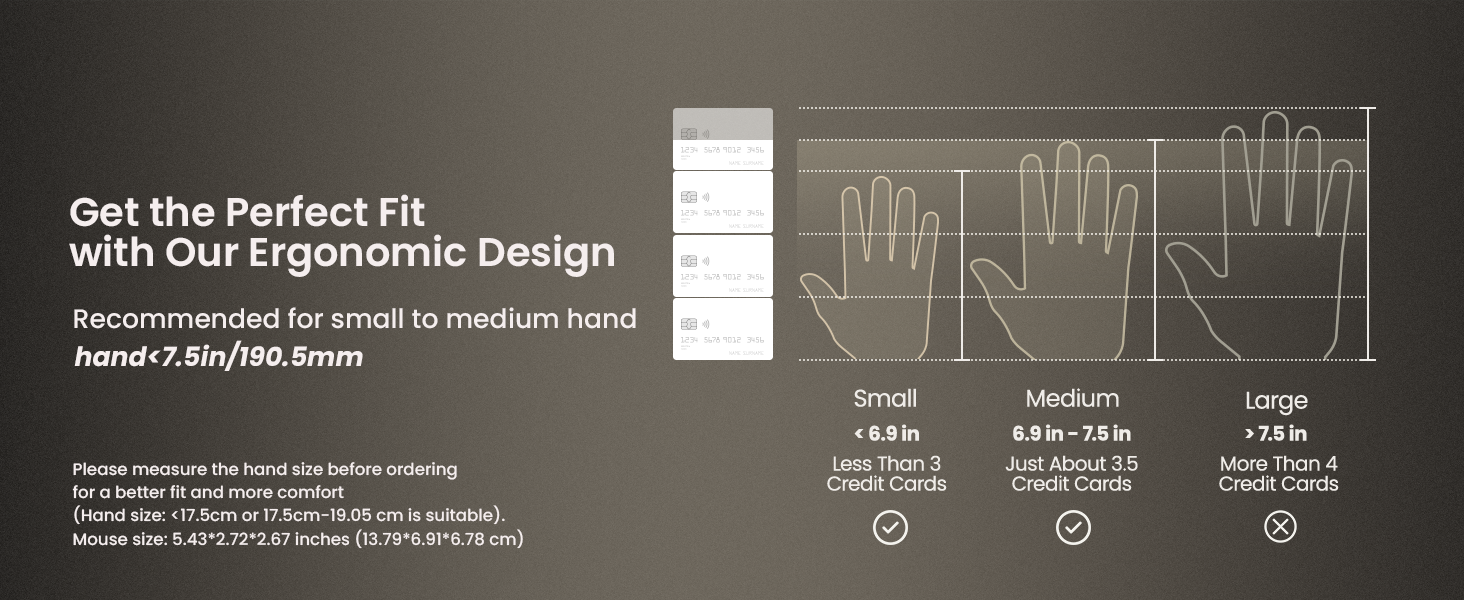
The ProtoArc EM11 NL mouse is specifically designed for small to medium-sized hands. For optimal comfort and ergonomic benefits, it is recommended for hand lengths under 7.5 inches (19.05 cm). Please measure your hand size before ordering to ensure a better fit.

8. Spesifikasi
| Fitur | Detil |
|---|---|
| Dimensi Produk | 3.54x2.76x0.04 inci |
| Berat Barang | 10.2 ons |
| Nomor Model Barang | EM11 NL |
| Baterai | 1 Baterai Nonstandar (termasuk) |
| Teknologi Konektivitas | 2.4G USB-A Receiver, Bluetooth |
| Fitur Khusus | Ergonomic Design, Multi-Device, Rechargeable, Vertical Design, Wireless |
| Teknologi Deteksi Gerakan | Optik |
| Warna | Putih |
| Pabrikan | ProtoArc |
9. Penyelesaian masalah
If you encounter any issues with your ProtoArc EM11 NL mouse, please try the following steps:
- Masalah Koneksi: Ensure the mouse is turned on and fully charged. For 2.4G connection, verify the USB-A receiver is securely plugged into your device. For Bluetooth, ensure Bluetooth is enabled on your device and the mouse is in the correct pairing mode (B1 or B2). Try re-pairing the mouse.
- Lagging/Unresponsive: Check for interference from other wireless devices. Ensure the mouse is within the effective range of your device. Try changing the DPI setting.
- Masalah Pengisian Daya: Ensure the Type-C cable is properly connected to both the mouse and a working USB power source. Try a different USB port or charging cable.
- Cursor Inaccuracy: Ensure the optical sensor on the bottom of the mouse is clean and free from obstructions. Use the mouse on a suitable surface.
10. Garansi dan Dukungan
Untuk informasi garansi dan dukungan teknis, silakan merujuk ke situs resmi ProtoArc. websitus web atau hubungi layanan pelanggan mereka secara langsung. Simpan struk pembelian Anda sebagai bukti pembelian untuk klaim garansi.