1. Pendahuluan
This manual provides detailed instructions for the safe installation, operation, and maintenance of your PHORUS 48-inch Modern White Ceiling Fan with Lights and Remote/APP Control. Please read all instructions carefully before beginning installation and retain this manual for future reference.
2. Informasi Keselamatan
- Pastikan aliran listrik terputus di pemutus sirkuit sebelum pemasangan atau perawatan.
- Semua instalasi kabel harus sesuai dengan peraturan kelistrikan nasional dan lokal. Jika Anda tidak familiar dengan instalasi kabel, konsultasikan dengan teknisi listrik yang berkualifikasi.
- Kipas harus dipasang dengan jarak minimal 7 kaki (2.1 meter) dari lantai ke tepi belakang bilah kipas.
- Struktur pemasangan harus mampu menopang berat kipas (sekitar 13.4 pon).
- Jangan menekuk dudukan mata pisau selama pemasangan atau pembersihan.
- Kipas ini dirancang untuk penggunaan di dalam ruangan.
3. Isi Paket
Verifikasi bahwa semua komponen tersedia sebelum memulai instalasi:
- Perakitan Motor Kipas
- Papan gantung
- 5 Fan Blades
- LED Lampnaungan
- Kontrol Jarak Jauh (dengan 2 baterai AAA)
- Screws and Mounting Hardware
- Manual Instruksi

4. Spesifikasi
| Fitur | Spesifikasi |
|---|---|
| Merek | PHORUS |
| Nama Model | #8907 |
| Ukuran | 48 inci |
| Warna | Putih |
| Bahan | Akrilik, Plastik |
| Tipe Motor | DC Motor (30W) |
| Sumber Cahaya | LED (28W) |
| Warna Terang | 3 (White, Warm, Neutral) |
| Rentang Peredupan | Tanpa ступен (10%-100%) |
| Kecepatan Angin | 6 |
| Metode Kontrol | Remote Control, APP Control |
| Fitur Khusus | Reversible Function, 2-Hour Timer, Memory Function |
| Tingkat Suara | Di bawah 35 dB |
| Dimensi Produk | 48"P x 48"L x 10.83"T |
| Berat Barang | 13.4 pon |
5. Pengaturan dan Instalasi
5.1 Daftar Periksa Pra-Instalasi
- Ensure the power supply is turned off at the main circuit breaker.
- Confirm you have all necessary tools (screwdriver, drill, wire strippers, etc.).
- Verify that the ceiling junction box is securely mounted and capable of supporting the fan.
5.2 Instalasi Langkah demi Langkah
- Attach Blades to Motor Assembly: Secure each of the five fan blades to the motor assembly using the provided screws. Ensure the 'THIS SIDE UP' marking on the blade attachment is facing upwards.
- Install LED Light Board: Carefully place the LED light board into the designated area on the motor assembly and secure it with screws. Connect the LED wires.
- Attach LED Lampnaungan: Tempatkan LED lampshade over the light board and twist it clockwise until it is securely fastened.
- Mount Hanging Board: Secure the hanging board to your ceiling junction box using appropriate screws. Ensure it is firmly attached.
- Hubungkan Kabel: Connect the fan's electrical wires to your household wiring. The typical connections are: Black (Live) to Black (Live), White (Neutral) to White (Neutral), and Yellow/Green (Ground) to Green (Ground). Use the provided wire connectors.
- Secure Fan to Hanging Board: Lift the fan assembly and attach it to the hanging board, ensuring all wires are tucked safely inside the canopy. Secure the fan with the provided screws.
6. Petunjuk Pengoperasian
6.1 Fungsi Kontrol Jarak Jauh
The included remote control allows for convenient operation of your ceiling fan:
- Daya Hidup/Mati: Tekan tombol daya untuk menghidupkan atau mematikan kipas dan lampu.
- Kecepatan Kipas: Select from 6 wind speeds (1-6) to adjust airflow.
- Lampu Hidup/Mati: Kendalikan lampu secara terpisah dari kipas.
- Suhu Warna: Cycle through 3 light colors: White (6000K), Neutral (4500K), and Warm (3000K).
- Peredupan: Adjust light brightness from 10% to 100%.
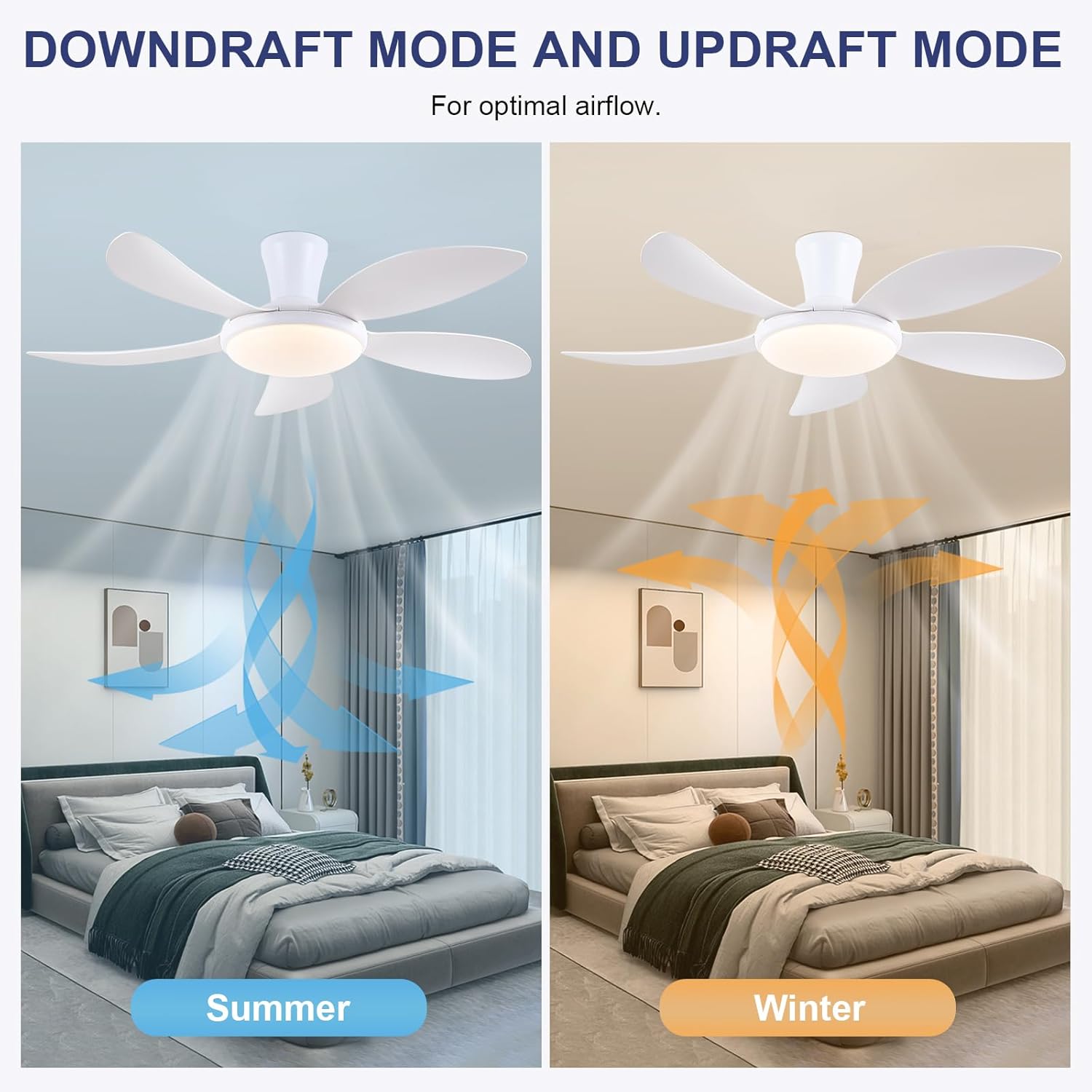
- Fungsi Reversibel: Press the F/R key to change the blade rotation direction for summer (downdraft) or winter (updraft) modes. The fan will stop briefly before reversing.
- Pengatur waktu: Set a 2-hour timer for automatic shutdown.
- Mode Malam: Activates a low-speed fan and dim light setting.

6.2 Remote Code Pairing
If the remote control is not responding, it may need to be paired:
- Turn off the main power supply to the fan for one minute.
- Turn on the main power supply and simultaneously long-press the 'Code Key' button on the remote control for 3-5 seconds.
- The fan light will blink 2-3 times, indicating successful code matching. The remote can now be operated normally.
6.3 Kontrol APLIKASI
Control your fan using the 'Fan Lamp Pro' mobile application:
- Unduh APLIKASI: Scan the QR code provided in the product images or search for "Fan Lamp Pro" in your app store.
- Terhubung melalui Bluetooth: Pastikan Bluetooth ponsel Anda diaktifkan.
- Pasangkan Perangkat: Open the app, add a new device, and follow the on-screen instructions to connect to your fan. The fan light will blink twice upon successful connection.
- Fungsi: The app allows control over fan speeds, light colors, dimming, reverse function, and timer settings, similar to the remote control.
6.4 Kecepatan Kipas dan Aliran Udara
- Tingkat 1-2: Low Comfortable Wind, suitable for sleep.
- Tingkat 3-4: Medium Natural Wind, suitable for daily life.
- Tingkat 5-6: High Cooling Wind, suitable for hot weather.

6.5 Pengaturan Cahaya
- The LED light source supports stepless dimming and memory function, retaining your last brightness and color temperature setting.
- Choose from 3 color temperatures: 3000K (Warm Light), 4500K (Natural Light), and 6000K (White Light).

6.6 Fungsi Reversibel
The reversible DC motor allows you to change the direction of the fan seasonally:
- Mode Musim Panas (Downdraft): Blades rotate counter-clockwise, pushing cool air downwards.
- Mode Musim Dingin (Updraft): Blades rotate clockwise, drawing cool air up and circulating warm air downwards.
7. Pemeliharaan
- Pembersihan: Untuk membersihkan kipas, lap dengan kain lembut dan kering.amp kain. Jangan gunakan pembersih atau pelarut yang bersifat abrasif.
- Perawatan Pisau: The ABS blades are designed to be easy to clean and resistant to deformation.
- Pemeriksaan Rutin: Periksa secara berkala semua sambungan dan sekrup untuk memastikan semuanya terpasang dengan aman.
8. Penyelesaian masalah
Jika Anda mengalami masalah dengan kipas angin Anda, lihat masalah umum dan solusi berikut:
- Kipas tidak beroperasi: Check power supply, ensure all wiring connections are secure, and verify remote control pairing.
- Cahaya tidak berfungsi: Check power supply, ensure light wires are connected, and verify remote control pairing.
- Kipas berisik: Ensure all screws are tightened, especially on the blades and mounting bracket. Check for any obstructions.
- Kendali jarak jauh tidak berfungsi: Replace batteries, ensure line of sight to the fan, and re-pair the remote control as per section 6.2.
- Masalah koneksi aplikasi: Ensure Bluetooth is on, the app is updated, and try re-pairing the device.
9. Garansi dan Dukungan
PHORUS provides a one-year quality warranty for this product. For any damage or quality problems, free replacement service is offered. If you have any questions or require assistance, please contact PHORUS customer service. You will receive a satisfactory answer within 24 hours.
For additional support and resources, please visit the official PHORUS websitus atau lihat informasi kontak yang diberikan bersama pembelian Anda.


