Selamat datang
Thank you for choosing the BYTECH BICONIC True Wireless Earbuds. This manual provides essential information on how to set up, operate, maintain, and troubleshoot your new earbuds. Please read this manual thoroughly before use to ensure optimal performance and longevity of your device.
Petunjuk Keselamatan Penting
- Jangan biarkan earbud atau wadah pengisi daya terkena suhu ekstrem, kelembapan, atau cairan.
- Hindari menjatuhkan, membenturkan, atau membongkar perangkat.
- Jangan gunakan pembersih abrasif atau bahan kimia keras untuk membersihkan earbud atau wadahnya.
- Dengarkan dengan volume sedang untuk mencegah kerusakan pendengaran. Paparan suara keras dalam waktu lama dapat menyebabkan kehilangan pendengaran permanen.
- Jauhkan dari jangkauan anak-anak dan hewan peliharaan.
- Dispose of the device responsibly according to local regulations. Do not dispose of with household waste.
Apa yang Termasuk
Harap periksa isi paket untuk memastikan semua item ada:
- BYTECH BICONIC True Wireless Earbuds (Left and Right)
- Kotak Pengisian Daya
- Kabel Pengisian Daya
- Panduan Pengguna
Produk Selesaiview
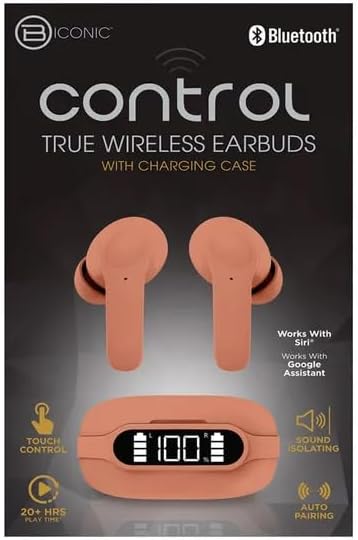
Familiarize yourself with the components of your BYTECH BICONIC True Wireless Earbuds.

Memulai
Mengisi Daya Earbud dan Casing
The BYTECH BICONIC earbuds come with a rechargeable battery in both the earbuds and the charging case. Ensure both are fully charged before first use.
- Place the earbuds into the charging case, ensuring they are correctly seated in their respective slots (L for left, R for right).
- Connect the provided charging cable to the charging port on the case and the other end to a USB power source (e.g., computer USB port, wall adapter).
- The digital display on the charging case will show the battery level. Allow sufficient time for a full charge.
- Setelah terisi penuh, lepaskan kabel pengisi daya.
Pairing Bluetooth
Follow these steps to pair your earbuds with your Bluetooth-enabled device:
- Pastikan earbud terisi daya dan berada di dalam wadah pengisian daya.
- Open the charging case. The earbuds will automatically enter pairing mode, and an indicator light on the earbuds will flash.
- On your device (smartphone, tablet, etc.), go to the Bluetooth settings and turn Bluetooth on.
- Pencarian untuk available devices. You should see "BYTECH BICONIC" or a similar name appear in the list.
- Select "BYTECH BICONIC" to connect. Once connected, a voice prompt will confirm the successful pairing, and the indicator lights on the earbuds will stop flashing.
- Earbud akan secara otomatis terhubung kembali ke perangkat yang terakhir dipasangkan saat dikeluarkan dari wadahnya, asalkan Bluetooth diaktifkan pada perangkat tersebut.
Petunjuk Pengoperasian
Kontrol Sentuh
The BYTECH BICONIC earbuds feature intuitive touch controls for easy management of your audio and calls.
| Tindakan | Fungsi |
|---|---|
| Ketukan Tunggal (Earbud Kiri/Kanan) | Putar/Jeda musik, Jawab/Akhiri panggilan |
| Ketuk Dua Kali (Earbud Kanan) | Lagu Berikutnya |
| Ketuk Dua Kali (Earbud Kiri) | Trek Sebelumnya |
| Ketuk Tiga Kali (Earbud Kiri/Kanan) | Aktifkan Asisten Suara (Siri/Google Assistant) |
| Tekan Lama (Earbud Kiri/Kanan) | Tolak Panggilan |
Menyalakan dan Mematikan
- Nyalakan: Earbud akan menyala secara otomatis saat dilepas dari wadah pengisi daya.
- Matikan: Masukkan kembali earbud ke dalam wadah pengisi daya dan tutup kembali. Earbud akan mati secara otomatis dan mulai mengisi daya.
Pemeliharaan dan Perawatan
Proper care will extend the life of your BYTECH BICONIC True Wireless Earbuds.
- Pembersihan: Use a soft, dry, lint-free cloth to clean the earbuds and charging case. Do not use liquids or aerosol cleaners.
- Penyimpanan: Bila tidak digunakan, selalu simpan earbud dalam wadah pengisi daya untuk melindunginya dan menjaganya tetap terisi daya.
- Hindari Kondisi Ekstrim: Do not expose the device to extreme heat, cold, or direct sunlight.
- Tahan Air: These earbuds are not waterproof. Avoid contact with water or excessive moisture.
Penyelesaian Masalah
Jika Anda mengalami masalah dengan earbud Anda, lihat solusi umum berikut:
| Masalah | Larutan |
|---|---|
| Earbud tidak dapat dipasangkan | Pastikan earbud terisi daya. Matikan dan nyalakan Bluetooth di perangkat Anda. Lupakan perangkat di pengaturan Bluetooth dan pasangkan kembali. |
| Hanya satu earbud yang berfungsi | Place both earbuds back into the charging case, close the lid, wait a few seconds, then take them out again. Ensure both are charged. |
| Tidak ada suara | Periksa level volume pada perangkat Anda dan earbud. Pastikan earbud terhubung dengan benar. Coba putar audio yang berbeda. |
| Casing pengisi daya tidak mengisi daya | Pastikan kabel pengisi daya terhubung dengan aman ke casing dan sumber daya. Coba port USB atau adaptor daya yang berbeda. |
Spesifikasi Teknis
Detailed specifications for your BYTECH BICONIC True Wireless Earbuds:
| Fitur | Detil |
|---|---|
| Nomor Model | BC-AU-BE-144-TN |
| Teknologi Konektivitas | Nirkabel (Bluetooth) |
| Faktor Bentuk | Di Dalam Telinga (Intraurales) |
| Warna | Kafe |
| Fitur Khusus | Rechargeable Battery, Touch Control, Sound Isolating, Auto Pairing |
| Komponen yang Termasuk | Kabel |
| Estimated Play Time | 20+ Hours (with charging case) |
Informasi Garansi dan Dukungan Pelanggan
BYTECH products are designed and manufactured to the highest quality standards. For information regarding warranty coverage, please refer to the warranty card included with your purchase or visit the official BYTECH weblokasi.
If you require further assistance or have questions not covered in this manual, please contact BYTECH customer support through their official channels. Please have your model number (BC-AU-BE-144-TN) and purchase details ready when contacting support.


