Perkenalan
This manual provides detailed instructions for the Mesqool Alarm Clock with Bluetooth Speaker, FM Radio, USB Chargers, Dimmer, Snooze, and Battery Backup (Model CR1025). Please read this manual thoroughly before operating the device to ensure proper use and optimal performance.
The Mesqool CR1025 is a versatile bedside device combining multiple functions:
- Alarm Clock with 2 optional sounds (radio or buzzer) and 9-minute snooze.
- Bluetooth 5.0 Speaker for wireless audio streaming.
- Digital FM Radio (87.5-108MHz) with auto-scan and 20 station presets.
- Adjustable Night Light.
- Dual USB Charging Station (Type-C & USB-A, 5V/1A each).
- Large LED display with 5-level dimmer and 12/24H time format.
- Battery backup for settings retention during power outagyaitu.

Image: The Mesqool Alarm Clock highlighting its five main features: Alarm Clock, Bluetooth V5.0, FM Radio, Night Light, and 2 USB Chargers.
Pengaturan
Power Connection and Battery Backup
The Mesqool CR1025 operates on AC power. Connect the provided power adapter to the DC IN port on the back of the unit and plug it into a standard wall outlet. The device also includes a battery backup feature (1 AAA battery included) to retain time and alarm settings during a power interruption. The battery does not power the display or alarm functions during an outage.

Image: The alarm clock connected to power, demonstrating its compact design suitable for a bedside table.
Pengaturan Waktu Awal
- Tekan tombol Waktu 12/24 tekan tombol. Angka jam akan mulai berkedip.
- Rotate the right knob (Scan) to adjust the hour.
- Tekan tombol Waktu 12/24 tombol lagi. Angka menit akan berkedip.
- Rotate the right knob (Scan) to adjust the minute.
- Tekan tombol Waktu 12/24 Tekan tombol sekali lagi untuk mengkonfirmasi pengaturan waktu.
Video: Demonstrates how to set the time on the Mesqool Alarm Clock by pressing the Time button and rotating the knob to adjust hours and minutes.
Format Waktu 12/24 Jam
Untuk beralih antara format waktu 12 jam dan 24 jam, tekan dan tahan tombol Waktu 12/24 button for 2 seconds. The display will change between AM/PM indicators for 12-hour format and no indicator for 24-hour format.
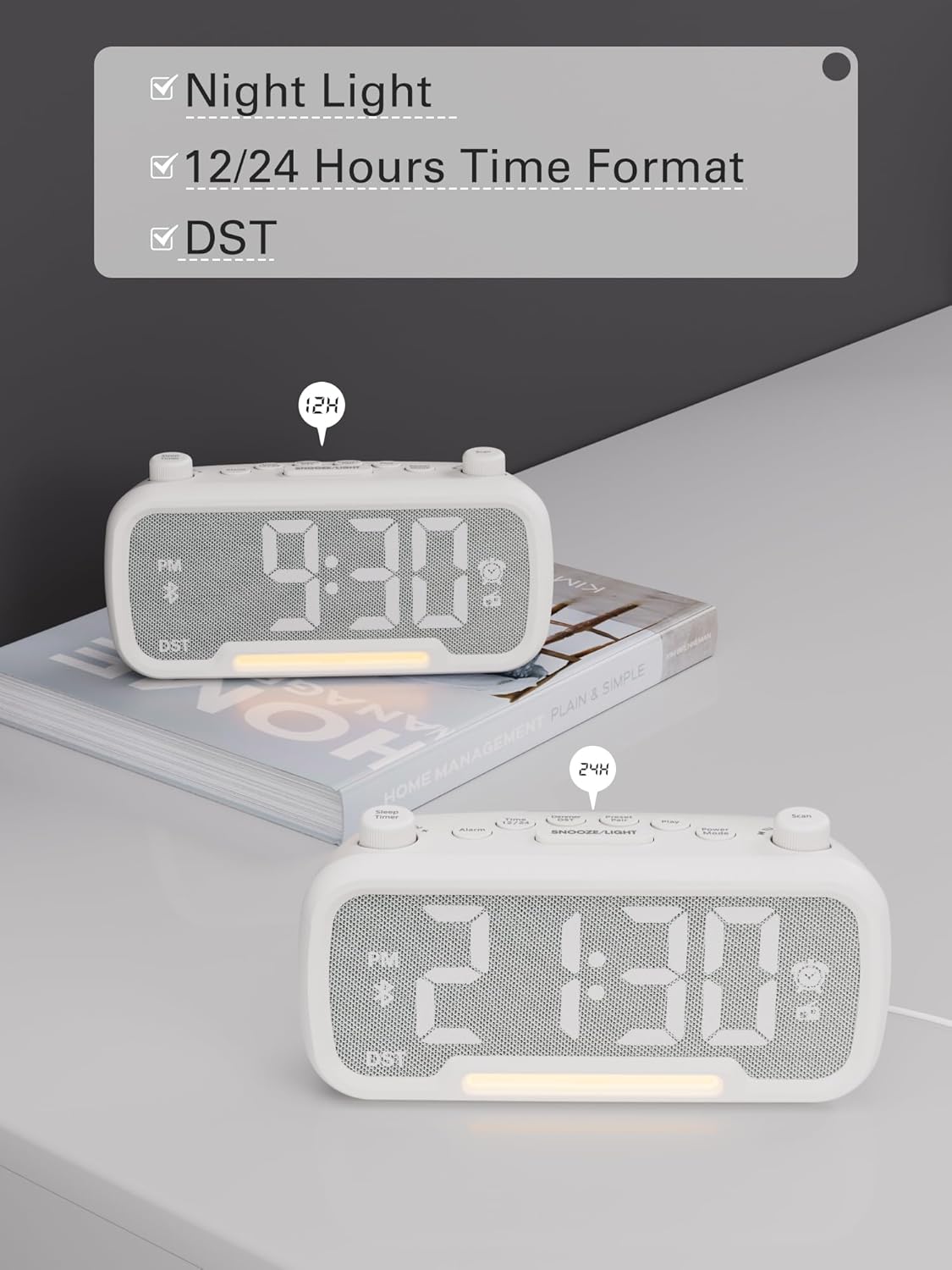
Image: The alarm clock displaying time in both 12-hour (with PM indicator) and 24-hour formats, also showing the DST indicator.
Daylight Saving Time (DST) Mode
Untuk mengaktifkan atau menonaktifkan Waktu Musim Panas (Daylight Saving Time/DST), tekan tombol Peredup DST button. The time will adjust by one hour forward or backward, and the "DST" indicator will appear or disappear on the display.
Video: Demonstrates how to activate or deactivate DST mode by pressing the DST button, showing the time adjustment.
Petunjuk Pengoperasian
Pengaturan Alarm
- Tekan dan tahan tombol Alarm Tekan tombol selama 2 detik. Angka jam akan berkedip.
- Rotate the left knob (Sleep Timer) to adjust the hour.
- Tekan tombol Alarm tombol lagi. Angka menit akan berkedip.
- Rotate the left knob (Sleep Timer) to adjust the minute.
- Tekan tombol Alarm button again to select the alarm sound: bell or last radio channel.
- Rotate the left knob (Sleep Timer) to adjust the alarm volume (L01-L16).
- Tekan tombol Alarm button once more to complete the alarm setting.
Video: Illustrates the steps to set the alarm time, choose the alarm sound (bell or radio), and adjust the alarm volume.
Membatalkan Alarm
Untuk membatalkan alarm, tekan tombol Alarm button. The alarm icon on the display will turn off, indicating that the alarm has been canceled.
Fungsi Tunda
Saat alarm berbunyi, tekan tombol TUNDA / CAHAYA Tekan tombol untuk mengaktifkan fungsi tunda. Alarm akan berhenti selama 9 menit lalu berbunyi lagi.

Image: The alarm clock with the SNOOZE/LIGHT button clearly marked, explaining its 9-minute snooze function.
Pengoperasian Speaker Bluetooth
- Tekan tombol Mode Daya button repeatedly until "bt" appears on the display. The Bluetooth icon will start flashing, indicating it's ready for pairing.
- On your mobile device, search for Bluetooth devices and select "CR1025" to connect.
- Once connected, the Bluetooth icon will stop flashing. You can now stream audio from your device.
Video: Shows how to enter Bluetooth mode and pair the alarm clock with a mobile device, indicated by the flashing and solid Bluetooth icon.

Image: The alarm clock wirelessly connected to a smartphone, demonstrating its Bluetooth 5.0 audio streaming capability.
Operasi Radio FM
- Tekan tombol Mode Daya button repeatedly until the radio icon lights up and a frequency is displayed.
- Pemindaian Otomatis: Tekan tombol Pindai button to automatically search for and store up to 20 FM stations (P01-P20).
- Pencarian Manual: Rotate the right knob (Scan) to browse frequencies manually.
- Saving a Station: While listening to a desired station, press and hold the Pasangan yang Telah Ditetapkan button for 2 seconds. Use the right knob (Scan) to select a preset number (P01-P20), then press Pasangan yang Telah Ditetapkan lagi untuk menyimpan.
- Memanggil Kembali Preset: Tekan sebentar tombol Pasangan yang Telah Ditetapkan tombol untuk beralih di antara stasiun yang tersimpan.
- Sesuaikan Volume: Rotate the left knob (Sleep Timer) to control the volume (16 levels).
Video: Demonstrates how to operate the FM radio, including auto-scanning, manual tuning, saving presets, and adjusting volume.

Image: The alarm clock showing an FM radio frequency, illustrating its use as a radio.
Pengaturan Pengatur Waktu Tidur
When using the FM radio or Bluetooth speaker functions, you can set a sleep timer to control playback duration before the device automatically turns off.
- Tekan tombol Pengatur Waktu Tidur button on the top left.
- Rotate the left knob (Sleep Timer) to select the desired duration: 15, 30, 60, 90, or 120 minutes. You can also select "OFF" to disable the sleep timer.
Video: Demonstrates how to set the sleep timer for the FM radio or Bluetooth speaker, showing available duration options.
Tampilan Peredup
The LED display has 5 levels of brightness. To adjust the brightness, press the Peredup DST button repeatedly to cycle through the levels (L01-L05).
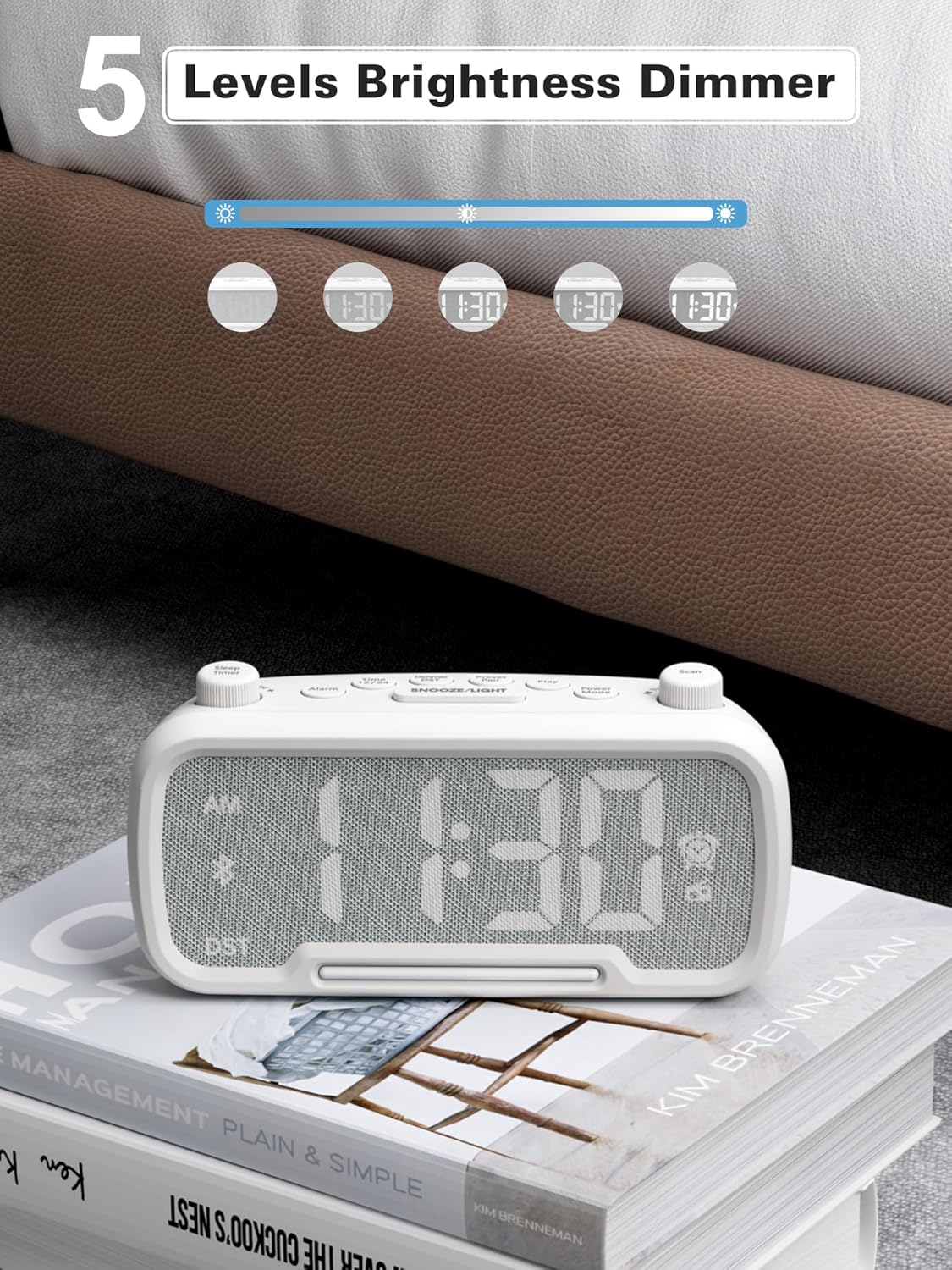
Image: The alarm clock illustrating the five different brightness levels for its LED display.
Lampu Malam
The alarm clock features a gentle fixed night light. To turn the night light on or off, press the TUNDA / CAHAYA button. This light creates a sleep-friendly environment.

Image: The alarm clock's warm night light glowing, positioned next to a teddy bear, suggesting its use in a child's room.
Port Pengisian Daya USB
The device includes two USB charging ports: one Type-C and one USB-A. Both ports provide 5V/1A output, allowing you to conveniently charge your smartphone, tablet, or other USB-powered devices simultaneously.

Image: The alarm clock with a smartphone connected to its Type-C port and a smartwatch to its USB-A port, demonstrating simultaneous charging.
Pemeliharaan
- Pembersihan: Gunakan kain lembut dan kering untuk membersihkan permukaan jam alarm. Jangan gunakan cairan pembersih atau bahan abrasif.
- Penyimpanan: Jika menyimpan perangkat untuk jangka waktu yang lama, cabut perangkat dari sumber daya dan lepaskan baterai cadangan. Simpan di tempat yang sejuk dan kering.
- Hindari Kelembaban: Keep the device away from water, high humidity, and direct sunlight to prevent damage.
Penyelesaian Masalah
| Masalah | Kemungkinan Penyebab | Larutan |
|---|---|---|
| Tidak ada tampilan/Perangkat tidak menyala | Adaptor daya tidak tersambung atau stopkontak rusak. | Ensure the power adapter is securely plugged into the device and a working wall outlet. Test the outlet with another device. |
| Alarm tidak berbunyi | Alarm not set, alarm volume too low, or alarm canceled. | Verify alarm time is set correctly, alarm icon is visible, and volume is adequate. Ensure the alarm was not accidentally canceled. |
| Bluetooth tidak terhubung | Perangkat tidak dalam mode pemasangan, berada di luar jangkauan, atau sudah terhubung ke perangkat lain. | Ensure the clock is in Bluetooth pairing mode ("bt" flashing). Move your mobile device closer. Disconnect from other Bluetooth devices. |
| Penerimaan radio FM buruk | Weak signal, antenna not extended. | Fully extend the FM antenna. Try repositioning the clock for better reception. Perform an auto-scan again. |
| Pengisian USB tidak berfungsi | Cable issue, device not compatible, or device already fully charged. | Check the USB cable for damage. Ensure your device is compatible with 5V/1A charging. Verify the device requires charging. |
Spesifikasi
- Merek: Mesqool
- Nomor Model: CR1025
- Warna: Putih
- Tipe Tampilan: DIPIMPIN
- Sumber Daya: Corded Electric (AC power)
- Baterai cadangan: 1 baterai AAA (termasuk)
- Dimensi Produk: 3.31"W x 2.32"H (Note: Length is 6.61" from feature bullets)
- Berat Barang: 7.7 ons
- Bahan: Fabric, Acrylonitrile Butadiene Styrene
- Frekuensi Radio FM: 87.5-108MHz
- Keluaran USB: Tipe-C & USB-A, masing-masing 5V/1A
- Suara Alarm: Bell, FM Radio
- Kecerahan Tampilan: 5 tingkat
- Format Waktu: 12 jam/24 jam
- Fitur Khusus: Bluetooth 5.0, Night Light, DST adjustment, Snooze
Garansi dan Dukungan
For warranty information or technical support, please refer to the contact details provided with your purchase or visit the official Mesqool weblokasi. Simpan kwitansi pembelian Anda untuk klaim garansi.


