1. Petunjuk Keselamatan Penting
Please read this instruction manual carefully before using the appliance and keep it for future reference. Failure to follow these instructions may result in electric shock, fire, or serious injury.
- Do not immerse the appliance, its cord, or plug in water or any other liquid.
- Alat ini hanya ditujukan untuk penggunaan rumah tangga. Jangan gunakan di luar ruangan atau untuk tujuan komersial.
- Jauhkan alat ini dari jangkauan anak-anak dan hewan peliharaan.
- Jangan mengoperasikan penyedot debu dengan kabel atau steker yang rusak.
- Ensure the dust tank and filters are correctly installed before use.
- Do not vacuum liquids, hot ashes, sharp objects, or flammable materials.
- Only use the original charger and battery provided with the appliance.
- Jangan mencoba memperbaiki atau memodifikasi alat sendiri. Hubungi petugas servis yang berkualifikasi.
2. Produk Lebihview
2.1 Komponen
The Taurus Homeland Ultimate Digital vacuum cleaner comes with several components designed for versatile cleaning.

Figure 2.1: Main unit, extension tube, motorized brush, and various accessories.
- Main Unit (with Digital Brushless Motor and Dust Tank)
- Tabung Ekstensi
- Motorized Brush Head (with Optic LED)
- ALL ROAD Brush Roller (pre-installed in brush head)
- FUZZY Brush Roller (for delicate surfaces)
- Alat Celah 2-in-1
- Kuas Gabungan
- Braket Pemasangan di Dinding
- Adaptor Daya/Pengisi Daya
2.2 Fitur Utama
- Digital Brushless Motor: Powerful 400W motor reaching 90,000 RPM for efficient cleaning.
- Daya Hisap Tinggi: Delivers 21,000 Pa for deep cleaning on various surfaces.
- Removable Lithium-Ion Battery: 29.6V battery offering up to 55 minutes of autonomy in ECO mode.
- Advanced Triple Filtration System: Cyclonic, HEPA, and Mesh filters capture fine dust and purify air.
- Layar LCD: Displays battery level (25% to 100%) and alerts for filter/brush blockages.
- Optic LED Lighting: Integrated into the motorized brush head for improved visibility in dark areas.
- Desain Ringan: Weighs approximately 2 kg for comfortable handling and extended reach.
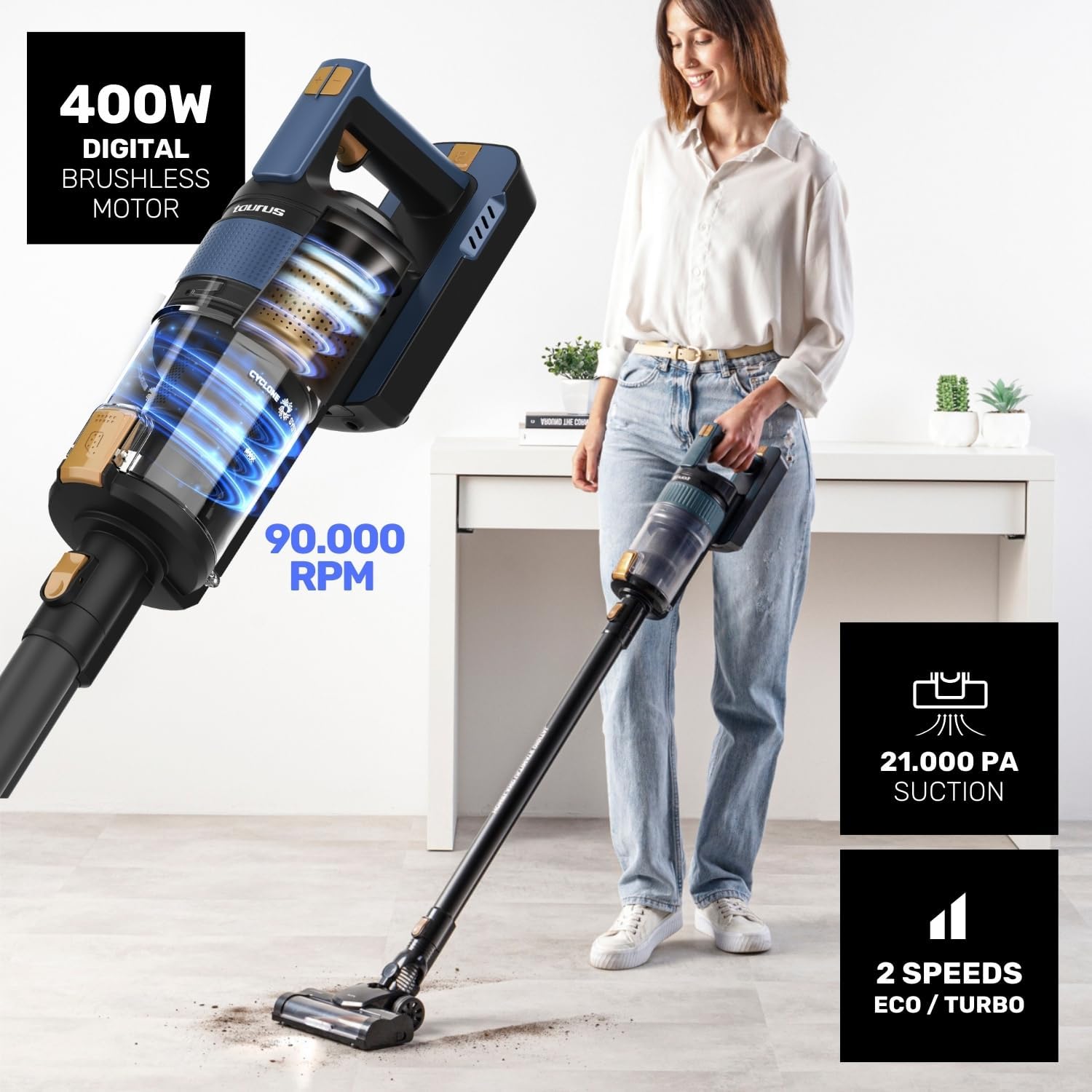
Figure 2.2: Powerful motor and suction capabilities.

Figure 2.3: Lightweight design for easy maneuverability.
3. Pengaturan dan Perakitan
3.1 Perakitan
- Masukkan selang ekstensi ke unit utama hingga berbunyi klik dan terpasang dengan benar.
- Attach the motorized brush head to the other end of the extension tube, ensuring it clicks securely.
- Alternatively, attach accessories like the 2-in-1 crevice tool or combined brush directly to the main unit for handheld use.

Figure 3.1: One Touch System for easy accessory attachment.
3.2 Mengisi Baterai
Sebelum digunakan pertama kali, isi daya baterai hingga penuh. Baterai dapat dilepas untuk memudahkan pengisian daya.
- Remove the battery from the main unit by pressing the release button.
- Connect the power adapter to the charging port on the battery.
- Plug the adapter into a power outlet. The LCD screen will indicate charging status.
- Pengisian penuh memerlukan waktu sekitar 4 jam.

Figure 3.2: Battery charging and autonomy details.
4. Petunjuk Pengoperasian
4.1 Powering On/Off and Speed Modes
- Press the power button to turn the vacuum cleaner on. It will start in ECO mode.
- Press the mode button to switch between ECO and TURBO modes.
- Tekan tombol daya lagi untuk mematikan alat.
4.2 Using the Motorized Brush Head
The motorized brush head is equipped with Optic LED lighting for enhanced visibility.
- ALL ROAD Brush: Suitable for all floor types, including carpets and hard floors.
- FUZZY Brush: Ideal for delicate surfaces like parquet and hardwood floors. To change brush rollers, refer to the maintenance section.

Figure 4.1: ALL ROAD motorized brush in action.

Figure 4.2: Optic LED and interchangeable brush rollers.
4.3 Menggunakan Aksesoris
- Alat Celah 2-dalam-1: Sangat cocok untuk celah sempit, sudut, dan area yang sulit dijangkau.
- Kuas Gabungan: Cocok untuk pelapis furnitur, tirai, dan permukaan yang halus.
5. Perawatan dan Pembersihan
Perawatan rutin memastikan kinerja optimal dan memperpanjang umur penyedot debu Anda.
5.1 Mengosongkan Tangki Debu
The 600 ml dust tank features a hygienic TOUCH & CLEAN emptying system.
- Hold the main unit over a waste bin.
- Press the dust tank release button to open the bottom flap and empty the contents.
- Tutup penutupnya dengan rapat setelah dikosongkan.

Figure 5.1: Hygienic dust tank emptying.
5.2 Membersihkan Filter
The Triple Filtration System (Cyclonic, HEPA, and Mesh filters) is washable.
- Twist and pull to remove the dust tank from the main unit.
- Separate the cyclonic, HEPA, and mesh filters from the dust tank.
- Rinse all filter components under running water until clean. Do not use detergents.
- Allow all parts to air dry completely for at least 24 hours before reassembling.
- Reassemble the filters and dust tank, then reattach to the main unit.

Figure 5.2: Triple Filtration System components.

Figure 5.3: Washable filters for easy maintenance.
5.3 Cleaning Brush Rollers
Periodically check and clean the brush rollers to remove tangled hair or debris.
- Turn off the vacuum cleaner and detach the motorized brush head.
- Locate the brush roller release tab/lock on the side of the brush head.
- Remove the brush roller and use scissors or a brush to remove any tangled hair or fibers.
- Reinsert the clean brush roller and secure it in place.
6. Penyelesaian masalah
Jika Anda mengalami masalah dengan penyedot debu Anda, lihat tabel di bawah ini untuk mengetahui masalah umum dan solusinya.
| Masalah | Kemungkinan Penyebab | Larutan |
|---|---|---|
| Penyedot debu tidak menyala. | Baterai tidak terisi atau tidak terpasang dengan benar. | Isi daya baterai hingga penuh. Pastikan baterai terpasang dengan aman dan terkunci pada tempatnya. |
| Daya hisap rendah. | Dust tank is full, filters are clogged, or brush roller is blocked. | Empty the dust tank. Clean or replace filters. Remove any obstructions from the brush roller. |
| Brush roller stops spinning. | Hair or debris tangled around the brush roller. | Turn off the vacuum, remove the brush roller, and clear any obstructions. |
| LCD screen shows an error/alert. | Indicates filter blockage or brush blockage. | Refer to the maintenance section to clean filters or brush roller. |
7. Spesifikasi
| Fitur | Detil |
|---|---|
| Nomor Model | HVCA7300B |
| Tenaga Motor | 400W Digital Brushless |
| Daya Hisap | 21,000 tahun |
| Jenis Baterai | 29.6V Lithium-Ion (Removable) |
| Otonomi Maksimum | Hingga 55 menit (mode ECO) |
| Waktu Pengisian Daya | Sekitar 4 jam |
| Kapasitas Tangki Debu | 600 ml |
| Sistem Filtrasi | Triple Advanced Filtration (Cyclonic, HEPA, Mesh) |
| Berat | Sekitar 2 kg |
| Dimensi (P x L x T) | 12 x 23 x 120 cm (sudah dirakit) |
8. Garansi dan Dukungan Pelanggan
Taurus products are manufactured to the highest quality standards. For information regarding warranty coverage, technical support, or spare parts, please refer to the warranty card included with your purchase or visit the official Taurus website. You may also contact customer service through the retailer where you purchased the product.
Simpan bukti pembelian Anda untuk klaim garansi apa pun.


