1. Pendahuluan
Thank you for choosing the BLITZWILL Ceiling Fan Light. This innovative fixture combines LED lighting, a summer fan, and a winter air circulator into a single, convenient unit. Designed for ease of use and versatility, it eliminates the need for multiple separate products, providing illumination and airflow efficiently. This manual provides detailed instructions for installation, operation, and maintenance to ensure optimal performance and longevity of your device.
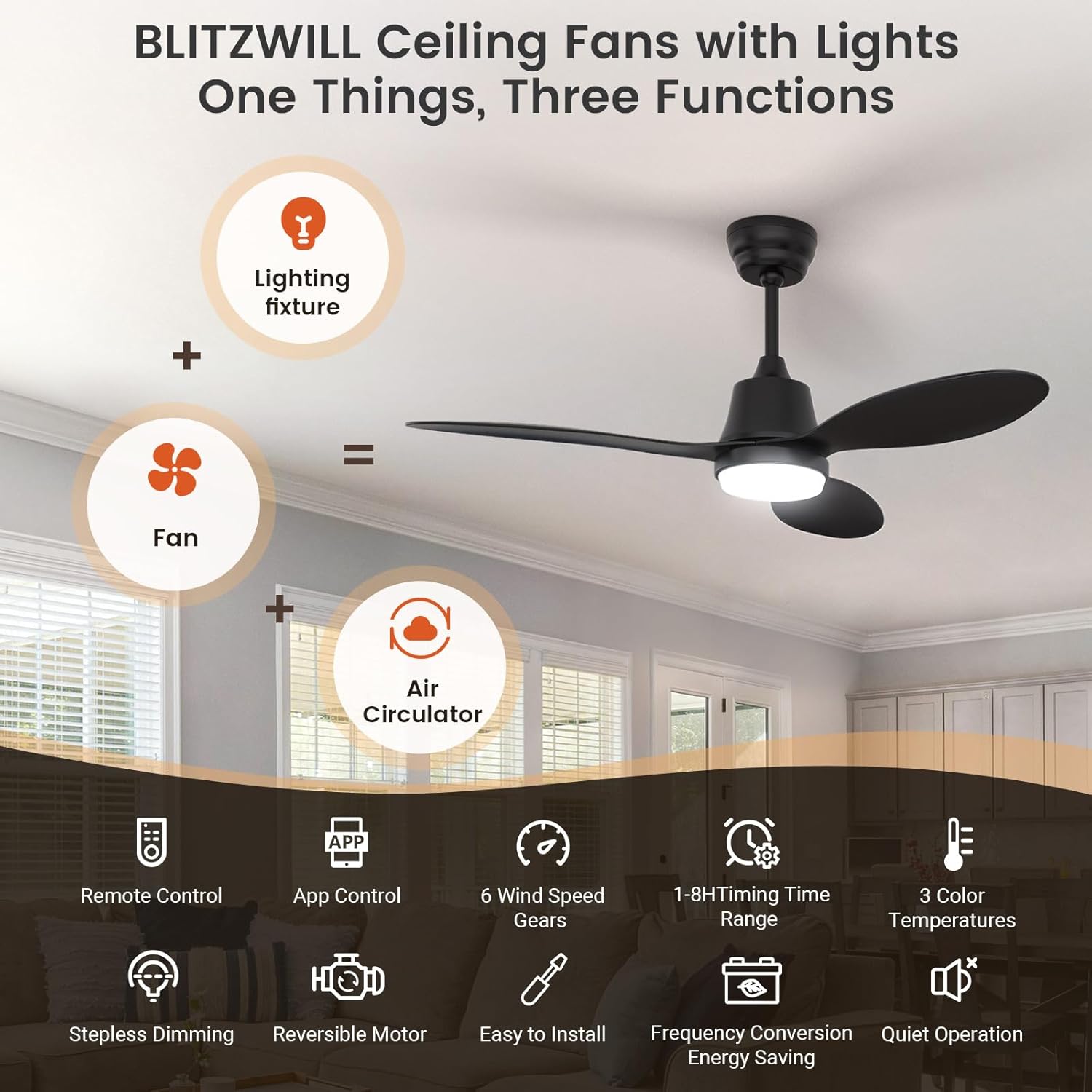
Figure 1: The BLITZWILL Ceiling Fan Light integrates lighting, fan, and air circulation functions into one device.
2. Petunjuk Keselamatan Penting
Harap baca semua petunjuk keselamatan dengan saksama sebelum pemasangan dan penggunaan. Kegagalan mengikuti petunjuk ini dapat mengakibatkan sengatan listrik, kebakaran, atau cedera serius.
- Always disconnect power at the circuit breaker before installing, cleaning, or servicing the unit.
- This product is designed for indoor use and covered outdoor spaces only. Do not expose to direct water or extreme weather conditions.
- Pastikan pasokan listrik voltage matches the requirements of the fan light.
- Jangan memasukkan jari atau benda apa pun ke dalam bilah kipas saat kipas sedang beroperasi.
- Keep children away from the fan light during operation.
- Jangan mencoba memperbaiki atau memodifikasi unit sendiri. Hubungi teknisi servis yang berkualifikasi untuk perbaikan.
- Ensure the E26/E27 socket is securely mounted and capable of supporting the weight of the fan light.
3. Isi Paket
Verifikasi bahwa semua komponen ada dan tidak rusak sebelum melanjutkan instalasi.
- BLITZWILL Ceiling Fan Light Unit
- Smart Remote Control with Wall Mount
- E26/E27 Socket Extender (if applicable)
- User Manual (dokumen ini)

Figure 2: Main components of the BLITZWILL Ceiling Fan Light package.
4. Pengaturan dan Instalasi
The BLITZWILL Ceiling Fan Light is designed for quick and easy installation, requiring no special tools or wiring. It fits most standard E26/E27 bulb sockets.
4.1 Langkah Instalasi:
- Matikan: Before beginning, ensure the power to the light socket is turned off at the circuit breaker to prevent electric shock.
- Siapkan Soket: If needed, screw the provided E26/E27 socket extender into your existing light socket.
- Install Fan Light: Carefully screw the BLITZWILL Ceiling Fan Light unit into the E26/E27 socket (or extender) until it is securely fastened.
- Pasang Bilah Kipas: Gently slide the fan blades into their designated slots on the main unit. Ensure they click into place securely.
- Nyalakan: Pulihkan daya pada pemutus arus.
- Uji Fungsionalitas: Use the remote control or app to test the light and fan functions.

Figure 3: Plug-and-Play installation process, showing options with and without the socket extender.
5. Petunjuk Pengoperasian
Your BLITZWILL Ceiling Fan Light can be controlled via the included smart remote or a dedicated mobile application.
5.1 Fungsi Kontrol Jarak Jauh:
The smart remote allows comprehensive control over all features.
- Daya Hidup/Mati: Turns the light and/or fan on or off.
- Kontrol Cahaya:
- Penyesuaian Suhu Warna: Cycle through 3000K (Cozy Romantic), 4000K (Soft Natural), and 6000K (Bright Comfortable).
- Penyesuaian Kecerahan: Peredupan tanpa langkah dari 1% hingga 100%.
- Mode Cahaya Malam: Activates a low-intensity light setting.
- Fungsi Memori: The light will recall your last brightness and color temperature setting when turned back on.
- Kontrol Kipas:
- Kecepatan Kipas: Select from 6 wind speeds (1-6).
- Fungsi Terbalik: Changes the direction of fan rotation for summer (downward airflow) or winter (upward airflow) modes.
- Pengatur waktu: Set the fan to turn off automatically after 1 to 8 hours.

Figure 4: Customizable light color temperatures and stepless dimming.

Figure 5: Fan speed settings and timer options for personalized comfort.
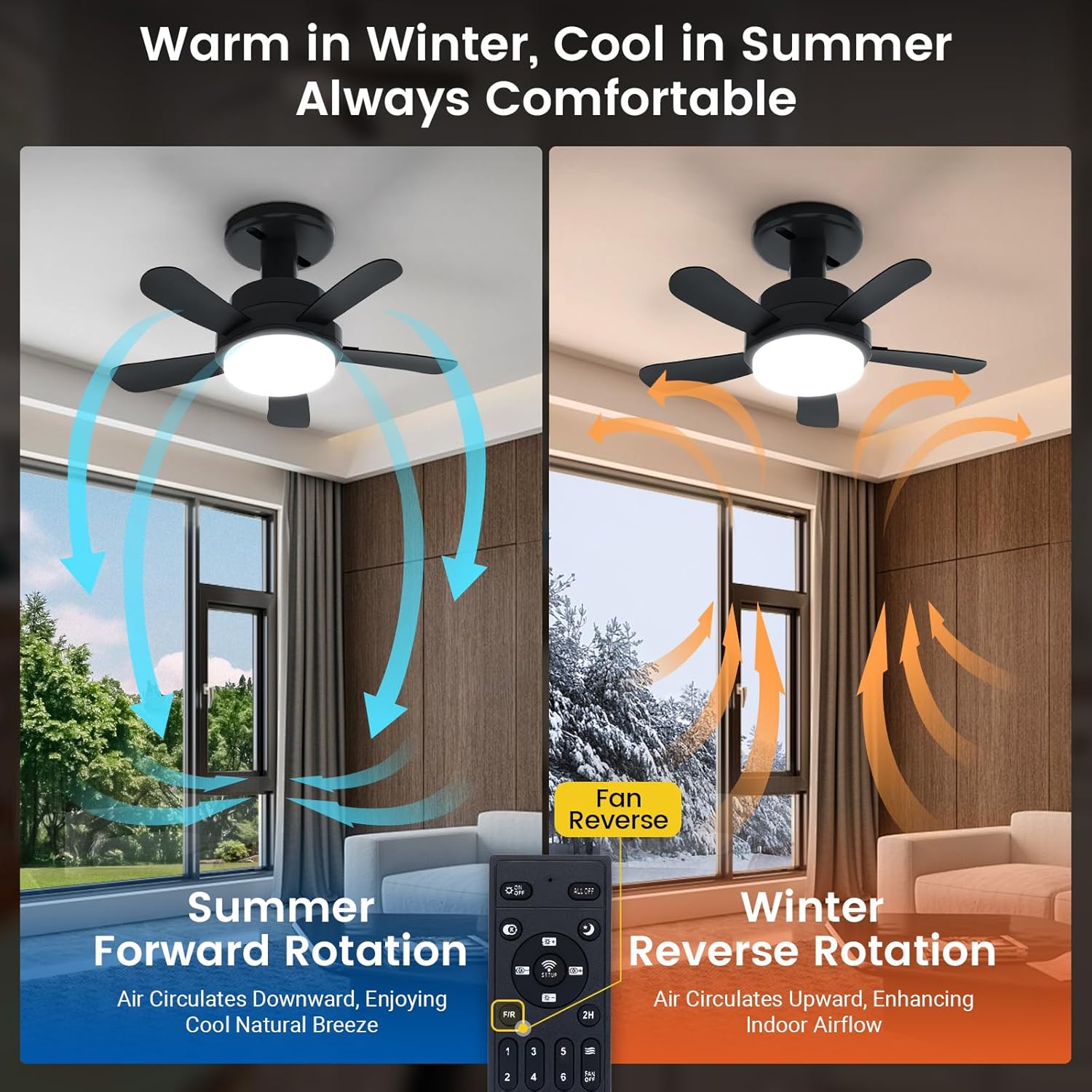
Figure 6: Reversible motor function for optimal airflow in summer and winter.
5.2 APP Control:
Download the official BLITZWILL app from your smartphone's app store. Follow the in-app instructions to pair your device. The app provides the same comprehensive control as the remote, with an intuitive graphical interface.
6. Fitur Utama
- Fungsionalitas 3-in-1: Combines LED lighting, a cooling fan for summer, and an air circulator for winter, offering a versatile solution for year-round comfort.
- Instalasi Mudah: Universal E26/E27 screw base allows for simple, tool-free installation, similar to screwing in a light bulb. Fan blades are easily detachable for cleaning.
- Pencahayaan yang Dapat Disesuaikan: Features 3 color temperatures (3000K/4000K/6000K) and stepless dimming (1%-100%). The memory function retains your preferred settings.
- Quiet & Energy-Efficient DC Motor: Advanced DC motor provides powerful airflow with minimal noise (under 35 decibels) and reduced energy consumption, ideal for quiet environments.
- Motor Reversibel: Allows you to switch airflow direction. Downward airflow creates a cooling effect in summer, while upward airflow helps distribute warm air evenly in winter.

Figure 7: The variable frequency DC motor ensures quiet and energy-efficient operation.

Figure 8: The memory function automatically recalls your last light settings.
7. Pemeliharaan
Regular maintenance ensures the longevity and optimal performance of your BLITZWILL Ceiling Fan Light.
- Pembersihan:
- Selalu matikan aliran listrik di pemutus sirkuit sebelum membersihkan.
- Wipe the fan light and blades with a soft, damp kain. Jangan gunakan pembersih atau pelarut yang bersifat abrasif.
- The fan blades can be easily detached for thorough cleaning.
- Penggantian Bohlam: The LED light source is integrated and not user-replaceable. If the light fails, contact customer support.
- Kontrol Jarak Jauh: Replace batteries (not specified type, assume AAA/AA) when the remote's range decreases or it stops responding.
8. Penyelesaian masalah
If you encounter issues with your BLITZWILL Ceiling Fan Light, refer to the following common problems and solutions:
| Masalah | Kemungkinan Penyebab | Larutan |
|---|---|---|
| Kipas atau Lampu tidak menyala. | No power supply; Loose connection; Remote control battery low/dead. | Check circuit breaker; Ensure fan light is securely screwed into socket; Replace remote control batteries. |
| Kipasnya berisik atau bergoyang. | Fan blades not securely attached; Unit not securely screwed into socket. | Ensure all fan blades are properly clicked into place; Tighten the fan light unit in the socket. |
| Kontrol jarak jauh tidak merespons. | Batteries dead/incorrectly inserted; Remote not paired with unit. | Replace batteries, ensuring correct polarity; Refer to remote pairing instructions (if applicable, usually automatic). |
| Cahaya berkedip atau berubah kecerahan secara tiba-tiba. | Unstable power supply; Interference. | Ensure stable power; Try resetting the unit by turning power off and on at the circuit breaker. |
9. Spesifikasi
| Merek | SERANGAN LISTRIK |
| Model | B0DGQB27FS |
| Gaya | BLITZWILL Ceiling Fans with Lights & Socket Fan |
| Tipe Kamar | Bedroom (also suitable for dining areas, kitchens, living rooms, offices, garages) |
| Fitur Khusus | Timer, Reversible Motor, Memory Function, Dimmable, APP Control |
| Penggunaan yang Direkomendasikan | Cooling, Air Circulation, Illumination |
| Penggunaan Dalam/Luar Ruangan | Indoor (and covered outdoor spaces) |
| Metode Kontrol | Aplikasi, Jarak Jauh |
| Suhu Warna Cahaya | 3000K / 4000K / 6000K |
| Kecerahan | 1% - 100% Stepless Dimmable |
| Kecepatan Kipas | 6 Kecepatan |
| Tingkat Kebisingan | Under 35 decibels |
| Basis Soket | E26/E27 Universal |
10. Garansi dan Dukungan
For warranty information or technical support, please contact BLITZWILL customer service. Details can typically be found on the product packaging or the official BLITZWILL weblokasi.
BLITZWILL Official Store: Visit BLITZWILL Store on Amazon