Perkenalan
Thank you for choosing the YESWELDER MIG-205DS PRO Multi-Process Welder. This machine is designed for versatility, offering 5-in-1 welding capabilities including Gas MIG, Flux Core MIG, Spool Gun MIG, Lift TIG, and Stick welding. This manual provides essential information for the safe and efficient operation, setup, maintenance, and troubleshooting of your welding machine. Please read this manual thoroughly before operation to ensure proper use and to prevent injury or damage.
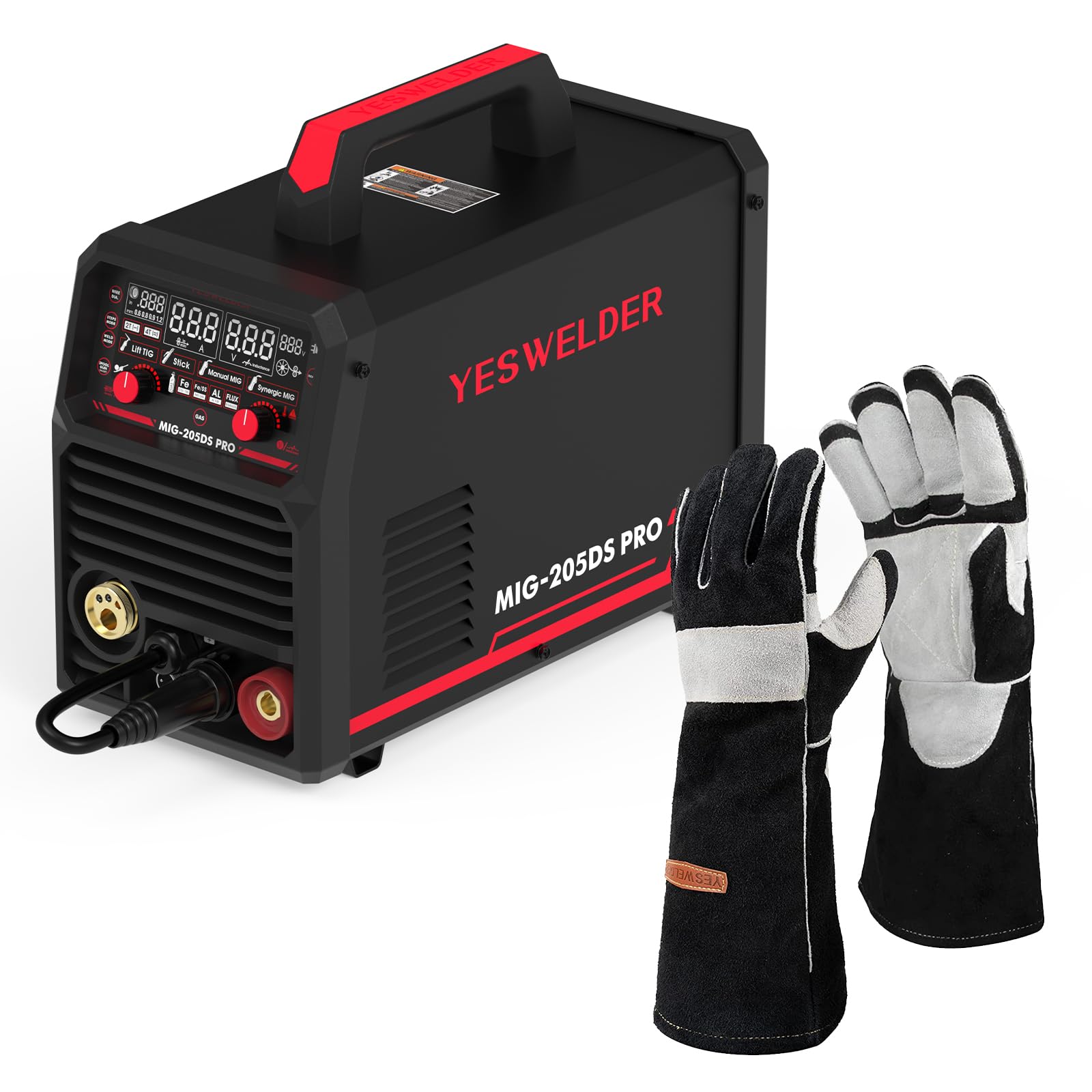
Image: The YESWELDER MIG-205DS PRO Multi-Process Welder, showcasing its compact design and various connection points for different welding processes, along with included accessories like the MIG torch, ground clamp, and electrode holder.
Informasi Keselamatan
Welding can be dangerous. It is crucial to follow all safety precautions to prevent serious injury or death. Always wear appropriate personal protective equipment (PPE) including a welding helmet with proper shade, welding gloves, protective clothing, and safety shoes. Ensure adequate ventilation to avoid inhaling welding fumes. Keep a fire extinguisher nearby. Disconnect power before performing any maintenance or service.
- Sengatan listrik: Can kill. Do not touch live electrical parts. Wear dry insulating gloves and clothing.
- Asap dan Gas: Dapat membahayakan kesehatan Anda. Jauhkan kepala Anda dari asap. Gunakan ventilasi atau pembuangan yang cukup pada area pembakaran untuk menjauhkan asap dan gas dari zona pernapasan.
- Sinar Busur: Can burn eyes and skin. Wear a welding helmet with a proper shade filter. Wear protective clothing to protect your skin.
- Kebakaran dan Ledakan: Percikan api pengelasan dapat menyebabkan kebakaran atau ledakan. Jauhkan bahan yang mudah terbakar dari area pengelasan. Sediakan alat pemadam api.
- Bagian Panas: Can cause severe burns. Do not touch hot parts with bare hands.

Image: A pair of black and gray YESWELDER MIG welding gloves, designed for hand protection during welding operations. These gloves feature a durable leather construction with reinforced palms and fingers.

Image: A diagram illustrating the dimensions of the YESWELDER MIG welding gloves, showing a total length of 16 inches, a palm width of 6.7 inches, and a finger length of 7.5 inches, indicating their extended coverage and fit.
Produk Selesaiview
The MIG-205DS PRO is a versatile welding machine featuring advanced IGBT inverter technology for stable performance. It includes a large digital display for clear parameter adjustments and monitoring. The machine supports multiple welding processes, making it suitable for various applications.
Fitur Utama:
- 5-in-1 Multi-Process: Gas MIG, Flux Core MIG, Spool Gun MIG, Lift TIG, Stick.
- Volume Gandatage Input: 110V/220V automatic detection.
- Advanced Digital Display: Enhanced clarity for settings.
- IGBT Inverter Technology: For reliable and stable arc performance.
- Synergic Control: Simplifies parameter setup for MIG welding.

Gambar: Close-up view of the YESWELDER MIG-205DS PRO's upgraded large LED digital display, showing various welding parameters and mode selections such as Lift TIG, Stick, Manual MIG, and Synergic MIG, along with material and gas settings.

Image: A visual representation of the five welding processes supported by the YESWELDER MIG-205DS PRO: Spool Gun Welding, Gas MIG Welding, Flux Core Welding, Stick Welding, and Lift TIG Welding, each depicted with an example of the welding process.
Pengaturan
1. Membongkar dan Inspeksi
- Keluarkan mesin las dan semua aksesorinya dari kemasan dengan hati-hati.
- Inspect for any shipping damage. Contact your supplier immediately if damage is found.
- Verifikasi apakah semua komponen yang tercantum dalam daftar pengepakan ada.
2. Koneksi Daya
- The MIG-205DS PRO automatically detects input voltage (110V atau 220V).
- Connect the power cord to a suitable grounded power outlet. Ensure the circuit breaker rating is appropriate for welding current.
- For 220V operation, ensure the correct plug adapter is used if necessary.
3. Tanah Clamp Koneksi
- Hubungkan kabel groundamp cable to the appropriate terminal on the front panel (usually the negative (-) terminal for MIG/Stick, or positive (+) for Lift TIG).
- Pasangkan kabel ground dengan amanamp pada benda kerja, memastikan kontak listrik yang baik.
4. Gas Connection (for Gas MIG)
- Connect the gas hose from your shielding gas cylinder (e.g., Argon/CO2 mix for MIG, 100% Argon for TIG) to the gas inlet on the rear of the machine.
- Pastikan semua sambungan terpasang rapat untuk mencegah kebocoran gas.
- Set the gas regulator to the recommended flow rate (typically 15-25 CFH for MIG).
5. Wire Installation (MIG/Flux Core)
- Open the wire feeder compartment.
- Install the wire spool onto the spindle, ensuring it rotates freely.
- Masukkan kawat las melalui tabung pemandu dan ke dalam rol penggerak.
- Sesuaikan tegangan rol penggerak untuk mencegah kawat tergelincir atau hancur.
- Select the correct drive roller groove size for your wire diameter.
- Feed the wire through the MIG torch liner until it exits the contact tip.
6. Spool Gun Connection (Optional)
- Connect the spool gun cable to the dedicated spool gun port on the front panel.
- Ensure the spool gun is loaded with the appropriate wire (e.g., aluminum wire for aluminum welding).
7. Lift TIG Torch Connection (Optional, not included)
- Connect the Lift TIG torch to the appropriate terminal (usually the negative (-) terminal for DC TIG).
- Connect the gas hose from the TIG torch to the gas outlet on the machine or directly to the gas cylinder with a separate regulator.
- Ensure a tungsten electrode is properly installed in the torch.
8. Stick Electrode Holder Connection
- Connect the electrode holder cable to the positive (+) terminal on the front panel.
- Insert the desired stick electrode into the holder.
Mode Operasi
The MIG-205DS PRO offers multiple welding processes. Select the desired mode using the control panel.
1. Digital Display and Control Panel
The large digital display shows welding parameters such as current (Amps), voltage (Volts), and wire feed speed. Use the control knobs to adjust these parameters. The display also indicates the selected welding mode and material type.
Gambar: Detail view of the YESWELDER MIG-205DS PRO's control panel and digital display, highlighting the clear readouts for current, voltage, and wire feed speed, along with indicators for selected welding modes and material types (Fe, Fe/Ss, AL, Flux).
2. Gas MIG Welding
- Pengaturan: Ensure gas cylinder is connected and flowing, correct wire is installed, and ground clamp aman.
- Pemilihan Mode: Select "Gas MIG" on the control panel.
- Penyesuaian Parameter: Use the synergic function for automatic parameter setting based on wire diameter and material, or adjust manually.
- Operasi: Position the torch, press the trigger to start the arc and wire feed. Maintain a consistent travel speed and arc length.
3. Flux Core MIG Welding
- Pengaturan: Install flux core wire. No shielding gas is required. Ensure polarity is set correctly (usually DCEN - electrode negative).
- Pemilihan Mode: Select "Flux Core MIG" on the control panel.
- Penyesuaian Parameter: Adjust current and wire feed speed according to wire manufacturer recommendations.
- Operasi: Similar to Gas MIG, but the flux in the wire provides shielding.
4. Spool Gun MIG Welding
- Pengaturan: Connect the spool gun with appropriate wire (e.g., aluminum). Ensure shielding gas (100% Argon for aluminum) is connected.
- Pemilihan Mode: Select "Spool Gun MIG" on the control panel.
- Penyesuaian Parameter: Adjust settings for aluminum welding, typically higher wire feed speed and AC balance if available (this machine is DC only for TIG, so MIG will be DC).
- Operasi: The spool gun feeds wire directly, ideal for softer wires like aluminum.
5. Pengelasan TIG Angkat
- Pengaturan: Connect Lift TIG torch, gas, and ground clamp. Ensure tungsten electrode is sharpened.
- Pemilihan Mode: Select "Lift TIG" on the control panel.
- Penyesuaian Parameter: Tetapkan yang diinginkan ampmarah.
- Operasi: Touch the tungsten to the workpiece, then lift slightly to initiate the arc. This method minimizes tungsten contamination.
6. Stick Welding (SMAW)
- Pengaturan: Connect electrode holder to positive (+) and ground clamp to negative (-) for DCEP (most common), or vice-versa for DCEN. Insert appropriate electrode.
- Pemilihan Mode: Select "Stick" on the control panel.
- Penyesuaian Parameter: Mengatur amperage based on electrode type and diameter.
- Operasi: Strike the arc by lightly scratching the electrode on the workpiece. Maintain a consistent arc length and travel speed.

Image: A welder wearing a helmet and protective gear, operating the YESWELDER MIG-205DS PRO machine. The image emphasizes the smooth operation and quality results achievable with the welder, showing sparks during a welding process.
Pemeliharaan
Regular maintenance ensures the longevity and optimal performance of your welding machine. Always disconnect power before performing any maintenance.
1. Pembersihan Umum
- Periodically clean the exterior of the machine with a dry, soft cloth.
- Use compressed air to blow out dust and debris from the cooling vents. Ensure the air is dry and oil-free.
- Keep the control panel clean and free from grease or dirt.
2. Penggantian Bahan Habis Pakai
- Obor MIG: Regularly inspect and replace worn contact tips, nozzles, and diffusers. Ensure the liner is clean and free of kinks.
- Obor TIG: Inspect and replace tungsten electrodes as needed. Ensure the collet and collet body are clean.
- Stick Electrode Holder: Check for wear on the jaws and cable connections.
3. Wire Feeder Maintenance
- Clean the drive rollers and wire guide tubes to prevent wire feeding issues.
- Check drive roller tension and adjust as necessary.
- Inspect the wire spool spindle for smooth rotation.
4. Inspeksi Kabel dan Sambungan
- Regularly inspect all welding cables (MIG torch, ground clamp, electrode holder) for cuts, abrasions, or loose connections.
- Ensure power cord and plug are in good condition.
Penyelesaian Masalah
Bagian ini menyediakan solusi untuk masalah umum yang mungkin Anda temui. Untuk masalah yang tidak tercantum di sini, hubungi dukungan pelanggan.
| Masalah | Kemungkinan Penyebab | Larutan |
|---|---|---|
| Tidak Ada Daya | Power switch off, circuit breaker tripped, loose power cord. | Turn on power switch. Reset circuit breaker. Check power cord connection. |
| Tidak ada Busur | Poor ground connection, incorrect welding mode, wrong parameters, faulty torch/electrode holder. | Pastikan tanah bersihamp is secure. Select correct mode. Adjust parameters. Inspect and replace torch/holder if damaged. |
| Poor Wire Feed (MIG) | Incorrect drive roller tension, wrong drive roller size, clogged liner, wire tangled. | Adjust drive roller tension. Use correct roller groove. Clean or replace liner. Untangle wire spool. |
| Porosity in Weld (MIG) | Insufficient shielding gas, gas leak, contaminated workpiece, incorrect gas type. | Check gas cylinder level and flow rate. Inspect gas hose for leaks. Clean workpiece thoroughly. Use correct shielding gas. |
| Perlindungan dari Panas Berlebih | Exceeded duty cycle, blocked cooling vents. | Allow machine to cool down. Ensure cooling vents are clear. Reduce welding time or current. |
Spesifikasi
| Fitur | Detil |
|---|---|
| Model | MIG-205DS PRO |
| Proses Pengelasan | Gas MIG, Flux Core MIG, Spool Gun MIG, Lift TIG, Stick |
| Masukan Voltage | Vol Ganda 110V/220Vtage (Automatic Detection) |
| Kisaran Arus Keluaran | Nomor telepon 30-205 Amps (maks) |
| Teknologi | Pembalik IGBT |
| Menampilkan | Advanced Digital Display |
| Aksesoris yang disertakan | MIG Torch, Ground Clamp, Electrode Holder, Welding Gloves |
Garansi dan Dukungan
For warranty information, technical support, or service inquiries, please refer to the warranty card included with your product or visit the official YESWELDER websitus. Simpan struk pembelian Anda sebagai bukti pembelian.
Sumber Daya Daring: For additional support, FAQs, and product registration, please visit www.yeswelder.com.


