1. Pendahuluan
This manual provides detailed instructions for the installation, operation, and maintenance of your ieGeek S3 2K Wireless Outdoor Security Camera. Please read this manual thoroughly before using the product to ensure proper function and safety. Keep this manual for future reference.
2. Produk Lebihview
The ieGeek S3 is a 2K battery-powered wireless security camera designed for both indoor and outdoor use. It features 180° pan rotation, smart motion detection, color night vision, and two-way audio communication.
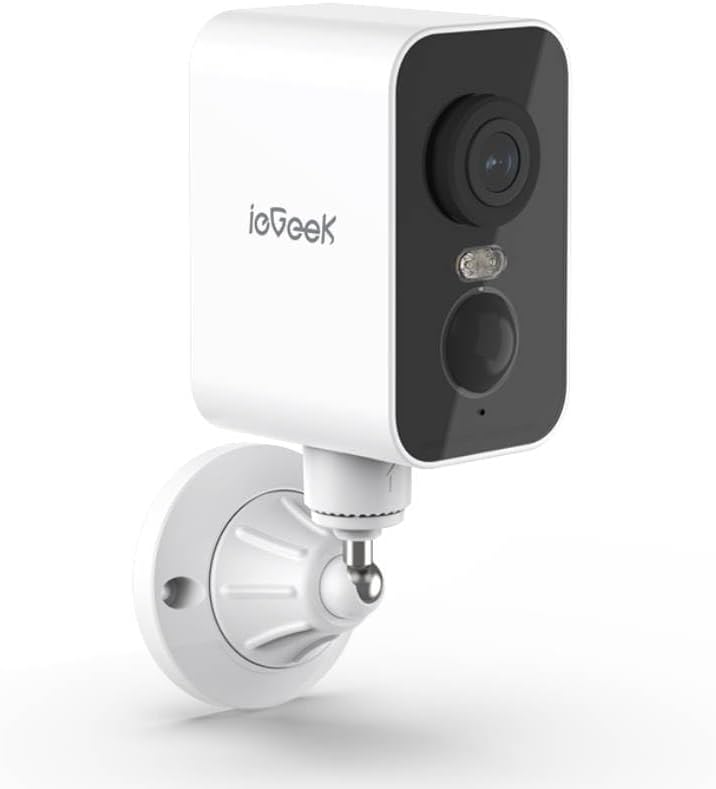
Gambar 2.1: ieGeek S3 2K Wireless Outdoor Security Camera. This image displays the white rectangular camera body with a black front panel housing the lens, an LED light, and a motion sensor. The camera is attached to a white wall-mount bracket.
2.1 Apa yang ada di dalam kotak
- ieGeek S3 Battery Security Camera
- Bracket Screw Pack (for wall mounting)
- Stiker Instalasi
- Kabel Pengisian Daya
- Instruksi Manual (dokumen ini)
3. Pengaturan
3.1 Mengisi Daya Kamera
Before initial use, fully charge the camera's built-in 5200 mAh lithium-ion battery using the provided charging cable. Connect the cable to the camera's charging port and a standard USB power adapter (not included). The charging indicator light will provide status.
3.2 Unduh Aplikasi dan Pembuatan Akun
- Download the 'CloudEdge' or 'ieGeek Cam' app from your smartphone's app store (iOS or Android).
- Buka aplikasi dan ikuti petunjuk di layar untuk membuat akun baru atau masuk jika Anda sudah memilikinya.
3.3 Physical Installation (Wall Mount)
The ieGeek S3 camera is designed for wall mounting and has an IP65 waterproof rating, making it suitable for outdoor environments.
- Choose a suitable location for installation. Ensure the camera has a clear field of view and good Wi-Fi signal strength.
- Use the provided installation sticker to mark the drill holes on the wall.
- Bor lubang dan masukkan jangkar dinding.
- Attach the mounting bracket to the wall using the screws from the bracket screw pack.
- Secure the camera to the mounting bracket. Adjust the camera angle as needed.
3.4 Device Pairing with App
- Ensure your smartphone is connected to a 2.4GHz Wi-Fi network. The camera supports 2.4GHz Wi-Fi only.
- Open the 'CloudEdge' or 'ieGeek Cam' app and tap the '+' icon to add a new device.
- Pilih model kamera Anda dari daftar.
- Follow the in-app instructions to power on the camera and reset it if necessary (usually by pressing a reset button until an indicator light flashes).
- Scan the QR code displayed on your phone screen with the camera lens. Hold the phone approximately 4-8 inches (10-20 cm) from the camera.
- Once the camera confirms successful scanning (e.g., with an audible prompt), proceed in the app to complete the connection.
- Name your camera and set its location.
4. Mengoperasikan Kamera
4.1 Langsung View and Pan Rotation
Dari layar utama aplikasi, ketuk kamera Anda untuk mengakses siaran langsung. view. You can use the on-screen controls to pan the camera 180° horizontally to adjust the viewsudut.
4.2 Deteksi Gerakan dan Peringatan
The camera features AI motion detection. When motion is detected, the camera will record a video clip and send an alert to your smartphone. You can customize motion detection sensitivity and alert settings within the app.
4.3 Audio Dua Arah
Manfaatkan mikrofon dan speaker internal untuk komunikasi dua arah. Ketuk ikon mikrofon di siaran langsung. view to speak through the camera, and listen to audio from the camera's location.
4.4 Penglihatan Malam
The camera automatically switches to color night vision in low-light conditions, providing clear surveillance up to 33 feet (10 meters) using its infrared LEDs.
4.5 Penyimpanan Video
Rekaman video footage dapat disimpan dengan dua cara:
- Kartu TF (MicroSD): Insert a TF card (up to 128GB, not included) into the camera's designated slot for local storage.
- Penyimpanan Awan: Optional cloud storage services may be available through the app for remote access and backup of recordings.
4.6 Integrasi Alexa
The ieGeek S3 camera is compatible with Amazon Alexa. Follow the instructions in the 'CloudEdge' or 'ieGeek Cam' app to link your camera with your Alexa account for voice control and viewing live feeds on compatible Alexa devices.
5. Pemeliharaan
5.1 Pengisian Baterai
The camera is battery-powered. When the battery level is low, you will receive an alert via the app. Recharge the camera using the provided charging cable. Battery life varies based on usage and environmental factors.
5.2 Pembersihan
To maintain optimal performance, periodically clean the camera lens and housing with a soft, dry cloth. Avoid using harsh chemicals or abrasive materials that could damage the camera's surface or lens.
6. Penyelesaian masalah
- Kamera tidak terhubung ke Wi-Fi: Ensure your Wi-Fi network is 2.4GHz. Check Wi-Fi signal strength at the camera's location. Try resetting the camera and repeating the pairing process.
- Kualitas gambar buruk: Bersihkan lensa kamera. Pastikan tidak ada penghalang di bidang pandang kamera. viewPeriksa kecepatan koneksi internet Anda.
- Deteksi gerakan tidak berfungsi: Verify motion detection is enabled in the app settings. Adjust sensitivity levels. Ensure the camera is positioned correctly to capture motion in the desired area.
- Baterai cepat terkuras: Peristiwa deteksi gerakan yang sering terjadi, langsung view access, and two-way audio use can consume battery faster. Reduce motion detection sensitivity or frequency if possible. Ensure the camera is fully charged.
- Masalah aplikasi: Ensure the app is updated to the latest version. Try restarting the app or your smartphone.
7. Spesifikasi
| Nama Model | ieGeek Battery Cam S3 |
| Resolusi Pengambilan Video | 2K (Resolusi Gambar Diam Efektif 3 MP) |
| Penggunaan Dalam/Luar Ruangan | Dalam Ruangan, Luar Ruangan |
| Sumber Daya | Ditenagai Baterai (Lithium Ion 5200 mAh) |
| Teknologi Konektivitas | 2.4GHz Wi-Fi (Wi-Fi 6 Technology) |
| Tipe Pengendali | CloudEdge, Amazon Alexa, ieGeek Cam App |
| Jenis Pemasangan | Dudukan Dinding |
| Fitur Khusus | Pan Rotating 180°, AI Motion Detection, Color Night Vision, 2-Way Audio |
| Viewsudut ing | 180 Derajat (Panci) |
| Rentang Penglihatan Malam | 33 Kaki (10 meter) |
| Kecepatan Bingkai | 15 bingkai per detik |
| Tingkat Tahan Air | Tahan air (IP65) |
| Opsi Penyimpanan | TF Card (MicroSD) up to 128 GB, Cloud Storage (optional) |
| Dimensi (P x L x T) | 3.9x1x3.9 inci |
| Berat Barang | 11.2 ons |
| Perangkat yang Kompatibel | Alexa, Smartphone, Smartwatch, Tablet |
8. Garansi dan Dukungan
For warranty information, please refer to the specific terms provided at the time of purchase or contact ieGeek customer support directly. If you encounter any issues or have questions regarding your ieGeek S3 camera, please visit the official ieGeek website or contact their customer service team for assistance.
Dukungan online: Visit the ieGeek Store on Amazon


