1. Pendahuluan
Thank you for choosing the MAXSafes Model 10002V Drop Down Biometric Handgun Safe. This safe is designed to provide secure storage and quick access to your firearm using advanced finger vein recognition, a digital keypad, or a mechanical key. Please read this manual thoroughly before installation and operation to ensure proper use and maximum security.

Figure 1: MAXSafes Model 10002V Drop Down Biometric Handgun Safe
2. Informasi Keselamatan
PERINGATAN: Always store firearms unloaded and separate from ammunition. Keep the safe locked and out of reach of children and unauthorized individuals. Never store the mechanical override keys inside the safe. Familiarize yourself with all local and federal laws regarding firearm storage.
- Pastikan brankas terpasang dengan aman untuk mencegah pengambilan yang tidak sah.
- Do not leave the safe open or unattended.
- Test all access methods periodically to ensure proper function.
- Segera ganti baterai saat indikator baterai lemah muncul.
3. Isi Paket
Verifikasi bahwa semua item ada dalam paket:
- MAXSafes Model 10002V Handgun Safe
- Mechanical Override Keys (2)
- Perangkat Keras Pemasangan (sekrup, jangkar)
- Instruksi Manual (dokumen ini)
4. Produk Lebihview
The MAXSafes 10002V features a robust design with multiple access options for enhanced security and convenience.

Figure 2: Key Features of the MAXSafes 10002V
Komponen:
- Pemindai Pembuluh Darah Jari: For advanced biometric access.
- Papan Ketik Digital: For 4-6 digit combination code entry.
- Lubang kunci: For mechanical override key access.
- Kompartemen Baterai: Located on the underside or rear of the unit.
- Lampu LED Interior: Illuminates the safe's interior upon opening.
- Titik Pemasangan: For securing the safe to a wall or desk.

Figure 3: Access Methods - Vein Recognition, Digital Keypad, Mechanical Key
5. Pengaturan
5.1 Pemasangan Baterai
- Cari kompartemen baterai, biasanya terletak di bagian bawah atau belakang brankas.
- Buka penutup kompartemen.
- Masukkan 4 baterai AA (tidak termasuk), pastikan polaritasnya benar (+/-).
- Tutup penutup ruang baterai dengan rapat.
- Brankas akan mengeluarkan bunyi bip, yang menandakan proses pengaktifan daya berhasil.
5.2 Initial Access and Programming
Upon first use, access the safe using the mechanical override key.
- Insert the mechanical key into the keyhole and turn it to unlock the safe.
- Buka pintu brankas.
5.2.1 Setting a Digital Combination Code
- With the safe door open, locate the internal programming button (usually a small red or green button).
- Press the programming button. The indicator light on the keypad will illuminate.
- Masukkan kode 4-6 digit yang Anda inginkan pada keypad.
- Press the programming button again to confirm. The safe will beep to confirm the new code.
- Uji kode baru tersebut dengan pintu terbuka sebelum menutupnya.
5.2.2 Registering Finger Vein IDs
The safe can store up to 50 finger vein IDs.
- With the safe door open, press the programming button. The indicator light will illuminate.
- Place your finger firmly on the vein scanner. The scanner will light up and beep.
- Lift and reposition your finger slightly, then place it on the scanner again. Repeat this process 3-5 times from different angles to ensure a comprehensive scan.
- A successful registration will be indicated by a series of beeps.
- Repeat for additional fingers or users (up to 50).
- Test registered finger veins with the door open before closing it.

Figure 4: Finger Vein Recognition Technology
5.3 Memasang Brankas
The safe can be mounted to a wall or desk. Choose a secure location that is out of sight and reach of unauthorized persons.
- Select a suitable mounting location (e.g., under a desk, inside a cabinet, on a wall stud).
- Position the safe in the desired location and mark the mounting points through the pre-drilled holes on the safe's back or bottom.
- Drill pilot holes into the mounting surface using an appropriate drill bit size for the provided hardware.
- Align the safe with the drilled holes and secure it using the provided screws and anchors. Ensure the safe is firmly attached and does not wobble.

Gambar 5: Contohamples of Wall and Desk Mounting Options
6. Petunjuk Pengoperasian
6.1 Pembukaan dengan Pengenalan Pembuluh Darah Jari
- Place a registered finger firmly on the vein scanner.
- The scanner will light up, and the safe will emit a confirmation beep if the vein pattern is recognized.
- The safe door will automatically drop down, providing quick access.
6.2 Opening with Digital Keypad
- Enter your programmed 4-6 digit combination code on the keypad.
- The safe will emit a confirmation beep if the code is correct.
- The safe door will automatically drop down.
6.3 Opening with Mechanical Key
Use the mechanical key as a backup in case of battery failure or forgotten codes.
- Locate the keyhole cover (if present) and remove it.
- Insert the mechanical key into the keyhole and turn it to unlock the safe.
- The safe door will open.
6.4 Mode Senyap
The safe features a silent mode for discreet access. Refer to the safe's specific button layout for activating/deactivating silent mode (often a dedicated button or a combination press).
6.5 Mode Alarm
The safe is equipped with an audible alarm. This alarm may activate if multiple incorrect access attempts are made or if the safe is tampered with. Consult the safe's interface for specific alarm settings or deactivation procedures.
6.6 Lampu LED Interior
The interior LED light automatically illuminates when the safe door opens, providing visibility in low-light conditions.
7. Pemeliharaan
7.1 Penggantian Baterai
When the low battery indicator (usually a flashing light or specific beep pattern) appears, replace all 4 AA batteries promptly. Use high-quality alkaline batteries for optimal performance.
7.2 Pembersihan
Usap bagian luar brankas dengan kain lembut dan kering.amp cloth. Avoid using abrasive cleaners or solvents that could damage the finish or electronic components. Keep the finger vein scanner clean and free of debris.
7.3 Regular Function Check
Periodically test all access methods (finger vein, keypad, mechanical key) to ensure they are functioning correctly. This helps identify potential issues before they become critical.
8. Penyelesaian masalah
If you encounter issues with your MAXSafes 10002V, refer to the following common problems and solutions:
| Masalah | Kemungkinan Penyebab | Larutan |
|---|---|---|
| Finger vein not recognized | Improper finger placement, unregistered finger, dirty scanner, skin conditions (e.g., very dry, damaged). | Ensure firm and consistent finger placement. Re-register the finger, trying different angles. Clean the scanner. Try another registered finger or access method. |
| Papan tombol tidak merespons | Low batteries, incorrect code, keypad malfunction. | Replace batteries. Re-enter code carefully. Use mechanical key if necessary. |
| Brankas tidak terbuka | Low batteries, incorrect access, mechanical obstruction. | Replace batteries. Try all access methods. Check for any obstructions preventing the door from dropping. |
| Indikator baterai lemah | Baterai lemah. | Segera ganti keempat baterai AA tersebut. |
9. Spesifikasi
Detailed specifications for the MAXSafes Model 10002V:
- Merek: MAXSafe
- Nomor Model: 10002V
- Dimensi Produk: 11.1"Panjang x 3.8"Lebar x 13.8"T
- Berat Barang: 9.55 pon
- Tipe Kunci: Biometric (Finger Vein), Electronic Combination Lock, Key
- Warna: Hitam
- Kapasitas: 8.7 pon
- Bahan: Carbon Steel (16 gauge)
- Fitur Khusus: Sensor Light, Audible Alarm
- Tipe Pemasangan: Wall Mount, Desk Mount
- UPC-nya: 762736839353
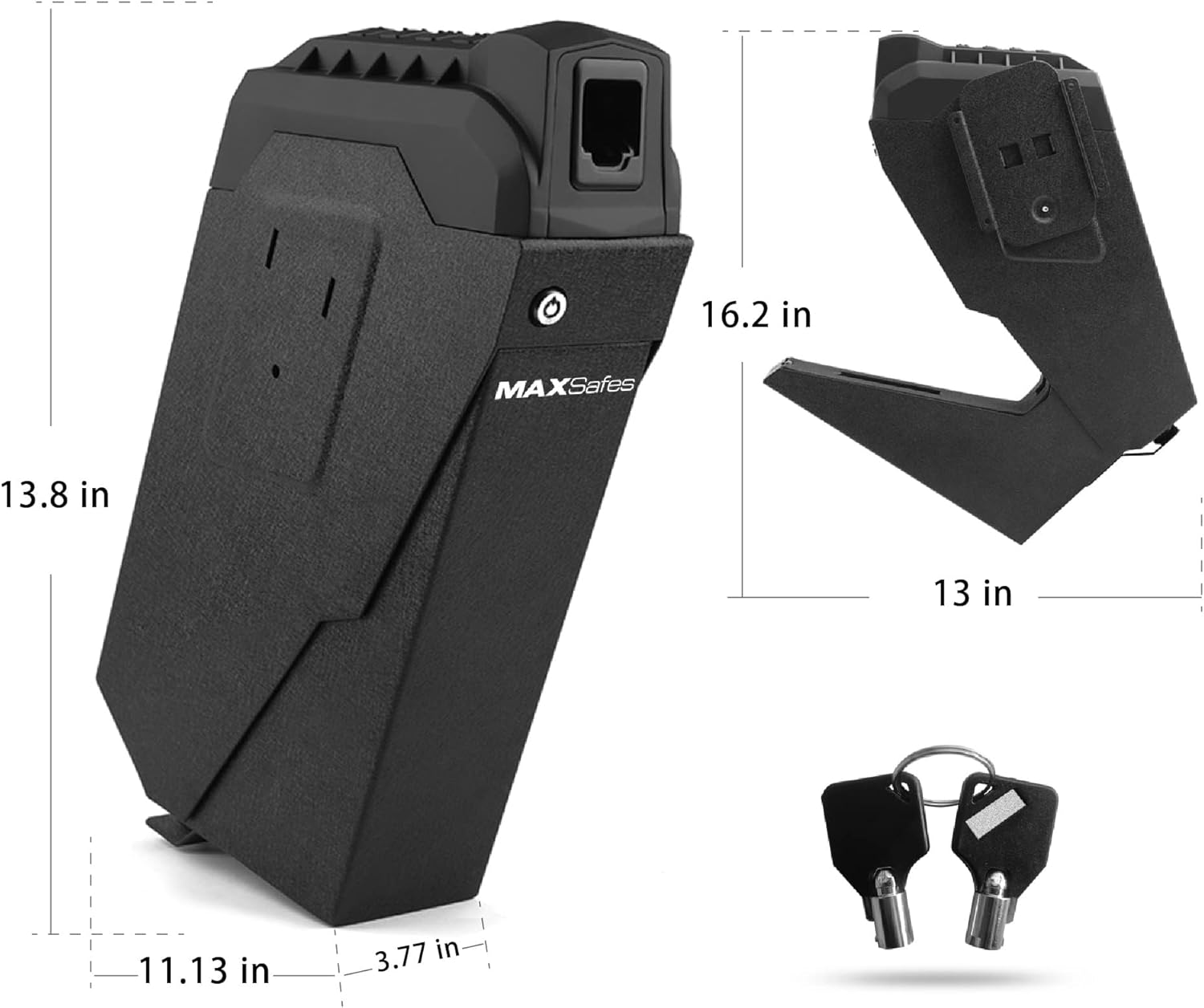
Figure 6: Product Dimensions and Included Keys
10. Garansi dan Dukungan
MAXSafes products are manufactured to high-quality standards. For warranty information or technical support, please refer to the contact details provided with your purchase documentation or visit the official MAXSafes websitus. Simpan struk pembelian Anda sebagai bukti pembelian untuk klaim garansi apa pun.


