1. Pendahuluan
The RØDECaster Video is an all-in-one video and audio production console designed to provide intuitive control over content creation. It integrates powerful video switching, recording, and production capabilities with a professional audio mixer, streamlining workflows for studio productions, video podcasts, interviews, and live event streaming with broadcast quality.
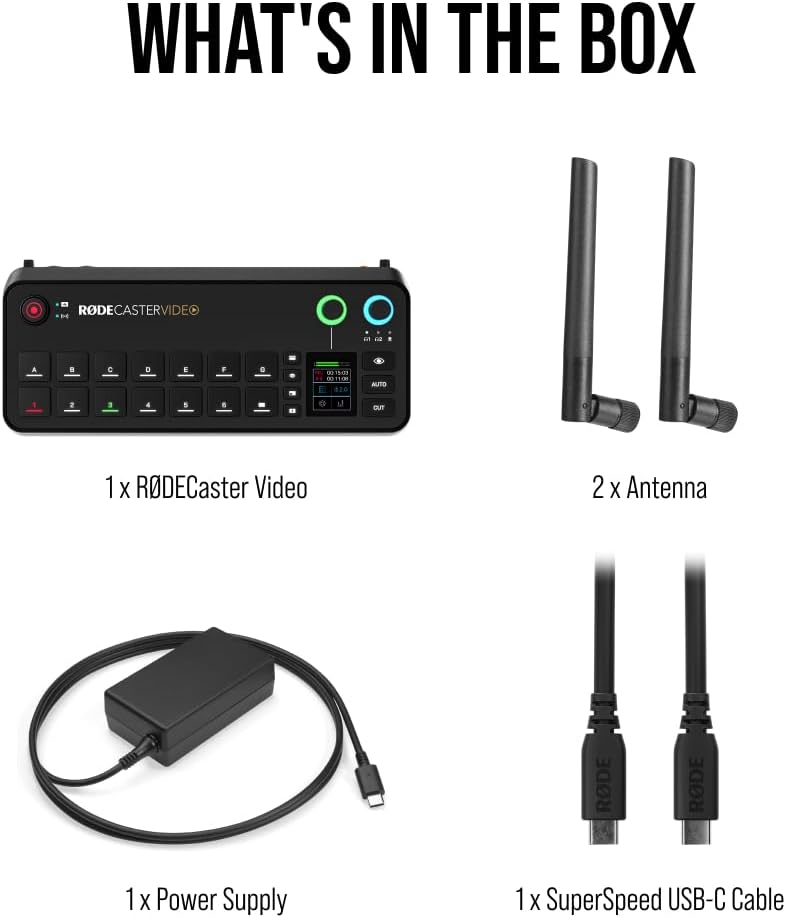
2. Apa yang ada di dalam kotak
Carefully unpack your RØDECaster Video and ensure all components are present:
- 1 x RØDECaster Video Unit
- 1 x RØDECaster External Video Antenna
- 2 x Antena Eksternal
- 1 x RØDECaster Video Power Supply
- 1 x SuperSpeed USB-C Cable (2m)
- 1 x SC27 Cable
3. Fitur Utama
- Multi-Source Video Switching: Seamlessly switch between up to six video sources (4x HDMI and 2x USB) and seven fully customizable multi-source scenes with dedicated buttons.
- Antarmuka Audio Profesional: Features two studio-grade Neutrik combo jacks with ultra-low-noise, high-gain Revolution Preamps for pristine audio from XLR microphones, instruments, or other audio sources.
- Integrated Production Tools: Access media playback, graphic overlays, automatic chroma keying, transitions, and multi-source scene creation directly from the front panel.
- Versatile Streaming & Recording: Stream directly to major platforms via Wi-Fi or Ethernet, or to streaming software via USB. Record directly to an external USB storage device, including isolated (ISO) recording for post-editing flexibility.
- Innovative Workflow Enhancements: Utilize Inspect Mode for safely previewing an input and intelligent auto-switching for seamless hands-free switching of video sources and scenes based on audio inputs.


4. Panduan Pengaturan
4.1 Koneksi Awal
- Sambungan Daya: Connect the provided power supply to the 15V 2A USB PD port on the rear of the RØDECaster Video. Plug the power cable into a suitable power outlet.
- Koneksi USB-C: Use the SuperSpeed USB-C cable to connect the RØDECaster Video to your computer for streaming, recording, and software control.
- Koneksi Ethernet (Opsional): For direct streaming or network control, connect an Ethernet cable to the Ethernet port.
- Pemasangan Antena: Attach the two external antennas to the designated ports on the unit for wireless connectivity.
4.2 Video Input Setup
Connect your video sources (cameras, computers, etc.) to the HDMI and USB video input ports on the RØDECaster Video. The unit supports up to 4 HDMI and 2 USB video inputs.
4.3 Audio Input Setup
Connect your microphones or instruments to the Neutrik combo jacks (XLR or 1/4" TRS) on the rear of the unit. The Revolution Preamps will ensure high-quality audio capture.
4.4 Initial Power-Up & Firmware Update
Upon first power-up, follow the on-screen prompts to select your language and perform any necessary firmware updates. It is recommended to keep your device's firmware up-to-date for optimal performance and new features.
5. Petunjuk Pengoperasian
5.1 Kontrol Dasar
- Layar Sentuh: Navigate menus, adjust settings, and manage scenes via the integrated touch screen.
- Fader: Control the audio levels of individual input channels.
- Kontrol Putar: Adjust headphone monitoring levels and other parameters as assigned.
- Tombol Khusus: Utilize buttons for quick access to chroma keying, media playback, graphics, and transitions.
5.2 Scene-Based Switching
The RØDECaster Video allows you to create and switch between up to seven customizable multi-source scenes. Each scene can combine different video inputs, graphic overlays, and audio configurations. Use the dedicated scene buttons for instant transitions.
5.3 Media Playback & Graphics
Load media (images, video clips) and graphic overlays onto the device's internal storage or an external USB drive. Use the dedicated buttons to trigger playback and display graphics during your production.
5.4 Streaming & Recording
Initiate direct streaming to platforms configured via Wi-Fi or Ethernet. For recording, ensure an external USB storage device is connected. The RØDECaster Video supports isolated (ISO) recording for individual video and audio tracks, providing flexibility for post-production.
5.5 Intelligent Auto-Switching
Enable intelligent auto-switching to automatically transition between video sources based on active audio inputs, allowing for hands-free operation during live productions.
6. Konektivitas
The RØDECaster Video offers extensive connectivity options:
- Masukan Video: 4x HDMI, 2x USB-C
- Input Audio: 2x Neutrik Combo Jacks (XLR/1/4" TRS) with Revolution Preamps
- Keluaran Audio: 2x Headphone outputs, 2x 1/4" TRS line outputs
- Data & Network: 2x USB-C (for computer/storage), Ethernet port, MicroSD card slot, Wi-Fi, Bluetooth
- Keamanan: Slot kunci Kensington
7. Spesifikasi
| Fitur | Detil |
|---|---|
| Nomor Model | RCV |
| Berat Barang | 2.81 pon (1275 Gram) |
| Dimensi Produk | 30.59x13.25x6.14 inci |
| Warna | Hitam |
| Perangkat yang Kompatibel | Android, Windows, iOS, macOS |
| Jenis Konektor | XLR, 1/4" TRS, USB-C |
| Jumlah Saluran | 6 |
| Sumber Daya | Listrik Kabel |
| Teknologi Konektivitas | HDMI, USB, XLR |
8. Pemeliharaan
- Pembersihan: Use a soft, dry cloth to clean the exterior of the RØDECaster Video. Avoid abrasive cleaners or solvents.
- Pembaruan Firmware: Regularly check the Rode website for firmware updates to ensure optimal performance and access to new features. Follow the instructions provided by Rode for safe updating.
- Penyimpanan: Simpan unit di tempat yang sejuk dan kering, jauh dari sinar matahari langsung dan suhu ekstrem saat tidak digunakan.
9. Penyelesaian masalah
- Tidak Ada Daya: Ensure the power supply is correctly connected to the unit and a working power outlet. Check the power button on the rear of the unit.
- Tidak ada input video: Verify that HDMI and USB video sources are properly connected and outputting a signal. Check cable integrity.
- Tidak Ada Masukan Audio: Confirm XLR/TRS cables are securely connected. Ensure phantom power is enabled for condenser microphones if required. Check input levels on the touch screen.
- Masalah Streaming: Check Wi-Fi or Ethernet connection. Verify streaming platform settings and stream key.
- Masalah Perekaman: Ensure an external USB storage device is connected and has sufficient free space. Check recording settings on the touch screen.
10. Garansi & Dukungan
The RØDECaster Video comes with a manufacturer's warranty. For detailed warranty information, please refer to the documentation included with your product or visit the official Rode website. For technical support, troubleshooting assistance, or service inquiries, please contact Rode customer support directly.


