1. Pendahuluan
This manual provides comprehensive instructions for the installation, operation, and maintenance of your Phanteks M25-140 Gen2 Triple Pack ARGB High Performance Cooling Fans. Please read this manual thoroughly before installation to ensure proper setup and optimal performance. These fans are designed for efficient thermal management in computer systems, featuring daisy-chain connectivity, integrated D-RGB lighting, and a single cable solution for simplified management.
2. Isi Paket
- 3x Phanteks M25-140 Gen2 Fans
- Sekrup Kipas
- Panduan Instalasi (dokumen ini)
3. Fitur Utama
- Daisy-Chain Unified Fan Design: Connect multiple fans easily for a streamlined setup and reduced cable clutter.
- Single Cable Solution (Linq6): Consolidates both fan power (PWM) and lighting controls (D-RGB) into one cable for a cleaner build.
- Pencahayaan D-RGB Terintegrasi: Features smooth lighting on fan blades and an infinity mirror effect in the hub for aesthetic customization.
- Estetika Ramping: Includes screw covers to provide a polished, professional appearance.
- Versatile Airflow Options: Available in regular and reverse airflow models to optimize system configuration.
- High Cooling Performance: Engineered for effective cooling on radiators and heat sinks.
4. Informasi Keselamatan
- Pastikan sistem komputer Anda dimatikan dan dicabut dari stopkontak sebelum pemasangan.
- Tangani komponen dengan hati-hati untuk menghindari kerusakan.
- Refer to your motherboard manual for specific fan header locations and D-RGB connection instructions.
- Do not force connectors; ensure proper alignment before plugging in.
- Jauhkan komponen-komponen kecil dari jangkauan anak-anak.
5. Pengaturan dan Instalasi
5.1. Siapkan Sistem Anda
Before beginning installation, ensure your computer is completely powered down and disconnected from the power supply. Open your PC case to access the fan mounting locations.
5.2. Daisy-Chain Connection
The M25-140 Gen2 fans feature a unified frame design allowing them to be daisy-chained together. Align the connectors on the side of each fan and gently push them together until they click into place. This creates a single block of fans, simplifying installation and cable management.
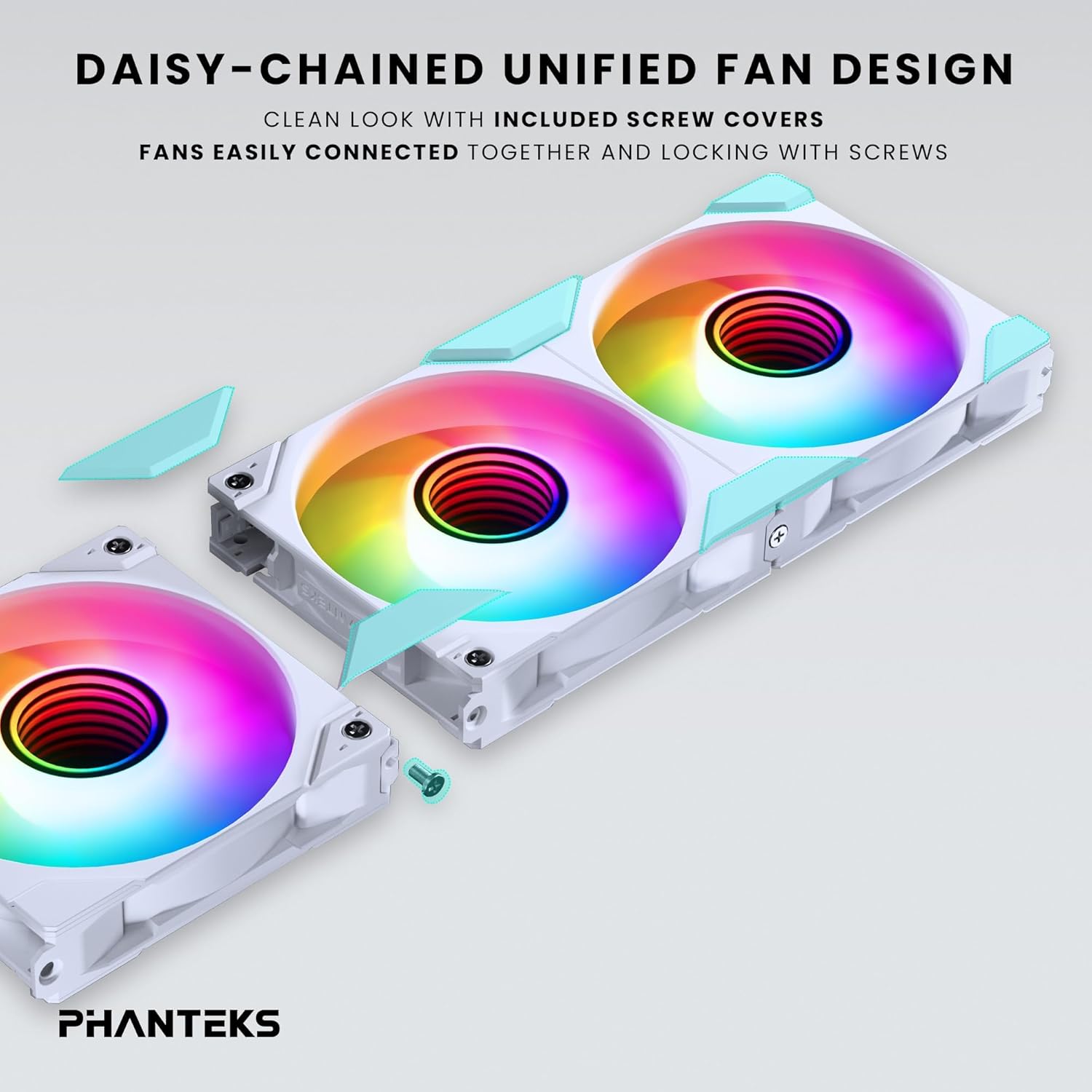
Image: Daisy-chaining Phanteks M25-140 Gen2 fans and applying screw covers.
5.3. Secure Fans
Mount the daisy-chained fan unit to your desired location (e.g., case front, top, or radiator) using the provided fan screws. Ensure the fans are securely fastened to prevent vibration. Once secured, attach the included screw covers for a clean, finished look.
5.4. Cable Connection (Linq6)
Connect the single Linq6 cable from the daisy-chained fan unit to a compatible fan/ARGB controller or motherboard header. This single cable manages both PWM fan speed control and D-RGB lighting. Refer to your motherboard or controller manual for specific connection points.

Image: Detail of the Linq6 single cable solution for fan and D-RGB control.
5.5. Airflow Configuration
The M25-140 Gen2 fans are available in regular and reversed airflow models. Ensure you install the correct fan type for your desired airflow direction. Regular fans pull air from the front to the rear, while reversed fans push air from the rear to the front.

Image: Diagram showing regular and reversed airflow directions for M25-140 Gen2 fans.
6. Operasi
6.1. Kontrol Pencahayaan ARGB
Once connected, the D-RGB lighting can be controlled via your motherboard's RGB software (e.g., ASUS Aura Sync, MSI Mystic Light Sync, Gigabyte RGB Fusion 2.0, ASRock Polychrome Sync) or a compatible Phanteks D-RGB controller (e.g., NEXLINQ). Customize colors, effects, and brightness to match your system's aesthetic.

Image: Close-up of the integrated D-RGB lighting with infinity mirror effect in the fan hub.
6.2. Kontrol Kecepatan Kipas
The fan speed (PWM) is controlled through the same Linq6 cable. You can adjust fan curves and speeds via your motherboard's BIOS/UEFI settings or dedicated fan control software provided by your motherboard manufacturer. This allows for optimization between cooling performance and noise levels.
7. Pemeliharaan
Regular maintenance ensures optimal performance and longevity of your fans.
- Pembersihan: Periodically clean the fan blades and frame to remove dust buildup. Use compressed air or a soft, dry cloth. Ensure the system is powered off before cleaning.
- Inspeksi: Periksa kabel untuk melihat tanda-tanda keausan atau kerusakan. Pastikan semua sambungan tetap aman.
- Do not use liquid cleaners directly on the fans or electrical components.
8. Penyelesaian masalah
| Masalah | Kemungkinan Penyebab | Larutan |
|---|---|---|
| Kipas tidak berputar | Loose power connection, incorrect header, insufficient power. | Check Linq6 cable connection to motherboard/controller. Ensure power supply is adequate. Verify BIOS settings for fan headers. |
| Pencahayaan ARGB tidak berfungsi | Loose D-RGB connection, incompatible header, software issue. | Ensure Linq6 cable is properly connected to a 3-pin 5V D-RGB header (not 4-pin 12V RGB). Check motherboard RGB software settings. |
| Fans making unusual noise | Obstruction, loose mounting, faulty fan. | Inspect for cables or debris obstructing fan blades. Tighten mounting screws. If noise persists, contact support. |
| Fans not detected by software | Incorrect connection, outdated software/drivers. | Verify Linq6 connection. Update motherboard BIOS and chipset drivers. Ensure RGB software is the latest version. |
9. Spesifikasi
| Fitur | Detil |
|---|---|
| Model | M25-140 Gen2 (PH-F140M25_G2_DWT01_3P) |
| Dimensi Kipas | Ukuran 140mm x 140mm x 25mm |
| Kecepatan Rotasi | Hingga 1800 RPM |
| Kapasitas Aliran Udara | 101.78 Kaki Kubik Per Menit (CFM) |
| Tingkat Kebisingan | 36.4dB |
| Jenis Konektor Daya | 6-Pin (Linq6) |
| Jil.tage | 12V (Fan), 5V (ARGB) |
| Apatage | 10 watts (total for pack) |
| Bahan | Polybutylene Terephthalate, Polycarbonate |
| Perangkat yang Kompatibel | Desktop, Gaming PC, Server |
10. Garansi dan Dukungan
Phanteks products are manufactured to the highest quality standards. This product comes with a limited warranty against defects in materials and workmanship. For specific warranty terms and conditions, please refer to the official Phanteks webkunjungi situs web atau hubungi pengecer lokal Anda.
For technical support, troubleshooting assistance, or to inquire about replacement parts, please visit the official Phanteks support page: www.phanteks.com/support.html


