1. Pendahuluan
Welcome to the user manual for your Nothing Phone (3a). This guide provides detailed instructions on setting up, operating, maintaining, and troubleshooting your device to ensure optimal performance and user experience.

Figure 1.1: The Nothing Phone (3a) showcasing its unique transparent back design and Glyph Interface.
2. Pengaturan
2.1. Unboxing dan Pemeriksaan Awal
Upon receiving your Nothing Phone (3a), carefully open the packaging and inspect the contents. Ensure all items listed in the "What's in the Box" section are present and undamaged.
- Nothing Phone (3a) device
- Kabel USB-C
- Ejektor Baki SIM
- Pelindung Layar yang Sudah Terpasang
2.2. Memasukkan Kartu SIM
- Temukan tempat kartu SIM di sisi telepon.
- Masukkan alat pelepas baki SIM ke dalam lubang kecil di samping baki dan tekan dengan kuat hingga baki keluar.
- Letakkan kartu Nano-SIM Anda ke dalam baki dengan kontak emas menghadap ke bawah.
- Masukkan kembali baki SIM secara hati-hati ke dalam telepon hingga terkunci pada tempatnya.
2.3. Panduan Pengaktifan dan Pengaturan Awal
Press and hold the power button on the right side of the phone until the Nothing logo appears. Follow the on-screen instructions to complete the initial setup, including language selection, Wi-Fi connection, Google account sign-in, and data transfer.
3. Operating Your Nothing Phone (3a)
3.1. Nothing OS 3.1 Overview
The Nothing Phone (3a) runs on Nothing OS 3.1, an intuitive and customizable Android-based operating system. It features functional adaptations for an optimized user experience.

Figure 3.1: Visual representation of Nothing OS 3.1's customizable interface.
3.2. Sistem Kamera
The Nothing Phone (3a) is equipped with an advanced camera system designed to capture high-quality photos and videos.
- Kamera Utama: 50-MP OIS (Optical Image Stabilization) main camera for detailed and stable shots.
- Kamera Telefoto: 50-MP telephoto lens with up to 30x Ultra Zoom for capturing distant subjects.
- Kamera Ultra Lebar: 8-MP ultra-wide-angle lens for expansive landscape and group shots.
- Kamera Depan: 32-MP front camera for sharp selfies and video calls.

Figure 3.2: Detailed breakdown of the Phone (3a)'s Elite Camera System components.

Figure 3.3: Illustration of the telephoto zoom lens technology and its capability to capture distant scenes.
3.3. Essential Key and Essential Space
The Essential Key is a new physical button on the side of your device. A short press captures screen content, while a long press allows you to record voice notes, ideas, and inspirations. The Essential Space organizes your captures and provides personalized suggestions.

Figure 3.4: The Essential Key and its integration with the Essential Space for content organization.
3.4. Antarmuka Glif
The Glyph Interface on the back of the phone provides unique LED light and sound notifications for calls, messages, and other alerts, offering a distinct visual and auditory experience.

Figure 3.5: The Glyph Interface on the rear of the Nothing Phone (3a), demonstrating its illuminated patterns.
4. Pemeliharaan
4.1. Manajemen Baterai
The Nothing Phone (3a) features a 5,000 mAh battery with 50W fast charging. To maximize battery lifespan:
- Hindari suhu ekstrem.
- Gunakan kabel USB-C yang tersedia untuk pengisian daya.
- Hindari mengosongkan baterai sepenuhnya secara sering.

Figure 4.1: Visual representation of the 5,000 mAh battery capacity.
4.2. Membersihkan Perangkat Anda
Use a soft, lint-free cloth to clean the screen and back of your phone. For stubborn smudges, slightly dampBilas kain dengan air. Hindari penggunaan bahan kimia keras atau bahan abrasif.
4.3. Pembaruan Perangkat Lunak
Periksa dan instal pembaruan perangkat lunak secara berkala untuk memastikan perangkat Anda memiliki fitur, patch keamanan, dan peningkatan kinerja terbaru. Navigasi ke Pengaturan > Sistem > Pembaruan perangkat lunak untuk memeriksa pembaruan.
5. Penyelesaian masalah
5.1. Masalah Umum dan Solusinya
| Masalah | Kemungkinan Penyebab | Larutan |
|---|---|---|
| Telepon tidak menyala | Baterai lemah, perangkat lunak macet | Charge the phone for at least 30 minutes. Perform a forced restart by holding the power button for 10-15 seconds. |
| Aplikasi mogok atau macet | App bug, insufficient RAM, outdated software | Clear app cache/data. Close background apps. Update the app or phone software. |
| Daya tahan baterai buruk | High screen brightness, background apps, network issues | Adjust screen brightness. Close unused apps. Disable unnecessary features like GPS/Bluetooth. |
5.2. Reset Pabrik
If issues persist, a factory reset may be necessary. This will erase all data on your phone, so ensure you have backed up important information. Navigate to Pengaturan > Sistem > Opsi reset > Hapus semua data (reset pabrik).
6. Spesifikasi
Key technical specifications for the Nothing Phone (3a) (Model: A059).
| Fitur | Detil |
|---|---|
| Nama Model | Tidak Ada Telepon (3a) |
| Nomor Model | Nomor telepon A059 |
| Sistem Operasi | Android 15, Nothing OS 3.1 |
| Menampilkan | 6.77-inch Flexible FHD+ AMOLED, 120 Hz, 1.07 billion colors |
| Prosesor | Snapdragon 7s Gen 3 (2.5 GHz, 8-core) |
| RAM | 12 GB (hingga 20 GB RAM Boost) |
| Penyimpanan | 256 GB |
| Kamera Utama | 50-MP OIS |
| Kamera Telefoto | 50-MP (30x Ultra Zoom) |
| Kamera Ultra Lebar | 8 MP |
| Kamera Depan | 32 MP |
| Baterai | 5,000 mAh (Pengisian Cepat 50W) |
| Ukuran | Ukuran 7.75x0.83x16.35 cm |
| Berat | 201 gram |
| Tahan Air/Debu | Tingkat IP64 |
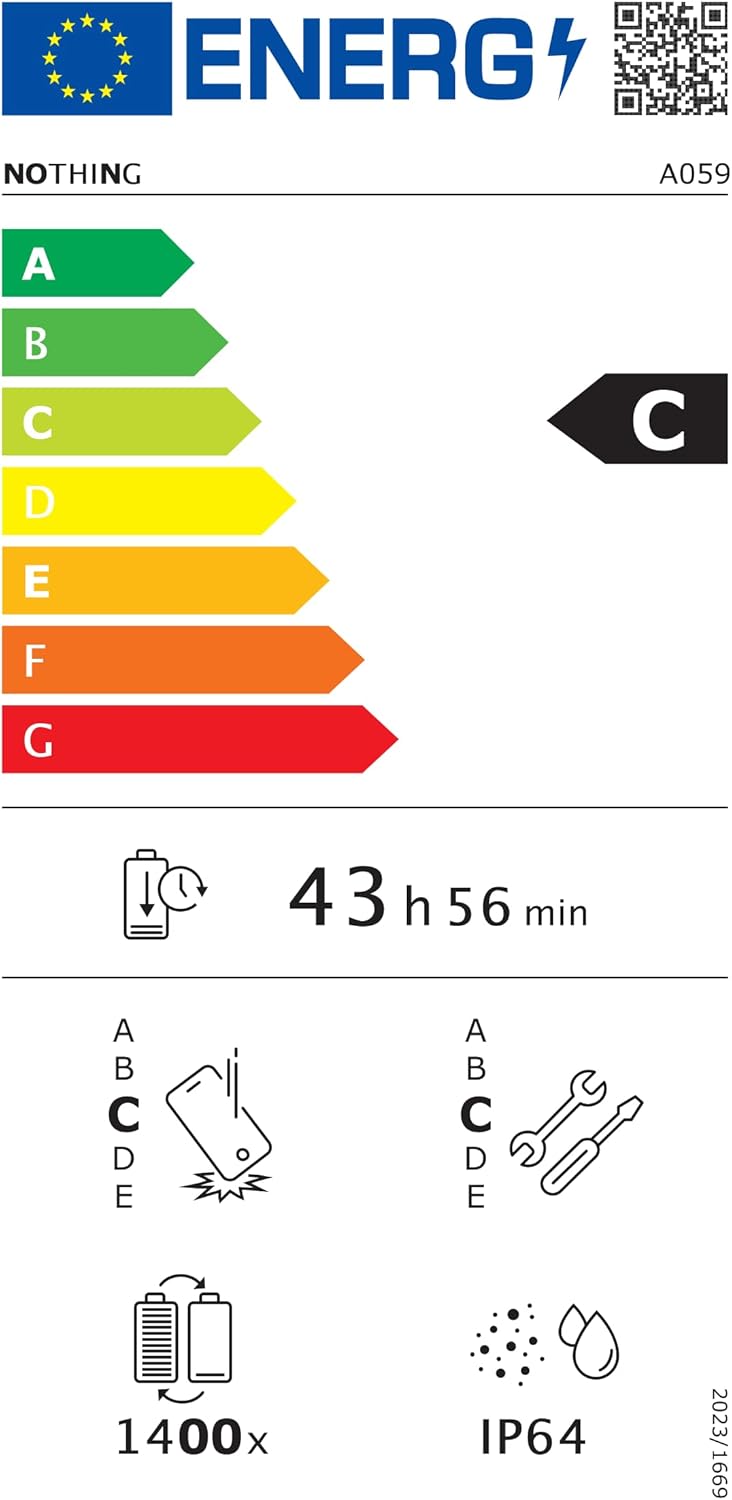
Figure 6.1: EU Energy Label for Nothing Phone (3a), indicating energy efficiency and IP64 rating. More details available at eprel.ec.europa.eu/qr/2179652.
7. Garansi dan Dukungan
Your Nothing Phone (3a) comes with a manufacturer's warranty. Please refer to the warranty card included in your product packaging for specific terms and conditions.
For further assistance, technical support, or warranty claims, please visit the official Nothing support webAnda dapat menemukan informasi lebih lanjut di situs web mereka atau menghubungi layanan pelanggan mereka. Tidak ada toko di Amazon.


