Perkenalan
Welcome to your JLab Go Lux ANC Wireless Headphones. This manual provides detailed instructions to help you get the most out of your new headphones, covering setup, operation, maintenance, and troubleshooting.
Apa yang ada di dalam kotak
- JLab Go Lux ANC Wireless Headphones
- Kabel Pengisian Daya USB-C

Image: JLab Go Lux ANC Headphones and included USB-C charging cable.
Produk Selesaiview
Familiarize yourself with the key components and controls of your JLab Go Lux ANC Wireless Headphones.

Gambar: Close-up view of the right earcup, highlighting the power button, volume controls, and ANC/Be Aware mode button.
Fitur Utama:
- Hybrid Active Noise Cancelling (ANC): Reduces external distractions by up to 30 dB.
- Be Aware Mode: Memungkinkan Anda mendengar lingkungan sekitar sambil mendengarkan audio.
- Cloud Foam Comfort: Ergonomically shaped Form-Fit Earcups with 1-inch Cloud Foam cushions and adjustable hinges for extended comfort.
- JLab App Customization: Personalize ANC/Be Aware settings, touch controls, and sound preferences.
- Panggilan yang Sangat Jernih: Equipped with noise-canceling microphones for clear communication.
- Multititik Bluetooth: Hubungkan ke dua perangkat secara bersamaan.
- Wireless Share Mode: Share audio wirelessly between two Lux headphones.
- Pasangan Cepat Google & Pasangan Microsoft Swift: Effortless pairing with Android and Windows devices.
- Google Find My Device: Cari headphone Anda jika hilang.
- Desain Lipat: Rotating earcups for compact storage and portability.
Pengaturan
1. Pengisian Awal
Before first use, fully charge your headphones using the provided USB-C cable. The LED indicator will show charging status.
2. Daya Hidup/Mati
- Nyalakan: Tekan dan tahan tombol daya hingga indikator LED menyala.
- Matikan: Tekan dan tahan tombol daya hingga indikator LED mati.
3. Pemasangan Bluetooth
- Turn on your JLab Go Lux ANC headphones.
- The headphones will automatically enter pairing mode (LED will flash blue/red).
- On your device (smartphone, laptop, etc.), open Bluetooth settings and select "JLab Go Lux ANC" from the list of available devices.
- Setelah terhubung, LED akan menyala biru terang.
Pasangan Cepat Google & Pasangan Microsoft Swift: For supported Android and Windows 10/11 devices, simply turn on your headphones near the device, and a pop-up notification will prompt you to connect with a single click.
4. Kustomisasi Aplikasi JLab
Download the JLab App from the App Store or Google Play Store to unlock full customization options for your headphones.
- Customize ANC/Be Aware settings.
- Sesuaikan kontrol sentuh.
- Fine-tune sound with the equalizer (JLab Signature, Balance, Bass Boost presets available).
- Enable Safe Hearing with volume limits.
- Terima pembaruan perangkat lunak.

Image: The JLab App interface on a smartphone, demonstrating sound and noise control customization options.
Petunjuk Pengoperasian
1. Active Noise Cancelling (ANC) & Be Aware Mode
Toggle between ANC, Be Aware, and ANC Off modes using the dedicated button on the earcup.
- ANC Hibrida: Eliminates external distractions for an immersive audio experience.
- Be Aware Mode: Memungkinkan suara sekitar untuk melewatinya, sehingga Anda tetap menyadari lingkungan sekitar.

Image: A person wearing the headphones, demonstrating the use of ANC or Be Aware mode in a public environment.
2. Fungsi Panggilan
The built-in noise-canceling microphones ensure clear calls.
- Menjawab/Mengakhiri Panggilan: Tekan tombol multifungsi sekali.
- Tolak Panggilan: Tekan dan tahan tombol multifungsi.
- Aktifkan Voice Assistant: Tekan tombol multifungsi dua kali.

Image: A person engaged in a phone call while wearing JLab Go Lux ANC headphones, emphasizing the clear call feature.
3. Pemutaran Musik
- Putar/Jeda: Tekan tombol multifungsi sekali.
- Volume Naik: Tekan sebentar tombol '+'.
- Volume Turun: Tekan sebentar tombol '-'.
- Lagu Berikutnya: Tekan lama tombol '+'.
- Lagu Sebelumnya: Tekan lama tombol '-'.
4. Bluetooth Multipoint
Connect your headphones to two devices simultaneously. For example, connect to your laptop for work calls and your phone for music. The headphones will intelligently switch between devices.
5. Wireless Share Mode
Share your audio with another pair of JLab Lux headphones. Refer to the JLab App or JLab support for detailed instructions on activating Wireless Share Mode.
6. Google Find My Device
If you misplace your headphones, use the Google Find My Device feature to locate them. Ensure this feature is enabled and configured on your connected Android device.

Image: A person using the Google Find My Device app on a smartphone to locate their JLab headphones.
Kenyamanan dan Kesesuaian
The JLab Go Lux ANC headphones are designed for comfort during extended use.
- Form-Fit Earcups: Ergonomically shaped to the natural outline of the ear.
- Cloud Foam Cushions: 1-inch thick cushions provide plush comfort.
- Engsel yang Dapat Disetel: Customize the fit for various head sizes and shapes.

Image: A person wearing JLab Go Lux ANC headphones, showcasing the comfortable Cloud Foam earcups.
Pengisian Daya dan Daya Tahan Baterai
Your JLab Go Lux ANC headphones offer extended battery life.
- Daya Tahan Baterai: Up to 70+ hours of playtime (40+ hours with ANC on).
- Pengisian daya: Use the included USB-C cable to charge. A full charge typically takes a few hours.
- Indikator LED: The LED light on the earcup indicates charging status and battery level.
Pemeliharaan
- Clean headphones with a soft, damp kain. Hindari bahan kimia keras.
- Simpan di tempat sejuk dan kering saat tidak digunakan.
- Jangan sampai terkena suhu ekstrem atau kelembapan.
- The headphones are not water resistant. Avoid contact with liquids.
- The foldable design with rotating earcups allows for compact storage.
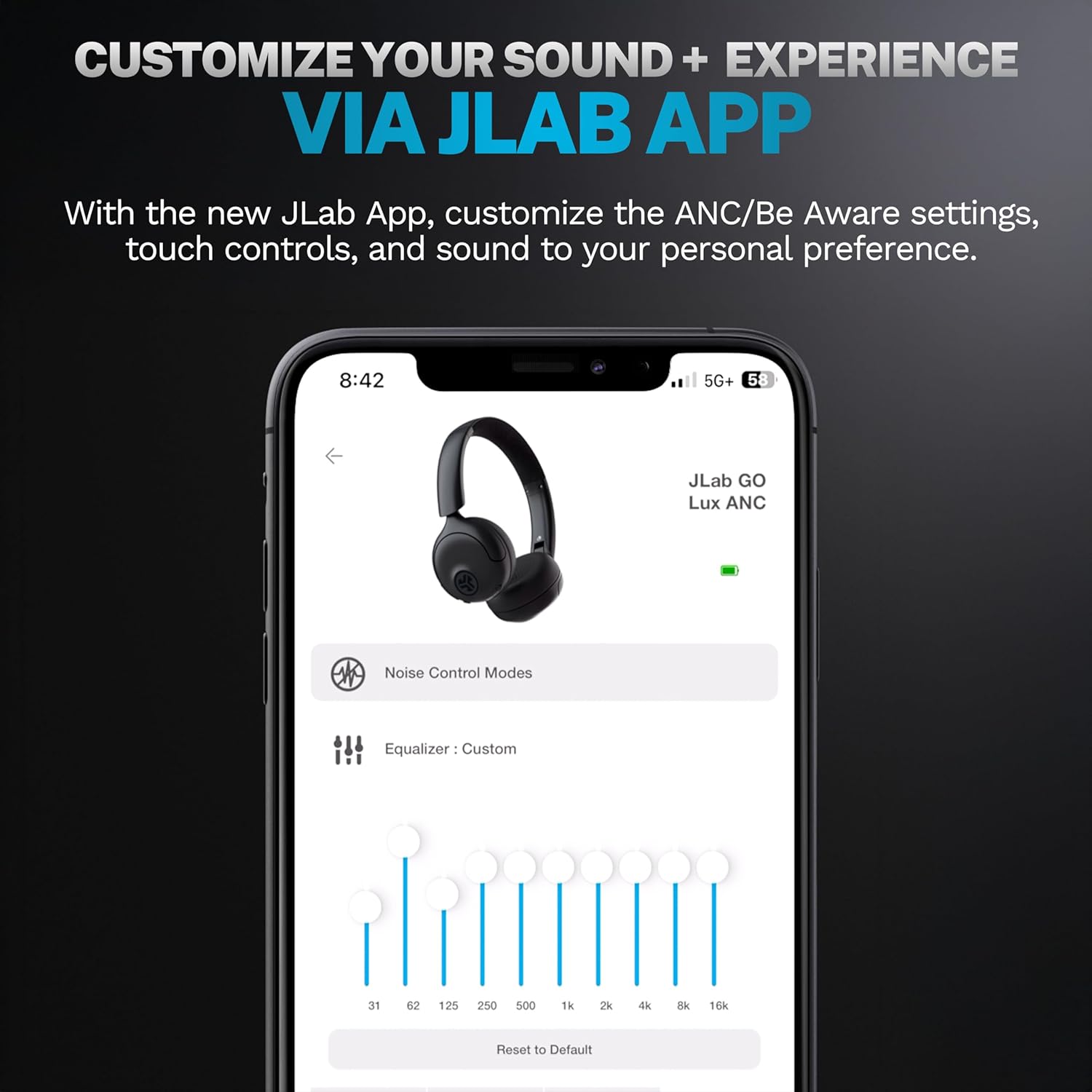
Image: JLab Go Lux ANC headphones in their folded position, demonstrating portability.
Penyelesaian Masalah
| Masalah | Larutan |
|---|---|
| Headphone tidak menyala | Ensure headphones are charged. Press and hold the power button for 3-5 seconds. |
| Tidak dapat dipasangkan dengan perangkat | Make sure Bluetooth is enabled on your device. Ensure headphones are in pairing mode (flashing blue/red LED). Forget the device in your Bluetooth settings and re-pair. |
| Tidak ada suara atau volume rendah | Periksa tingkat volume pada headphone dan perangkat yang terhubung. Pastikan headphone terhubung dengan benar. |
| ANC tidak bekerja secara efektif | Ensure ANC mode is activated. Adjust headphone fit to ensure a good seal around your ears. |
| Masalah kualitas panggilan | Ensure microphones are not obstructed. Check your device's connection and signal strength. |
Spesifikasi
| Fitur | Detil |
|---|---|
| Nama Model | HBGOLUXANCMVE20WEB |
| Teknologi Konektivitas | Nirkabel (Bluetooth) |
| Versi Bluetooth | 5.0 |
| Bentuk Lubang Suara | Di Telinga |
| Fitur Pengendalian Kebisingan | Peredam Kebisingan Aktif Hibrida, Mode Waspada |
| Jenis Penggerak Audio | Driver Dinamis (40mm) |
| Respon Frekuensi | 20 Hz - 20 kHz |
| Kepekaan | 104dB |
| Daya Tahan Baterai | Up to 70+ hours (40+ hours with ANC) |
| Metode Kontrol | Sentuh, Kontrol Aplikasi |
| Berat Barang | 10.6 ons (0.3 Kilogram) |
| Dimensi Produk | 2.95x6.1x7.48 inci |
| Tingkat Tahan Air | Tidak Tahan Air |
Garansi dan Dukungan
Your JLab Go Lux ANC Wireless Headphones come with a JLab 2 Year Warranty.
For detailed warranty information, product support, or to contact customer service, please visit the official JLab websitus atau lihat kartu garansi yang disertakan dengan produk Anda.
Anda juga dapat mengunjungi Toko JLab di Amazon untuk informasi dan aksesori lebih lanjut.


