Perkenalan
This manual provides detailed instructions for the safe and efficient operation, maintenance, and troubleshooting of your Tuni Silver Conical Burr Coffee Grinder and Tuni Mini Coffee Scale. Please read this manual thoroughly before using the products to ensure optimal performance and longevity.
The Tuni Silver Conical Burr Coffee Grinder features 48 adjustable grind settings and a patented anti-static 40mm conical burr for precise and consistent grinding. The Tuni Mini Coffee Scale is equipped with a high-precision sensor, offering multiple measurement units and modes for accurate coffee preparation.
Petunjuk Keselamatan Penting
- Baca semua petunjuk sebelum digunakan.
- Do not immerse the grinder or scale in water or other liquids.
- Keep hands and utensils out of the bean hopper and ground coffee container during operation.
- Unplug the grinder from the outlet when not in use, before putting on or taking off parts, and before cleaning.
- Jangan mengoperasikan alat apa pun dengan kabel atau steker yang rusak, atau setelah alat mengalami malfungsi atau terjatuh atau rusak dengan cara apa pun.
- Gunakan hanya lampiran yang direkomendasikan atau dijual oleh produsen.
- Peralatan ini hanya untuk penggunaan rumah tangga.
Komponen Produk
Tuni G1 Conical Burr Coffee Grinder

- Bean Hopper (250g/8.8oz capacity)
- Grind Adjustment Collar
- Conical Burrs (Upper and Lower)
- Grinder Body with Control Panel (LED display, Start/Stop button, Grind Time/Cup Size adjustment)
- Ground Coffee Container (75g/2.6oz capacity)
- Pemegang Portafilter
- Sikat Pembersih
Tuni Mini Coffee Scale
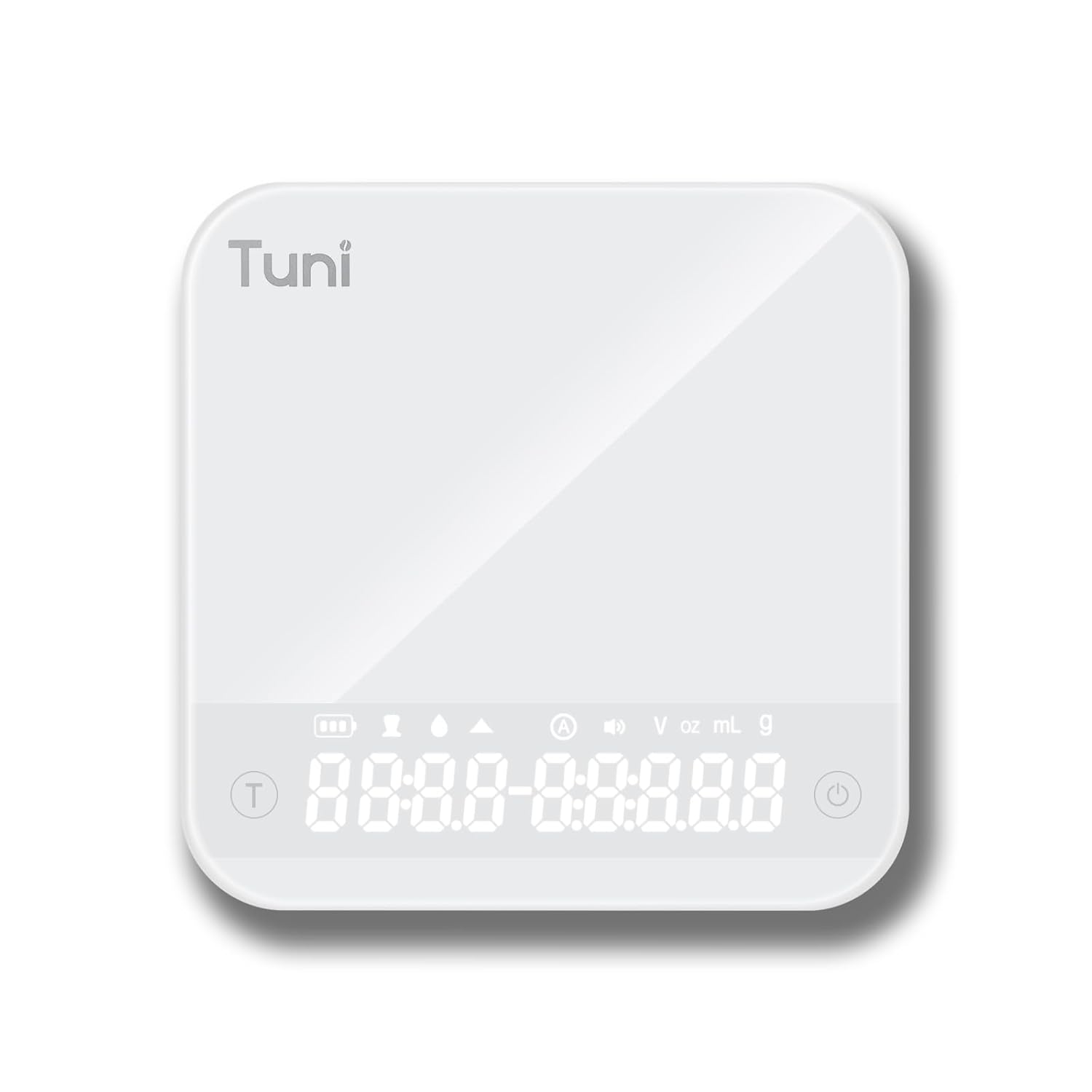
- Tempered Glass Weighing Platform
- Hidden LED Display
- Tombol Daya/Tare
- Tombol Pengatur Waktu
- Unit Conversion Button (g, ml, oz)
Pengaturan
Pengaturan Penggiling
- Membongkar: Keluarkan semua komponen dari kemasan dengan hati-hati. Simpan kemasan untuk penyimpanan atau pengangkutan di kemudian hari.
- Pembersihan: Sebelum digunakan pertama kali, bersihkan bagian luar penggiling dengan air.amp cloth. Wash the bean hopper and ground coffee container with warm, soapy water, rinse thoroughly, and dry completely.
- Merakit Hopper: Place the bean hopper onto the grinder body, ensuring it is securely locked in place.
- Sambungan Daya: Plug the grinder into a grounded electrical outlet.
Pengaturan Skala
- Membongkar: Keluarkan timbangan dari kemasannya.
- Pengisian daya: If necessary, charge the scale using the provided USB cable until fully charged.
- Penempatan: Letakkan timbangan di atas permukaan yang datar, stabil, dan rata untuk memastikan pembacaan yang akurat.
Petunjuk Pengoperasian
Using the Tuni G1 Coffee Grinder

- Tambahkan Kacang: Fill the bean hopper with whole roasted coffee beans. The hopper has a capacity of 250g (8.8oz).
- Pilih Pengaturan Penggilingan: Rotate the grind adjustment collar to select your desired grind size. The grinder offers 48 settings, suitable for:
- Espreso: Pengaturan 0-16 (sangat halus)
- Tuang/Teteskan: Pengaturan 16-32 (sedang)
- Pers Prancis: Pengaturan 32-48 (kasar)

Gambar: Detail view of the Tuni G1 Coffee Grinder's control panel and grind adjustment collar, emphasizing the 48 precision settings. - Choose Output Method: Place either the ground coffee container or your portafilter (using the included holder) under the dispensing chute.
- Set Grind Time/Cups: Use the control panel to adjust the grind time in 0.5-second increments (up to 40 seconds) or select the desired number of cups (2 to 12 cups).
- Mulai Menggiling: Press the Start/Stop button to begin grinding. The grinder will automatically stop once the set time or quantity is reached. You can also manually stop grinding by pressing the button again.
- Wadah Kosong: Once grinding is complete, remove the ground coffee container or portafilter.
Using the Tuni Mini Coffee Scale

- Nyalakan: Press the Power button to turn on the scale. The hidden LED display will illuminate.
- Pilih Satuan: Press the Unit Conversion button to cycle through available units: grams (g), milliliters (ml), and ounces (oz).
- Fungsi Tara: Place an empty container on the weighing platform. Press the Power/Tare button to zero out the weight of the container.
- Penimbangan: Add your ingredients (e.g., coffee beans, water) to the container. The display will show the precise weight.
- Fungsi Pengatur Waktu:
- Pengaturan Waktu Manual: Press the Timer button to start the timer. Press again to pause, and a third time to reset.
- Mode Otomatis: The scale features an automatic mode that can detect changes in weight and start the timer automatically, ideal for pour-over brewing. Refer to the scale's specific instructions for activating this mode.
- Powder/Water Ratio Mode: This mode assists in maintaining specific brewing ratios.
- Flow Rate Mode: Displays the flow rate of liquid, useful for precise pour-over techniques.
- Matikan: Press and hold the Power button to turn off the scale. The scale will also auto-shutoff after a period of inactivity to conserve battery.
Perawatan dan Pembersihan
Pembersihan Mesin Penggiling
- Cabut: Selalu cabut steker penggiling sebelum membersihkan.
- Hopper Kosong: Keluarkan sisa biji kopi dari hopper.
- Hapus Gerinda: Carefully remove the upper burr. Use the provided cleaning brush to brush away any coffee grounds from both the upper and lower burrs.
- Clean Chute: Use the brush to clean the dispensing chute.
- Lap Bagian Luar: Wipe the exterior of the grinder body with a soft, damp cloth. Do not use abrasive cleaners or immerse the grinder in water.
- Berkumpul kembali: Reassemble the burrs and hopper once all parts are dry.
Pembersihan Kerak

- Wipe the tempered glass surface with a soft, damp kain.
- Jangan gunakan bahan kimia keras atau bahan abrasif.
- The scale is water-resistant, but do not immerse it in water.
Penyelesaian Masalah
Grinder Issues
| Masalah | Kemungkinan Penyebab | Larutan |
|---|---|---|
| Penggiling tidak dimulai. | Tidak terpasang; daya padamtage; hopper not correctly seated; motor overheated. | Ensure plug is securely in outlet; check power supply; ensure hopper is locked in place; allow grinder to cool down for 30 minutes. |
| Penggilingan tidak konsisten. | Gerinda kotor atau tersumbat; pengaturan penggilingan tidak tepat untuk jenis biji kopi. | Clean burrs thoroughly; adjust grind setting to a finer or coarser level as needed. |
| Grinder is loud or struggling. | Beans are too oily/hard; burrs are clogged. | Clean burrs; try different beans; do not overfill hopper. |
Scale Issues
| Masalah | Kemungkinan Penyebab | Larutan |
|---|---|---|
| Pembacaan yang tidak akurat. | Scale not on a flat surface; battery low; overloaded; external vibrations. | Place on a stable, level surface; recharge battery; do not exceed 2000g capacity; avoid vibrations during use. |
| Layar tidak menyala. | Baterai habis. | Charge the scale using the provided USB cable. |
Spesifikasi
Tuni G1 Conical Burr Coffee Grinder
- Pengaturan Penggilingan: 48 precision settings
- Jenis Duri: Mata Bor Kerucut Baja Tahan Karat 40mm
- Kecepatan Penggilingan: 450 RPM (revolutions per minute)
- Kapasitas Hopper Kacang: 250 gram (8.8 ons)
- Grounds Container Capacity: 75 gram (2.6 ons)
- Grind Time Adjustment: 1-40 seconds (0.5s increments)
- Pemilihan Piala: 2-12 cangkir
- Ukuran: 7.08" x 4.52" x 14.0"
- Bahan Tubuh: Baja tahan karat
Tuni Mini Coffee Scale
- Rentang Pengukuran: 0.3g - 2000g (0.01oz - 70.5oz)
- Ketepatan: 0.1 gram
- Satuan: g, ml, oz
- Pengatur waktu: Max 99 minutes 59 seconds
- Modus: Manual Timing, Automatic Mode, Powder/Water Ratio Mode, Flow Rate Mode
- Menampilkan: Hidden LED Tempered Glass Display
- Kekuatan: Dapat diisi ulang (USB)
- Ukuran: Kira-kira berukuran 4.1" x 4.1" x 0.8"
- Berat Produk: 0.33 pon
Garansi dan Dukungan
Tuni products are manufactured with high-quality materials and craftsmanship. For warranty information and customer support, please refer to the warranty card included with your product or visit the official Tuni websitus. Harap siapkan nomor model produk dan tanggal pembelian Anda saat menghubungi dukungan.
Official Tuni Store: Visit the Tuni Store on Amazon


