1. Pendahuluan
This manual provides detailed instructions for setting up, operating, and maintaining your BenQ EW2790U 27-inch 4K monitor. Please read this manual thoroughly before using the monitor to ensure proper functionality and to prevent damage.
2. Informasi Keselamatan
Selalu ikuti tindakan pencegahan keselamatan dasar ini untuk mengurangi risiko kebakaran, sengatan listrik, dan cedera:
- Jangan biarkan monitor terkena hujan atau kelembapan.
- Jangan membuka monitor casing; serahkan perbaikan kepada personel yang berkualifikasi.
- Pastikan ventilasi yang baik di sekitar monitor.
- Gunakan hanya kabel daya dan adaptor yang disediakan oleh BenQ.
- Cabut kabel monitor saat terjadi badai petir atau saat tidak digunakan dalam waktu lama.
3. Isi Paket
Verifikasi bahwa semua item ada dalam paket Anda:
- Monitor 4K BenQ EW2790U 27 inci
- Kabel Listrik
- Kabel HDMI
- Kabel USB-C
- Panduan Memulai Cepat
- Kartu Garansi
4. Pengaturan
4.1 Merakit Stand
- Letakkan monitor menghadap ke bawah pada permukaan yang lembut dan bersih untuk mencegah goresan.
- Attach the stand base to the stand neck and secure it with the provided screw.
- Sejajarkan rakitan penyangga dengan slot pemasangan di bagian belakang monitor dan dorong hingga berbunyi klik dan terpasang dengan benar.

Figure 4.1: Assembled BenQ EW2790U monitor.
4.2 Menghubungkan Kabel
Hubungkan kabel-kabel yang diperlukan ke monitor dan komputer Anda:
- Kekuatan: Hubungkan kabel daya ke input daya monitor dan kemudian ke stopkontak.
- Rekaman video:
- HDMI: Connect an HDMI cable from your computer's HDMI output to one of the monitor's HDMI ports (HDMI 1, 2, or 3).
- USB-C: Connect a USB-C cable from your computer's USB-C port to the monitor's USB-C (65W) port for video, data, and power delivery.
- USB Hilir: Connect USB-A devices to the USB-A 3.2 downstream ports on the monitor.
- Suara: Hubungkan headphone ke jack headphone jika diinginkan.

Gambar 4.2: Belakang view of BenQ EW2790U showing connectivity ports.

Gambar 4.3: Rinci view of BenQ EW2790U input/output ports.
4.3 Menyesuaikan Ergonomi
The EW2790U monitor offers various adjustments for comfortable viewsedang:
- Penyesuaian Ketinggian: Naikkan atau turunkan monitor sesuai ketinggian mata yang Anda inginkan.
- Memiringkan: Sesuaikan sudut vertikal layar.
- Memutar: Putar layar secara horizontal.
- Poros: Putar layar 90 derajat untuk mode potret.

Figure 4.4: BenQ EW2790U monitor pivot adjustment.
5. Mengoperasikan Monitor
5.1 Daya Hidup/Mati
Press the Power key located on the bottom right of the monitor to turn it on or off.

Figure 5.1: Monitor controls: Scenario hotkey, 5-way controller, and Power key.
5.2 Menu Tampilan di Layar (OSD)
Use the 5-way controller on the bottom bezel to navigate the OSD menu and adjust settings such as brightness, contrast, color mode, and input source.
5.3 Scenario Hotkey
The Scenario hotkey allows quick access to custom or preset optimal monitor settings for various uses like work, studying, gaming, or watching movies.
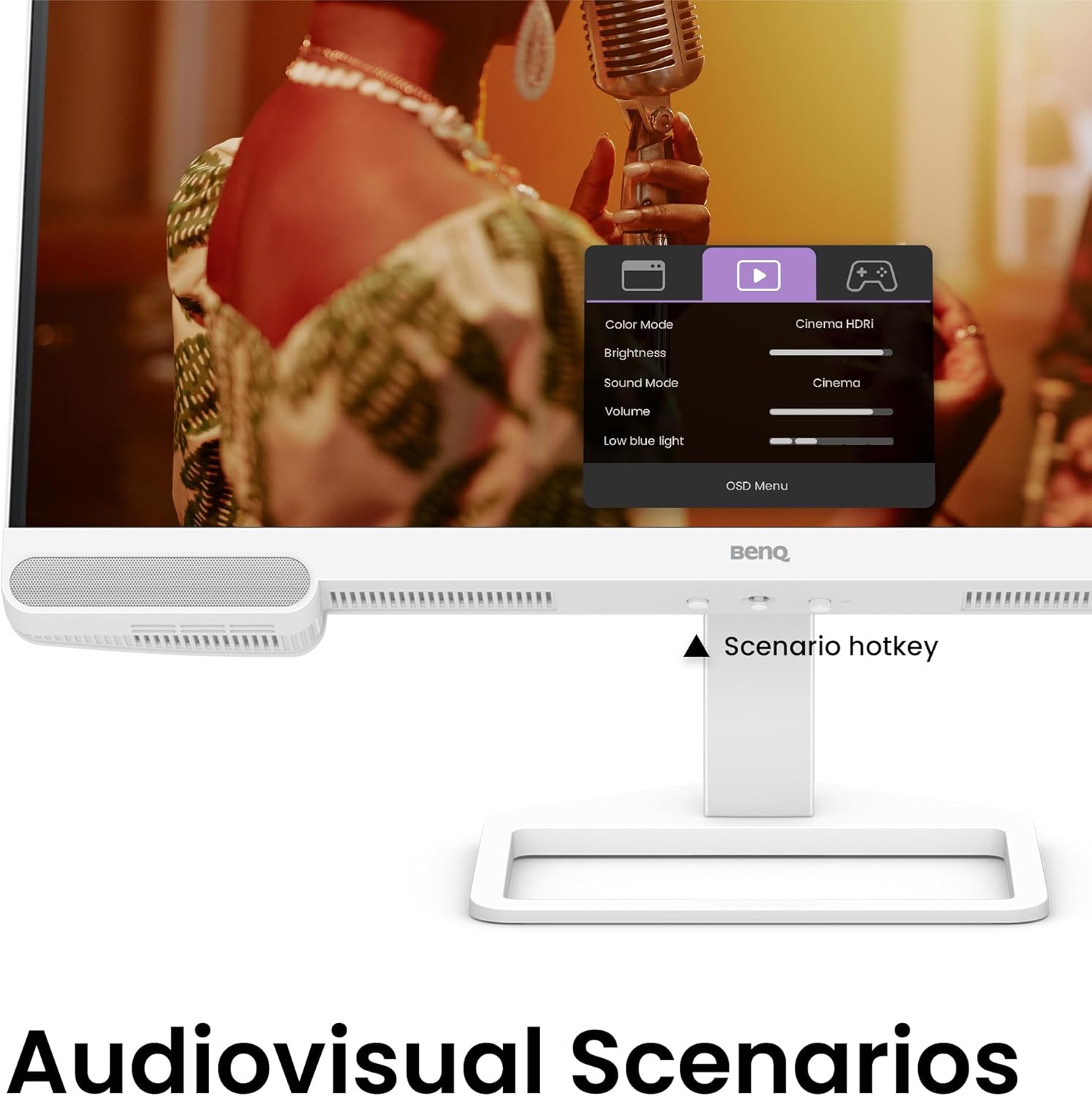
Figure 5.2: OSD menu accessed via Scenario hotkey.
5.4 Teknologi Kontras AI
The exclusive AI Contrast technology intelligently adjusts the contrast based on the displayed content, optimizing image quality without affecting other areas of the screen.

Figure 5.3: Demonstration of AI Contrast technology.
5.5 Speaker Terintegrasi
The monitor includes a pair of 5W built-in speakers for audio output. Adjust the volume through the OSD menu or your connected device.

Figure 5.4: BenQ EW2790U built-in 5W speakers.
6. Pemeliharaan
6.1 Membersihkan Monitor
- Selalu cabut monitor sebelum membersihkan.
- Gunakan kain yang lembut dan tidak berbulu secara tipis dampdibersihkan dengan air atau pembersih ringan yang tidak bersifat abrasif.
- Jangan menyemprotkan pembersih langsung ke layar.
- Hindari penggunaan alkohol, amonia, atau pembersih abrasif, karena dapat merusak layar atau komponen lainnya.asing.
6.2 Penyimpanan
Store the monitor in a cool, dry place away from direct sunlight and extreme temperatures. If storing for an extended period, consider using the original packaging for protection.
7. Penyelesaian masalah
| Masalah | Kemungkinan Penyebab | Larutan |
|---|---|---|
| Tidak ada gambar di layar | Kabel daya terputus; Kabel video terputus; Sumber input yang dipilih salah. | Ensure power and video cables are securely connected. Press the Scenario hotkey to select the correct input source. |
| Gambarnya buram atau terdistorsi | Resolusi tidak tepat; Kabel video longgar. | Set the display resolution to 3840x2160. Check video cable connections. |
| Tidak ada suara dari speaker | Volume too low; Muted; Incorrect audio output selected on computer. | Adjust volume via OSD menu or computer settings. Ensure monitor is selected as audio output device. |
| AI Contrast not working as expected | Feature disabled; Specific content not optimized. | Check OSD settings to ensure AI Contrast is enabled. Performance may vary with different content. |
8. Spesifikasi
| Fitur | Detil |
|---|---|
| Ukuran Layar | 27 inci |
| Resolusi | Resolusi 3840x2160 (4K UHD) |
| Rasio Aspek | 16:9 |
| Cakupan Warna | 95% P3 |
| AI Contrast Technology | Ya |
| Speaker Terintegrasi | 2x5W |
| Konektivitas | 1x USB Type-C (65W), 3x HDMI (2.0), USB-C 3.2 downstream, USB-A 3.2 downstream, Headphone Jack |
| Desain Ergonomis | Pengaturan Ketinggian, Kemiringan, Putar, dan Pivot |
| Berat Barang | 21.4 pon |
| Dimensi Produk (P x L x T) | 17x8x21 inci |
9. Garansi dan Dukungan
Your BenQ EW2790U monitor is covered by a manufacturer's warranty. Please refer to the warranty card included in your package for specific terms and conditions. For technical support, product registration, or service inquiries, please visit the official BenQ websitus atau hubungi departemen layanan pelanggan mereka.
BenQ Resmi Weblokasi: www.benq.com