Perkenalan
This manual provides essential information for the proper setup, operation, and maintenance of your My Arcade Sonic The Hedgehog Joystick Player. Please read this manual thoroughly before using the product to ensure a safe and enjoyable gaming experience.
Produk Selesaiview
The My Arcade Sonic The Hedgehog Joystick Player is a portable retro gaming console featuring classic SEGA titles. It offers an authentic arcade experience with a joystick and dedicated buttons.
Fitur Utama:
- Officially licensed SEGA game console.
- High-resolution 3.5-inch full-color display.
- Termasuk Sonic si Landak Dan Sonic the Hedgehog 2.
- 3.5mm headphone jack for private audio.
- Speaker terintegrasi dengan kontrol volume.
- Kecerahan layar dapat disesuaikan.
- Powered by 4 AA batteries (not included) or USB-C cable (not included).
Komponen:
- Gaming Console Unit
- Tongkat kendali
- Action Buttons (A, B, C)
- Tombol Beranda
- Credit/Start Button
- Kontrol Volume (+/-)
- Kontrol Kecerahan
- Soket Headphone 3.5 mm
- USB-C Power Input (5V IN)
- Battery Compartment (requires 4 AA batteries)

The My Arcade Sonic The Hedgehog Joystick Player, a portable retro gaming console.
Pengaturan
Powering the Console:
- Pemasangan Baterai: Locate the battery compartment on the back of the console. Insert 4 AA batteries (not included), ensuring correct polarity.
- USB-C Power (Optional): Alternatively, connect a USB-C cable (not included) to the 5V IN port on the back of the console to power it.
Penggunaan Awal:
- Peel off the protective screen sticker before use.
- Turn on the console using the power switch located on the back.

Belakang view of the console, highlighting the battery compartment, USB-C port, and headphone jack.
Petunjuk Pengoperasian
Game Selection and Start:
- Once powered on, use the joystick to navigate and select your desired game (Sonic si Landak or Sonic the Hedgehog 2) from the main menu.
- Tekan tombol START/CREDIT button to add virtual coins and begin the game.
- To skip the Sonic demo mode, press the START/CREDIT tombol.
Kontrol:
- Joystik: Controls character movement.
- Action Buttons (A, B, C): Perform in-game actions such as jumping or attacking.
- Kontrol Volume (+/-): Adjust the sound level of the built-in speaker using the buttons on the back of the console.
- Kecerahan Layar: Adjust the screen brightness using the dedicated button on the back.
- Jack Headphone: For private listening, connect 3.5mm headphones to the headphone jack on the back.
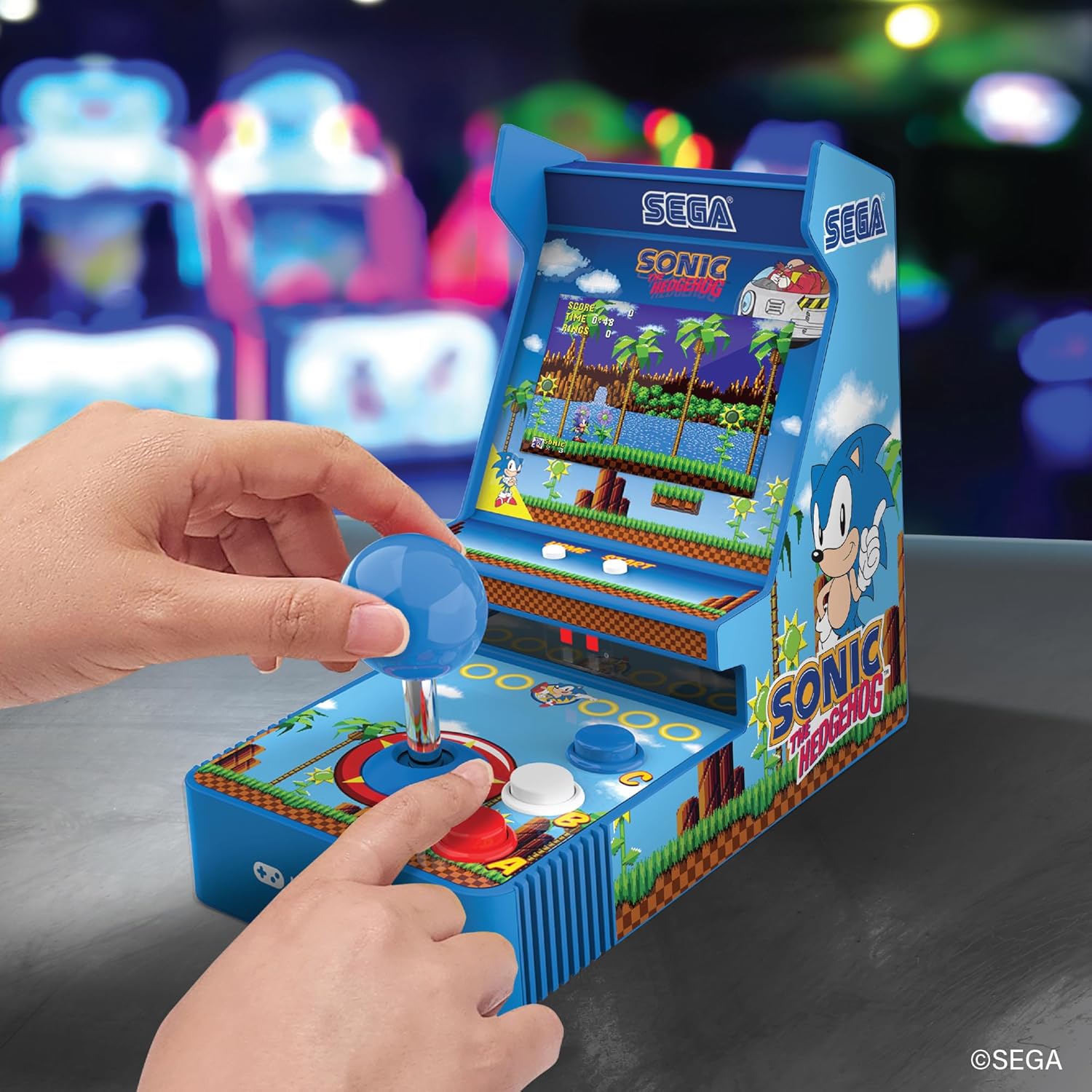
Depan view of the console, showing the joystick, action buttons, and screen during gameplay.
Official video demonstrating the My Arcade Sonic Arcade Game in action, showcasinGameplay dan fitur-fiturnya.
Pemeliharaan
To ensure the longevity of your My Arcade Sonic The Hedgehog Joystick Player, follow these simple maintenance guidelines:
- Keep the console clean by wiping it with a soft, dry cloth. Avoid using abrasive cleaners or solvents.
- Simpan konsol di tempat yang sejuk dan kering, jauhkan dari sinar matahari langsung dan suhu ekstrem.
- If not in use for an extended period, remove the AA batteries to prevent leakage.
Penyelesaian Masalah
If you encounter any issues with your My Arcade Sonic The Hedgehog Joystick Player, refer to the following common solutions:
- Konsol tidak menyala: Ensure that fresh AA batteries are correctly installed or that the USB-C cable is securely connected to a power source.
- Game does not start from demo mode: Tekan tombol START/CREDIT button to exit demo mode and begin gameplay.
- Tidak ada suara: Check the volume control buttons on the back of the console. If headphones are connected, ensure they are fully plugged in and functioning correctly.
- Layar redup: Adjust the screen brightness using the dedicated button on the back of the console.
If problems persist, please contact My Arcade customer support for further assistance.
Spesifikasi
| Fitur | Detil |
|---|---|
| Dimensi Produk | 4"P x 6.8"L x 7.6"T |
| Tipe Pengendali | Tongkat kendali |
| Berat Barang | 0.63 Kilogram (1.39 pon) |
| Ukuran Layar | 3.5 inci |
| Sumber Daya | 4 AA batteries (not included) or USB Type C (not included) |
| Antarmuka Perangkat Keras | USB Tipe C |
| Jenis Tampilan | Layar LCD |
| Bahan | Plastik |
| Kapasitas Penyimpanan Memori | 4MB |
| Nomor Model | DGUNL-7157 |
| UPC | 845620071579 |
Informasi Keselamatan
- Tidak cocok untuk anak di bawah usia 3 tahun karena bagian-bagiannya kecil.
- Selalu awasi anak kecil saat menggunakannya.
- Do not expose the console to water or excessive moisture.
- Avoid dropping or subjecting the console to strong impacts.
- Use only recommended battery types and ensure correct installation.
Garansi dan Dukungan
For warranty information or technical support, please refer to the official My Arcade websitus web atau hubungi layanan pelanggan mereka. Simpan struk pembelian Anda sebagai bukti pembelian.


