Informasi Kompatibilitas Penting
This ESR Rebound Magnetic Keyboard Case is designed for specific iPad models. Please verify your iPad model number to ensure compatibility before use.
- Kompatibel dengan: iPad Air 13-inch (M3/M2 2025/2024), iPad Pro 12.9-inch (6th/5th/4th/3rd Gen).
- Compatible Model Numbers: A2764, A2437, A2436, A2378, A2379, A2461, A2462, A2229, A2069, A2232, A2233, A1876, A2014, A1895, A1983.
- Tidak kompatibel dengan: iPad Pro 13-inch (M4) 2024 (Models: A2925, A2926, A3007) and iPad Pro 13-inch (M5) 2025 (Models: A3360, A3361, A3362).
To verify your iPad model, go to Pengaturan > Umum > Tentang on your device, or find the model number on the back of your iPad.

Figure 1: Compatibility warning indicating the keyboard case is not for iPad Pro 13-inch (M4) 2024.

Figure 2: Visual guide for compatible iPad models and how to locate your iPad's model number for verification.
Isi Paket
Pastikan semua item ada dalam paket:
- Casing Keyboard Magnetik ESR Rebound
- Kabel Pengisian Daya USB-A ke C
- Panduan Pengguna
Video 1: Membuka kemasan dan penjelasan lebih lanjutview of the ESR Rebound Magnetic Keyboard Case for iPad Air 13 & iPad Pro 12.9. This video demonstrates the contents of the package and initial setup.
Petunjuk Pengaturan
1. Memasang iPad Anda
- Buka casing keyboard.
- Align your iPad with the magnetic back of the case. The iPad will securely snap into place.
- Adjust the floating cantilever stand to your desired viewsudut.

Figure 3: Quick-set magnetic stand in use, showing an iPad securely attached and adjusted to an optimal angle.

Figure 4: Demonstration of the strong magnetic hold, securing the iPad to the case with 1,500g of holding force.
2. Menyalakan dan Memasangkan Bluetooth
- Long press the power button on the keyboard for 2 seconds to turn it on. The Bluetooth status indicator will flash.
- Di iPad Anda, buka Pengaturan > Bluetooth dan pastikan Bluetooth diaktifkan.
- Select "ESR Keyboard" from the list of available devices.
- Confirm the pairing request on your iPad. The Bluetooth indicator on the keyboard will turn solid blue once connected.
Video 2: Detailed instructions on how to power on the keyboard and pair it via Bluetooth with your iPad.
Petunjuk Pengoperasian
Penggunaan Keyboard
The keyboard features well-spaced, responsive keys for comfortable and accurate typing. It includes a dedicated function row for quick access to common iPad functions.
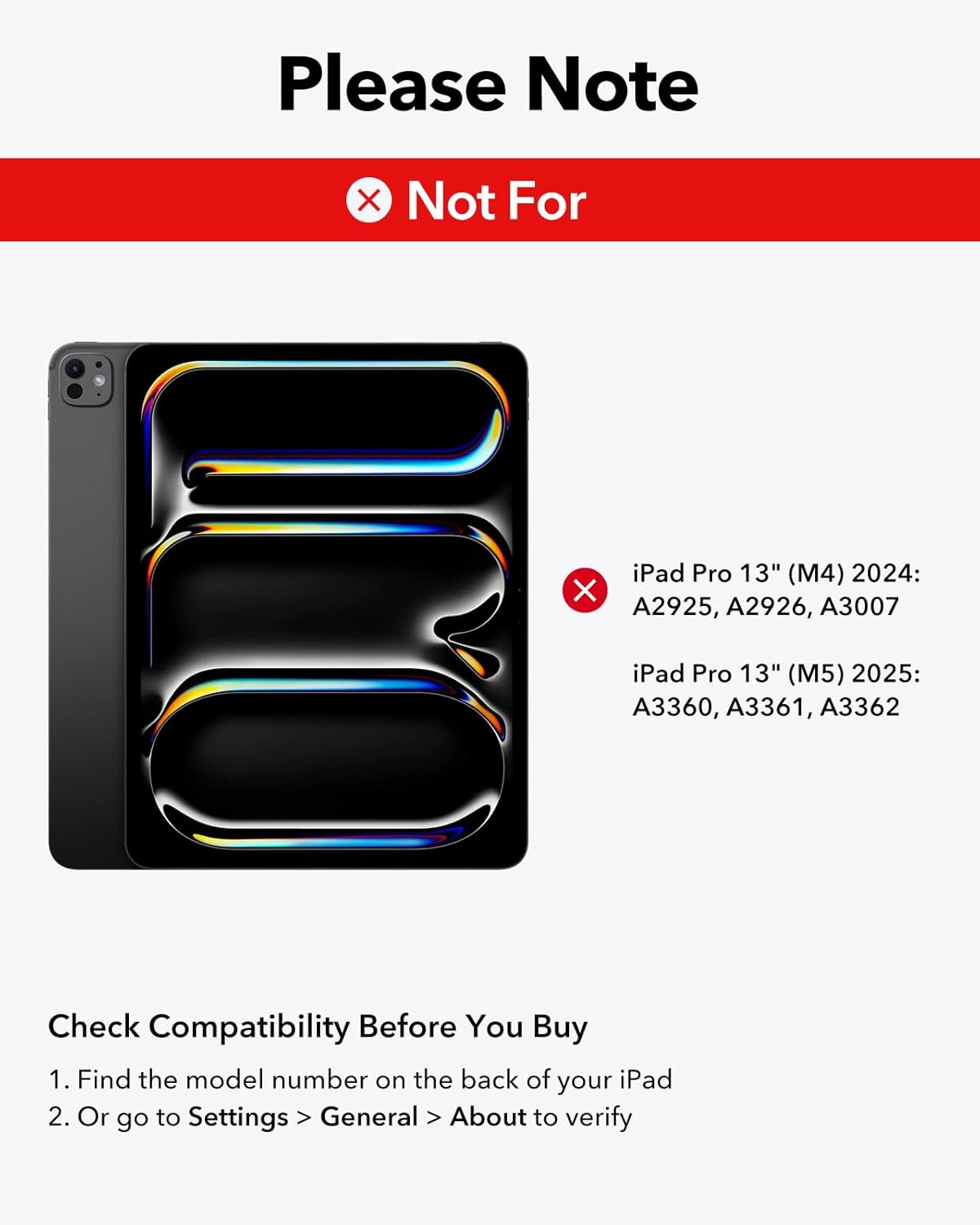
Figure 5: Close-up of hands typing on the keyboard, highlighting the laptop-style keys and their comfortable feel.
Tombol Backlit
The keyboard features adjustable 7-color backlighting with 3 brightness levels. Use the dedicated backlight key (often represented by a sun icon) to cycle through colors and adjust brightness.

Figure 6: The keyboard's backlit keys, demonstrating 12 color modes and 3 brightness levels for enhanced visibility in various lighting conditions.
Penggunaan Trackpad
The precision multi-touch trackpad supports full iPadOS gestures, allowing for efficient navigation and interaction with your iPad. Multi-touch gestures require iPadOS 14.5 or higher.
- Klik: Single tap or press down on the trackpad.
- Menggulir: Gunakan dua jari untuk menggulir ke atas atau ke bawah.
- Perbesar: Cubit dengan dua jari untuk memperbesar atau memperkecil.
- Pulang: Swipe up with three fingers to return to the home screen.

Figure 7: A hand demonstrating multi-touch gestures on the precision trackpad, enabling responsive navigation.

Figure 8: Visual guide to common multi-touch trackpad gestures, including click, scroll, zoom, and returning to the home screen.
Floating Cantilever Stand
The floating cantilever design allows your iPad to be positioned at various angles for optimal viewing and typing comfort. Simply open the case and adjust the iPad's position to achieve the perfect angle.

Figure 9: The floating cantilever stand in action, providing an adjustable and stable platform for the iPad.
Magnetic Clasp and Pencil Holder
The case features a secure magnetic clasp that not only keeps the case closed but also provides a dedicated holder for your Apple Pencil or other styluses, ensuring they are safely stored and charged (if compatible).

Figure 10: The secure magnetic clasp with an integrated pencil holder, designed to keep your Apple Pencil or other styluses safely attached.
Pemeliharaan
- Pembersihan: Gunakan yang lembut, damp cloth to wipe down the exterior of the case and keyboard. Avoid harsh chemicals.
- Penyimpanan: Saat tidak digunakan, jaga agar casing keyboard tetap tertutup untuk melindungi iPad dan keyboard.
- Pengisian daya: Charge the keyboard using the provided USB-A to C charging cable. The iPad cannot be charged through the keyboard case.
Penyelesaian Masalah
Keyboard Not Responding / Touchscreen Unresponsive
If the keyboard is not responding or the iPad touchscreen becomes unresponsive after double-clicking the trackpad, follow these steps:
- Pergi ke Settings > Accessibility > Touch.
- Turn off "AssistiveTouch".
- Ensure the keyboard is sufficiently charged. Low battery can affect performance.
Video 3: Troubleshooting guide for issues related to incorrect size, fit, or wrong purchase. This video also addresses touchscreen unresponsiveness after trackpad use.
Masalah Konektivitas
- Pastikan keyboard terisi penuh.
- Re-pair the keyboard with your iPad by following the "Powering On and Bluetooth Pairing" steps.
- Mulai ulang iPad dan keyboard Anda.
Spesifikasi
| Merek | ESR |
| Perangkat yang Kompatibel | iPad Air 13-inch (M3/M2 2025/2024), iPad Pro 12.9-inch (6th/5th/4th/3rd Gen) |
| Teknologi Konektivitas | Bahasa Indonesia: Bluetooth |
| Deskripsi Papan Ketik | Magnetik |
| Tata Letak Papan Ketik | Bahasa QWERTY |
| Fitur Khusus | Ergonomic, Floating Cantilever Stand, Multi-Touch Trackpad, Backlit Keys |
| Bahan | Plastik |
| Warna | Ungu |
| Sumber Daya | Bertenaga Baterai |
| Berat Barang | 2.64 pon |
| Dimensi Paket | 12.91x9.53x1.06 inci |
Garansi dan Dukungan
ESR menyediakan dukungan pelanggan yang komprehensif untuk produk ini:
- Jaminan: This product includes a comprehensive 12-month warranty.
- Mendukung: Lifetime support and personalized help are available.
- Sumber daya: Detailed setup videos and FAQs can be found on the ESR support weblokasi.
For further assistance, please visit the official ESR support webkunjungi situs web atau hubungi layanan pelanggan melalui platform pembelian Anda.