1. Pendahuluan
This user manual provides essential information for the safe and efficient operation of your iFFALCON 65U85 4K Mini LED Google TV. Please read this manual thoroughly before using the product and retain it for future reference.
2. Informasi Keselamatan
Selalu ikuti tindakan pencegahan keselamatan dasar saat menggunakan televisi ini untuk mengurangi risiko kebakaran, sengatan listrik, dan cedera.
- Jangan biarkan TV terkena hujan atau lembab.
- Jangan membuka TV casing; serahkan semua servis kepada personel yang berkualifikasi.
- Pastikan ventilasi yang baik dan jangan menghalangi lubang ventilasi.
- Gunakan hanya kabel daya dan aksesori yang ditentukan oleh produsen.
- Jauhkan TV dari sumber panas dan sinar matahari langsung.
3. Isi Paket
Verifikasi bahwa semua item ada dalam paket:
- iFFALCON 65U85 4K Mini LED Google TV
- Kontrol Jarak Jauh
- Kabel listrik
- User Manual (dokumen ini)
- Kartu Garansi
- Wall Bracket (if included)
4. Pengaturan
4.1 Pembongkaran dan Penempatan
Carefully remove the TV from its packaging. Place the TV on a stable, flat surface or mount it on a wall using a VESA-compatible bracket. Ensure adequate space around the TV for ventilation.
4.2 Menghubungkan Daya dan Perangkat
- Hubungkan kabel daya ke TV lalu ke stopkontak.
- Connect external devices (e.g., gaming consoles, Blu-ray players) to the HDMI 2.1 ports.
- For internet access, connect an Ethernet cable to the LAN port or prepare for Wi-Fi setup.
4.3 Initial Setup and Remote Pairing
Upon first power-on, the TV will guide you through the initial setup process. This includes language selection, network connection, and Google account login.
To pair the Bluetooth remote control:
- Arahkan remote control ke TV.
- Tekan dan tahan tombol Pengaturan tombol dan Rumah tombol secara bersamaan selama 4 detik.
- The TV will display a pairing confirmation message once successful.
4.4 Koneksi Jaringan
Connect your TV to the internet via Wi-Fi or Ethernet to access Google TV features and streaming services.
- Wifinya: Select your network from the list and enter the password.
- Eternet: Connect an Ethernet cable from your router to the TV's LAN port.
5. Mengoperasikan TV Anda
5.1 Antarmuka Google TV
Your iFFALCON 65U85 features Google TV, providing a personalized experience with access to a vast library of content and apps.

5.2 Kontrol Suara dengan Asisten Google
Use the built-in Google Assistant for hands-free control. Press the Google Assistant button on your remote and speak your commands.
- Pencarian untuk movies and shows.
- Kendalikan perangkat rumah pintar.
- Dapatkan jawaban atas pertanyaan.

5.3 Casting Content (AirPlay2 & Chromecast)
Easily share content from your smartphone or tablet to the TV screen.
- AirPlay2: For Apple devices, use AirPlay2 to stream videos, photos, and music.
- Chromecast: For Android devices and Chrome browser, use Chromecast built-in to cast content.

6. Fitur Utama
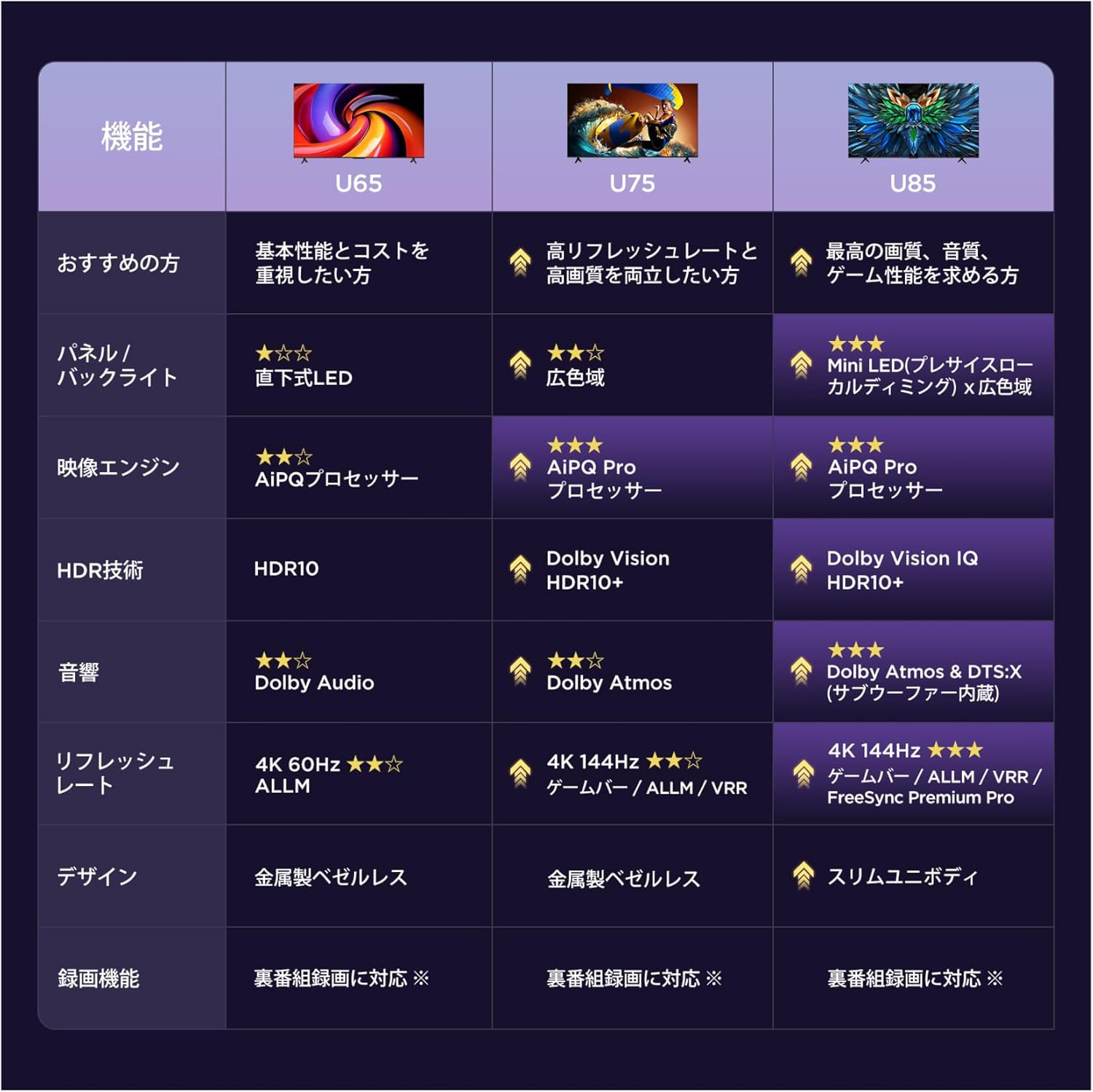
6.1 Display Technology: Mini LED & 4K HDR
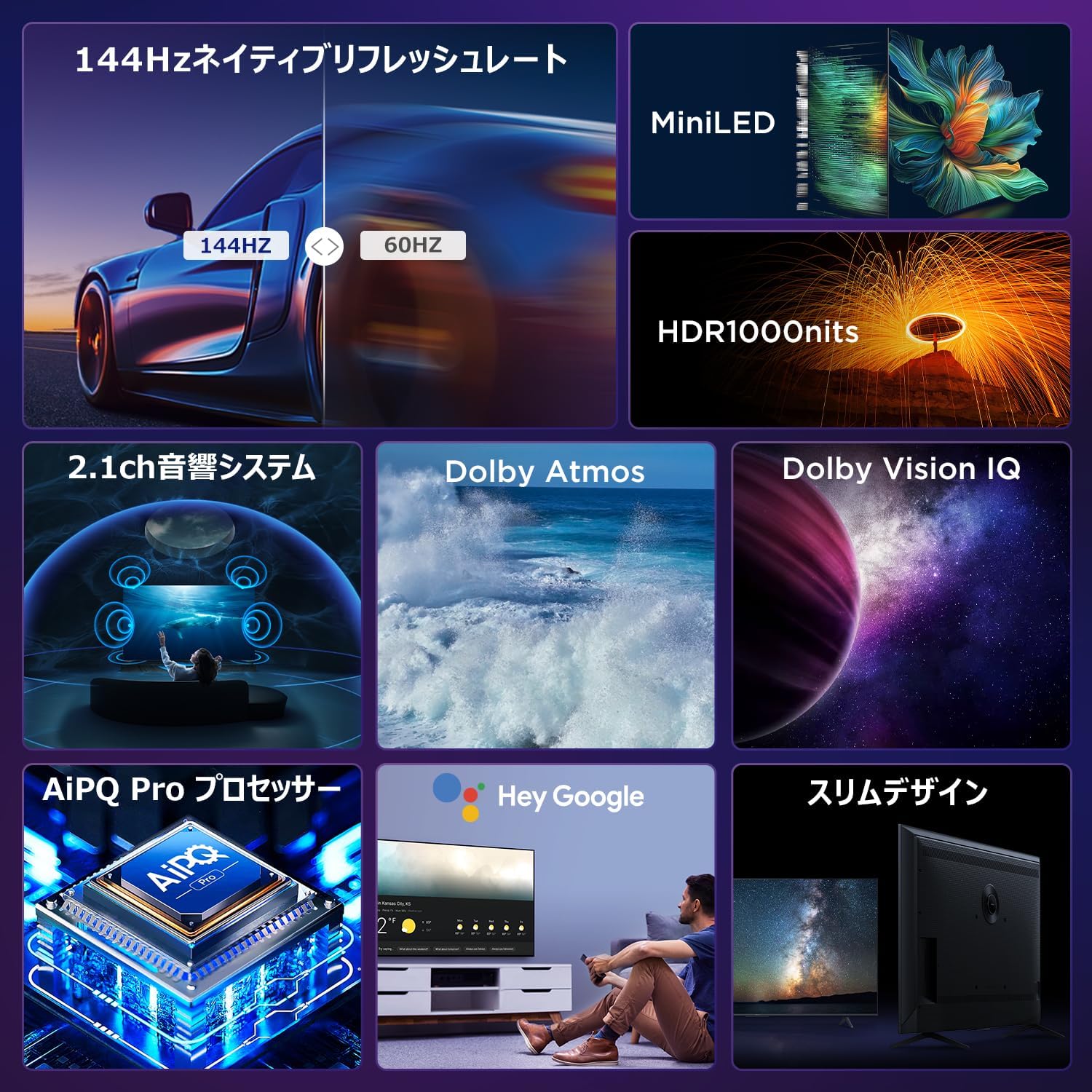
Experience stunning visuals with Mini LED backlight technology, delivering 1000 nits peak brightness and enhanced contrast. Combined with 4K resolution, Dolby Vision IQ, and HDR10+, you get precise brightness, vibrant colors, and deep blacks.


6.2 Immersive Audio: Dolby Atmos & DTS Virtual:X
Enjoy a captivating audio experience with Dolby Atmos and DTS Virtual:X, delivering multi-dimensional sound that fills your room. The 2.1ch speaker system provides powerful bass and clear audio.


6.3 Gaming Features: 144Hz VRR & Game Master
Designed for gamers, the 65U85 offers a native 144Hz refresh rate, Variable Refresh Rate (VRR), Auto Low Latency Mode (ALLM), and FreeSync Premium Pro for smooth, tear-free gameplay.


6.4 AiPQ Pro Processor
The AiPQ Pro processor intelligently optimizes color, contrast, and motion for every scene, delivering a visually stunning and immersive viewpengalaman ing.

6.5 Slim Metal Bezel-less Design
The TV features a sleek, metal bezel-less design that blends seamlessly into any living space, offering a premium aesthetic.

7. Spesifikasi
| Fitur | Keterangan |
|---|---|
| Ukuran Layar | 65 inci |
| Jenis Tampilan | VA Panel, Mini LED |
| Resolusi | Resolusi 4K (3840x2160) |
| Tingkat Penyegaran | 144 Hz (Asli) |
| Dukungan HDR | Dolby Vision IQ, HDR10+ |
| Suara | 2.1ch Speaker System, Dolby Atmos, DTS Virtual:X |
| Platform TV Pintar | Google TV |
| Asisten Suara | Asisten Google |
| Konektivitas | 3x HDMI 2.1, 2x USB, Wi-Fi, Bluetooth |
| Dimensi (L x D x T) | 144.8 x 32.4 x 89.5 cm (dengan dudukan) |
| Berat | 19 kg |
| Kompatibilitas VESA | Ya |

8. Penyelesaian masalah
Jika Anda mengalami masalah dengan TV Anda, lihat solusi umum berikut:
- Tidak Ada Daya: Pastikan kabel daya tersambung dengan aman dan stopkontak berfungsi.
- Tidak Ada Gambar/Suara: Check all cable connections (HDMI, audio). Verify the correct input source is selected.
- Jarak Jauh Tidak Berfungsi: Replace batteries. Re-pair the remote control as described in Section 4.3.
- Tidak ada koneksi internet: Check your router and modem. Reconnect to the Wi-Fi network or ensure the Ethernet cable is properly connected.
- Masalah Kualitas Gambar: Adjust picture settings (brightness, contrast, color). Ensure content source is high quality.
Untuk masalah yang terus berlanjut, hubungi dukungan pelanggan.
9. Pemeliharaan
Proper maintenance ensures the longevity of your iFFALCON TV:
- Membersihkan Layar: Gently wipe the screen with a soft, dry, lint-free cloth. Do not use harsh chemicals or abrasive cleaners.
- Membersihkan Casing: Gunakan yang lembut, damp cloth to wipe the TV casing.
- Ventilasi: Jaga agar lubang ventilasi bebas dari debu dan penghalang.
- Matikan: Cabut TV dari stopkontak saat terjadi badai petir atau bila ditinggalkan tanpa pengawasan dalam waktu lama.
10. Garansi dan Dukungan
Your iFFALCON 65U85 TV comes with a manufacturer's warranty. Please refer to the included warranty card for details on coverage, terms, and conditions.
For technical support, service inquiries, or further assistance, please visit the official iFFALCON website or contact their customer service hotline. Contact information can be found on the warranty card or the official product page.
11. Video Produk
11.1 Mini LED Quantum Dot 144Hz 65-inch TV
This video showcases the Mini LED and Quantum Dot display technology of the 65-inch iFFALCON TV, highlighting its 144Hz refresh rate for smooth visuals.


