1. Pendahuluan
This manual provides comprehensive instructions for the installation, operation, and maintenance of your MYPIN Magnetic Solar Wireless Backup Camera System. Please read this manual thoroughly before using the product to ensure proper function and safety. This system is designed to enhance visibility and safety for various vehicles, including RVs, campers, trailers, and trucks.
2. Isi Paket
Pastikan semua barang yang tercantum di bawah ini termasuk dalam paket Anda. Jika ada barang yang hilang atau rusak, silakan hubungi layanan pelanggan.
- 7-inch HD Wireless Monitor
- Magnetic Solar Wireless Backup Camera
- Monitor Power Cable (for cigarette lighter socket)
- Type-C Charging Cable for Camera
- Pengisi Daya Cepat
- Monitor Mounting Bracket (Dashboard Mount)
- Monitor Suction Cup Mount (Windshield Mount)
- Panduan Pengguna
3. Produk Lebihview
3.1 Komponen Sistem
The MYPIN Wireless Backup Camera System consists of two main components: the 7-inch HD monitor and the magnetic solar-powered wireless camera.

Figure 3.1: System Components and Wireless Signal Transmission. The image displays the 7-inch monitor and the solar-powered camera, illustrating their wireless connection and range, with an RV in the background.
3.2 Fitur Monitor
- Layar HD 7 inci: Memberikan penjelasan yang jelas dan rinci. view.
- Split-Screen Modes: Supports dual and quad-screen viewing for multiple cameras (additional cameras sold separately, ASIN: B0FJXTWV22).
- Image Flip Function: Allows for 4 types of image adjustments (normal, mirror, horizontal flip, vertical flip).
- Perekaman Berulang DVR: Built-in system for continuous recording, supporting up to 128GB SD card (not included).
- Pedoman Parkir: Selectable on/off grid lines for parking assistance.
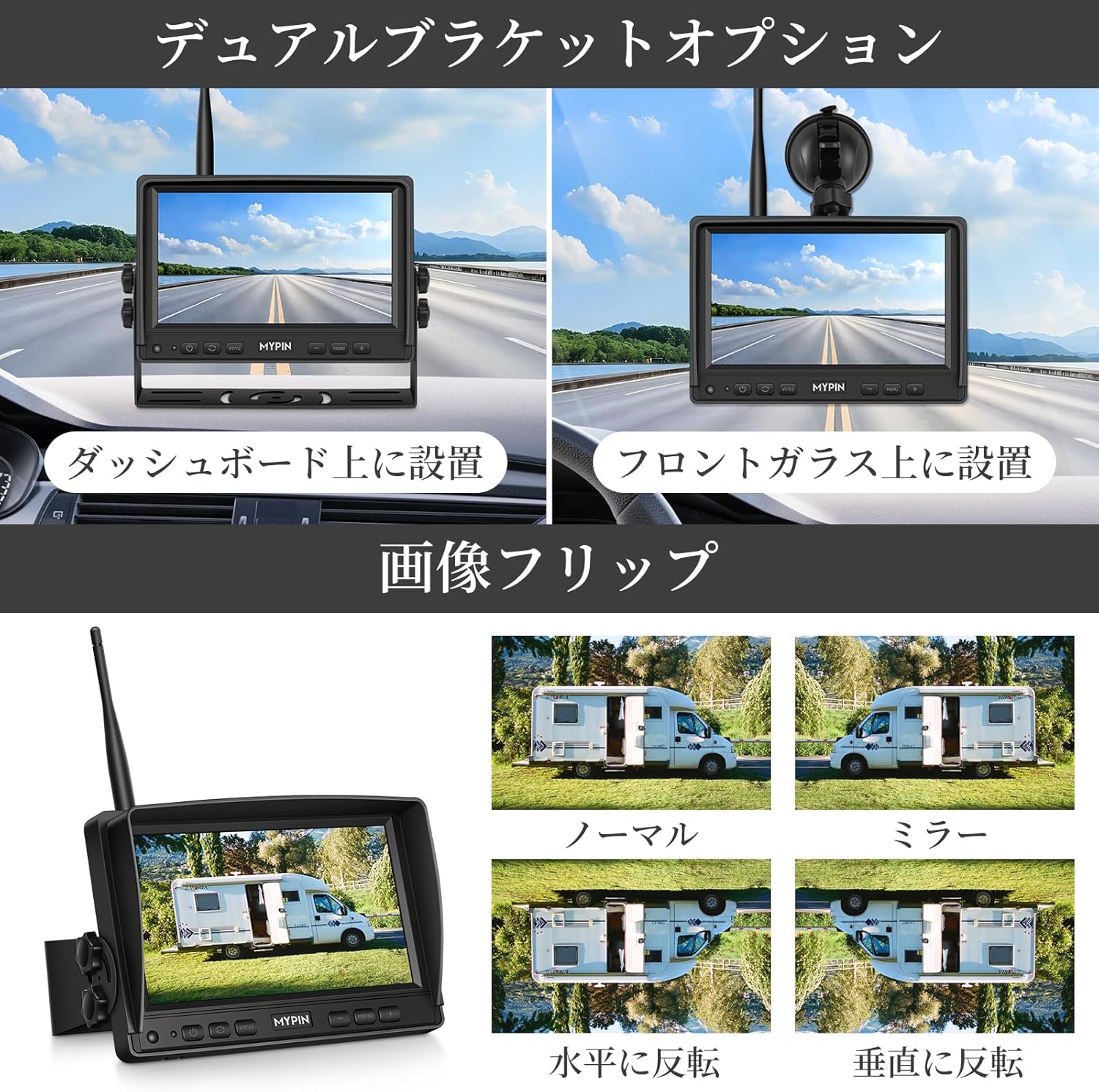
Figure 3.2: Monitor Mounting Options and Image Flip Functionality. This image demonstrates how the monitor can be mounted on the dashboard or windshield, and shows the different image orientation options available.
3.3 Fitur Kamera
- Resolusi HD 1080P: Delivers clear and sharp video.
- Sudut Lebar 140° View: Provides a broad field of vision.
- Bertenaga Surya: Integrated solar panel for continuous charging during daylight.
- Baterai 9900mAh: High-capacity rechargeable battery for extended operation.
- Basis Magnetik yang Kuat: Allows for easy, drill-free attachment to metal surfaces.
- Penglihatan Malam Super: Equipped with 6 infrared LEDs and an automatic light sensor for clear images in low-light conditions.
- IP69 Tahan Air: Desain tahan lama untuk penggunaan di segala cuaca.
- Sudut yang dapat disesuaikan: Sudut kamera dapat disesuaikan untuk hasil optimal. viewing.

Figure 3.3: Camera Features. This image highlights the camera's IP69 waterproof rating, 9900mAh battery, solar charging capability, Type-C charging port, and its adjustable viewsudut.
4. Pengaturan
4.1 Mengisi Daya Kamera
The camera is equipped with a 9900mAh rechargeable battery and a solar panel for continuous charging. Before first use, it is recommended to fully charge the camera using the provided Type-C charging cable and fast charger.
- Hubungkan kabel Type-C ke port pengisian daya kamera.
- Connect the other end to the fast charger and plug it into a power outlet.
- The camera will also charge automatically when exposed to sunlight via its solar panel.
4.2 Memasang Kamera
The camera features a strong magnetic base for easy, drill-free installation on any metal surface of your vehicle.
- Choose a suitable metal surface at the rear of your vehicle (e.g., trailer, RV, truck) that provides a clear view.
- Pastikan permukaannya bersih dan kering.
- Place the camera firmly onto the chosen metal surface. The strong magnets will secure it in place.
- Sesuaikan sudut kamera untuk mencapai hasil yang diinginkan. viewperspektif.

Figure 4.1: Camera Installation and Monitor Power Connection. This image illustrates the magnetic attachment of the camera to a vehicle, the adjustment of its angle, and the connection of the monitor to the vehicle's cigarette lighter socket.
4.3 Memasang Monitor
The monitor offers two mounting options: dashboard mount and suction cup windshield mount.
- Pemasangan Dasbor: Attach the dashboard bracket to the monitor and place it on a flat, stable surface on your dashboard.
- Dudukan Kaca Depan: Attach the suction cup mount to the monitor. Clean the desired area on your windshield, press the suction cup firmly, and engage the lever to secure it.
4.4 Menghubungkan Monitor
Power the monitor by plugging the provided power cable into your vehicle's cigarette lighter socket.
- Insert the small end of the power cable into the monitor's power input port.
- Plug the larger end into the vehicle's 12V cigarette lighter socket.
- The monitor will power on automatically when the vehicle's ignition is turned on (or when the cigarette lighter socket receives power).
5. Petunjuk Pengoperasian
5.1 Daya Hidup/Mati
The monitor powers on automatically when connected to a powered cigarette lighter socket. To manually turn the monitor on or off, press the power button located on the monitor's front panel.
5.2 Monitor Display Modes
The 7-inch monitor supports various display modes, including single camera view, dual-screen, and quad-screen (if multiple cameras are connected).
- Tekan tombol MENU button to access settings.
- Gunakan + or - buttons to navigate through display modes.
- Tekan tombol OK untuk mengonfirmasi pilihan Anda.

Figure 5.1: Monitor Split-Screen Modes. This image displays the various screen configurations available on the monitor, including full screen, dual screen, quad screen, and H-split screen.
5.3 Image Flip Function
Adjust the camera image orientation as needed for your specific mounting position.
- Access the image settings via the MENU tombol.
- Select from 4 available flip modes: Normal, Mirror, Horizontal Flip, Vertical Flip.
5.4 DVR Loop Recording
The system features a built-in DVR for continuous loop recording. An SD card (up to 128GB, not included) is required for recording.
- Insert a compatible SD card into the monitor's SD card slot.
- Sistem akan secara otomatis mulai merekam saat dihidupkan.
- When the SD card is full, older unprotected video segments will be overwritten automatically.
- In case of an accident or sudden impact, the G-sensor will automatically protect the current video segment from being overwritten.

Figure 5.2: Continuous Loop Recording. This diagram shows the system's loop recording functionality, where video footage from various vehicle types is continuously recorded and older fileData akan ditimpa ketika kartu SD penuh.
5.5 Penglihatan Malam
The camera is equipped with 6 infrared LEDs and an automatic light sensor to provide clear night vision.
- Kamera secara otomatis beralih ke modus penglihatan malam dalam kondisi cahaya redup.
- Images will be displayed in HD quality even in complete darkness.

Figure 5.3: High-Quality Night Vision. This image compares daytime and nighttime views captured by the camera, highlighting its superior night vision capabilities.
5.6 Parking Guidelines
Adjustable parking guidelines can be enabled or disabled to assist with parking maneuvers.
- Access the settings menu to toggle parking guidelines on or off.
- The guidelines provide visual cues for distance and trajectory.
Figure 5.4: Parking Guidelines. This image shows the monitor displaying parking guidelines, making it easier to maneuver a trailer into a parking spot.
5.7 Operasi Jarak Jauh
The system allows for convenient remote operation by simply turning the monitor on or off. This eliminates the need to frequently access the camera for control.
6. Pemeliharaan
6.1 Pembersihan
- Bersihkan lensa kamera dan layar monitor secara teratur dengan kain lembut.amp cloth to ensure clear visibility.
- Avoid using abrasive cleaners or solvents that may damage the surfaces.
6.2 Perawatan Baterai
- Ensure the camera's solar panel is kept clean and unobstructed to maximize charging efficiency.
- For prolonged storage, fully charge the camera battery and store it in a cool, dry place. Recharge periodically to maintain battery health.
Peringkat Tahan Air 6.3
The camera has an IP69 waterproof rating, making it highly durable and resistant to water and dust ingress. However, avoid submerging the camera in water for extended periods.
7. Penyelesaian masalah
If you encounter issues with your MYPIN Wireless Backup Camera System, refer to the following common problems and solutions:
| Masalah | Kemungkinan Penyebab | Larutan |
|---|---|---|
| Tidak ada gambar di monitor | Monitor not powered; Camera battery low; Signal interference; Camera not paired. | Check monitor power connection; Charge camera battery; Move camera/monitor to reduce interference; Re-pair camera (refer to pairing instructions in full manual). |
| Image freezing or flickering | Weak signal; Interference; Distance too far. | Ensure camera and monitor are within range (up to 320ft in open areas); Minimize obstructions between camera and monitor; Check for other wireless devices causing interference. |
| Kualitas penglihatan malam yang buruk | Camera lens dirty; IR LEDs obstructed. | Clean camera lens; Ensure IR LEDs are not blocked. |
| Loop recording not working | No SD card inserted; SD card full and protected; SD card incompatible. | Insert a compatible SD card (up to 128GB); Format the SD card; Replace with a new SD card if corrupted. |
| Camera falling off | Surface not metal; Surface dirty/uneven; Extreme vibration. | Ensure mounting surface is metal; Clean and dry the surface; Consider additional securing methods if experiencing extreme vibrations. |
8. Spesifikasi
| Fitur | Detil |
|---|---|
| Merek | PINKU |
| Nomor Model | CE0386 |
| Ukuran Monitor | 7 inci |
| Resolusi Kamera | Kualitas HD 1080P |
| Camera Angle of View | 140 derajat |
| Teknologi Sensor Optik | Bahasa Indonesia: CMOS |
| Ukuran Sensor Optik | 1/3 inci |
| Jangkauan Transmisi Nirkabel | Hingga 320 kaki (area terbuka) |
| Kapasitas Baterai Kamera | 9900 mAh |
| Metode Pengisian Daya | Solar, Type-C |
| Peringkat Tahan Air | Tingkat IP69 |
| DVR Support | Loop Recording, G-sensor |
| Dukungan Kartu Memori | Up to 128GB SD card (not included) |
| Product Dimensions (Camera) | Kira-kira 11.94 x 7.87 x 9.40 cm |
| Dimensi Paket | Ukuran 26.8x20.7x10.8 cm |
| Berat | 1.9 kg (kemasan) |
9. Garansi dan Dukungan
9.1 Informasi Garansi
This product comes with a standard manufacturer's warranty. Please refer to the warranty card included in your package or contact MYPIN customer support for specific warranty terms and conditions.
9.2 Dukungan Pelanggan
For technical assistance, troubleshooting, or any questions regarding your MYPIN Magnetic Solar Wireless Backup Camera System, please contact our customer support team. Contact details can typically be found on the product packaging or the official MYPIN weblokasi.


