1. Pendahuluan
The BeLink MK9000 Portable 3D Video Projector is a compact, high-performance DLP LED projector designed for ultimate entertainment and convenience. This manual provides essential information for setting up, operating, and maintaining your projector, ensuring you get the most out of its advanced features.

Figure 1: The BeLink MK9000 Portable 3D Video Projector shown with its packaging, highlighting its compact design and 4K UHD capabilities.
2. Isi Paket
Harap centang kotak untuk item berikut:
- BeLink MK9000 Portable 3D Video Projector
- Kontrol Jarak Jauh
- Adaptor Daya
- Panduan Pengguna (Dokumen ini)
3. Fitur Produk
The BeLink MK9000 boasts a range of features designed for an exceptional viewpengalaman ing:
- Ultra-bright 7500 Lumens: Enjoy vibrant, clear images in almost any lighting condition.
- Teknologi DLP: Delivers superior image quality with enhanced brightness and contrast, making it perfect for movies, presentations, and gaming.
- HD & 3D Support: Full HD resolution and 3D capabilities for immersive viewpengalaman ing.
- Desain Portabel: Lightweight and compact, perfect for on-the-go entertainment or business use.
- Smart Home Theater Experience: Ideal for streaming, gaming, or projecting large-screen content at home or in any environment.
- Beberapa Pilihan Konektivitas: HDMI, USB, and wireless capabilities to easily connect to a range of devices.
- Speaker bawaan: Convenient audio output for a fully integrated experience.
- Operasi Tenang: Minimal noise during use, making it perfect for both entertainment and presentations.
- Lampu LED Hemat Energi Lamp: Long-lasting and eco-friendly, providing years of reliable performance.
4. Panduan Pengaturan
4.1 Unboxing dan Penempatan
Carefully remove all components from the packaging. Place the projector on a stable, flat surface. Ensure adequate ventilation around the device to prevent overheating.
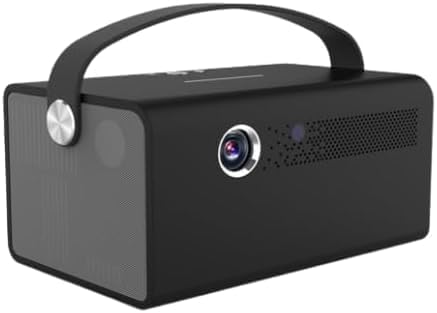
Gambar 2: Depan view of the BeLink MK9000 projector, showing the lens and ventilation grilles.
4.2 Sambungan Daya
Connect the power adapter to the projector's DC IN port and then plug the adapter into a standard wall outlet.
4.3 Penyalaan Awal
Tekan tombol daya pada proyektor atau remote control untuk menghidupkan perangkat. Lampu indikator akan menyala.
4.4 Penyesuaian Fokus
Adjust the focus ring located near the projector lens until the projected image appears clear and sharp on your screen or wall.
5. Petunjuk Pengoperasian
5.1 Pemilihan Sumber
Use the "Source" button on the remote or the projector's control panel to cycle through available input sources (e.g., HDMI, USB, Wi-Fi).
5.2 Perangkat Penghubung
5.2.1 Koneksi HDMI
Connect your HDMI-enabled device (laptop, gaming console, Blu-ray player) to the HDMI port on the projector using an HDMI cable. Select the corresponding HDMI input source.
5.2.2 Koneksi USB
Insert a USB flash drive into the USB port to access compatible media files (photos, videos, documents) directly from the projector's media player.
5.2.3 Koneksi Nirkabel (Wi-Fi)
Navigate to the projector's network settings menu. Select your Wi-Fi network from the list and enter the password to establish a wireless connection. This enables streaming and screen mirroring features.
5.3 Pemutaran 3D
For 3D content, ensure your source material is 3D compatible (e.g., 3D Blu-ray). The projector supports active 3D technology; active 3D glasses are required and sold separately. The projector will automatically detect 3D signals.
5.4 Keluaran Audio
The projector features built-in speakers for convenient audio output. For enhanced sound, you can connect external speakers or headphones to the audio output port, or utilize Bluetooth connectivity if your external audio device supports it.

Gambar 3: Sisi view of the BeLink MK9000 projector, highlighting the integrated speaker grille for audio output.
6. Pemeliharaan
6.1 Membersihkan Lensa
Gently wipe the projector lens with a soft, lint-free cloth specifically designed for optical surfaces. Do not use abrasive cleaners, solvents, or excessive pressure, as this can damage the lens coating.
6.2 Membersihkan Badan Proyektor
Use a soft, dry cloth to clean the exterior of the projector. Avoid using liquid cleaners directly on the device. For stubborn marks, slightly dampen the cloth with water and wipe gently, then dry immediately.
6.3 Penyimpanan
When not in use for extended periods, store the projector in a cool, dry place, away from direct sunlight, dust, and extreme temperatures. It is recommended to use the original packaging or a protective case.
7. Penyelesaian masalah
Jika Anda mengalami masalah dengan proyektor Anda, silakan lihat masalah dan solusi umum berikut ini:
7.1 Tidak Ada Gambar yang Ditampilkan
- Pastikan proyektor dalam keadaan menyala dan lampu indikator daya aktif.
- Check all cable connections (HDMI, power) to ensure they are securely plugged in.
- Verifikasi bahwa sumber masukan yang benar dipilih pada proyektor.
- Test with a different source device or cable if possible.
7.2 Gambar Buram atau Terdistorsi
- Sesuaikan cincin fokus pada lensa proyektor hingga gambarnya tajam.
- Ensure the projection distance is within the recommended range for the projector.
- Periksa apakah ada penghalang di depan lensa.
7.3 Tidak Ada Suara
- Periksa level volume pada proyektor dan perangkat sumber yang terhubung.
- Ensure external audio devices are properly connected if used, and that the projector's audio output is correctly configured.
- If using HDMI, ensure the audio output is enabled on the source device.
7.4 Remote Control Tidak Berfungsi
- Periksa dan ganti baterai pada remote control jika perlu.
- Pastikan tidak ada penghalang antara remote dan penerima IR proyektor.
- Point the remote directly at the projector's IR sensor.
8. Spesifikasi Teknis
| Fitur | Detil |
|---|---|
| Nama Merek | BeLink |
| Fitur Khusus | 3D-Siap |
| ASIN | B0DX88277D |
| Tanggal Pertama Tersedia | 14 Februari 2025 |
| Penggunaan yang Direkomendasikan untuk Produk | Bioskop Rumah |
| Teknologi Konektivitas | Wifi gratis |
| Resolusi Tampilan | Ukuran 4096x2160 |
9. Garansi dan Dukungan
The BeLink MK9000 Portable 3D Video Projector comes with a standard manufacturer's warranty. For detailed warranty information, technical support, or service inquiries, please refer to the warranty card included in your package or visit the official BeLink webKunjungi situs ini untuk mendapatkan sumber daya dukungan terbaru.
Catatan: Syarat dan ketentuan garansi dapat berbeda-beda tergantung wilayah. Harap simpan bukti pembelian Anda untuk klaim garansi.