1. Pendahuluan
Thank you for choosing the HUPEJOS V30-4CH Dash Cam. This device is designed to provide comprehensive surveillance for your vehicle with its 4-channel recording capabilities, offering a 360-degree field of view. It features 2K Full HD recording, built-in WiFi for app control, voice command functionality, advanced night vision with WDR technology, and a 24/7 parking mode for continuous protection. This manual will guide you through the installation, operation, and maintenance of your dash cam to ensure optimal performance.
2. Apa yang ada di dalam kotak
Harap verifikasi bahwa semua item yang tercantum di bawah ini disertakan dalam paket Anda:
- 1 x V30-4CH Dash Cam (Main Unit)
- 1 x 1080P Rear Camera (Waterproof)
- 1 x Kabel Daya Tipe-C
- 1x19.6ft Kabel Kamera Belakang
- 2 x Stiker Elektrostatik
- Kartu SD 1 x 64GB
- 1 x Dudukan Hisap
- 1 x Alat Pemotong Kabel Mobil
- 1 x Kotak Kemasan
- 1 x Panduan Pengguna

Image: All components included in the HUPEJOS V30-4CH Dash Cam package.
3. Fitur Utama
3.1. 4-Channel 360° View
The V30-4CH Mini Dash Cam provides a 150°*4 super wide-angle field of view. The left and right cameras can be rotated to adjust the angle, ensuring 360° all-around protection. It offers two main recording modes:
- 2K Depan + 1080P Belakang
- 1080P Front + 2560x720P Left/Right + 720P Rear
The left and right lens footage is stitched together into a single frame for easy viewing, capturing every detail seamlessly.
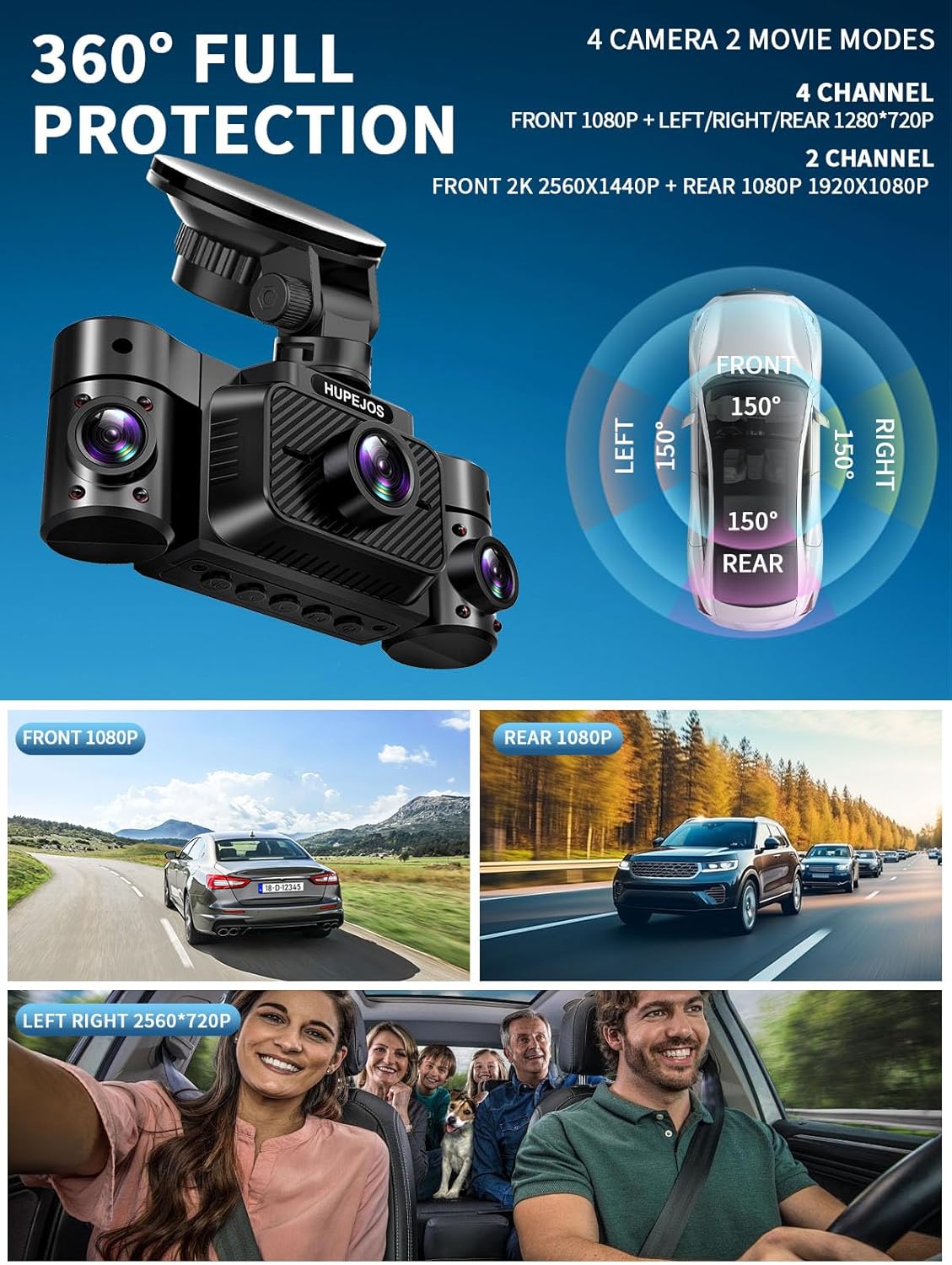
Image: Visual representation of the 360-degree full protection provided by the 4-channel dash cam.
3.2. Loop Recording & G-Sensor
The dash cam supports loop recording, overwriting the oldest videos when the included 64GB SD card (maximum support 256GB) is full. Recording segments are typically 3 minutes long. The built-in sensitivity G-sensor automatically detects sudden shakes or collisions, locking the footage to prevent it from being overwritten during loop recording, ensuring critical event data is preserved.

Image: Loop recording mechanism, illustrating how the dash cam manages storage by overwriting old files.

Image: G-sensor automatically locking emergency recordings during an impact.
3.3. Mode Parkir 24 Jam
When your vehicle is parked and turned off, the dash cam automatically switches to parking mode. This feature provides 24/7 surveillance. The time-delay recording function allows continuous recording with low power consumption and a low frame rate, offering 360° protection. To enable this feature, a hardwire kit (ASIN: B0DBR2SLFH) must be purchased separately and connected.

Image: Radar intelligent monitoring system for 24-hour parking mode, detecting objects within 3-4 meters.
3.4. Super Night Vision with WDR Technology
Equipped with a large F/1.8 aperture and 6 layers of optical lenses, the dash camera utilizes HDR/WDR technology to automatically balance light and dark areas in the video. This ensures clear capture of details like license plates, day or night. The IR LED can be manually turned ON or OFF via the dash camera Menu, or set to automatic.

Image: Super Night Vision with WDR technology, enhancing clarity in low-light conditions.
3.5. Built-in WiFi & App Control
The integrated WiFi allows you to connect your smartphone to the dash cam via a dedicated app. Through the app, you can instantly view, manage, and download recorded videos. This enables easy sharing of footage with friends and family on social media platforms. The WiFi range is approximately 6-7 meters from the dash cam. Note that this is not a cloud dash cam, and real-time remote viewing beyond this range is not supported; videos must be downloaded to your phone's album.

Image: App control interface for viewing, managing, and sharing dash cam videos via WiFi.
3.6. Kontrol Suara
Control your dash cam hands-free using simple English voice commands. This feature allows you to operate the device while keeping your focus on driving safely. Supported commands include:
- "Take Photo"
- "Start Video"
- "Stop Video"
- "Turn On Audio" / "Turn Off Audio"
- "Turn On WiFi" / "Turn Off WiFi"
- "Turn On Screen" / "Turn Off Screen"
- "Tampilkan Kamera Depan"
Note: Only the voice options available in the dash camera menu are supported.

Image: Smart voice control feature, enabling hands-free operation of the dash cam.
3.7. Super Capacitor
The dash cam is equipped with a super capacitor, providing reliable and long-lasting performance even in extreme temperatures, enhancing durability and safety.

Image: Super capacitor benefits, highlighting durability and temperature resistance.
4. Pengaturan dan Instalasi
Before permanent installation, it is recommended to test the dash cam's functionality. Ensure all cables are connected correctly and the device powers on.

Image: Visual guide for the installation process of the dash cam.
- Step 1: Prepare Windshield. Find a suitable spot on the front windshield, ideally near the rearview cermin, yang tidak menghalangi pandangan Anda view. Thoroughly clean the windshield surface using water or alcohol, then wipe it dry with a clean cloth. Peel off the electrostatic sticker from its cellophane backing and transfer it to the desired location. Eliminate any air bubbles. It is recommended to let the sticker set for at least half an hour to ensure strong adhesion.
- Step 2: Attach Suction Mount. Attach the suction mount to the camera's mount connector, pushing it in until it clicks. Clean the suction mounting pad. Securely attach the suction mount to the electrostatic sticker on the windshield. Rotate the locking clamp on the mount 90° upward until it clicks into place, ensuring a firm grip.
- Step 3: Route Power Cable. Carefully route the Type-C power cable around the windshield and tuck it under the trim using the provided car wire trim tool. Connect the other end to your car's cigarette lighter socket or a hardwire kit (if installed).
- Step 4: Rear Camera Installation. We recommend positioning the rear camera in the center of your rear windshield, avoiding the defogging lines to prevent interference with video quality. Remove the protective film from the sticky pad and the camera lens. Fix the rear camera in the selected position. Adjust the angle as needed. Connect the rear camera cable to the main front camera unit. (NOTE: The rear camera is waterproof.)
5. Petunjuk Pengoperasian
5.1. Daya Hidup/Mati
- Otomatis: The dash cam will automatically power on and begin recording when your vehicle's engine starts. It will power off automatically when the engine is turned off.
- Manual: Press and hold the power button for a few seconds to manually turn the device on or off.
5.2. Navigasi Menu
Gunakan tombol fisik pada dashcam untuk menavigasi opsi menu. Biasanya, terdapat tombol untuk Menu, Atas, Bawah, OK/Konfirmasi, dan Mode. Lihat petunjuk di layar untuk fungsi spesifik.
5.3. Kontrol Suara
Once enabled in the settings, simply speak the supported commands (listed in Section 3.6) clearly to control the dash cam without touching it.
5.4. Mobile App Control (WiFi)
- Download the dedicated HUPEJOS app from your smartphone's app store.
- Turn on WiFi on your dash cam (via voice command or menu).
- Connect your smartphone to the dash cam's WiFi network (SSID and password usually displayed on the dash cam screen or in the manual).
- Buka aplikasi untuk view hidup footage, telusuri video yang direkam, unduh files, dan sesuaikan pengaturan.
5.5. Adjusting Camera Angles
The left and right cameras on the main unit can be manually rotated to achieve the desired viewing angle for interior or side coverage.
6. Pemeliharaan
- Membersihkan Lensa: Bersihkan lensa kamera secara teratur dengan kain lembut dan bebas serat untuk memastikan kualitas video yang jernih. Hindari penggunaan bahan abrasif.
- Manajemen Kartu SD: Format the SD card periodically (e.g., once a month) to maintain optimal performance and prevent data corruption. This can usually be done through the dash cam's menu settings. Back up any important footage sebelum diformat.
- Pembaruan Firmware: Check the official HUPEJOS website or app for any available firmware updates. Keeping your dash cam's firmware up-to-date can improve performance and add new features.
- Suhu: Avoid exposing the dash cam to extreme temperatures for prolonged periods when not in use. The super capacitor provides resilience, but prolonged exposure to very high or low temperatures can still affect electronic components.
7. Penyelesaian masalah
- Kamera Dasbor Tidak Menyala:
- Ensure the power cable is securely connected to both the dash cam and the car's power source.
- Check the car's cigarette lighter socket or hardwire kit for power.
- Cobalah sumber daya atau kabel yang berbeda jika tersedia.
- Videotage is Unclear/Blurry:
- Bersihkan lensa kamera dengan kain lembut.
- Ensure the protective film has been removed from all lenses.
- Periksa apakah area kaca depan tempat kamera dipasang bersih.
- Verify that the video resolution settings are set to the highest quality.
- SD Card Error/Recording Issues:
- Format the SD card through the dash cam's menu.
- Ensure the SD card is a high-speed (Class 10 or U3) card from a reputable brand, with a maximum supported capacity of 256GB.
- Cobalah kartu SD lain untuk mengesampingkan kemungkinan kerusakan kartu.
- App Connection Issues (WiFi):
- Pastikan WiFi diaktifkan pada dashcam.
- Confirm your phone is connected to the dash cam's specific WiFi network.
- Nyalakan ulang kamera dasbor dan telepon pintar Anda.
- Ensure you are within the 6-7 meter WiFi range.
- Kontrol Suara Tidak Merespons:
- Berbicaralah dengan jelas dan langsung ke arah kamera dasbor.
- Ensure the voice control feature is enabled in the dash cam's settings.
- Mengurangi kebisingan latar belakang di dalam kendaraan.
- Mode Parkir Tidak Aktif:
- Confirm that the hardwire kit is correctly installed and connected. Parking mode requires a continuous power supply.
- Periksa pengaturan mode parkir di menu dashcam.
8. Spesifikasi
| Fitur | Spesifikasi |
|---|---|
| Nama Model | V30-4CH |
| Dimensi Produk | 1.76x4.8x1.8 inci |
| Berat Barang | 1.43 pon |
| Teknologi Konektivitas | USB, Wi-Fi |
| Resolusi Pengambilan Video | 2K Front + 1080P Rear; 1080P Front + 2560*720P Left/Right + 720P Rear |
| Fitur Khusus | 2" IPS Screen, 360 Degree Protection, G-Sensor Lock, Loop Recording, App Control, Audio Recording, Built-In WiFi, Super Night Vision, WDR, 24/7 Radar Parking Mode, Voice Control |
| Kartu SD disertakan | 64GB (Max support 256GB) |
| Jenis Pemasangan | Dudukan Kaca Depan |
| Metode Kontrol | Aplikasi, Suara |
| Pabrikan | HUPEJOS |
9. Garansi dan Dukungan
The HUPEJOS V30-4CH Dash Cam typically comes with a 2-year warranty from the date of purchase, covering manufacturing defects. Please retain your proof of purchase for warranty claims.
For technical support, troubleshooting assistance, or warranty inquiries, please contact HUPEJOS customer service via email. Refer to the contact information provided on the product packaging or the official HUPEJOS weblokasi.


