1. Pendahuluan
This manual provides detailed instructions for the proper use and maintenance of your Oakcastle HIFI500 Remote Control. This remote is designed as a replacement or spare for the Oakcastle HIFI500 audio system, ensuring seamless control over its functions. Please read this manual thoroughly before use to ensure optimal performance and longevity of your remote control.
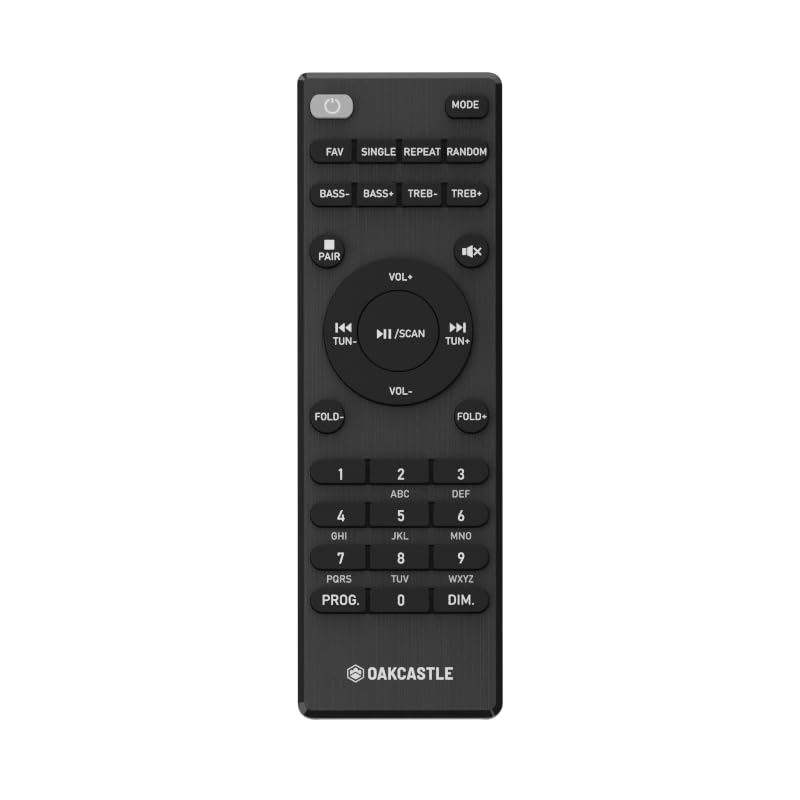
Gambar 1.1: Depan view of the Oakcastle HIFI500 Remote Control. This image displays the compact design and button layout, including power, volume, source selection, and playback controls, typical for operating the HIFI500 audio system.
2. Pengaturan
2.1. Pemasangan Baterai
The Oakcastle HIFI500 Remote Control requires two AAA batteries (not included) for operation. Follow these steps to install the batteries:
- Temukan tempat baterai di bagian belakang remote control.
- Tekan tab ke bawah dan geser penutup baterai ke bawah untuk membukanya.
- Masukkan dua baterai AAA, pastikan terminal positif (+) dan negatif (-) sejajar dengan tanda di dalam kompartemen.
- Geser kembali penutup baterai ke tempatnya hingga terdengar bunyi klik yang kuat.
Catatan: Always use new batteries and dispose of old batteries responsibly. Do not mix old and new batteries, or different types of batteries.
2.2. Penggunaan Awal
Once batteries are installed, the remote control is ready for use with your Oakcastle HIFI500 audio system. Point the remote directly at the infrared (IR) receiver on your HIFI500 system. No additional pairing is typically required for this replacement remote.
3. Mengoperasikan Kendali Jarak Jauh
The Oakcastle HIFI500 Remote Control provides full functionality for your HIFI500 audio system. Below is a general guide to common button functions:
- Tombol power (⏻): Turns the HIFI500 system on or off.
- Volume Naik/Turun (Vol+ / Vol-): Menyesuaikan tingkat keluaran audio.
- Bisu (🔇): Mematikan sementara output audio.
- Source/Input (Sumber): Cycles through available audio inputs (e.g., CD, FM, Bluetooth, AUX).
- Kontrol Pemutaran (▶ / ⏸ / ⏹ / ⏪ / ⏩): Controls media playback (Play, Pause, Stop, Rewind, Fast Forward) for compatible sources like CD or USB.
- Tombol Navigasi (▲ / ▼ / ◀ / ▶): Used to navigate menus and selections on the HIFI500 system display.
- Tombol OK/Enter: Konfirmasikan pilihan.
- Papan Tombol Numerik (0-9): For direct input of radio frequencies, track numbers, or other numerical data.
Refer to your Oakcastle HIFI500 audio system's main user manual for specific functions and advanced operations.
4. Pemeliharaan
4.1. Pembersihan
To clean your remote control, gently wipe the surface with a soft, dry cloth. For stubborn dirt, slightly dampBasahi kain dengan air atau pembersih lembut yang tidak abrasif. Hindari penggunaan bahan kimia keras, pelarut, atau bahan abrasif, karena dapat merusak lapisan permukaan atau komponen internal remote.
4.2. Penggantian Baterai
Replace batteries when the remote's response becomes sluggish or stops working. Follow the battery installation steps outlined in Section 2.1. Always replace both batteries simultaneously with new ones.
4.3. Penyimpanan
When not in use for extended periods, it is recommended to remove the batteries from the remote control to prevent leakage, which can cause damage. Store the remote in a cool, dry place away from direct sunlight and extreme temperatures.
5. Penyelesaian masalah
If you encounter issues with your Oakcastle HIFI500 Remote Control, please refer to the following common problems and solutions:
- Remote tidak merespons:
- Periksa apakah baterai terpasang dengan benar dan dengan polaritas yang tepat.
- Ganti baterainya dengan yang baru.
- Ensure there are no obstructions between the remote control and the HIFI500 system's IR receiver.
- Make sure you are within the effective range and pointing the remote directly at the HIFI500 system.
- Intermittent function:
- Ini sering kali menandakan daya baterai rendah. Ganti baterainya.
- Ensure the remote's IR emitter is clean and free from dirt or smudges.
If the problem persists after trying these solutions, please contact Oakcastle customer support.
6. Spesifikasi
| Fitur | Spesifikasi |
|---|---|
| Model | HIFI500 Remote Control |
| Merek | kastil oak |
| Teknologi Konektivitas | Infrared (IR) |
| Sumber Daya | 2 x Baterai AAA (tidak termasuk) |
| Jumlah Maksimum Perangkat yang Didukung | 1 (Oakcastle HIFI500 Audio System) |
| Fitur Khusus | Ringan |
| Berat Barang | 2.82 ons (sekitar 80 gram) |
| Dimensi Paket | 8 x 3.2 x 2.5 inci (sekitar 20.3 x 8.1 x 6.3 cm) |
| Pabrikan | MAYORITAS |
7. Garansi dan Dukungan
7.1. Informasi Garansi
This Oakcastle HIFI500 Remote Control is covered by a manufacturer's warranty. Please refer to the warranty card included with your original Oakcastle HIFI500 audio system or visit the official Oakcastle webSitus ini untuk syarat dan ketentuan garansi yang terperinci. Simpan bukti pembelian Anda untuk klaim garansi.
7.2. Dukungan Pelanggan
For technical assistance, troubleshooting beyond this manual, or warranty inquiries, please contact Oakcastle customer support. You can typically find contact information, including phone numbers, email addresses, and support portals, on the official Oakcastle weblokasi.
Please have your product model (HIFI500 Remote Control) and purchase details ready when contacting support.


