1. Pendahuluan
Thank you for choosing the Infiniity DM56 Sport Smartwatch. This device is designed to enhance your active lifestyle with advanced fitness tracking, health monitoring, and smart connectivity features. Equipped with a vibrant 1.43-inch AMOLED display, built-in GPS, and comprehensive health sensors, the DM56 is your reliable companion for both daily wear and intense workouts.
This manual provides detailed instructions on how to set up, operate, maintain, and troubleshoot your smartwatch to ensure optimal performance and longevity.

Gambar 1.1: Depan view of the Infiniity DM56 Sport Smartwatch, showcasing its round AMOLED display and rugged design.
2. Apa yang ada di dalam kotak
Upon opening your Infiniity DM56 Sport Smartwatch package, please ensure all the following items are present:
- Infiniity DM56 Sport Smartwatch
- Kabel Pengisian Daya
- User Manual (dokumen ini)
3. Pengaturan
3.1 Mengisi Daya Jam Tangan Pintar
Before first use, fully charge your DM56 smartwatch. A full charge typically takes approximately 2 hours.
- Connect the magnetic charging cable to the charging contacts on the back of the smartwatch. Ensure the pins align correctly.
- Colokkan ujung USB kabel pengisi daya ke adaptor daya USB standar (disarankan 5V/1A) atau port USB komputer.
- The watch display will show a charging indicator. Once fully charged, the indicator will change or disappear.
3.2 Memasangkan dengan Ponsel Pintar Anda
To unlock the full potential of your DM56 smartwatch, you need to pair it with your smartphone via Bluetooth using the dedicated companion application. The DM56 is compatible with Android 5.0+ and iOS 11 and above.
- Unduh Aplikasi: Pencarian untuk the official Infiniity companion app (refer to the packaging or quick start guide for the exact app name) on the Google Play Store (for Android) or Apple App Store (for iOS) and install it.
- Aktifkan Bluetooth: Pastikan Bluetooth diaktifkan di ponsel cerdas Anda.
- Buka Aplikasi: Launch the companion app on your smartphone and follow the on-screen instructions to create an account or log in.
- Tambahkan Perangkat: Di dalam aplikasi, navigasikan ke bagian 'Tambah Perangkat' atau 'Pasangkan Perangkat'. Aplikasi akan mencari smartwatch yang tersedia.
- Select DM56: Select 'DM56' from the list of found devices. A pairing request may appear on both your phone and the watch. Confirm the pairing on both devices.
- Pengaturan Lengkap: Once paired, the app will guide you through initial settings, such as profile information, notification permissions, and data synchronization.
4. Mengoperasikan Smartwatch
4.1 Navigasi Dasar
The DM56 features a responsive touchscreen and physical buttons for intuitive control.
- Layar sentuh: Geser ke atas, bawah, kiri, atau kanan untuk menavigasi menu dan notifikasi. Ketuk untuk memilih item.
- Tombol Fisik: The watch has multiple buttons, typically labeled 'SPORT', 'SEL', 'BACK', and a dedicated 'GPS' button. Their functions may vary depending on the current screen or mode.
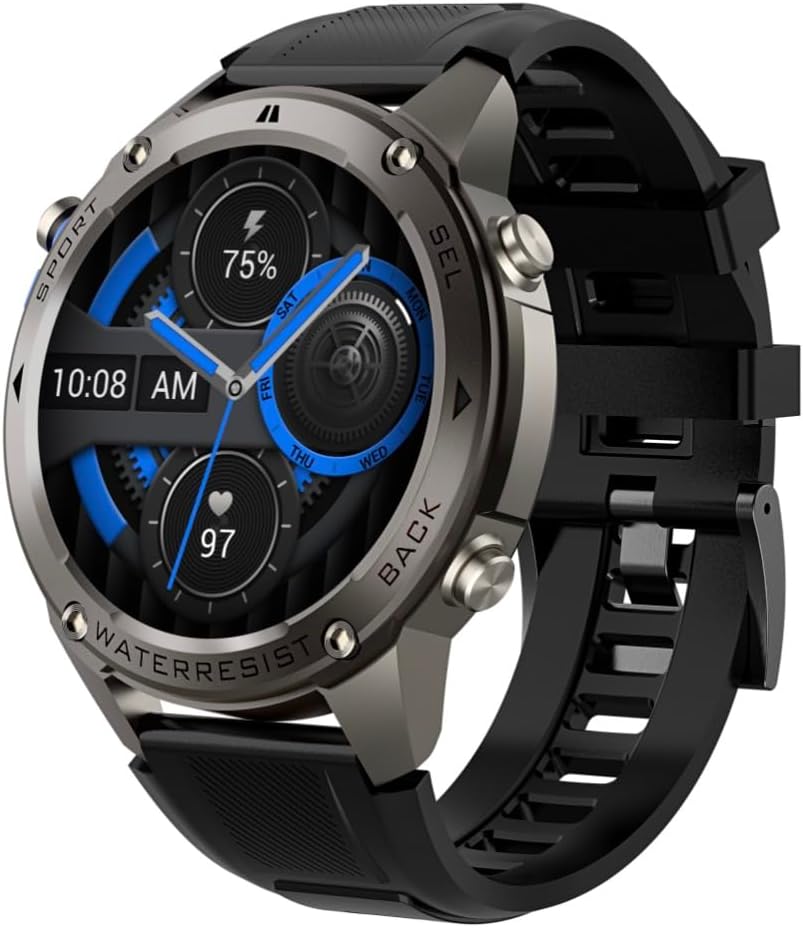
Gambar 4.1: Samping view of the Infiniity DM56 Sport Smartwatch, highlighting the physical control buttons.
4.2 Fitur Tampilan
The 1.43-inch AMOLED display offers vibrant colors and deep blacks with a resolution of 466x466 pixels.
- Tampilan Selalu Aktif: The DM56 supports Always-On Display functionality, allowing you to see the time and essential information at a glance without needing to raise your wrist or press a button. This feature can be configured in the watch settings.

Image 4.2: The Infiniity DM56 Sport Smartwatch display, showcasing a typical watch face with various data points.
4.3 Built-in GPS & Compass
The DM56 features dual-frequency GPS (L1+L5) and supports multiple satellite systems (GPS, GLONASS, BDS, Galileo, NAVIC, QZSS) for precise outdoor tracking. A built-in compass further aids navigation.
- Pelacakan GPS: When starting an outdoor activity (e.g., running, cycling), the watch will automatically attempt to acquire a GPS signal. Ensure you are in an open area for faster signal acquisition. Your route, distance, and pace will be recorded.
- Kompas: Access the compass feature from the watch's menu to get real-time directional information.

Image 4.3: The Infiniity DM56 Sport Smartwatch from an angle, highlighting the dedicated GPS button on the side.

Gambar 4.4: Close-up view of the GPS button on the Infiniity DM56 Sport Smartwatch, indicating its function.
4.4 Pemantauan Kesehatan Sepanjang Hari
The DM56 is equipped with the VC30F sensor for continuous health monitoring.
- Pemantauan Denyut Jantung: Track your heart rate in real-time throughout the day. View your current heart rate on the watch face or in the dedicated heart rate app.
- Pemantauan Oksigen Darah (SpO2): Ukur tingkat saturasi oksigen darah Anda.
- Pelacakan Tidur: The watch automatically monitors your sleep patterns, including deep sleep, light sleep, and awake times. View Analisis tidur terperinci di aplikasi pendamping.
- Pelacakan Stres: Pantau tingkat stres Anda sepanjang hari.
- Alat pengukur langkah: Counts your daily steps, distance, and estimated calories burned.
Note: The Infiniity DM56 Smartwatch is NOT A MEDICAL DEVICE. All health monitoring data is for reference only and should not be used for medical diagnosis or treatment.
4.5 Mode Olahraga
The DM56 offers over 170 customizable sports modes, with 14 built-in modes such as outdoor running, cycling, and swimming. You can add up to 10 additional modes manually via the companion app.
- Memulai Aktivitas: Navigate to the 'Workout' or 'Sports' menu on the watch, select your desired activity, and tap to start.
- Selama Aktivitas: The watch will display real-time metrics such as duration, distance, heart rate, and calories burned.
- Ending Activity: Swipe or press the designated button to pause or end the activity. Your workout data will be saved and synchronized with the app.
4.6 Smart Notifications & Calls
Once paired with your smartphone, the DM56 can receive notifications and handle calls directly on your wrist.
- Pemberitahuan: Receive alerts for incoming calls, SMS messages, and app notifications (e.g., social media, email). Configure which app notifications you want to receive in the companion app.
- Make/Answer Call: The DM56 allows you to make and answer calls directly from the watch, utilizing its built-in microphone and speaker. Ensure the watch is connected to your phone via Bluetooth.
5. Pemeliharaan
Peringkat Tahan Air 5.1
The DM56 has a 5ATM waterproof rating, meaning it can withstand water pressures equivalent to a depth of 50 meters. This makes it suitable for swimming, showering, and other water-based activities. However, it is not recommended for diving or high-pressure water activities.
- Avoid exposing the watch to hot water, steam, or strong detergents.
- Setelah terkena air garam, bilas jam tangan dengan air bersih dan keringkan secara menyeluruh.
5.2 Pembersihan dan Perawatan
Untuk menjaga tampilan dan fungsionalitas smartwatch Anda:
- Bersihkan badan dan tali jam secara teratur dengan kain lembut dan kering.amp kain.
- Pastikan kontak pengisian daya di bagian belakang jam bersih dan kering sebelum mengisi daya.
- Hindari penggunaan pembersih atau pelarut yang bersifat abrasif.
5.3 Optimalisasi Daya Tahan Baterai
The DM56 is powered by a 500mAh high-voltage battery, offering extended usage. To maximize battery life:
- Adjust screen brightness to a lower level.
- Limit the use of Always-On Display if not essential.
- Matikan notifikasi yang tidak perlu.
- Nonaktifkan pemantauan detak jantung terus menerus jika tidak diperlukan 24/7.
6. Penyelesaian masalah
If you encounter issues with your Infiniity DM56 smartwatch, try the following common solutions:
- Jam tidak menyala: Pastikan jam tangan terisi penuh. Sambungkan ke pengisi daya dan tunggu beberapa menit sebelum mencoba menyalakannya kembali.
- Tidak dapat dipasangkan dengan telepon:
- Pastikan Bluetooth diaktifkan pada ponsel dan jam tangan Anda.
- Pastikan jam tangan berada dalam jangkauan Bluetooth ponsel Anda.
- Mulai ulang jam tangan dan ponsel Anda.
- Hapus cache Bluetooth di ponsel Anda (Android) atau lupakan perangkat dan pasangkan kembali.
- Pastikan aplikasi pendamping diperbarui ke versi terbaru.
- Data kesehatan yang tidak akurat:
- Pastikan jam tangan dikenakan dengan pas di pergelangan tangan Anda, tidak terlalu ketat atau terlalu longgar.
- Bersihkan sensor di bagian belakang jam.
- Note that environmental factors and individual physiology can affect readings. Remember, it is not a medical device.
- Notifikasi tidak diterima:
- Periksa pengaturan notifikasi di aplikasi pendamping.
- Ensure the app has necessary permissions on your phone (e.g., notification access).
- Verify that the watch is connected to your phone.
- Masa pakai baterai pendek: Lihat Bagian 5.3 untuk kiat-kiat pengoptimalan baterai.
Jika masalah masih berlanjut setelah mencoba langkah-langkah ini, silakan hubungi dukungan pelanggan untuk bantuan lebih lanjut.
7. Spesifikasi
| Fitur | Spesifikasi |
|---|---|
| Nomor Model | DM56 |
| Menampilkan | 1.43-inch AMOLED, 466x466 pixels |
| Sensor | Heart Rate (VC30F), Accelerometer (STK8321), Magnetometer (Compass), Barometer+Altitude (SPL07-03) |
| Konektivitas | Bluetooth 5.3 |
| Kapasitas Baterai | 500 mAh |
| Tingkat Tahan Air | 5 ATM |
| Kesesuaian | Android 5.0+ and iOS 11 and above |
| Berat Barang | 3 ons |
| Dimensi Paket | 4.25x4.25x2.8 inci |
| Sistem Operasi | Android Wear 2.7 (Note: This refers to the underlying OS, not necessarily full Android Wear functionality) |
| Bahasa Indonesia: GPS | Built-in GPS (L1+L5 dual-frequency) |
| Membentuk | Bulat |
| Jenis Baterai | Nonstandard Battery, Lithium Ion |
8. Garansi dan Dukungan
The Infiniity DM56 Sport Smartwatch comes with a standard manufacturer's warranty. Please refer to the warranty card included in your product packaging for specific terms and conditions, including warranty duration and coverage details.
For technical support, troubleshooting assistance beyond what is covered in this manual, or warranty claims, please contact Infiniity customer service through the contact information provided on the product packaging or the official Infiniity weblokasi.
Harap simpan bukti pembelian Anda untuk tujuan garansi.