1. Pendahuluan
The Divoom Dipow 35W GaN Fast Charger is a compact and efficient power adapter designed for a wide range of USB-C compatible devices. It features advanced Gallium Nitride (GaN) technology for fast and cool charging, along with a unique pixel screen that can be customized via the Divoom application. This manual provides essential information for the safe and effective use of your Dipow 35W charger.

Image: The Divoom Dipow 35W GaN Fast Charger, showcasing its compact design and pixel screen.
2. Fitur Utama
- Adorable Pixel Display with DIY Clock: Features a retro diving helmet design with a customizable pixel screen. Users can personalize the display with over 1000 designs or create their own using the Divoom app. The screen activates when the charger is plugged in.
- Fast & Efficient GaN Charging: Equipped with 35W GaN technology, allowing for rapid charging of compatible devices. For example, an iPhone 15 Pro Max can charge to 56% in approximately 30 minutes. GaN technology ensures the charger remains compact and operates at a cooler temperature.
- Kompak & Ramah Perjalanan: Designed to be pocket-sized with a 90° foldable plug, making it convenient for travel and use in tight outlets without obstructing adjacent sockets.
- Kompatibilitas Universal: Supports various fast charging protocols including PD 3.0, QC, and PPS through its single USB-C port, ensuring compatibility with a wide range of devices such as iPhones (15/16 series), Samsung Galaxy, Xiaomi, iPads, MacBooks, and Nintendo Switch.
- Perlindungan Keamanan Cerdas: Incorporates multiple protection features against overcurrent, overheating, overvoltage, and short circuits to ensure safe charging for your devices.
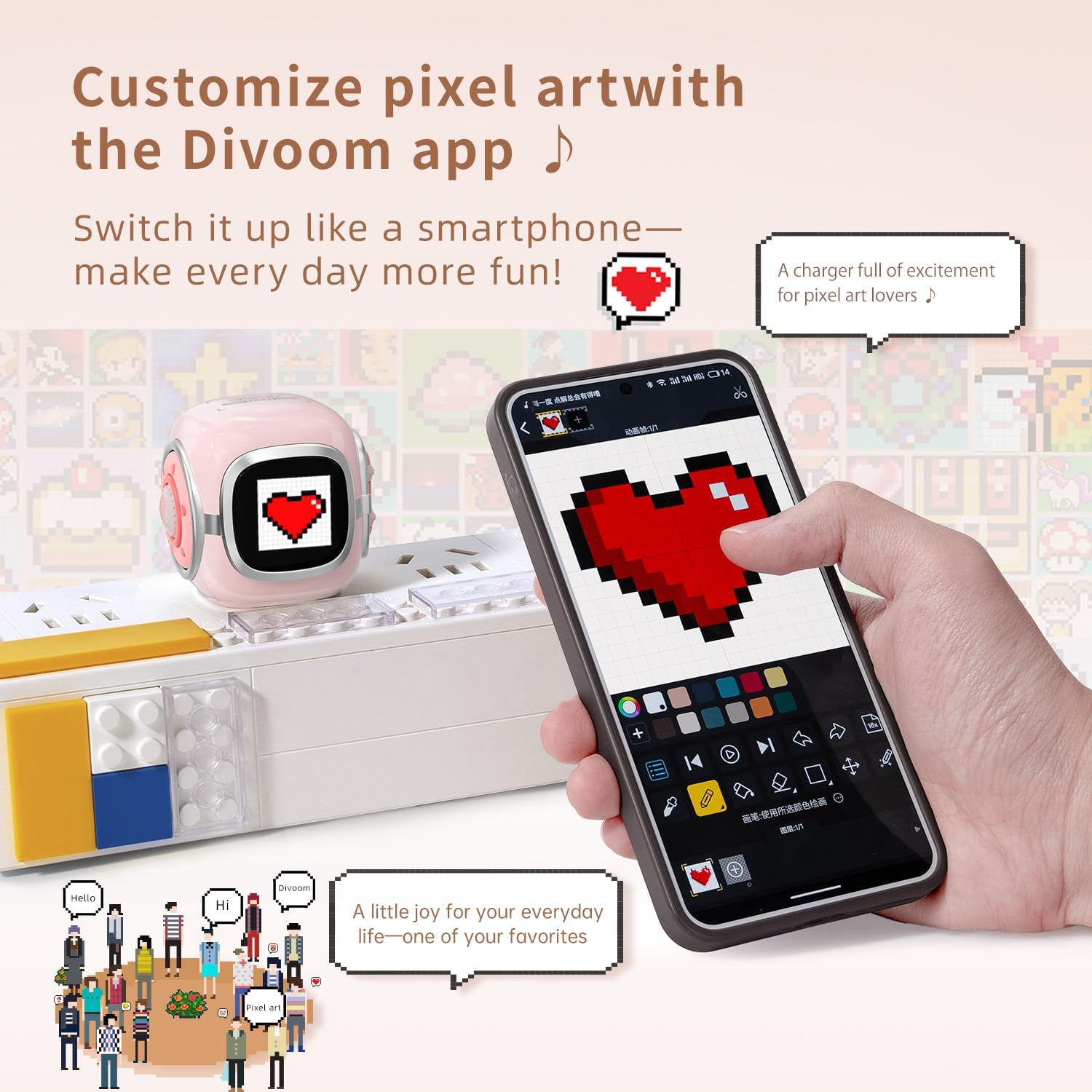
Image: The Divoom Dipow charger connected to a power strip, displaying pixel art, alongside a smartphone demonstrating the Divoom app's customization features.

Image: A visual comparison demonstrating the Divoom Dipow charger's 35W ultra-fast charging capability, achieving 56% charge in 30 minutes versus 20% with a typical charger.

Image: The Divoom Dipow charger demonstrating its compact size by fitting into a handbag and its foldable plug design when inserted into a wall outlet.
3. Pengaturan
3.1 Koneksi Awal
- Buka lipatannya: Gently unfold the 90° foldable plug from the charger body.
- Colokkan ke Stopkontak: Insert the charger into a standard wall outlet. The pixel screen will light up upon connection.
- Hubungkan Perangkat Anda: Use a compatible USB-C charging cable (not included) to connect your device to the USB-C port on the charger. Ensure the connection is secure.
3.2 Divoom App Setup (for Pixel Screen Customization)
- Unduh Aplikasi: Pencarian untuk "Divoom" in your device's app store (iOS or Android) and download the official Divoom application.
- Sandingkan melalui Bluetooth: Open the Divoom app and follow the on-screen instructions to pair your smartphone with the Dipow 35W charger via Bluetooth. Ensure Bluetooth is enabled on your device.
- Access Customization: Once paired, you can access various customization options for the pixel screen, including pixel art, animations, and clock faces.
4. Petunjuk Pengoperasian
4.1 Mengisi Daya Perangkat Anda
Once the charger is plugged into a power outlet and your device is connected via a USB-C cable, charging will begin automatically. The pixel screen may display charging status or a customized animation/clock face.
4.2 Customizing the Pixel Screen
The Divoom app provides extensive options for personalizing the pixel screen:
- Pixel Art Gallery: Browse a vast community gallery of pixel art designs. Select a design to instantly display it on your charger's screen.
- Buat Sendiri: Use the app's design tools to create custom pixel art or animations. These can be uploaded to your charger in real-time.
- Tampilan Jam: Choose from a variety of dynamic clock faces to display time, date, and other information.
- Penyesuaian Kecerahan: Adjust the screen brightness through the app to suit your environment.
Video: A demonstration of the Divoom Dipow 35W charger's functions, including pixel screen customization and fast charging capabilities.
5. Pemeliharaan
- Pembersihan: Disconnect the charger from the power outlet before cleaning. Use a soft, dry cloth to wipe the surface. Avoid using liquid cleaners or abrasive materials.
- Penyimpanan: When not in use, fold the plug and store the charger in a cool, dry place away from direct sunlight and moisture.
- Penanganan: Avoid dropping the charger or subjecting it to strong impacts, as this may damage internal components or the pixel screen.
6. Penyelesaian masalah
6.1 Charger Not Powering On / Screen Not Lighting Up
- Ensure the charger is securely plugged into a functional power outlet.
- Try plugging another device into the same outlet to confirm the outlet is working.
6.2 Perangkat Tidak Mengisi Daya
- Verifikasi bahwa kabel USB-C tersambung dengan benar ke pengisi daya dan perangkat Anda.
- Coba gunakan kabel USB-C lain untuk menyingkirkan kemungkinan kabel yang rusak.
- Ensure your device is compatible with USB-C charging and the charger's output specifications.
6.3 Divoom App Connectivity Issues
- Make sure Bluetooth is enabled on your smartphone and the charger is powered on.
- Restart the Divoom app and attempt to reconnect.
- If issues persist, try unpairing and re-pairing the charger through your phone's Bluetooth settings and the Divoom app.
7. Spesifikasi
| Nomor Model | Dipow-35 |
| Merek | Divoom |
| Daya Keluaran | 35W |
| Jenis Konektor | USB Tipe C |
| Perangkat yang Kompatibel | Smartphones, Headphones, Tablets, Game Consoles (e.g., iPhone 16/16 Pro Max/16 Pro/15 Pro Max/15 Pro/15/14 Pro Max/14 Pro/14/13 Pro/13 Pro Max/13 Mini/13/12 Pro Max/12 Mini/12/11/11Pro/11Pro Max/X/XR/Xs/Xs Max/8/8 Plus/7/7/6/6S/Plus, iPad, iPad air/ 2, iPad mini 4 3 2 1, iPad Pro, Samsung Galaxy Note 20/10/S23/S24/S22 Ultra/S22+/S21/S20/Huawei, Xiaomi and other USB-C outlet devices) |
| Fitur Khusus | Fast Charging, Pixel Screen, Foldable Plug |
| Warna | Berwarna merah muda |
| Masukan Voltage | 240 Volt |
| Arus Keluaran | 3 Amps |
| Volume Keluarantage | 5 Volt |
| Berat Barang | 3.03 ons |
| Dimensi Paket | 3.54x3.15x2.56 inci |
8. Informasi Keselamatan
- Jangan biarkan pengisi daya terkena air, kelembapan, atau suhu ekstrem.
- Hindari membongkar atau memodifikasi pengisi daya.
- Jauhkan dari jangkauan anak-anak.
- Pastikan ventilasi yang baik saat mengisi daya untuk mencegah panas berlebih.
- If the charger shows signs of damage, discontinue use immediately.
9. Garansi dan Dukungan
The Divoom Dipow 35W GaN Fast Charger is covered by a manufacturer's warranty. For specific warranty terms, conditions, and customer support, please refer to the official Divoom webKunjungi situs web mereka atau hubungi layanan pelanggan mereka secara langsung. Harap simpan bukti pembelian Anda untuk klaim garansi.


