1. Pendahuluan
Terima kasih sudah membeliasing the iFFALCON 40S55T 40-inch Full HD Google TV. This manual provides essential information for the safe and efficient use of your television. Please read it thoroughly before operating the device and retain it for future reference.
The iFFALCON 40S55T is a tunerless smart TV designed for streaming content, offering a Full HD display, Google TV operating system, Chromecast built-in, and Dolby Audio for an immersive entertainment experience.
2. Informasi Keselamatan
Selalu ikuti tindakan pencegahan keselamatan dasar saat menggunakan televisi ini untuk mengurangi risiko kebakaran, sengatan listrik, dan cedera.
- Jangan biarkan TV terkena hujan atau lembab.
- Jangan membuka TV casing; serahkan semua servis kepada personel yang berkualifikasi.
- Pastikan ventilasi yang baik di sekitar TV.
- Jauhkan TV dari sinar matahari langsung, sumber panas, dan medan magnet yang kuat.
- Use only the power cord and accessories supplied by the manufacturer.
- Cabut TV saat terjadi badai petir atau saat tidak digunakan dalam jangka waktu lama.
3. Isi Paket
Verifikasi bahwa semua barang ada di dalam kotak:
- iFFALCON 40S55T 40-inch Full HD Google TV
- Kontrol Jarak Jauh
- Meja TV (2 buah)
- Sekrup untuk Dudukan TV
- Kabel listrik
- Kartu Garansi
- Instruksi Manual (dokumen ini)
4. Pengaturan
4.1 Memasang Dudukan TV
- Letakkan TV dengan hati-hati menghadap ke bawah di permukaan yang lembut dan rata untuk mencegah kerusakan layar.
- Sejajarkan setiap bagian dudukan dengan slot yang sesuai di bagian bawah TV.
- Amankan dudukan menggunakan sekrup yang tersedia. Pastikan sekrup terpasang dengan kuat.
4.2 Menghubungkan Daya
Connect the power cable to the TV's power input and then plug it into a wall outlet. The TV will enter standby mode.
4.3 Initial Setup (Google TV & Network)
Upon first power-on, the TV will guide you through the initial setup process for Google TV. This includes:
- Pilihan bahasa.
- Menghubungkan ke jaringan Wi-Fi.
- Signing in with your Google account to access personalized content and apps.
- Menerima syarat dan ketentuan.
4.4 Konektivitas
The iFFALCON 40S55T offers various connection options for external devices.

Gambar: Lebih dariview of the TV's connectivity options, including HDMI, USB, Bluetooth, and Wi-Fi.
- Port HDMI: Hubungkan perangkat eksternal seperti konsol game, pemutar Blu-ray, atau dekoder.
- Port USB: Untuk menghubungkan perangkat penyimpanan USB untuk memutar media files.
- Wifinya: For wireless internet connection to access streaming services and online features.
- Bluetooth dapat digunakan untuk berbagai keperluan, seperti: For connecting wireless headphones, speakers, or other Bluetooth-enabled accessories.
4.5 Tunerless Operation
This TV is designed as a tunerless model, meaning it does not have a built-in tuner for terrestrial (over-the-air) broadcasts. To watch terrestrial, BS, or CS broadcasts, an external tuner is required and must be purchased separately.

Image: The iFFALCON 40S55T TV showcasing its smart features, highlighting its tunerless design and ability to enjoy internet video content without an antenna connection.
5. Mengoperasikan TV
5.1 Kendali Jarak Jauh Berakhirview
The remote control provides access to all TV functions, including power, volume, channel navigation, and smart TV features. It also supports voice search via 'Hey Google'.

Image: The TV remote control, featuring quick access buttons for popular streaming services and a dedicated microphone button for voice commands.
- Tombol Daya: Menyalakan atau mematikan TV.
- Tombol Navigasi: Gunakan tombol arah dan tombol OK untuk menavigasi menu.
- Tombol Volume/Saluran: Adjust volume and change channels (if an external tuner is connected).
- Tombol Pintasan Aplikasi: Direct access to popular streaming services like Netflix, YouTube, etc.
- Tombol Mikrofon: Press and hold to activate 'Hey Google' voice search.
5.2 Fitur Google TV
Your iFFALCON TV runs on Google TV, providing a personalized and integrated entertainment experience.
- Agregasi Konten: Google TV organizes movies, shows, and live TV from all your apps and subscriptions into one place.
- Rekomendasi yang Dipersonalisasi: Berdasarkan Anda viewing history and preferences, Google AI suggests content you might enjoy.
- Pencarian Suara: Use the 'Hey Google' feature on your remote to quickly find content, get information, or control smart home devices.
- Chromecast Bawaan: Easily cast content from your smartphone, tablet, or computer directly to your TV screen.

Image: A smartphone screen mirroring content to the iFFALCON TV, demonstrating the Chromecast built-in feature for enjoying mobile content on a larger display.
5.3 Pengaturan Gambar
The TV incorporates advanced image processing technologies to deliver a superior viewpengalaman ing.
- AI PQ Processor: TCL's proprietary AiPQ Processor intelligently adjusts image quality at the pixel level, enhancing clarity, color, and contrast for a vivid and realistic picture.
- Full HD (FHD): Experience sharp and detailed images with Full High Definition resolution, offering 200% more detail than standard HD screens.

Image: A visual comparison illustrating the enhanced detail and clarity provided by Full HD resolution compared to standard HD.
- HDR10/HLG Support: Enjoy a wider range of colors and contrast with HDR10 and HLG compatibility, revealing stunning detail in both bright and dark scenes.

Image: The TV screen showcasing the vibrant and detailed picture quality achieved with HDR10/HLG technology.
- Peredupan Mikro: This technology analyzes the image in hundreds of separate zones to adjust brightness and darkness independently, enhancing contrast and picture quality.

Image: A visual representation of Micro Dimming technology, illustrating how it enhances contrast and picture depth by adjusting brightness in specific areas of the screen.
5.4 Sound Settings (Dolby Audio)
The TV features Dolby Audio for clear, rich, and immersive sound.
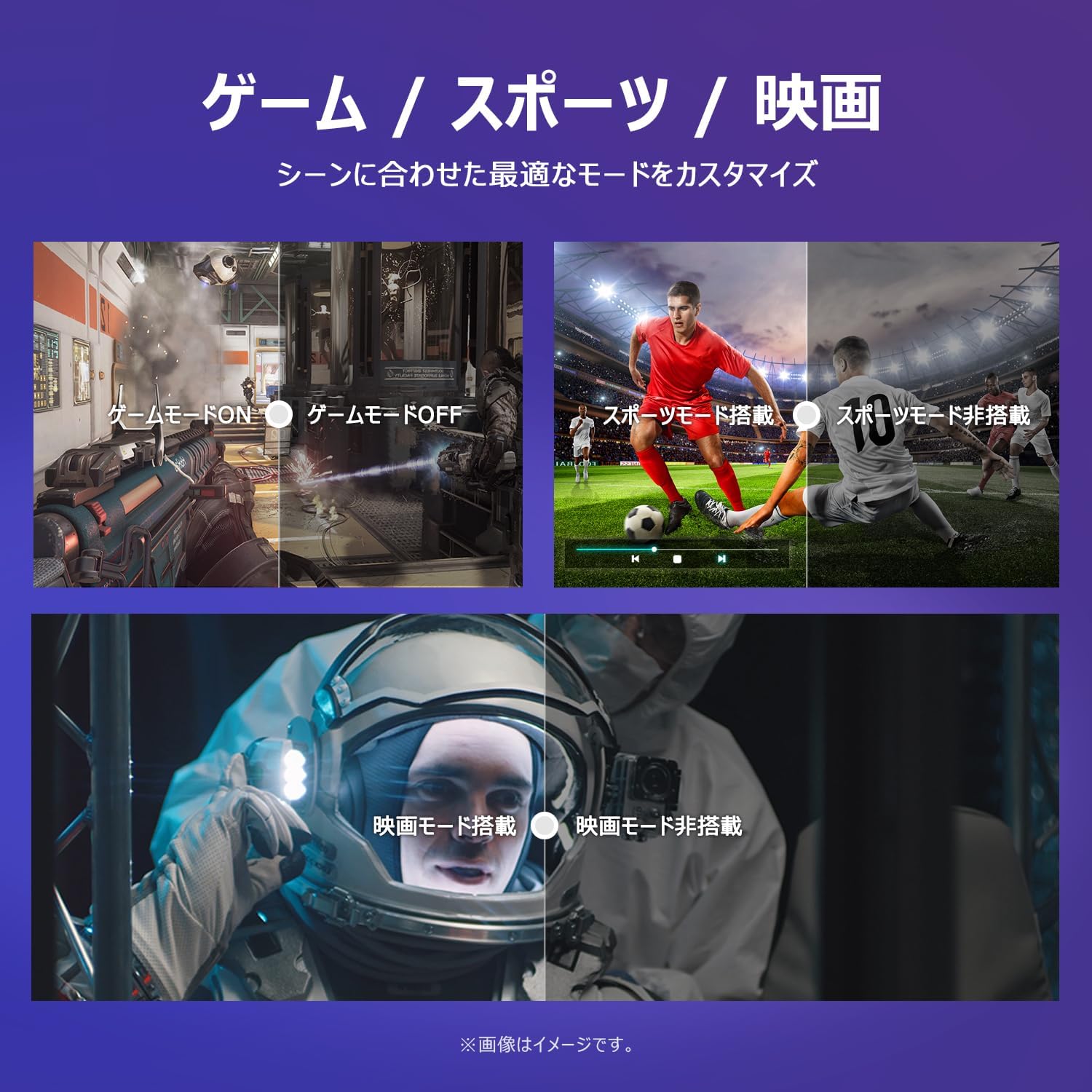
Image: The TV screen with a visual representation of sound, highlighting the immersive audio experience provided by Dolby Audio.
Access the sound settings menu to adjust modes like Standard, Music, Movie, or Custom to suit your preferences.
5.5 Mode Permainan
Activate Game Mode for an optimized gaming experience with reduced input lag.
Image: Visual comparisons demonstrating the optimized settings for Game Mode, Sports Mode, and Movie Mode, adapting the TV's performance to different content types.
The TV also offers dedicated Sports Mode and Movie Mode to enhance viewing for specific content types.
5.6 Pengaturan Sistem
The quick settings menu allows you to customize frequently used system settings and rearrange their order for intuitive and convenient access.

Gambar: A view of the TV's quick system settings interface, illustrating how users can easily access and customize various functions like brightness, picture mode, and network settings.
6. Pemeliharaan
Perawatan dan pemeliharaan yang tepat akan memperpanjang umur televisi Anda.
- Membersihkan Layar: Usap layar secara perlahan menggunakan kain lembut bebas serat. Untuk noda membandel, gunakan pembersih layar khusus TV, dan usapkan langsung ke kain, bukan ke layar.
- Membersihkan Casing: Gunakan kain lembut dan kering untuk membersihkan TV casing. Jangan gunakan pembersih atau pelarut yang bersifat abrasif.
- Ventilasi: Pastikan lubang ventilasi di bagian belakang TV tidak terhalang untuk mencegah panas berlebih.
- Kabel Daya: Periksa kabel daya secara berkala untuk mengetahui adanya kerusakan. Jika rusak, hubungi layanan pelanggan untuk penggantian.
7. Penyelesaian masalah
Jika Anda mengalami masalah dengan TV Anda, lihat masalah dan solusi umum berikut. Jika masalah berlanjut, hubungi dukungan pelanggan.
| Masalah | Kemungkinan Penyebab | Larutan |
|---|---|---|
| Tidak ada daya | Kabel daya tidak tersambung; Stopkontak tidak berfungsi | Ensure power cable is securely plugged in; Test outlet with another device |
| Tidak ada gambar, tetapi ada suara | Sumber input salah; Masalah perangkat eksternal | Tekan tombol 'Input' pada remote untuk memilih sumber yang benar; Periksa koneksi perangkat eksternal. |
| Tidak ada suara, tetapi gambar ada | Volume dibisukan atau terlalu rendah; Masalah pada sistem audio eksternal | Unmute or increase volume; Check audio cable connections to external sound system |
| Kontrol jarak jauh tidak berfungsi | Baterai habis; Ada penghalang antara remote dan TV | Ganti baterai; Singkirkan semua penghalang; Pastikan remote diarahkan ke sensor IR TV. |
| Tidak dapat terhubung ke Wi-Fi | Kata sandi salah; Masalah pada router; TV terlalu jauh dari router | Periksa kata sandi Wi-Fi; Mulai ulang router; Dekatkan TV ke router atau gunakan penguat sinyal Wi-Fi. |
8. Spesifikasi
Detailed technical specifications for the iFFALCON 40S55T TV:

Image: Dimensional drawing of the iFFALCON 40S55T TV, indicating its physical measurements.
| Fitur | Spesifikasi |
|---|---|
| Ukuran Layar | 40 inci |
| Jenis Tampilan | VA Liquid Crystal |
| Resolusi | HD Penuh (1920x1080) |
| Tingkat Penyegaran | 60Hz |
| Rasio Aspek | 16:9 |
| Rasio Kontras | 1000:1 |
| Sistem Operasi | Google TV |
| Keluaran Audio | 20 Watt (2.1 saluran) |
| Port HDMI | 2 |
| Port USB | 1 |
| Konektivitas Nirkabel | Wi-Fi, Bluetooth |
| Dimensi Produk (W x H x D) | 89.2 x 55.8 x 18.4 cm (dengan dudukan) |
| Berat Produk | 4.63 kg |
| Kompatibel dengan Pemasangan di Dinding | Ya |
| Aksesoris yang disertakan | Stand, Remote Control, Warranty Card, Power Cable |
9. Garansi dan Dukungan
Your iFFALCON 40S55T TV comes with a manufacturer's warranty. Please refer to the included warranty card for specific terms, conditions, and duration of coverage.
For technical support, troubleshooting assistance beyond this manual, or warranty claims, please contact iFFALCON customer service. Contact information can typically be found on the warranty card or the official iFFALCON weblokasi.
Please have your model number (40S55T) and purchase date ready when contacting support.


