Perkenalan
This manual provides comprehensive instructions for the OMAIC EN2Q36H replacement remote control, designed for Hisense Smart TVs. It covers essential information regarding setup, operation, and maintenance to ensure optimal performance and user experience. This remote offers a direct replacement solution without the need for complex programming.
Pengaturan
The OMAIC EN2Q36H remote control is designed for immediate use with compatible Hisense Smart TVs. No programming or pairing is required.
Instalasi Baterai
- Temukan tempat baterai di bagian belakang remote control.
- Geser penutup baterai ke bawah atau ke arah yang ditunjukkan oleh panah untuk membukanya.
- Insert two AAA alkaline batteries (not included), ensuring the positive (+) and negative (-) terminals align correctly with the markings inside the compartment.
- Pasang kembali penutup baterai dengan menggesernya ke posisi semula hingga terkunci dengan aman.
Once batteries are installed, the remote is ready to operate your Hisense Smart TV.

Petunjuk Pengoperasian
This remote control utilizes infrared (IR) technology for communication with your Hisense Smart TV. Ensure a clear line of sight between the remote and the TV's IR receiver for optimal performance.
Fitur Utama
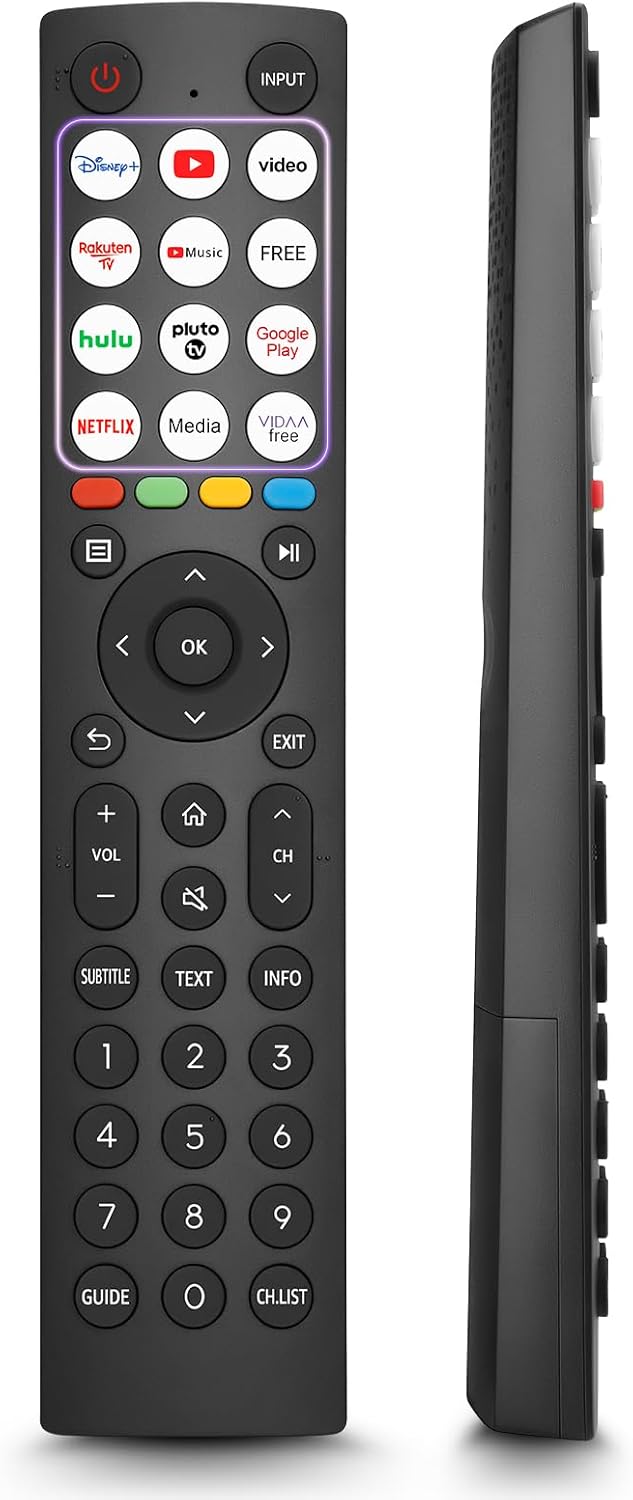
- 12 Shortcut Buttons: Quickly access popular streaming services and applications with dedicated buttons.
- Strong IR Signal: Provides a longer transmission distance and quick response without noticeable delay.
- Konstruksi Tahan Lama: Made from high-quality ABS and silicone materials for extended lifespan.

Fungsi Tombol
Familiarize yourself with the functions of each button on your OMAIC EN2Q36H remote control:
| Tombol | Fungsi |
|---|---|
| KEKUATAN | Switches the TV on or into standby mode. |
| MASUKAN | Memilih sumber masukan (HDMI, AV, dll.). |
| APP Buttons | Quick access buttons for specific applications (e.g., Disney+, Netflix, YouTube). |
| MENU | Displays the Quick Setup menu. |
| Kontrol MEDIA | Buttons for Play, Pause, Stop, Fast Forward, Rewind. |
| Navigasi (Atas/Bawah/Kiri/Kanan) | Navigates on-screen menus and adjusts system settings. |
| OK | Confirms selection in on-screen menus. |
| KEMBALI | Kembali ke menu sebelumnya. |
| EXIT | Keluar dari menu saat ini. |
| VOL +/- | Menyesuaikan tingkat volume. |
| RUMAH | Enters the Home screen. |
| BISU | Mematikan atau memulihkan suara TV. |
| CH ^/v | Switches channels. |
| SUBTITLE | Activates or deactivates subtitle mode. |
| TEKS | Turns teletext function on and off. |
| INFORMASI | Menampilkan informasi program terkini. |
| NUMBER Buttons (0-9) | Direct channel selection or number input. |
| MEMANDU | Displays the Electronic Programme Guide (DTV input). |
| DAFTAR CH | Displays the Channel List on the screen. |

Compatible Hisense TV Models
The OMAIC EN2Q36H replacement remote control is compatible with the following Hisense VIDAA 4K HDTV Smart TV series:
- 32A4K, 40A4K, 43A4K
- 32A5KQ, 40A5KQ
- 43A6K, 50A6K, 55A6K, 58A6K, 65A6K, 70A6K, 75A6K, 85A6K
- 55U6KQ, 65U6KQ
- 43A7KQ, 50A7KQ, 55A7KQ, 65A7KQ, 75A7KQ
- 43E7KQ, 50E7KQ, 55E7KQ, 65E7KQ, 75E7KQ
Pemeliharaan
Untuk memastikan umur pakai dan fungsi yang optimal dari remote control Anda, ikuti panduan perawatan berikut:
- Pembersihan: Use a soft, dry cloth to clean the remote. Avoid using liquid cleaners or abrasive materials, as they may damage the surface or internal components.
- Penggantian Baterai: Replace batteries when the remote's response becomes sluggish or stops working. Always replace both batteries at the same time with new ones of the same type (AAA alkaline).
- Penyimpanan: Simpan remote di tempat yang sejuk dan kering, jauhkan dari sinar matahari langsung, suhu ekstrem, dan kelembapan tinggi.
- Hindari Tetes: Lindungi remote dari benturan fisik, karena terjatuh dapat merusak sirkuit internal.
Penyelesaian Masalah
If you encounter issues with your remote control, refer to the following troubleshooting steps:
| Masalah | Kemungkinan Penyebab | Larutan |
|---|---|---|
| Jarak jauh tidak merespons | Baterai mati atau salah dimasukkan. | Ganti baterai dengan baterai alkaline AAA baru, pastikan polaritasnya benar. |
| Jarak jauh tidak merespons | Adanya penghalang antara remote dan TV. | Ensure a clear line of sight to the TV's IR receiver. Remove any objects blocking the path. |
| Jarak jauh tidak merespons | Remote is too far from the TV. | Move closer to the TV. The remote has an extended range, but extreme distances may affect performance. |
| Tombolnya lengket atau tidak responsif | Kotoran atau serpihan di bawah tombol. | Bersihkan area di sekitar tombol secara perlahan dengan kain lembut dan kering. Hindari cairan. |
| Specific functions not working | TV model incompatibility (rare). | Verify your Hisense TV model is listed in the 'Compatible Hisense TV Models' section. |
Spesifikasi
| Fitur | Detil |
|---|---|
| Nama Model | EN2Q36H |
| Merek | OMAIK |
| Perangkat yang Kompatibel | Hisense Smart TVs |
| Teknologi Konektivitas | Infrared (IR) |
| Jumlah Tombol | 48 |
| Jenis Kontrol | Kontrol Tombol |
| Fitur Khusus | Universal, Comfortable |
| Warna | Hitam |
| Deskripsi Baterai | AAA (Alkalin) |
| Supported Devices (Max) | 1 |
| Dimensi Produk (Perkiraan) | Ukuran 34.7x24.7x2.2 cm |
| Berat Produk (Perkiraan) | 80 gram |

Garansi dan Dukungan
OMAIC is committed to the quality and compatibility of its replacement remote controls. We provide professional after-sales support to ensure customer satisfaction.
If you have any questions or concerns regarding your OMAIC EN2Q36H remote control or your order, please contact us directly. Our support team aims to respond to inquiries within 12 working hours.