1. Pendahuluan
This manual provides essential information for setting up, operating, and maintaining your NIMO 15.6-inch FHD Laptop. Please read this guide thoroughly to ensure optimal performance and longevity of your device. Keep this manual for future reference.
2. Apa yang ada di dalam kotak
- 1 x Laptop NIMO N155
- 1 x Charger Cepat Type-C 65W PD
- 1 x Panduan Pengguna
- Windows 11 Home (Terinstal sebelumnya)
- 2 Years Warranty, 90 Days Return Information
3. Produk Lebihview
The NIMO 15.6-inch FHD Laptop is designed for efficiency and convenience, featuring a robust AMD Ryzen 5 processor, ample memory, and fast storage. Its sleek design and comprehensive connectivity options make it suitable for various tasks.
3.1. Komponen Laptop

Figure 1: NIMO 15.6-inch FHD Laptop (Rose Gold variant)
This image displays the NIMO 15.6-inch FHD Laptop in Rose Gold, showcasing its full-size keyboard, large touchpad, and the vibrant display. Key features like fingerprint sensor, Type-C PD charger, and backlit keyboard are highlighted on the screen.
3.2. Port dan Konektor

Figure 2: NIMO Laptop Ports Diagram
This diagram illustrates the available ports on the NIMO laptop, including Micro SD card reader, USB 2.0, USB 3.2 Gen1, Audio Jack, Kensington Lock on one side, and Type-C, USB 3.2 Gen1 Full-function, HDMI 1.4, and a Charge LED on the other side.
- Port USB3.0: For high-speed data transfer and connecting peripherals.
- Port USB 2.0: Untuk menghubungkan perangkat USB standar.
- Tipe-C Port: Supports 65W Power Delivery (PD) for fast charging and data transfer.
- HDMI1.4: Untuk menghubungkan ke layar eksternal.
- Pembaca Kartu Micro SD: Untuk memperluas penyimpanan atau memindahkan barang files dari kartu memori.
- Jack Audio: Untuk menghubungkan headphone atau speaker eksternal.
- Slot Kunci Kensington: For physical security of the device.
4. Pengaturan
4.1. Pengaktifan Awal
- Keluarkan laptop dan semua aksesori dari kotaknya.
- Connect the 65W Type-C PD Fast Charger to the laptop's Type-C port and a power outlet.
- Open the laptop lid. The laptop may power on automatically. If not, press the power button located on the top right of the keyboard.
- Ikuti petunjuk di layar untuk menyelesaikan pengaturan Windows 11 Home, termasuk bahasa, wilayah, koneksi jaringan, dan pembuatan akun pengguna.
4.2. Menghubungkan ke Jaringan
During the initial setup or at any time, you can connect your NIMO laptop to a Wi-Fi network:
- Klik ikon Wi-Fi di system tray (pojok kanan bawah layar).
- Pilih jaringan Wi-Fi yang Anda inginkan dari daftar.
- Masukkan kata sandi jaringan jika diminta, lalu klik 'Hubungkan'.
5. Petunjuk Pengoperasian
5.1. Manajemen Daya
- Nyalakan: Tekan tombol daya.
- Mode tidur: Tutup penutupnya atau tekan tombol daya sebentar.
- Menutup: Klik tombol Mulai, lalu Daya > Matikan.
- Mulai ulang: Klik tombol Mulai, lalu Daya > Mulai Ulang.
5.2. Keyboard dan Touchpad
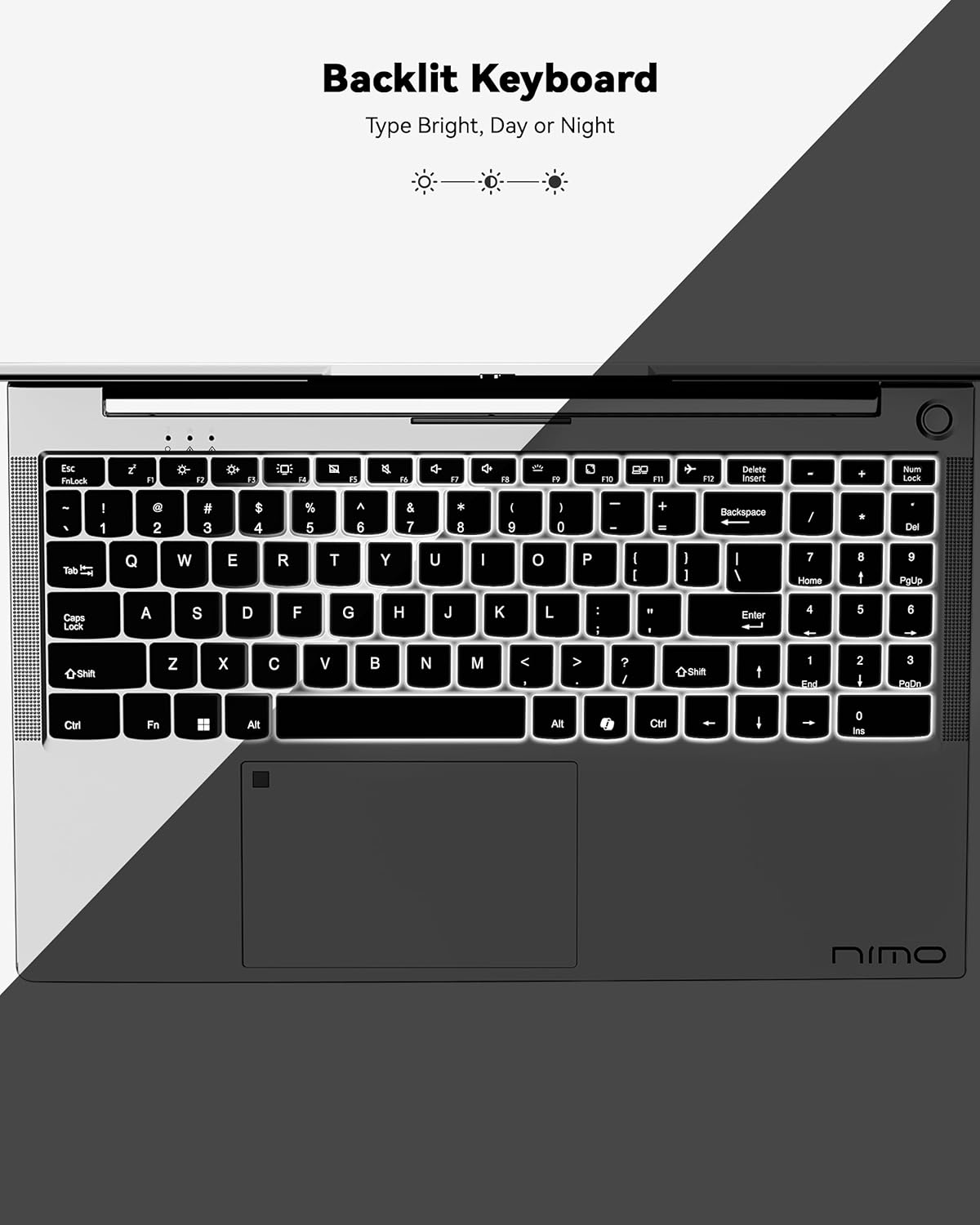
Gambar 3: Keyboard dengan Lampu Latar
This image highlights the backlit keyboard feature of the NIMO laptop, demonstrating how the keys illuminate for typing in low-light conditions.
- Keyboard dengan lampu latar: Tekan Tombol Fn+F5 (or the key with the keyboard backlight icon) to toggle the backlight on/off or adjust brightness.
- Papan sentuh: Supports multi-touch gestures for scrolling, zooming, and navigation. Refer to Windows settings for customization.
- Sensor Sidik Jari: Located on the touchpad for secure and instant login. Set up your fingerprint in Windows Settings > Accounts > Sign-in options.

Figure 4: Fingerprint Sensor on Touchpad
This image shows a close-up of the NIMO laptop's touchpad, clearly indicating the integrated fingerprint sensor for quick and secure access.
5.3. Webkamera
Laptop ini memiliki kamera 2MP. webcam for video calls and conferences. Ensure proper lighting for best image quality.
5.4.Audio
The integrated speakers provide clear audio. You can also connect headphones or external speakers via the audio jack.
6. Fitur Utama
- Vivid 15.6" Full HD Display: Enjoy stunning visuals with the 15.6" Full HD (1920x1080) IPS anti-glare display, featuring an 85% screen-to-body ratio and micro-edge design.
- Performa Kuat: Equipped with an AMD Ryzen 5 processor, 16GB DDR4 RAM, and a 1TB PCIe SSD for fast boot-ups, seamless multitasking, and efficient handling of applications.
- Upgradable Components: The RAM and SSD slots are expandable, allowing for future memory and storage upgrades.
- 65W USB-C PD Fast Charger: The included charger provides rapid power delivery, offering 2 hours of use from just 15 minutes of charging. It is also versatile for charging other compatible devices.
- Secure & Instant Login: Integrated fingerprint reader on the touchpad ensures quick and secure access to your device.
- Ergonomic Backlit Keyboard: Work comfortably in any environment with the backlit keyboard, featuring adjustable brightness.
- Konektivitas yang Sempurna: Features Wi-Fi 6 and Bluetooth 5.2 for stable, high-speed wireless connections, along with multiple USB 3.0 ports and HDMI for versatile peripheral connections.
Video 1: NIMO Laptop - Perfect for Work and Study, Anytime, Anywhere
This video demonstrates the NIMO laptop's versatility for various tasks, highlighting its portability and performance for work, study, and entertainment in different settings.
Video 2: NIMO 15.6 FHD Laptop for Students Home Work
This video showcases the NIMO 15.6 FHD laptop as an ideal device for students, home users, and professionals, emphasizing its suitability for educational and work-related tasks.
7. Pemeliharaan
- Pembersihan: Gunakan kain lembut dan bebas serat untuk membersihkan layar dan bagian luarnya. Hindari penggunaan bahan kimia keras.
- Perawatan Baterai: To prolong battery life, avoid fully discharging the battery frequently. Store the laptop in a cool, dry place.
- Pembaruan Perangkat Lunak: Perbarui sistem operasi Windows dan driver Anda secara berkala untuk memastikan kinerja dan keamanan yang optimal.
- Ventilasi: Ensure the laptop's ventilation openings are not blocked to prevent overheating. Use on a hard, flat surface.
8. Penyelesaian masalah
- Laptop tidak menyala: Ensure the charger is securely connected and the battery has sufficient charge. Try a different power outlet.
- Layarnya kosong: Connect to an external monitor to check if the display is the issue. Restart the laptop.
- Masalah konektivitas Wi-Fi: Restart your router and the laptop. Check Wi-Fi settings and ensure airplane mode is off.
- Kinerja lambat: Close unnecessary applications, check for malware, and ensure sufficient free storage space. Consider upgrading RAM or SSD if performance remains an issue.
- Keyboard atau touchpad tidak merespons: Restart laptop. Periksa pembaruan driver di Pengelola Perangkat.
For persistent issues, please refer to the support section or contact NIMO customer service.
9. Spesifikasi
| Fitur | Spesifikasi |
|---|---|
| Ukuran Tampilan Layar Berdiri | 15.6 inci |
| Resolusi Layar | 1920 x 1080 piksel (HD Penuh) |
| Prosesor | AMD Ryzen 5 (3.7 GHz) |
| RAM | 16 GB DDR4 (Dapat diupgrade) |
| Kecepatan Memori | Frekuensi 4800 MHz |
| Perangkat Keras | SSD 1024 GB (Dapat diupgrade) |
| Koprosesor Grafis | Grafis terintegrasi AMD |
| Sistem Operasi | Windows 11 Rumah |
| Tipe Nirkabel | 802.11a/b/g/n/ac (Wi-Fi 6) |
| Bahasa Indonesia: Bluetooth | Bluetooth 5.2 |
| Jumlah Port USB 2.0 | 1 |
| Jumlah Port USB 3.0 | 3 |
| Daya Tahan Baterai Rata-rata | 9 Jam |
| Berat Barang | 5 pon |
| Dimensi Produk | 14.07x8.98x0.76 inci |
| Belakang Webresolusi kamera | 2 MP |
| Fitur Khusus | Keyboard dengan lampu latar, pembaca sidik jari, audio HD, keypad numerik |
10. Garansi dan Dukungan
Laptop NIMO Anda dilengkapi dengan Garansi pabrik 2 tahunSelain itu, NIMO menawarkan Kebijakan pengembalian dan penukaran tanpa ribet selama 90 hari. Our dedicated support team is available to assist with any issues or replacements.
10.1. Hubungi Dukungan
- For product-related questions or technical assistance, please contact NIMO customer service via their official websitus, email, atau telepon.
- Contact information can typically be found on the NIMO official websitus atau halaman produk.
11. Informasi Keselamatan
- Gunakan hanya pengisi daya asli dan periksa kabel secara berkala untuk memastikan tidak ada kerusakan.
- Pegang laptop pada bagian bawahnya dan pertimbangkan untuk menggunakan casing pelindung. Hindari meletakkan benda berat di atasnya.
- Place the laptop on a hard, flat surface to ensure proper ventilation and prevent overheating. Keep it away from extreme temperatures and moisture.
- Do not overcharge the battery. Discontinue use if the battery swells or shows signs of damage.
- Set strong passwords, keep software updated, use antivirus protection, and regularly back up your data.
- Jika terjadi tumpahan cairan, segera cabut kabel daya laptop dan biarkan hingga benar-benar kering sebelum mencoba menyalakannya.
- For any technical issues, consult qualified professionals. Do not attempt to disassemble or repair the device yourself.
12. Penafian Hukum
This laptop is provided "as is," with no express or implied warranties except for the manufacturer's limited warranty (if applicable). Implied warranties of merchantability or fitness for a specific purpose are disclaimed. NIMO is not liable for damages resulting from misuse (e.g., non-approved chargers, unauthorized repairs), physical damage, or failure to follow safety guidelines, including data loss or business interruption. Users are responsible for regularly backing up their data. This disclaimer does not exclude liability for manufacturing defects or violations of mandatory local laws. By using the NIMO laptop, you accept these terms, which are governed by applicable jurisdiction laws.


