1. Informasi Keselamatan Penting
Harap baca dan pahami semua petunjuk keselamatan sebelum perakitan dan penggunaan. Kegagalan mengikuti petunjuk ini dapat mengakibatkan cedera atau kerusakan pada produk.
- Selalu ikuti petunjuk perakitan dengan hati-hati untuk menghindari cedera.
- Keep electrical components away from water and never leave them unattended while in use.
- Do not exceed the weight limit of the vanity to prevent damage or injury.
- For any safety concerns, please contact the seller.
- Ensure all connections are secure before using the electrical outlets.
2. Isi Paket
Verify that all components are present and undamaged before beginning assembly. Refer to the detailed parts list provided in your physical instruction manual.
- Vanity Desk Components (panels, drawers, shelves)
- Mirror with 12 LED Bulbs
- Bangku Rias
- Power Outlet Unit (2 AC outlets, 2 USB ports)
- Hair Dryer Stand
- Perangkat Keras Perakitan (sekrup, pasak, kunci cam, dll.)
- Alat Perakitan (kunci inggris dasar, obeng)
- Manual Instruksi

Gambar: Lebih dariview of the Yanosaku Vanity Desk with its accompanying stool.
3. Petunjuk Perakitan
Assembly is required for this vanity desk. It is recommended to follow the step-by-step instructions provided in the physical manual included with your product. Lay out all parts and hardware before starting. Two people are recommended for assembly.
- Bongkar dan Identifikasi: Carefully unpack all components and compare them against the parts list in the manual.
- Merakit Struktur Dasar: Begin by assembling the main frame of the vanity desk, including the side panels and central support.
- Pasang Laci: Assemble each of the 11 drawers according to the instructions and install them into their respective slots.
- Attach Top Panel and Mirror: Secure the tabletop and then attach the mirror unit, ensuring all electrical connections for the lights are properly routed.
- Install Shelves and Accessories: Attach the 4 shelves, fold-up panel, power outlet unit, and hair dryer stand.
- Cara Merakit Bangku: Put together the vanity stool.

Image: Diagram showing the overall dimensions of the vanity desk and stool.
4. Petunjuk Pengoperasian
4.1 Sistem Pencahayaan LED
The vanity mirror is equipped with 12 LED Hollywood-style bulbs offering three color lighting modes and adjustable brightness.
- Daya Hidup/Mati: Press the power button on the mirror frame to turn the lights on or off.
- Ubah Mode Warna: Short press the 'M' button to cycle through the three color modes: Warm, Natural, and Cool.
- Sesuaikan Kecerahan: Long press the power button to increase or decrease the brightness of the lights. Release when the desired brightness is reached.

Image: Visual representation of the three distinct lighting modes (Cold White, Warm White, Warm Yellow) available on the vanity mirror.
4.2 Power Outlet and USB Ports
Stasiun pengisian daya terintegrasi menyediakan akses mudah ke daya untuk perangkat elektronik Anda.
- Stopkontak AC: Plug in hair dryers, curling irons, or other small appliances into the two standard 125V/12A AC outlets.
- Port USB: Gunakan dua port USB 5V/2A untuk mengisi daya ponsel, tablet, atau perangkat bertenaga USB lainnya.
- Ensure the vanity desk is properly connected to a wall outlet for the charging station to function.

Image: Close-up of the built-in power strip, highlighting the AC outlets and USB ports, with a hair dryer in its dedicated holder.
4.3 Fold-up Panel
The vanity features a foldable side panel to expand your workspace when needed.
- Untuk Memperluas: Gently lift the fold-up panel and extend the support bracket underneath until it locks into place.
- Melipat: Release the support bracket and carefully lower the panel back into its compact position.

Image: Illustration showing the vanity's side panel in its expanded state for additional space and folded state for compactness.
4.4 Storage Drawers and Shelves
Utilize the 11 drawers and 4 shelves for organized storage of cosmetics, accessories, and other items.
- The drawers feature smooth gliding mechanisms for easy access.
- The embedded tempered glass tabletop allows for visible storage in the top central drawers, making items easily locatable.
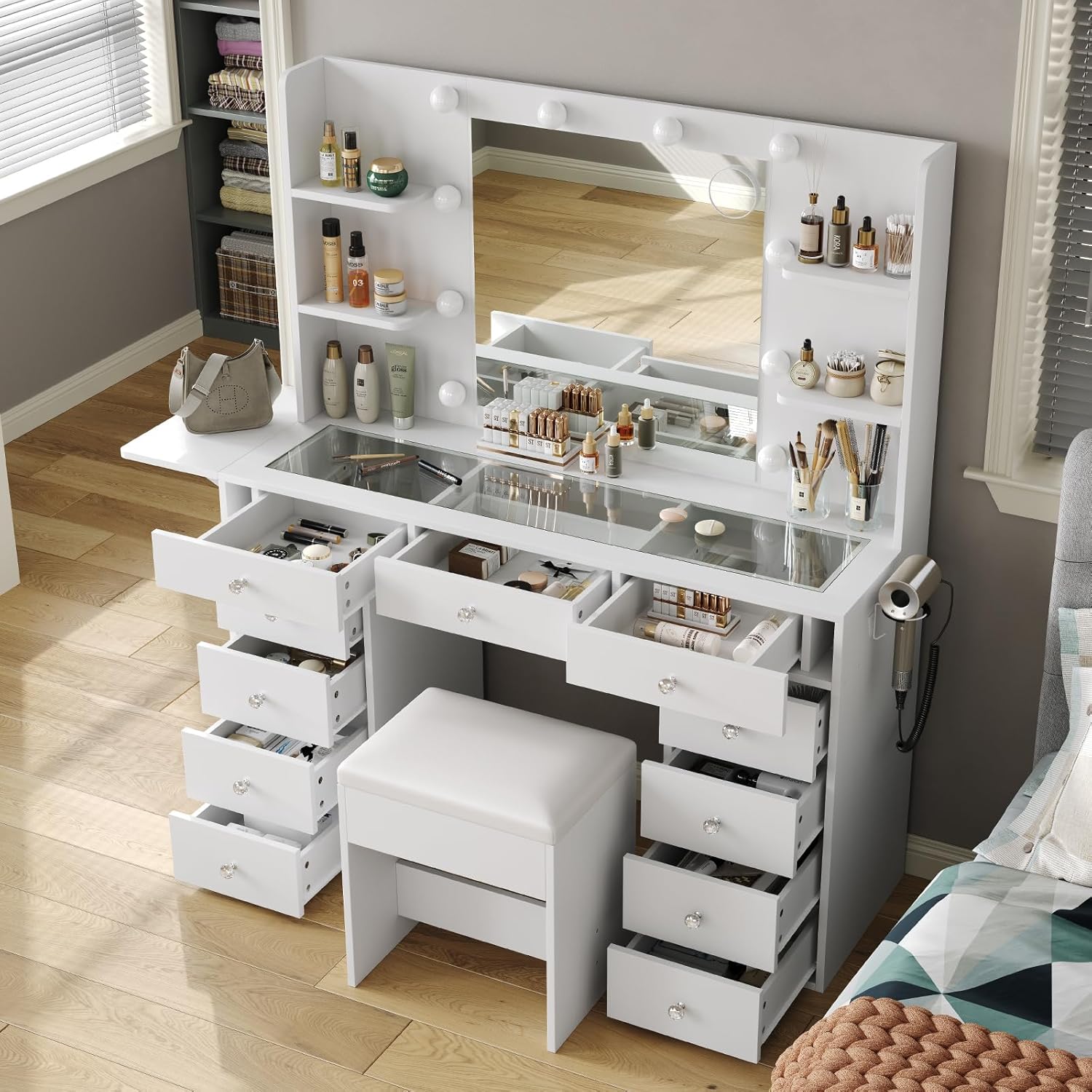
Gambar: Udara view of the vanity desk with several drawers pulled open, demonstrating the extensive storage capacity.

Image: Close-up of the embedded tempered glass tabletop, providing a clear view of cosmetics and accessories stored in the drawers beneath.
5. Pemeliharaan
5.1 Pembersihan
- Permukaan Kayu: Bersihkan dengan kain lembut,amp kain. Hindari bahan kimia keras atau pembersih abrasif yang dapat merusak lapisan akhir.
- Cermin: Gunakan cairan pembersih kaca standar dan kain bebas serat.
- Bohlam LED: Dust gently with a dry, soft cloth. Do not use liquid cleaners directly on the bulbs or electrical components.
- Bagian Atas Kaca: Clean with glass cleaner. The tempered glass is designed to be anti-scalding and easy to clean.
5.2 Perawatan Umum
- Periksa semua sekrup dan pengencang secara berkala untuk memastikan semuanya kencang. Kencangkan kembali jika perlu.
- Hindari meletakkan benda panas langsung di permukaan tanpa pelindung.
- Jauhkan meja rias dari sinar matahari langsung dan kelembapan berlebihan untuk mencegah perubahan bentuk atau perubahan warna.
6. Penyelesaian masalah
| Masalah | Kemungkinan Penyebab | Larutan |
|---|---|---|
| Lampu LED tidak berfungsi | 1. Power cable not connected 2. Loose connection to LED controller 3. Faulty bulb or controller | 1. Ensure power cable is securely plugged into wall outlet and vanity. 2. Check connections to the LED controller and mirror. 3. Contact customer support for replacement parts if necessary. |
| Stopkontak/port USB tidak berfungsi | 1. Vanity not plugged in 2. Overload on circuit | 1. Verify the main power cord is securely plugged into a functional wall outlet. 2. Unplug some devices to reduce load. If issue persists, contact customer support. |
| Laci tidak meluncur dengan mulus | 1. Improper assembly of drawer slides 2. Obstruction in drawer track | 1. Ulangview assembly instructions for drawer slide installation. Ensure they are aligned correctly. 2. Remove any objects obstructing the drawer tracks. |
| Fold-up panel does not stay extended | Support bracket not locked | Ensure the support bracket is fully extended and locked into its designated position. |
If you encounter any issues not listed here, or if the suggested solutions do not resolve the problem, please contact Yanosaku customer support for assistance.
7. Spesifikasi
| Fitur | Detil |
|---|---|
| Nomor Model | VD010-WH |
| Dimensi (Keseluruhan) | 47 inches (Width) x 54 inches (Height) x 15.7 inches (Depth) |
| Bahan | Kayu Rekayasa |
| Warna | Putih |
| Lampu LED | 12 Hollywood-style bulbs, 3 color modes (Warm/Natural/Cool), adjustable brightness |
| Stopkontak | 2 x Stopkontak AC 125V/12A |
| Port USB | 2 Port USB 5V/2A |
| Penyimpanan | 11 Drawers, 4 Shelves |
| Fitur Khusus | Fold-up Panel, Embedded Tempered Glass Tabletop, Hair Dryer Stand |
| Perakitan Diperlukan | Ya |
| Berat Barang | 140 pon |
8. Garansi dan Dukungan
Yanosaku stands behind the quality of its products. For warranty information, replacement parts, or technical support, please refer to the contact details provided in your product packaging or reach out to the seller directly through the platform of purchase.
When contacting support, please have your model number (VD010-WH) and purchase date readily available.