1. Pendahuluan
Thank you for choosing the InMotion ANC True Wireless Earbuds. This manual provides essential information for setting up, operating, and maintaining your earbuds to ensure optimal performance and longevity. Please read this manual thoroughly before use.
These earbuds feature Active Noise Cancelling (ANC) for an immersive audio experience, true wireless connectivity for freedom of movement, and intuitive touch controls. They are designed for comfort with suction tips and offer up to 6 hours of use on a single charge.
Informasi Keselamatan
- Jangan biarkan earbud atau wadah pengisi daya terkena suhu ekstrem, kelembapan, atau cairan.
- Hindari menjatuhkan atau membenturkan perangkat dengan keras.
- Jangan mencoba membongkar atau memodifikasi earbud atau wadah pengisi daya.
- Jauhkan dari jangkauan anak-anak.
- Gunakan hanya kabel pengisi daya yang disediakan atau kabel setara yang bersertifikat.
2. Apa yang ada di dalam kotak
Verifikasi bahwa semua item ada dalam paket Anda:
- InMotion ANC True Wireless Earbuds (Left and Right)
- Tas Pembawa Pengisi Daya
- Kabel Pengisian Daya USB-C
- User Manual (dokumen ini)

Image: The InMotion ANC True Wireless Earbuds resting inside their open charging case, showcasinDesainnya yang ramping dan indikator pengisian daya.
3. Pengaturan
3.1 Mengisi Daya Earbud dan Casing
Sebelum penggunaan pertama, isi daya earbud dan casing pengisi daya hingga penuh.
- Letakkan earbud ke dalam wadah pengisi daya, pastikan terpasang dengan benar.
- Hubungkan kabel pengisian daya USB-C ke port pengisian daya pada casing dan ujung lainnya ke sumber daya USB (misalnya, adaptor dinding, port USB komputer).
- Lampu indikator pada casing akan menunjukkan status pengisian daya. Setelah terisi penuh, lampu akan menunjukkan pengisian selesai atau mati.
A full charge provides up to 6 hours of earbud use. The charging case provides multiple additional charges.
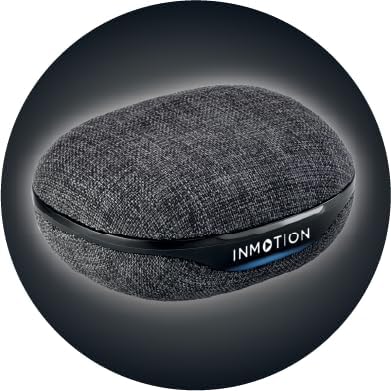
Gambar: Depan view of the InMotion ANC True Wireless Earbuds charging case, highlighting the charging port and indicator lights.
3.2 Pairing with Your Device (One-Step Pairing)
The InMotion ANC True Wireless Earbuds feature one-step pairing for quick and easy connection.
- Pastikan earbud terisi daya dan berada di dalam wadah pengisian daya.
- Buka penutup casing pengisi daya. Earbud akan otomatis masuk ke mode berpasangan.
- Pada perangkat Anda (smartphone, tablet, laptop), buka pengaturan Bluetooth dan aktifkan Bluetooth.
- Pencarian untuk "InMotion ANC Earbuds" (or similar name) in the list of available devices.
- Select the earbuds to connect. Once connected, you will hear an audible confirmation, and the indicator lights on the earbuds may change.
Earbud akan secara otomatis tersambung kembali ke perangkat terakhir yang dipasangkan saat dilepaskan dari casing, jika Bluetooth diaktifkan pada perangkat.
4. Petunjuk Pengoperasian
4.1 Kontrol Sentuh
The earbuds are equipped with intuitive touch controls on each earbud. Specific functions may vary slightly by device, but common controls include:
- Putar/Jeda: Ketuk satu kali pada salah satu earbud.
- Lagu Berikutnya: Ketuk dua kali pada earbud kanan.
- Lagu Sebelumnya: Ketuk dua kali pada earbud kiri.
- Menjawab/Mengakhiri Panggilan: Ketuk satu kali pada salah satu earbud saat ada panggilan masuk.
- Tolak Panggilan: Tekan dan tahan salah satu earbud selama panggilan masuk.
- Aktifkan Voice Assistant: Ketuk tiga kali pada salah satu earbud.
- Alihkan Mode ANC/Transparansi: Press and hold on either earbud (duration may vary, refer to specific product details if available).

Gambar: Samping view of a single InMotion ANC True Wireless Earbud, illustrating its ergonomic design and the touch-sensitive area.
4.2 Peredam Kebisingan Aktif (ANC)
The Active Noise Cancelling feature reduces ambient noise, allowing for a more immersive listening experience. To activate or deactivate ANC, use the designated touch control gesture (typically a press and hold). Some models may also feature a Transparency Mode, which allows you to hear your surroundings while still enjoying your audio.
5. Pemeliharaan
Proper maintenance ensures the longevity and performance of your InMotion ANC True Wireless Earbuds.
5.1 Pembersihan
- Bersihkan earbud dan casing pengisi daya secara perlahan menggunakan kain yang lembut, kering, dan tidak berbulu.
- Jangan gunakan pembersih abrasif, alkohol, atau pelarut kimia.
- Carefully remove any earwax or debris from the ear tips and speaker mesh using a small, soft brush or cotton swab.
5.2 Penyimpanan
When not in use, store the earbuds in their charging case to protect them from dust, dirt, and damage. Store the case in a cool, dry place away from direct sunlight and extreme temperatures.

Gambar: Belakang view of the InMotion ANC True Wireless Earbuds charging case, showing its compact and portable design.
6. Penyelesaian masalah
Jika Anda mengalami masalah dengan earbud Anda, cobalah solusi berikut:
| Masalah | Larutan |
|---|---|
| Earbud tidak dapat dipasangkan/dihubungkan. |
|
| Tidak ada suara dari satu atau kedua earbud. |
|
| Kotak pengisi daya tidak mengisi daya. |
|
| ANC tidak berfungsi secara efektif. |
|
7. Spesifikasi
| Fitur | Detil |
|---|---|
| Nama Model | Earbud Nirkabel Sejati ANC |
| Kontrol Kebisingan | Peredam Kebisingan Adaptif |
| Teknologi Konektivitas | Nirkabel (Bluetooth) |
| Komponen yang Termasuk | Pengisian tas jinjing |
| Perangkat yang Kompatibel | Laptops, Smartphone, Tablets |
| Metode Kontrol | Menyentuh |
| Jenis Penggerak Audio | Driver Dinamis |
| Fitur Khusus | Menjawab Panggilan |
| Pabrikan | Bergerak |
| Berat Barang | 3.2 ons |
| Warna | Hitam |
| Penempatan Telinga | Di Telinga |
| Faktor Bentuk | Di Telinga |
| Impedansi | Tegangan 16 ohm |
| Daya Tahan Baterai (Earbud) | Hingga 6 jam |
| Waktu Pengisian Daya | Approx. 1.5 hours (for earbuds and case) |
8. Garansi dan Dukungan
InMotion products are manufactured with high-quality standards. For warranty information and customer support, please refer to the warranty card included with your product or visit the official InMotion website. You can also contact InMotion customer service through their Amazon store page:
Visit the InMotion Store on Amazon
InMotion is committed to providing excellent customer service and support for their products.