1. Pendahuluan
This manual provides essential information for the safe and efficient operation of your FASTWD Android 15 Tablet 11-inch. Please read this manual thoroughly before using the device and retain it for future reference. This tablet features an 11-inch 2K display, Android 15 operating system, Octa-Core processor, 36GB RAM, 256GB ROM (expandable up to 1TB), 4G LTE, and 5G WiFi connectivity.
2. Informasi Keselamatan
- Jangan biarkan tablet terkena suhu ekstrem, sinar matahari langsung, atau kelembapan tinggi.
- Hindari menjatuhkan atau membenturkan tablet ke benda keras.
- Gunakan hanya pengisi daya dan aksesori yang telah disetujui untuk mencegah kerusakan dan memastikan keamanan.
- Jauhkan tablet dari air dan cairan lainnya.
- Jangan mencoba membongkar atau memperbaiki tablet sendiri. Hubungi dukungan pelanggan untuk mendapatkan bantuan.
- Buang baterai dan perangkat sesuai dengan peraturan setempat.
3. Isi Paket
Upon opening your FASTWD Android 15 Tablet package, please verify that all the following items are included:
- FASTWD Tablet
- Papan Ketik Bluetooth
- Mouse
- Kasus Pelindung
- Pena Stylus
- Kabel Tipe-C
- Pengisi daya
- Panduan Pengguna

Image: The FASTWD Android 15 Tablet displayed with its full set of accessories, including the keyboard, mouse, protective case, stylus, and charging components.
4. Perangkat Berakhirview
The FASTWD Android 15 Tablet features a sleek metal body with an 11-inch 2K INCell display. It is designed for both productivity and entertainment.
4.1 Ciri Fisik
- Menampilkan: 11-inch 2K UHD INCell display with 120Hz refresh rate.
- Kamera: 8MP front camera, 13MP rear camera with LED flash.
- Pelabuhan: Port USB Type-C untuk pengisian daya dan transfer data.
- Slot Kartu: Dual SIM card slot, also supports MicroSD card expansion up to 1TB.
- Pembicara: Empat amplitude speakers for enhanced audio.

Image: A visual representation of the FASTWD tablet's slim design, 11-inch screen, and Type-C charging port.
5. Pengaturan
5.1 Penyalaan Awal
- Press and hold the Power button located on the side of the tablet until the FASTWD logo appears.
- Ikuti petunjuk di layar untuk memilih bahasa, wilayah, dan terhubung ke jaringan Wi-Fi.
- Masuk dengan akun Google Anda atau buat akun baru untuk mengakses Google Play Store dan layanan lainnya.
5.2 Pemasangan Kartu SIM dan Kartu MicroSD
Your tablet supports dual SIM cards for 4G LTE connectivity and a MicroSD card for expanded storage.
- Temukan tempat kartu SIM/MicroSD di sisi tablet.
- Use the provided SIM ejector tool to gently push into the small hole next to the tray until it pops out.
- Masukkan kartu Nano-SIM dan/atau kartu MicroSD Anda ke dalam slot yang tersedia pada baki. Pastikan posisinya sudah benar.
- Masukkan kembali baki ke dalam tablet dengan hati-hati hingga berbunyi klik dan terpasang dengan benar.

Gambar: Detail view of the tablet's SIM card tray, showing slots for two SIM cards and one MicroSD card.
6. Petunjuk Pengoperasian
The FASTWD tablet runs on Android 15, offering an intuitive and customizable user experience.
6.1 Navigasi Dasar
- Geser ke atas: Akses laci aplikasi.
- Geser ke bawah: Buka panel notifikasi dan pengaturan cepat.
- Mengetuk: Pilih item atau buka aplikasi.
- Tekan lama: Akses menu kontekstual atau pindahkan ikon.
- Cubit untuk Memperbesar: Adjust zoom level in apps like browser or gallery.
6.2 Fitur Android 15
Android 15 introduces several enhancements for privacy, security, and user experience:
- Improved Privacy Controls: Granular permissions for apps, allowing you to authorize access more precisely.
- Optimasi AI: Intelligent AI features for improved performance and battery life.
- Navigasi Gerakan: New touch control gestures for a more fluid interaction.
- Global Dark Mode: System-wide dark theme for reduced eye strain and power consumption.
- Pembukaan Kunci dengan Pengenalan Wajah: Securely unlock your tablet using facial recognition.
- Kontrol Orang Tua: Manage screen time and app access for children.
- Layar Terbagi: Use two applications simultaneously side-by-side.
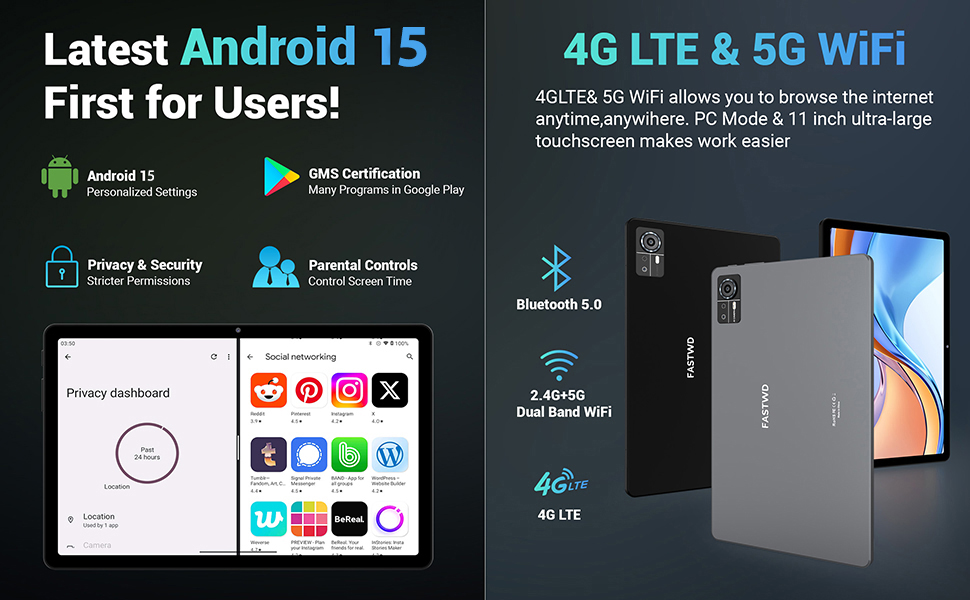
Image: A visual guide to key Android 15 features such as easy app pairing, storage management, quick Bluetooth connection, face recognition unlock, double-tap to wake, and parental control settings.
7. Konektivitas
Your FASTWD tablet offers versatile connectivity options for internet access and peripheral devices.
Koneksi Wi-Fi 7.1
- Pergi ke Pengaturan > Jaringan & internet > Wifi gratis.
- Beralih Wi-Fi On.
- Pilih jaringan yang Anda inginkan dari daftar dan masukkan kata sandi jika diminta.
- The tablet supports dual-band 2.4G/5G Wi-Fi for stable and fast connections.
7.2 4G LTE Mobile Data
With a compatible SIM card installed, you can access 4G LTE mobile data.
- Ensure your SIM card is correctly installed (refer to Section 5.2).
- Pergi ke Pengaturan > Jaringan & internet > Jaringan seluler.
- Memungkinkan Data seluler and configure APN settings if required by your carrier.
7.3 Pemasangan Bluetooth
Connect Bluetooth accessories like the included keyboard and mouse.
- Pergi ke Pengaturan > Perangkat yang terhubung > Bahasa Indonesia: Bluetooth.
- Aktifkan Bluetooth On.
- Letakkan aksesori Bluetooth Anda ke mode berpasangan.
- Select the accessory from the list of available devices and follow any on-screen prompts to complete pairing.
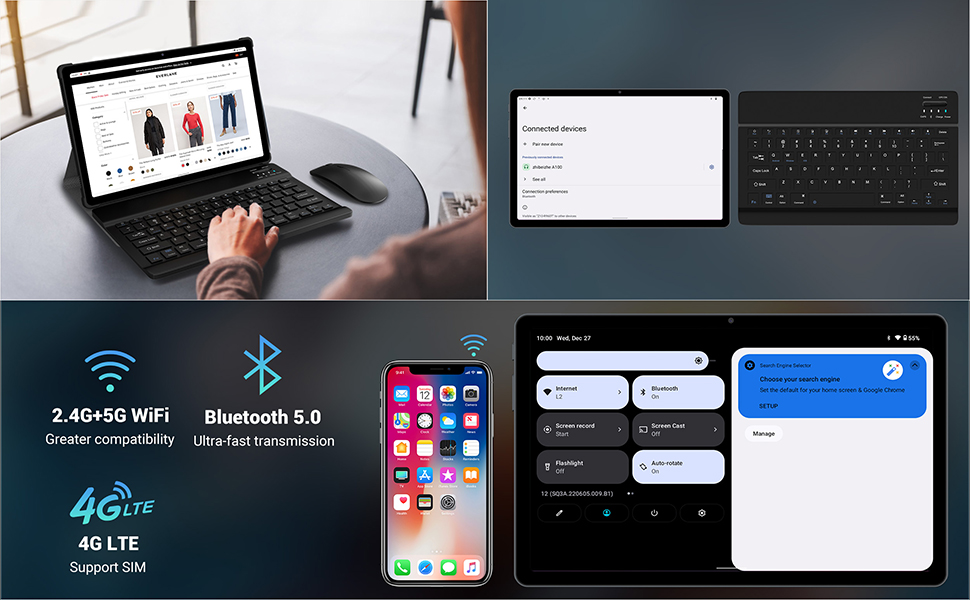
Image: The FASTWD tablet connected to its keyboard and mouse, illustrating its 2.4G+5G WiFi, Bluetooth 5.0, and 4G LTE SIM support for comprehensive connectivity.
8. Kamera
The tablet is equipped with an 8MP front camera and a 13MP rear camera for photos and video calls.
- Buka Kamera aplikasi.
- Ketuk tombol rana untuk mengambil foto.
- Beralih antara kamera depan dan belakang menggunakan ikon sakelar kamera.
- AI post-processing technology enhances photo quality, making images more realistic.

Gambar: Detail view of the tablet's rear camera, highlighting its 13MP sensor and AI Camera branding.
9. Manajemen Baterai
The tablet features a 9580mAh battery for extended usage and supports 12W fast charging.
9.1 Mengisi Daya Tablet
- Connect the Type-C cable to the tablet's charging port.
- Colokkan ujung kabel lainnya ke pengisi daya yang disediakan, lalu ke stopkontak.
- Ikon baterai di layar akan menunjukkan status pengisian daya.
9.2 Optimasi Baterai
- Sesuaikan kecerahan layar ke tingkat yang nyaman.
- Tutup aplikasi yang tidak digunakan yang berjalan di latar belakang.
- Enable battery saver mode in Pengaturan > Baterai.
- Nonaktifkan Wi-Fi, Bluetooth, atau GPS saat tidak digunakan.

Image: The FASTWD tablet connected to a Type-C charger, illustrating its 9580 mAh battery and 12W fast charging capability.
10. Penyimpanan
The tablet comes with 256GB of internal storage (ROM) and supports expansion up to 1TB via a MicroSD card.
10.1 Mengelola Penyimpanan
- Untuk memeriksa penggunaan penyimpanan, buka Pengaturan > Penyimpanan.
- You can free up space by uninstalling unused apps, deleting old fileatau memindahkan media ke kartu MicroSD.
10.2 Manajemen RAM
The tablet features 36GB RAM (12GB LPDDR4 + 24GB expandable virtual memory) for smooth multitasking.
- The system automatically manages RAM for optimal performance.
- You can activate additional virtual RAM in the settings if needed for demanding applications.
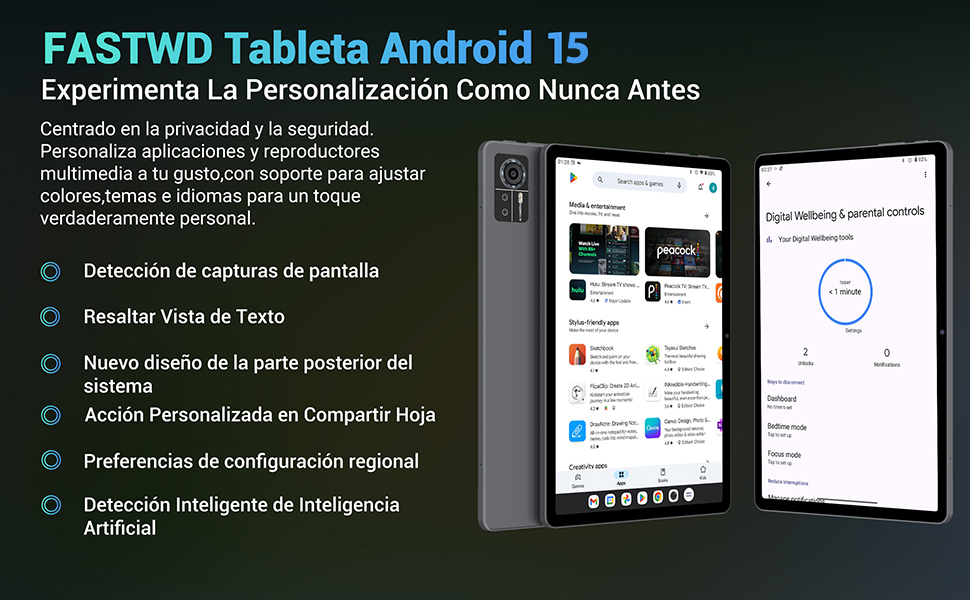
Image: An illustration highlighting the tablet's 36GB RAM (12+24GB), 256GB ROM, and 1TB MicroSD expansion capabilities, alongside its Octa-core processor.
11. Pemeliharaan
11.1 Pembersihan
- Gunakan kain lembut dan bebas serat untuk membersihkan layar dan bodi tablet.
- Jangan gunakan bahan kimia keras atau bahan abrasif.
11.2 Pembaruan Perangkat Lunak
- Periksa pembaruan sistem secara berkala di Pengaturan > Sistem > Pembaruan sistem untuk memastikan kinerja dan keamanan yang optimal.
12. Penyelesaian masalah
Jika Anda mengalami masalah dengan tablet Anda, lihat solusi umum berikut:
| Masalah | Larutan |
|---|---|
| Tablet tidak menyala. | Pastikan baterai terisi daya. Hubungkan pengisi daya dan tunggu beberapa menit sebelum mencoba menyalakannya kembali. Jika tidak responsif, lakukan restart paksa dengan menahan tombol Daya selama 10-15 detik. |
| Aplikasi mengalami kerusakan atau macet. | Close background applications. Clear the cache of the problematic app (Settings > Apps > [App Name] > Storage & cache > Clear cache). Restart the tablet. |
| Koneksi Wi-Fi buruk | Ensure you are within range of the Wi-Fi router. Restart your router and the tablet. Forget the network and reconnect. |
| Kartu SIM tidak terdeteksi | Ensure the SIM card is correctly inserted into the tray. Restart the tablet. Verify the SIM card is active with your mobile carrier. |
| Baterai cepat habis | Reduce screen brightness. Disable unused connectivity features (Wi-Fi, Bluetooth, GPS). Close background apps. Check for apps consuming excessive battery in Settings > Battery. |
13. Spesifikasi
Detailed technical specifications for the FASTWD Android 15 Tablet 11-inch (Model M986):
| Fitur | Spesifikasi |
|---|---|
| Merek | CEPAT WD |
| Nama Model | FASTWD Android 15 Tablet 11 Pulgadas |
| Sistem Operasi | Android 15 |
| Kecepatan Prosesor | Prosesor Octa-Core 2 GHz |
| RAM | 36 GB (12GB LPDDR4 + 24GB expandable) |
| Penyimpanan Internal (ROM) | 256 GB |
| Penyimpanan yang Dapat Diperluas | Kapasitas hingga 1 TB melalui kartu MicroSD. |
| Ukuran Layar | 11 Pulgadas (Inches) |
| Resolusi Layar | 2560 x 1440 pixels (2K UHD INCell) |
| Tingkat Penyegaran | 120Hz |
| Kamera Belakang | 13 MP |
| Kamera Depan | 8 MP |
| Kapasitas Baterai | 9580 mAh |
| Battery Life (average) | 8 Jam (pemutaran video) |
| Pengisian daya | 12W Fast Charging, Type-C Interface |
| Konektivitas | 4G LTE (Cellular), 5G Wi-Fi (802.11ac), Bluetooth 5.0 |
| Ukuran | Ukuran 29.7x19.6x4 cm |
| Berat | 1.36 kg |
| Fitur Khusus | Gaming Tablet, Face Recognition, Parental Control, GPS (Beidou, Galileo, Glonass, GPS) |
14. Garansi dan Dukungan
FASTWD offers two years of premium after-sales service and long-term technical support for your tablet.
- Periode Garansi: 2 tahun dari tanggal pembelian.
- Dukungan Teknis: For any issues or inquiries, please contact the FASTWD after-sales team through your Amazon purchase platform.
- Our support team aims to respond within 24 hours.


