Perkenalan
This manual provides essential information for the safe and efficient operation, maintenance, and troubleshooting of your Rowenta X-Clean 10 GZ7035WO Cordless Wet and Dry Vacuum Cleaner. Please read these instructions carefully before using the appliance and keep them for future reference.
Petunjuk Keselamatan
- Baca semua petunjuk sebelum digunakan.
- Peralatan ini tidak ditujukan untuk digunakan oleh orang (termasuk anak-anak) dengan keterbatasan fisik, sensorik, atau mental, atau kurang pengalaman dan pengetahuan, kecuali mereka telah diberi pengawasan atau petunjuk mengenai penggunaan peralatan oleh orang yang bertanggung jawab atas keselamatan mereka.
- Only use the appliance with the original charging station and accessories provided by Rowenta.
- Do not immerse the appliance, charging station, or adapter in water or other liquids.
- Ensure the appliance is unplugged from the power supply before cleaning or performing any maintenance.
- Jangan menyedot zat yang mudah terbakar atau meledak, abu panas, atau benda tajam.
- Jauhkan rambut, pakaian longgar, jari, dan semua bagian tubuh dari celah dan bagian yang bergerak.
- Do not operate the appliance if it is damaged or malfunctioning. Contact authorized service for repairs.
Produk Selesaiview
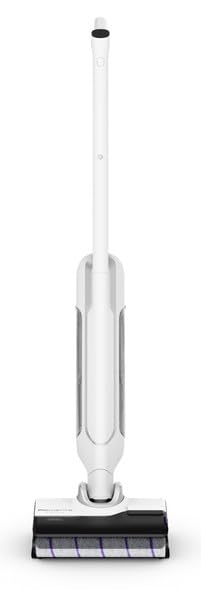
Image: The Rowenta X-Clean 10 GZ7035WO cordless wet and dry vacuum cleaner, its charging base, and a cleaning brush accessory.
The Rowenta X-Clean 10 GZ7035WO is a versatile cordless wet and dry vacuum cleaner designed for efficient cleaning of various floor types. Key components include:
- Unit Utama: Contains the motor, battery, and control panel.
- Menangani: Didesain secara ergonomis untuk genggaman dan kontrol yang nyaman.
- Tangki Air Bersih: Holds fresh water and cleaning solution for wet cleaning.
- Tangki Air Kotor: Collects dirty water and debris during operation.
- Rol Sikat: Actively scrubs and cleans surfaces.
- Stasiun Pengisian Daya: Provides a convenient base for charging and storage.
- Perlengkapan Aksesori: Includes a cleaning brush for maintenance.
Pengaturan
- Membongkar: Keluarkan semua komponen dari kemasannya dengan hati-hati.
- Berkumpul: Pasang pegangan ke unit utama hingga terkunci dengan aman dan berbunyi klik.
- Isi Daya Baterai: Place the vacuum cleaner on the charging station. Connect the charging station to a power outlet. The battery indicator lights will show the charging status. Allow for a full charge before first use (approximately 1 hour for full autonomy).
- Isi Tangki Air Bersih: For wet cleaning, remove the clean water tank, fill it with tap water (and a suitable cleaning solution if desired, following manufacturer's instructions), and reattach it securely.
Ensure all parts are correctly assembled and tanks are properly sealed before operation.
Petunjuk Pengoperasian
1. Memulai Peralatan
- Tekan tombol daya untuk menyalakan penyedot debu.
- Select the desired cleaning mode (wet or dry) and speed setting (up to 5 speeds available) using the controls on the handle.
2. Membersihkan Permukaan
- Untuk Lantai Keras: Use the wet cleaning mode for effective washing and vacuuming. Move the appliance slowly over the surface.
- Untuk Karpet: Use the dry vacuuming mode. The appliance is suitable for light carpet cleaning.
- The appliance is designed for both wet and dry use, allowing you to switch between modes as needed.
3. Mengosongkan Tangki Air Kotor
- When the dirty water tank is full, the appliance may indicate this or you will notice reduced performance.
- Matikan alat tersebut dan lepaskan tangki air kotor.
- Empty the contents into a drain and rinse the tank thoroughly with clean water.
- Reattach the dirty water tank securely to the main unit.
Pemeliharaan
1. Membersihkan Rol Sikat
- Matikan dan cabut alat tersebut.
- Remove the brush roll cover and then the brush roll itself.
- Use the provided cleaning brush to remove any hair, fibers, or debris tangled around the brush roll.
- Rinse the brush roll under running water if necessary and allow it to air dry completely before reinserting.
2. Membersihkan Filter HEPA
- Locate and remove the HEPA filter, typically found near the dirty water tank.
- Tap the filter gently to dislodge dust and debris. If washable, rinse under cold water until clean.
- Allow the filter to air dry completely for at least 24 hours before reinserting. Do not use the appliance with a wet filter.
- Replace the HEPA filter regularly (e.g., every 6-12 months) for optimal performance.
3. Membersihkan Tangki Air
Regularly rinse both the clean and dirty water tanks with fresh water after each use to prevent odor and bacterial growth. Ensure they are dry before storage.
4. Penyimpanan
Store the appliance on its charging station in a dry, cool place. Ensure the tanks are empty and clean before long-term storage.
Penyelesaian Masalah
| Masalah | Kemungkinan Penyebab | Larutan |
|---|---|---|
| Perangkat tidak menyala | Baterai lemah atau belum terisi daya. | Place the appliance on the charging station and ensure it is fully charged. |
| Daya hisap atau kinerja pembersihan yang buruk | Dirty or clogged HEPA filter. Clogged brush roll. Empty clean water tank. Full dirty water tank. | Clean or replace the HEPA filter. Clean the brush roll. Refill the clean water tank. Empty the dirty water tank. |
| Kebocoran air | Water tanks not properly sealed. Damaged tank or seal. | Ensure both clean and dirty water tanks are correctly installed and sealed. Check for any visible damage to tanks or seals. |
| Waktu pengoperasian yang singkat | Battery not fully charged. Battery aging. | Ensure the appliance is fully charged before use. If battery life significantly decreases, contact Rowenta customer service. |
Spesifikasi
- Merek: Rowenta
- Nomor Model: GZ7035WO
- Jenis: Penyedot Debu Basah dan Kering Tanpa Kabel
- Sumber Daya: Bertenaga baterai
- Otonomi: Sekitar 1 jam
- Jumlah Kecepatan: 5
- Jenis Filter: Filter HEPA
- Permukaan yang Direkomendasikan: Hard floors, carpets
- Berat Barang: 1 Kilogram
- Komponen yang Termasuk: Accessory kit, Charging station
- Fitur Khusus: Wet/Dry functionality
Garansi dan Dukungan
Your Rowenta X-Clean 10 GZ7035WO appliance is covered by a manufacturer's warranty. For detailed warranty information, service, or technical support, please refer to the warranty card included with your product or visit the official Rowenta webJangan mencoba memperbaiki alat tersebut sendiri, karena hal ini dapat membatalkan garansi.


