1. Pendahuluan
The DUSONLAP E6 Open Ear Earbuds are designed to provide a comfortable and secure audio experience while allowing awareness of your surroundings. Featuring Bluetooth 5.4 connectivity, IPX7 waterproofing, and an ergonomic ear hook design, these earbuds are suitable for various activities including workouts, running, and daily use. This manual provides detailed instructions for setup, operation, and maintenance of your E6 earbuds.
2. Apa yang ada di dalam kotak
Harap verifikasi bahwa semua item ada dalam paket Anda:
- Open-ear headphones x2 (Left & Right)
- Quick charging case x1
- USB-C fast charging cable x1
- Panduan Pengguna x1

3. Produk Lebihview
3.1 Komponen
The DUSONLAP E6 earbuds feature a lightweight design with ear hooks for secure placement. The charging case includes a digital display for battery percentage.
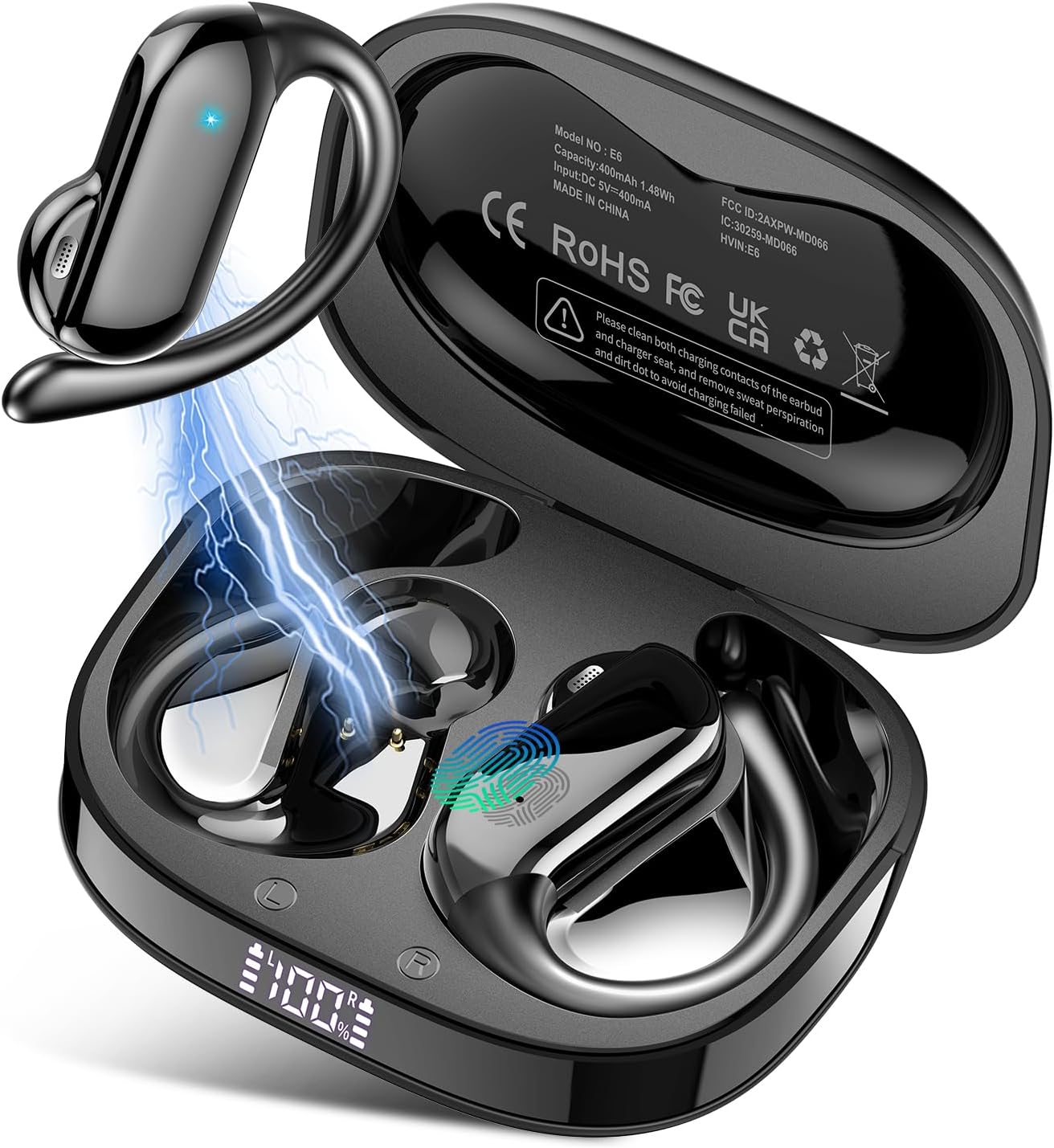

3.2 Kontrol
Earbud dilengkapi kontrol sentuh untuk berbagai fungsi:

- Putar/Jeda: Ketukan tunggal (x1)
- Jilid +: Single tap (x1) on right earbud
- Jilid -: Single tap (x1) on left earbud
- Lagu Berikutnya: Tap and hold for 2 seconds (2S) on right earbud
- Lagu Sebelumnya: Tap and hold for 2 seconds (2S) on left earbud
- Menjawab Panggilan: Ketuk dua kali (x2)
- Tutup/Tolak Panggilan: Tap and hold for 2 seconds (2S)
- Asisten Suara: Ketuk tiga kali (x3)
4. Pengaturan
4.1 Mengisi Daya Earbud dan Casing
Before first use, fully charge the earbuds and charging case. The charging case features a digital display to indicate the battery level.
- Place the earbuds into the charging case. Ensure the charging contacts are clean.
- Hubungkan kabel pengisi daya USB-C ke wadah pengisi daya dan sumber daya.
- A full charge provides up to 8 hours of playtime for the earbuds, and the charging case extends total playtime to 32 hours.
- Waktu pengisian daya casing sekitar 1.5 jam.

4.2 Memasangkan dengan Perangkat
The DUSONLAP E6 earbuds utilize Bluetooth 5.4 for quick and stable connections.
- Buka casing pengisi daya. Earbud akan otomatis menyala dan masuk ke mode berpasangan.
- Pada perangkat Anda (ponsel pintar, tablet, laptop), aktifkan Bluetooth.
- Pencarian untuk available Bluetooth devices and select "E6" from the list.
- Setelah terhubung, earbud akan secara otomatis berpasangan dengan perangkat Anda di masa mendatang saat dikeluarkan dari wadahnya.


5. Petunjuk Pengoperasian
5.1 Mengenakan Earbud
The E6 earbuds feature an ergonomic ear hook design for a secure and comfortable fit.
- Simply remove the headphones from the charging case.
- Hang the headphones on your ear bone for a perfect fit.
- Balikkan earphone dan selipkan ke belakang telinga.
- Adjust the ear hook, wear and pull down the ear hook for a secure fit.


5.2 Manajemen Panggilan
The earbuds feature ENC (Environmental Noise Cancellation) microphone technology for clear calls.
- Menjawab Panggilan: Double tap (x2) on either earbud.
- Tutup/Tolak Panggilan: Tap and hold for 2 seconds (2S) on either earbud.
6. Pemeliharaan
To ensure the longevity and optimal performance of your DUSONLAP E6 earbuds, follow these maintenance guidelines:
- Pembersihan: Regularly wipe the earbuds and charging case with a soft, dry cloth. Ensure the charging contacts on both the earbuds and the case are free from dust, sweat, or debris to prevent charging issues.
- Tahan Air: The earbuds are IPX7 waterproof, meaning they can withstand sweat, rain, and splashes. However, they are not designed for swimming or prolonged submersion in water. Always dry the earbuds completely before placing them back in the charging case.
- Penyimpanan: Store the earbuds in their charging case when not in use to protect them from damage and keep them charged. Avoid exposing them to extreme temperatures or direct sunlight.
- Pengisian daya: Use the provided USB-C cable for charging. Avoid using damaged cables or chargers.


7. Penyelesaian masalah
If you encounter issues with your DUSONLAP E6 earbuds, refer to the following common solutions:
| Masalah | Kemungkinan Penyebab | Larutan |
|---|---|---|
| Earbud tidak dapat dipasangkan | Bluetooth dimatikan di perangkat, earbud tidak dalam mode pemasangan, gangguan. | Ensure Bluetooth is enabled on your device. Place earbuds in case, close, then open to re-enter pairing mode. Move closer to your device. |
| Tidak ada suara dari satu earbud | Low battery, earbud not connected, balance settings. | Charge both earbuds fully. Re-pair the earbuds. Check audio balance settings on your device. |
| Masalah pengisian daya | Dirty charging contacts, faulty cable/charger. | Bersihkan kontak pengisian daya pada earbud dan casing. Coba kabel USB-C dan adaptor daya yang berbeda. |
| Volume rendah | Device volume low, earbud placement. | Increase volume on both your device and the earbuds. Adjust earbud placement for optimal sound. |
| Koneksi terputus-putus | Distance from device, interference. | Reduce distance between earbuds and device. Avoid environments with strong Wi-Fi or other Bluetooth signals. |
8. Spesifikasi
| Fitur | Detil |
|---|---|
| Nama Model | E6 |
| Teknologi Konektivitas | Nirkabel |
| Teknologi Komunikasi Nirkabel | Bahasa Indonesia: Bluetooth |
| Versi Bluetooth | 5.4 |
| Penempatan Telinga | Over Ear (Open Ear Design) |
| Jenis Kontrol | Kontrol Sentuh |
| Tingkat Tahan Air | Tingkat IPX7 |
| Daya Tahan Baterai (Earbud) | Hingga 8 jam (sekali pengisian daya) |
| Total Waktu Bermain (dengan Casing Pengisi Daya) | Hingga 32 jam |
| Waktu Pengisian Daya | Approx. 1.5 hours for case |
| Unit Pengemudi | ukuran 14mm |
| Kontrol Kebisingan | Passive Noise Cancellation (ENC for calls) |
| Berat Barang | 4.2 ons |
| Pabrikan | DUSONLAP |
9. Garansi dan Dukungan
DUSONLAP provides a two-year warranty for the E6 Open Ear Earbuds, covering manufacturing defects from the date of purchase. For any product-related inquiries, technical assistance, or warranty claims, please contact DUSONLAP customer service. We aim to provide 24-hour customer service to address your needs promptly.
Harap simpan bukti pembelian Anda untuk validasi garansi.


