1. Petunjuk Keselamatan Penting
Harap baca semua petunjuk dengan saksama sebelum menggunakan alat ini. Simpan manual ini untuk referensi di kemudian hari.
- Pastikan voltagNilai yang tertera pada label peringkat sesuai dengan tegangan listrik utama Anda.tage.
- Jangan merendam kipas, steker, atau kabel ke dalam air atau cairan lainnya.
- Unplug the fan from the outlet when not in use, before cleaning, or before moving.
- Do not operate the fan with a damaged cord or plug. Contact authorized service personnel for repair.
- Jauhkan jari dan benda lain dari bilah kipas dan celahnya.
- Do not use the fan near windows, in bathrooms, or in wet environments.
- Peralatan ini tidak ditujukan untuk digunakan oleh orang (termasuk anak-anak) dengan keterbatasan fisik, sensorik, atau mental, atau kurang pengalaman dan pengetahuan, kecuali mereka telah diberi pengawasan atau petunjuk mengenai penggunaan peralatan oleh orang yang bertanggung jawab atas keselamatan mereka.
- Anak-anak harus diawasi untuk memastikan mereka tidak bermain-main dengan peralatan tersebut.
2. Produk Lebihview
The Mistral MFD4389DRW is a 43-inch DC Turbo Tower Fan designed for efficient air circulation. It features a DC brushless motor, 12 speed settings, and multiple operating modes. Control options include a full touch screen, remote control, and Wi-Fi with online voice control capabilities. The fan also offers a unique height conversion feature and 60-degree left-right oscillation.

Gambar 2.1: Depan view of the Mistral MFD4389DRW DC Turbo Tower Fan, showcasing its sleek design and touch control panel.

Gambar 2.2: Sisi view of the Mistral MFD4389DRW DC Turbo Tower Fan, highlighting its slim profile.

Gambar 2.3: Kembali view of the Mistral MFD4389DRW DC Turbo Tower Fan, showing the air intake grille.
3. Isi Paket
Verifikasi bahwa semua komponen ada dalam kemasan:
- Mistral MFD4389DRW DC Turbo Tower Fan Unit
- Kontrol Jarak Jauh
- User Manual (dokumen ini)
- Base components (if not pre-assembled)
- Height extension component (for convertible height models)
4. Perakitan
The Mistral MFD4389DRW fan features simple assembly. Typically, this involves attaching the base to the main fan unit. For models with height conversion, an additional extension piece may need to be secured.
- Keluarkan semua komponen dari kemasannya dengan hati-hati.
- Letakkan unit kipas utama dalam posisi terbalik di atas permukaan yang lembut dan rata untuk menghindari goresan.
- Align the base with the bottom of the fan unit. Ensure the power cord passes through the designated opening in the base.
- Secure the base to the fan unit using the provided screws (if applicable).
- For height conversion, insert the extension component between the base and the main unit, ensuring it clicks securely into place or is fastened as per instructions.
- Place the fan upright on a stable, level surface.
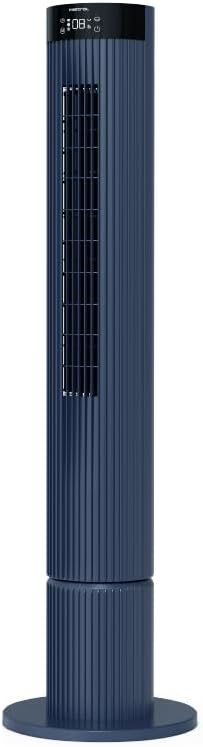
Figure 4.1: The fan demonstrating its convertible height feature, allowing adjustment between two different heights.
5. Pengaturan dan Penggunaan Awal
After assembly, position the fan in your desired location. Ensure it is on a stable, flat surface and away from curtains or objects that could obstruct airflow.
- Plug the power cord into a suitable electrical outlet (220-240V~, 50-60Hz).
- The fan will enter standby mode. The touch screen display may illuminate briefly.
- To power on, touch the power icon on the control panel or press the power button on the remote control.
6. Petunjuk Pengoperasian
The fan can be operated via the full touch screen control panel on the unit or the included remote control.
6.1 Fungsi Panel Kontrol
The touch screen control panel provides access to all fan functions:
- Tombol Daya: Menghidupkan atau mematikan kipas.
- Penyesuaian Kecepatan: Berganti-ganti antara 12 kecepatan kipas.
- Pemilihan Mode: Switches between Turbo, One-key Cycle, and Baby modes.
- Osilasi: Activates or deactivates 60-degree left-right oscillation.
- Pengatur waktu: Sets the pre-set On/Off timer for up to 12 hours.
- Indikator Wi-Fi: Menampilkan status koneksi Wi-Fi.
6.2 Kontrol Jarak Jauh
The remote control duplicates all functions available on the touch screen panel for convenient operation from a distance.
- Pastikan pengendali jarak jauh memiliki baterai yang berfungsi.
- Point the remote control towards the fan's control panel for optimal signal reception.
Mode Pengoperasian 6.3
- Mode Turbo: Memberikan aliran udara maksimal untuk pendinginan cepat.
- One-key Cycle Mode: Automatically cycles through different fan speeds to simulate natural breeze.
- Mode Bayi: Operates at a gentle, quiet speed suitable for nurseries or light sleeping.
7. Wi-Fi and Online Voice Control
The Mistral MFD4389DRW fan can be connected to your home Wi-Fi network for smart control via a mobile application and online voice commands.
Koneksi Wi-Fi 7.1
- Download the official Mistral smart home application from your device's app store.
- Daftar atau masuk ke akun Anda dalam aplikasi.
- Pastikan perangkat seluler Anda terhubung ke jaringan Wi-Fi 2.4GHz.
- Follow the in-app instructions to add a new device. This typically involves putting the fan into pairing mode (refer to the app or fan display for specific instructions, often by holding a Wi-Fi button).
- Once connected, the Wi-Fi indicator on the fan's control panel will illuminate steadily.
7.2 Online Voice Control
After successful Wi-Fi connection, you can link your fan to compatible smart home voice assistants (e.g., Google Assistant, Amazon Alexa) through the Mistral app settings.
- Open the Mistral app and navigate to the 'Integrations' or 'Voice Control' section.
- Select your preferred voice assistant and follow the prompts to link your Mistral account.
- Setelah terhubung, Anda dapat menggunakan perintah suara seperti:
- "Turn on the fan."
- "Set fan speed to 5."
- "Turn off oscillation."
- "Change fan mode to Baby."
8. Pemeliharaan
Pembersihan rutin membantu menjaga kinerja kipas dan memperpanjang masa pakainya.
8.1 Pembersihan
- Selalu cabut kipas dari stopkontak sebelum membersihkan.
- Gunakan yang lembut, damp kain untuk membersihkan permukaan luar kipas. Jangan gunakan pembersih atau pelarut abrasif.
- Gunakan penyedot debu dengan sikat untuk membersihkan debu dari kisi-kisi pemasukan dan pembuangan udara.
- Pastikan kipas benar-benar kering sebelum mencolokkannya kembali dan mengoperasikannya.
8.2 Penyimpanan
If storing the fan for an extended period, unplug it, clean it thoroughly, and store it in its original packaging or a dust-free environment.
9. Penyelesaian masalah
Jika Anda mengalami masalah dengan kipas angin Anda, lihat masalah umum dan solusi berikut:
| Masalah | Kemungkinan Penyebab | Larutan |
|---|---|---|
| Kipas tidak menyala. | Tidak ada catu daya. | Periksa apakah kabel daya telah terpasang dengan benar ke stopkontak yang berfungsi. |
| Aliran udara lemah. | Saluran masuk/keluar udara tersumbat; Kecepatan kipas terlalu rendah. | Clean grilles to remove dust. Increase fan speed. |
| Kipas mengeluarkan suara yang tidak biasa. | Obstruction; Loose parts. | Unplug and check for any foreign objects. Ensure base is securely attached. |
| Kontrol jarak jauh tidak berfungsi. | Baterai habis; Halangan. | Ganti baterai remote control. Pastikan tidak ada benda yang menghalangi jalur sinyal. |
| Koneksi Wi-Fi gagal. | Incorrect Wi-Fi password; Router issues; Fan too far from router. | Verify Wi-Fi password. Ensure fan is within range of a 2.4GHz Wi-Fi network. Restart router and fan. |
Jika masalah berlanjut setelah mencoba solusi ini, silakan hubungi dukungan pelanggan.
10. Spesifikasi
| Fitur | Spesifikasi |
|---|---|
| Model | MFD4389DRW |
| Jil.tage | 220-240V~, 50-60Hz 1.3A |
| Apatage | 40W |
| Volume Udara | 29.54 m³ / menit |
| Aliran Udara Maksimal | 4.26 m/detik |
| Noise Level (Lowest Speed) | 33.2dB |
| Noise Level (Highest Speed) | 68.3dB |
| Dimensi Produk (P*L*T) | 168 * 300 * 900 OR 1104 mm |
| Berat Bersih | 4.46 KG |
| Tanda Keamanan | Nomor telepon 250467-11 |
| Fitur Khusus | Remote Controlled, Timer, Wi-Fi Enabled |
| Jumlah Kecepatan | 12 |
11. Garansi dan Dukungan
This Mistral MFD4389DRW DC Turbo Tower Fan comes with a comprehensive warranty:
- Garansi Umum: 1 Tahun sejak tanggal pembelian.
- Garansi Motor: An additional 3 Years for the motor only, totaling 4 years for the motor.
For warranty claims, technical support, or service inquiries, please contact your local Mistral authorized service center or refer to the contact information provided on the official Mistral weblokasi.


