1. Pendahuluan
This manual provides detailed instructions for the Bikevee Wireless Cycling GPS Computer, a device designed to track and display various cycling data. It features a 2.4-inch LCD display with auto backlight, IPX7 waterproofing, and multi-satellite GPS tracking for accurate data collection.
1.1 Fitur Utama
- Daya Tahan Baterai Lebih Lama: Equipped with a 650mAh rechargeable battery, providing up to 28 hours of continuous use.
- Precision GPS Tracking: Utilizes 5-satellite systems (GPS, BDS, GLONASS, Galileo, QZSS) for stable and accurate signal reception.
- Tahan lama dan tahan air: IPX7 waterproof rating ensures resistance to rain and splashes.
- Hapus Tampilan: 2.4-inch LCD screen with automatic backlight for visibility in various lighting conditions.
- Data Komprehensif: Tracks speed (MPH/KM/H), distance, time, temperature, altitude, gradient, and more.
1.2 Apa yang ada di dalam kotak
Verifikasi bahwa semua komponen ada dalam paket:
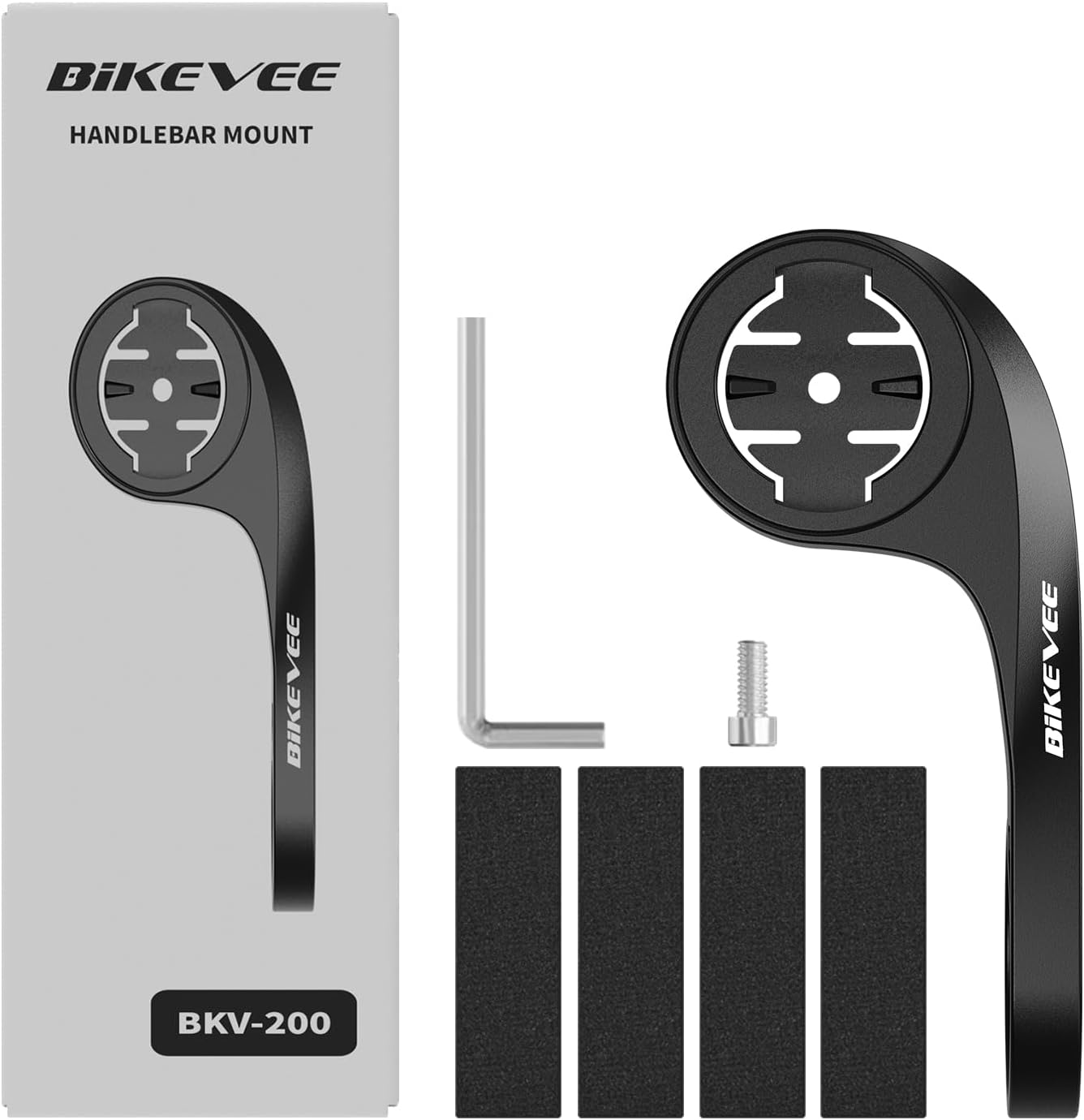
Figure 1.1: Package Contents. Includes Bike Computer, Charging Cable, Rubber Rings, Mount, Rubber Pad, and User Manual.
- Bikevee GPS Cycling Computer
- Dudukan Sepeda Standar
- Out Front Mount
- Bantalan Karet
- Kabel Pengisi Daya (Tipe-C)
- Cincin Karet untuk Pemasangan Dudukan
- Panduan Pengguna
2. Pengaturan dan Instalasi
2.1 Mengisi Daya Perangkat
Before first use, fully charge the Bikevee GPS Computer. Connect the provided Type-C charging cable to the device's charging port and a USB power source. The battery indicator on the screen will show charging status.
2.2 Memasang Perangkat
The Bikevee GPS Computer comes with both a standard bike mount and an out front mount. Choose the mount that best suits your preference and bicycle setup.
2.2.1 Standard Bike Mount Installation
- Tempelkan bantalan karet pada stang atau batang sepeda Anda.
- Posisikan dudukan sepeda standar di atas bantalan karet.
- Secure the mount using the provided rubber rings, wrapping them around the handlebar/stem and hooking them onto the mount.
- Align the Bikevee GPS Computer with the mount's grooves and twist clockwise until it locks into place.
2.2.2 Out Front Mount Installation

Figure 2.1: Bikevee Out Front Mount.
- Place the rubber pad around your bicycle's handlebar where you intend to install the mount.
- Position the out front mount over the rubber pad.
- Use the provided Allen key to tighten the screw on the mount's clamp around the handlebar until it is secure.
- Align the Bikevee GPS Computer with the mount's grooves and twist clockwise until it locks into place.
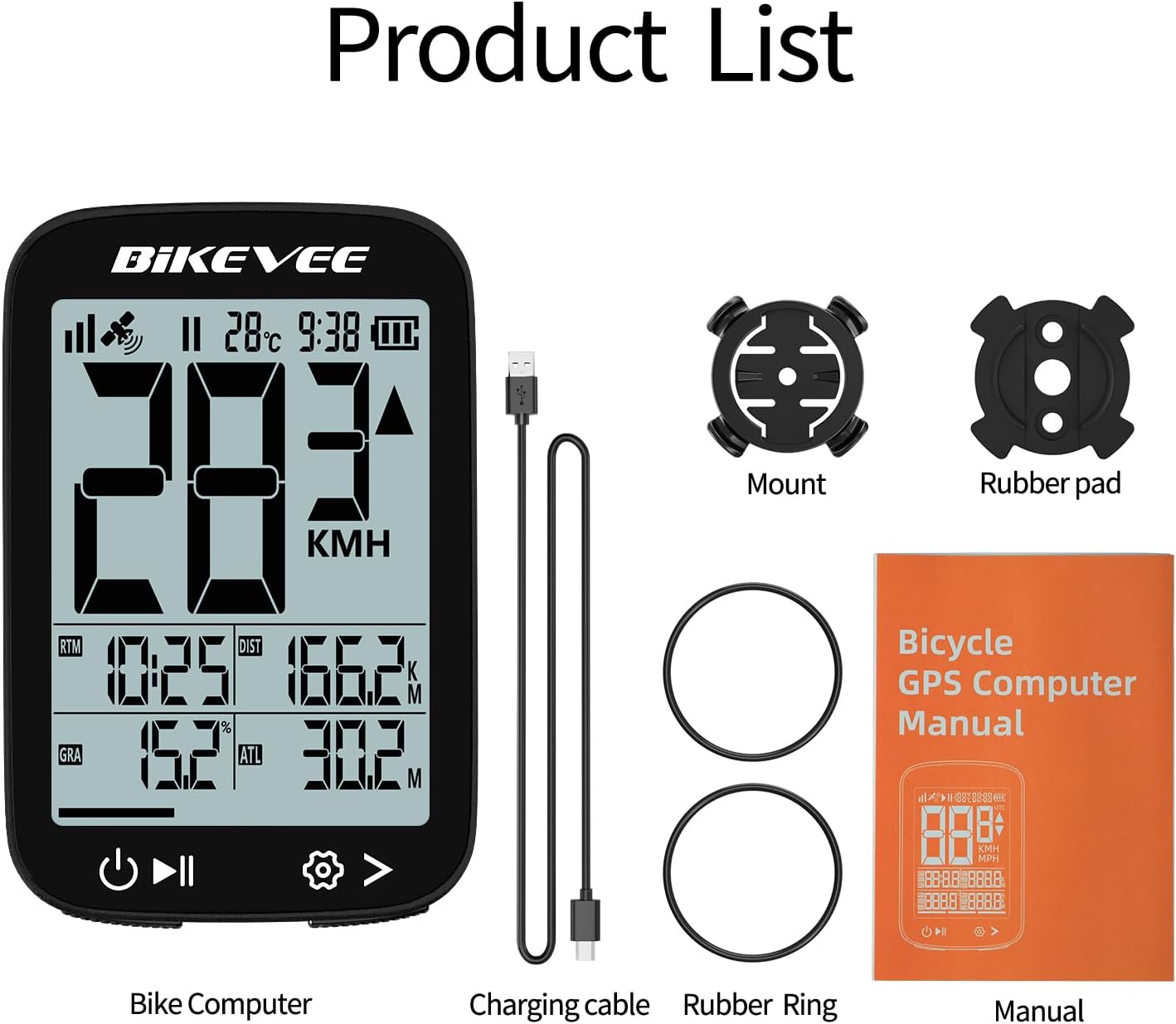
Figure 2.2: Handlebar Mount Components.
2.3 Pengaktifan dan Pengaturan Awal
- Nyalakan: Press and hold the power button (usually located at the bottom left) until the screen illuminates.
- Pemilihan Unit: Upon first power-on or after a reset, you may be prompted to select your preferred unit of measurement (MPH or KM/H). Use the navigation buttons to select and confirm.
- Akuisisi GPS: Take the device outdoors to an open area to allow it to acquire GPS satellite signals. This may take a few moments. A stable GPS signal icon will appear once connected.
3. Petunjuk Pengoperasian
3.1 Operasi Dasar
- Daya Hidup/Mati: Tekan dan tahan tombol kiri untuk menghidupkan atau mematikan.
- Mulai/Jeda/Hentikan Perjalanan: Press the middle button to start recording a ride. Press again to pause. Press and hold to stop and save the ride data.
- Pergantian Halaman: Use the right button to cycle through different data display pages.
- Lampu latar: The device features an automatic backlight that adjusts based on ambient light conditions.
3.2 Data Display and Interpretation
The Bikevee GPS Computer displays up to 14 types of cycling data, providing comprehensive insights into your ride.
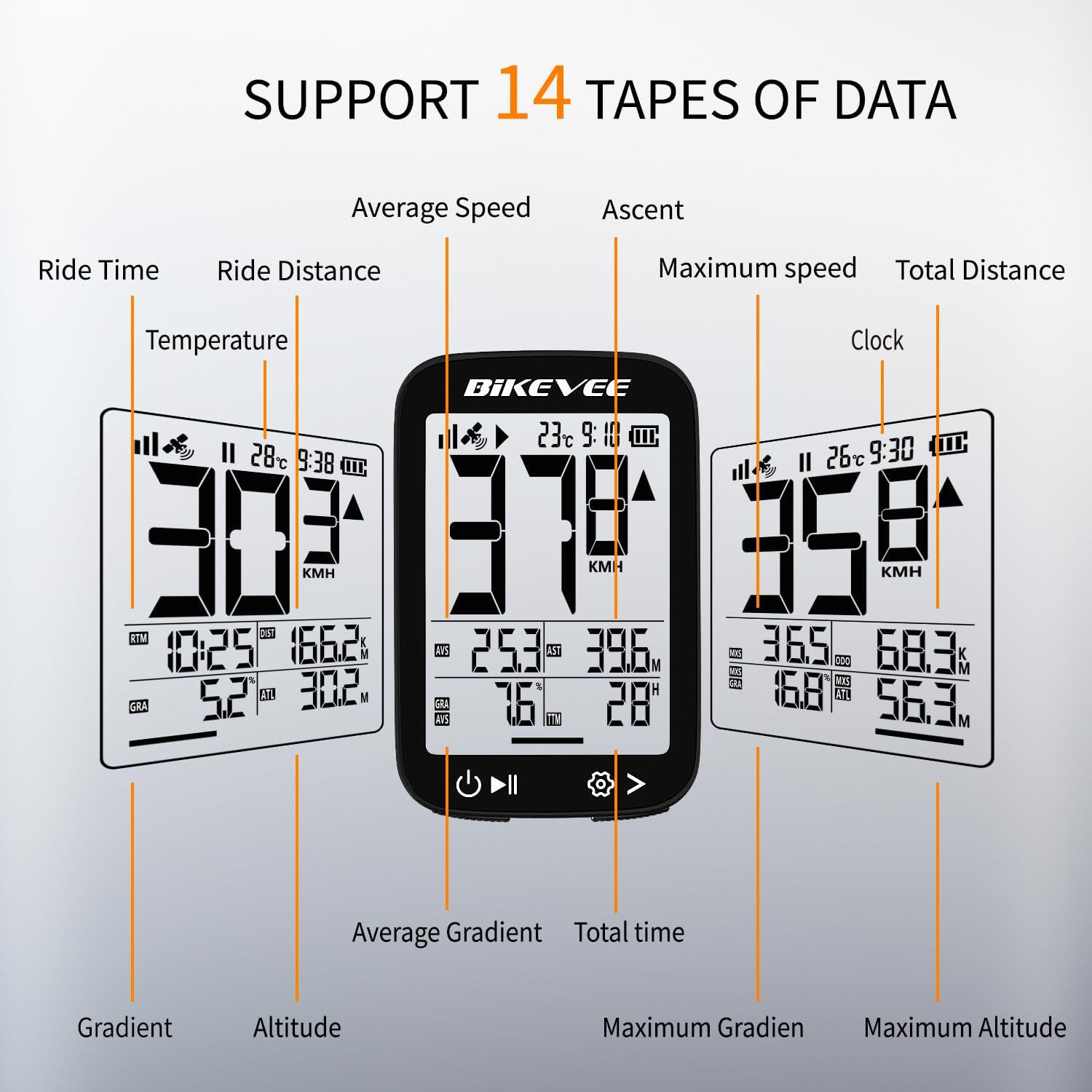
Figure 3.1: Supported Data Types Display.
- Kecepatan saat ini: Displays your real-time speed (MPH or KM/H).
- Kecepatan rata-rata: The average speed for the current ride.
- Kecepatan Maksimum: The highest speed recorded during the current ride.
- Waktu Berkendara: Duration of the current active ride.
- Ride Distance: Jarak yang ditempuh selama perjalanan saat ini.
- Jarak Total (Odometer): Cumulative distance recorded by the device.
- Suhu: Suhu sekitar.
- Jam: Waktu saat ini.
- Pendakian: Total elevation gained during the ride.
- Gradien: Current incline or decline percentage.
- Ketinggian: Current elevation above sea level.

Figure 3.2: Display Icons and Their Meanings.
- Sinyal Satelit: Menunjukkan kekuatan sinyal GPS.
- IPX7: Confirms waterproof rating.
- Tingkat Baterai: Menunjukkan sisa daya baterai.
- Lampu Latar Otomatis: Indicates auto backlight feature is active.
- Ketik-C: Denotes the charging port type.
- Perbandingan Kecepatan: Arrow indicates if current speed is higher or lower than average speed.
4. Pemeliharaan dan Perawatan
4.1 Membersihkan Perangkat
Untuk menjaga performa dan tampilan optimal, bersihkan perangkat secara teratur:
- Bersihkan layar dan badan dengan kain lembut dan kering.amp kain.
- Avoid using abrasive cleaners, solvents, or chemical sprays, as these can damage the device's surface or internal components.
- Ensure the charging port cover is securely closed to prevent dust and water ingress.
4.2 Tahan Air (IPX7)

Figure 4.1: IPX7 Waterproof Feature.
The Bikevee GPS Computer has an IPX7 waterproof rating, meaning it is protected against temporary immersion in water (up to 1 meter for 30 minutes). However, it is important to note:
- Jangan merendam perangkat di dalam air dalam waktu lama.
- Hindari pancaran air bertekanan tinggi.
- Ensure the charging port cover is sealed before exposure to water.
4.3 Perawatan dan Penyimpanan Baterai
- Simpan perangkat di tempat yang sejuk dan kering saat tidak digunakan.
- Hindari memaparkan perangkat ke suhu ekstrem (panas atau dingin) dalam waktu yang lama.
- Untuk penyimpanan jangka panjang, isi daya baterai hingga sekitar 50% untuk menjaga kesehatan baterai.
5. Penyelesaian masalah
If you encounter issues with your Bikevee GPS Computer, refer to the following common problems and solutions:
| Masalah | Kemungkinan Penyebab | Larutan |
|---|---|---|
| Perangkat tidak menyala. | Baterai lemah. | Isi daya perangkat sepenuhnya menggunakan kabel Tipe-C yang disediakan. |
| No GPS signal or inaccurate readings. | Terhambat view of sky; initial signal acquisition. | Move to an open outdoor area. Wait a few minutes for signal acquisition. Avoid dense forests or tunnels. |
| Tampilan redup atau tidak terbaca. | Auto backlight setting; low battery. | Ensure sufficient battery charge. The backlight adjusts automatically; try moving to a different lighting condition. |
| Perangkat membeku atau tidak responsif. | Gangguan perangkat lunak. | Lakukan reset lunak dengan menekan dan menahan tombol daya selama 10-15 detik hingga perangkat memulai ulang. |
6. Spesifikasi
Detailed technical specifications for the Bikevee Wireless Cycling GPS Computer:

Figure 6.1: Device Dimensions and Weight.
- Model: Bikevee Cycling GPS Computer
- Menampilkan: 2.4-inch LCD, Automatic Backlight
- Baterai: 650mAh Rechargeable Lithium-ion
- Daya Tahan Baterai: Hingga 28 jam (penggunaan terus-menerus)
- Sistem GPS: GPS, BDS, GLONASS, Galileo, QZSS (5-satellite tracking)
- Peringkat Tahan Air: Tingkat IPX7
- Ukuran: Approximately 70mm (Height) x 45mm (Width) / 2.76in x 1.77in
- Berat: Approximately 50g / 0.11lb
- Port Pengisian Daya: Type-C USB
- Data Types Supported: 14 types (e.g., Speed, Distance, Time, Temperature, Altitude, Gradient)
7. Informasi Garansi
The Bikevee Wireless Cycling GPS Computer is covered by a limited manufacturer's warranty. This warranty typically covers defects in materials and workmanship under normal use. Please retain your proof of purchase for warranty claims.
For specific warranty terms and conditions, including duration and coverage details, please refer to the warranty card included with your product or contact Bikevee customer support directly.
8. Dukungan Pelanggan
If you have any questions, require technical assistance, or need to report an issue with your Bikevee Wireless Cycling GPS Computer, please contact our customer support team.
- Dukungan online: Visit the official Bikevee websitus untuk FAQ, panduan pemecahan masalah, dan formulir kontak.
- Dukungan Email: Lihat kemasan produk Anda atau petunjuk resmi websitus untuk alamat email dukungan pelanggan.
When contacting support, please be prepared to provide your product model number (Bikevee Cycling GPS Computer) and a detailed description of the issue.


