1. Pendahuluan
This manual provides detailed instructions for the installation, operation, and maintenance of your CAMECHO 4G+64G Car Stereo. This head unit is specifically designed for Ford Fusion models manufactured between 2013 and 2016, offering advanced features such as Wireless CarPlay, Android Auto, GPS navigation, Bluetooth connectivity, and a high-resolution Incell touchscreen.
Please read this manual thoroughly before installation and use to ensure proper functionality and to maximize your driving experience.

Image: The CAMECHO car stereo seamlessly integrated into a Ford Fusion dashboard, displaying a navigation map. Below, two images illustrate the dashboard appearance before installation, indicating compatibility for specific Ford Fusion models (2013-2016).
2. Isi Paket
Pastikan semua komponen yang tercantum di bawah ini termasuk dalam paket Anda. Jika ada barang yang hilang atau rusak, silakan hubungi layanan pelanggan.
- 1 x Head Unit Android
- 1 x Kamera Mundur AHD
- 1 x Mikrofon Eksternal
- 1 x Protocol box (Canbus)
- 1 x Antena GPS
- 1 x Antena Radio
- 1 x Kabel Daya
- Kabel 1 x RCA
- 1 x Kabel Input Kamera Belakang
- 2 x Kabel USB
- 1 x Kabel USB Asli
- 1 x Accessories (mounting brackets, screws)
- 1 x Alat Instalasi
- 1 x Buku Petunjuk
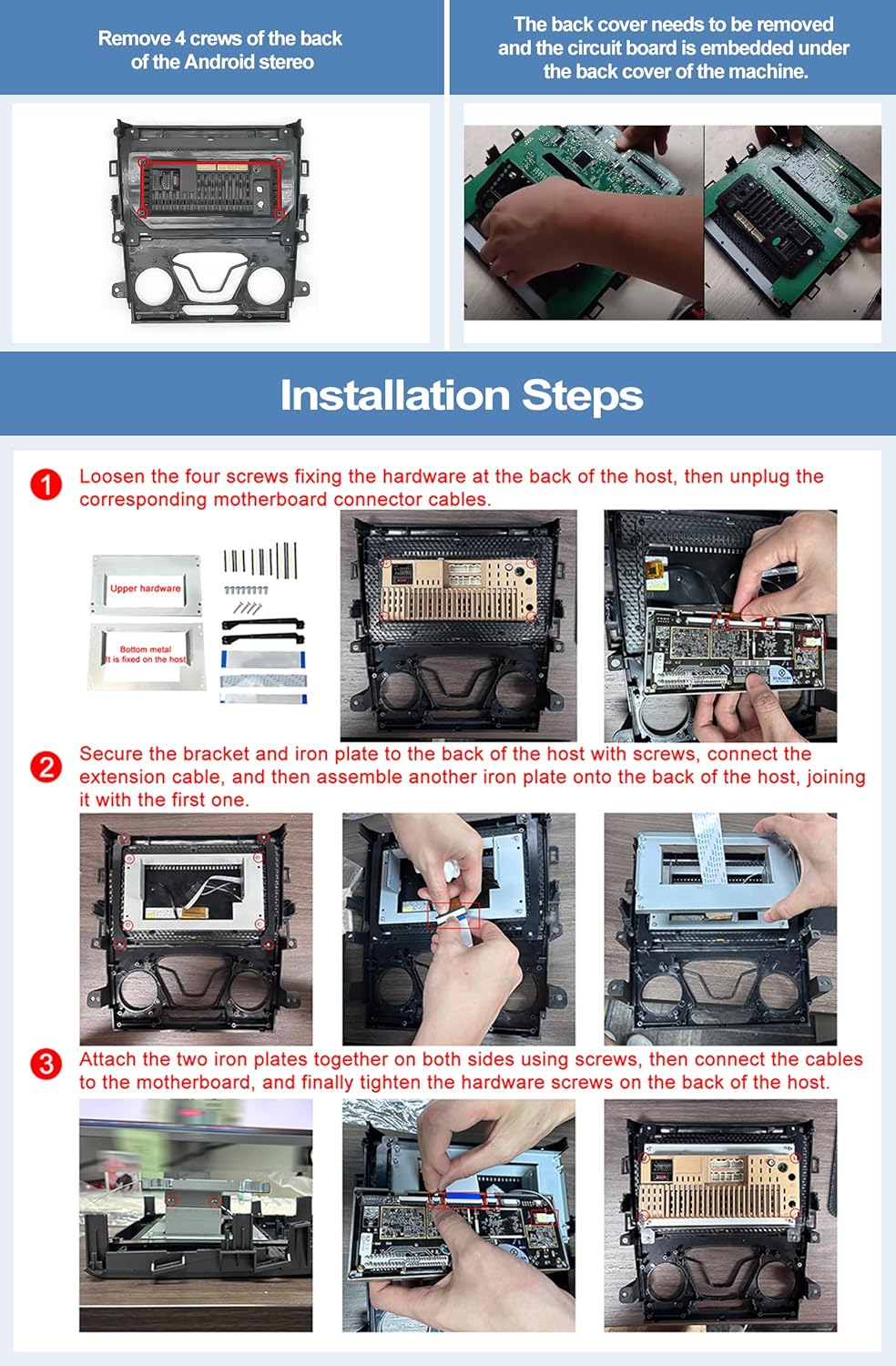
Image: A visual representation of all items included in the package, including the main head unit, AHD rear camera, various cables (power, RCA, USB, GPS, radio), external microphone, Canbus box, installation tools, and accessories.
3. Fitur Utama
3.1. Android 15 System & High-Resolution Display
The head unit operates on the Android 15 system, providing a smooth and responsive user experience. It features a 9-inch Incell touchscreen with a 1280*720 high-resolution display, offering clear visuals and quick touch response.

Image: Details on the Android 15 operating system, 4GB RAM and 64GB internal storage, and the Incell touchscreen's specifications including its 1280x720 resolution and light transmittance.
3.2. CarPlay Nirkabel & Android Auto
Enjoy seamless integration with your smartphone via wireless CarPlay and Android Auto. This feature allows for voice control (Google Assistant, Siri), access to phone calls, messages, music, and navigation apps directly from the head unit's screen, enhancing driving safety and convenience.

Image: Illustration of the wireless connectivity for CarPlay, Android Auto, and Mirror Link, demonstrating how a smartphone can interact with the car stereo.
3.3. Bluetooth 5.0 & Radio FM/RDS
The built-in Bluetooth 5.0 module supports hands-free calling and wireless audio streaming from your mobile device. The FM/RDS radio allows you to tune into your favorite stations with clear reception and displays station information where available. Multiple EQ sound effects are available for audio customization.

Gambar: Lebih dariview of the Bluetooth, FM/RDS radio, and equalizer adjustment functions, showing their respective icons and user interfaces.
3.4. Navigasi GPS & Konektivitas WiFi
Equipped with reliable GPS, the head unit supports both online and offline navigation, ensuring you can find your way without relying on your mobile phone's data. Connecting to WiFi enables internet browsing and access to various applications like YouTube and Spotify.

Image: Demonstrates the GPS navigation system with both online and offline map options, alongside the WiFi connectivity feature for accessing various online applications.
3.5. Belakang View Camera Input & Steering Wheel Control
The system supports a rear view camera, automatically displaying the camera feed on the screen when the vehicle is in reverse gear. Original steering wheel controls are supported, allowing you to manage functions like volume, track changes, and calls without taking your hands off the wheel. An external microphone is included for clearer voice communication.

Image: Illustrates the backup camera input displaying a clear rear view on the screen, along with the user interface for configuring steering wheel controls.
3.6. Split Screen & Mirror Link
The split-screen function allows two applications to run simultaneously, such as navigation and music playback. Mirror Link functionality supports both Android and iOS smartphones, enabling you to display your phone's screen on the head unit. Android devices support two-way operation, while iOS supports one-way display.
4. Panduan Instalasi
Pemasangan oleh profesional sangat disarankan. Pastikan daya kendaraan telah dimatikan sebelum memulai pemasangan.
4.1. Head Unit Assembly
- Kendurkan keempat sekrup yang mengencangkan perangkat keras di bagian belakang host, lalu cabut kabel konektor motherboard yang sesuai.
- Kencangkan braket dan pelat besi ke bagian belakang unit utama dengan sekrup, sambungkan kabel ekstensi, lalu pasang pelat besi lainnya ke bagian belakang unit utama, sambungkan dengan yang pertama.
- Satukan kedua pelat besi di kedua sisi menggunakan sekrup, kemudian sambungkan kabel ke motherboard, dan terakhir kencangkan sekrup perangkat keras di bagian belakang host.
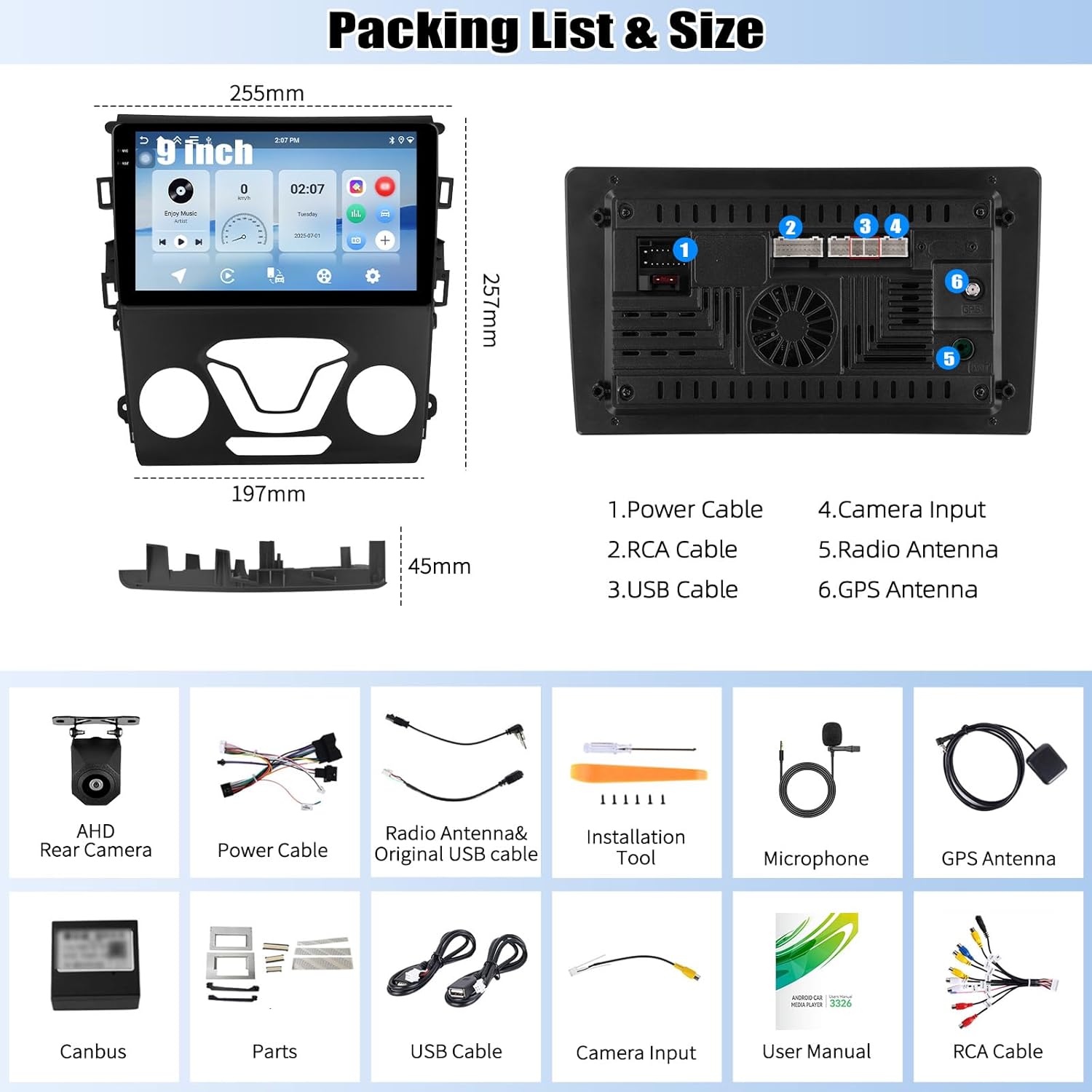
Image: A three-step visual guide demonstrating the assembly of the head unit, including screw removal, bracket attachment, and cable connections.
4.2. Canbus Connection for Steering Wheel Control
The included Canbus protocol box is essential for retaining original steering wheel control functionality. Ensure it is correctly connected.
- Plug the 8-pin cable into the connector of the head unit.
- Confirm that the CANBUS box is connected.
- After connecting, you must set the protocol correctly in the system settings for steering wheel controls to work. Go to Pengaturan > Pengaturan Pabrik (Kata sandi: 1234Bahasa Indonesia: Pengaturan CAN, lalu pilih Raise - Ford - Mondeo - 2013-2018 - Low Configuration untuk kendaraan Anda.

Image: Wiring diagram illustrating the connection of the Canbus box to the head unit and the vehicle's harness, highlighting the 8-pin cable for steering wheel control.
4.3. Pengkabelan Kamera Mundur
Proper wiring of the reversing camera ensures automatic display when reversing. The reversing input must be plugged in even if the camera is not used.
- Connect the positive pole of the camera's power supply to the car's reversing light positive pole.
- Connect the negative pole of the camera's power supply to the car's reversing light negative pole.
- The reversing trigger is controlled by the stereo; therefore, a separate trigger wire connection is not required.
Penting: The white plug (labeled 'WIFI/BT') must be connected to the main device for Bluetooth and WiFi signals to function correctly.

Image: Detailed wiring diagram for the reversing camera, showing connections to the vehicle's reversing light power and the head unit's video input.
5. Panduan Operasi
5.1. Koneksi CarPlay Nirkabel
- Connect the car radio's Bluetooth to your iPhone. The Bluetooth name is typically "Car BT". The Bluetooth PIN is 1234. A successful connection will show "phone audio, music audio" on your phone.
- Klik "SpeedPlay" pada unit utama.
- Allow "Contacts and Favorites Sync" and "Use CarPlay with SpeedPlay" when prompted.
- Wait for the connection to establish. The first connection may take slightly longer.
5.2. Koneksi Otomatis Android Nirkabel
- Klik "SpeedPlay" pada unit utama.
- Connect your Android phone to the rear 4-pin USB port using your original data cable.
- Allow "USB debugging" when prompted on your phone.
- Wait for the connection to establish. The first connection may take slightly longer.

Image: Step-by-step instructions for connecting both Wireless Apple CarPlay and Wireless Android Auto to the car stereo, including necessary phone and head unit actions.
5.3. Navigasi GPS
The head unit comes with pre-installed offline maps. For online navigation and real-time traffic updates, ensure the device is connected to WiFi or a mobile hotspot. You can download additional map data or navigation apps from the Google Play Store.
5.4. Fungsi Bluetooth
To pair your phone, go to the Bluetooth settings on the head unit and search for available devices. Select your phone and enter the PIN (default is 1234). Once paired, you can make/receive calls and stream audio.
5.5. Radio FM/RDS
Access the Radio application from the main menu. Use the scan function to find available stations or manually tune to a frequency. RDS (Radio Data System) will display station information if broadcasted.
5.6. Kontrol pada Setir
After proper Canbus setup (Section 4.2), your original steering wheel buttons should function. If not, you may need to manually map the buttons within the head unit's settings. Navigate to Pengaturan > Kontrol Roda Kemudi and follow the on-screen instructions to assign functions.
6. Penyelesaian masalah
- Kontrol Setir Tidak Berfungsi: Ensure the Canbus box is correctly connected and the protocol settings are configured as described in Section 4.2. Double-check the 8-pin cable connection.
- Kamera Mundur Tidak Menampilkan: Verify that the reversing input cable is securely plugged into the head unit. Check the camera's power connections. If the image is unclear or distorted, adjust the camera resolution settings via Pengaturan > Pengaturan Pabrik (Kata sandi: 1234Bahasa Indonesia: Sumber Video.
- No Bluetooth or WiFi Signal: Confirm that the white plug (WIFI/BT antenna) is securely connected to the main device.
- General Software Issues/Bugs: Ensure the system software is up to date. If persistent issues occur, a factory reset may resolve them (Note: this will erase all user data). Consult customer support for advanced troubleshooting.
- Kualitas Mikrofon Buruk: Use the provided external microphone for improved call clarity. Ensure it is properly connected to the head unit.
7. Spesifikasi
| Fitur | Spesifikasi |
|---|---|
| Nama Model | Stereo Mobil 4G+64G |
| Merek | KAMESHO |
| Sistem Operasi | Android 15 |
| Memori / Penyimpanan | RAM 4GB + ROM 64GB |
| Ukuran Layar | 9 inci |
| Jenis Tampilan | Incell Touchscreen |
| Resolusi | 1280*720 |
| Teknologi Konektivitas | Bluetooth 5.0, WiFi |
| Fitur Khusus | Wireless CarPlay & Android Auto, GPS Navigation, RDS/FM Radio, Rear View Camera Input, Steering Wheel Control, Split Screen, Mirror Link |
| Jenis peta | Seluruh Dunia (Online/Offline) |
| Berat Barang | 2.64 pon |
| Dimensi Produk | 10x1.8x10.1 inci |
| Jenis Pemasangan | Pemasangan Dasbor |
8. Garansi & Dukungan
8.1. Informasi Garansi
This CAMECHO car stereo unit comes with a Garansi 1 Tahun sejak tanggal pembelian, mencakup cacat produksi. Harap simpan bukti pembelian Anda untuk klaim garansi.
8.2. Dukungan Pelanggan
For technical assistance, installation queries, or any other support needs, please contact our customer service team.
E-mail: CAMECHOVIP@126.com

Image: A customer support representative ready to assist, with the support email address prominently displayed for user inquiries.


