Perkenalan
Welcome to the ACwO DwOTS Flow Open-Ear Earbuds user manual. These earbuds are designed to provide a unique open-ear listening experience with X-Fidelity sound, AI-ENC noise reduction for calls, and versatile dual modes for music and gaming. This manual will guide you through the setup, operation, and maintenance of your new earbuds.
Produk Selesaiview
The ACwO DwOTS Flow earbuds feature an open-ear design for comfort and environmental awareness. They come with a compact charging case.

Gambar 1: Depan view of ACwO DwOTS Flow Open-Ear Earbuds.

Gambar 2: Sisi view of ACwO DwOTS Flow Open-Ear Earbuds, showing the ear hook design.

Gambar 3: Kembali view of ACwO DwOTS Flow Open-Ear Earbuds.
Pengaturan
1. Mengisi Daya Earbud dan Casing
Before first use, fully charge the ACwO DwOTS Flow earbuds and their charging case.
- Letakkan earbud ke dalam wadah pengisi daya, pastikan terpasang dengan benar.
- Hubungkan wadah pengisi daya ke sumber daya menggunakan kabel USB yang kompatibel.
- Lampu indikator pada casing akan menunjukkan status pengisian daya.
- Pengisian daya selama 10 menit memberikan waktu putar sekitar 2.5 jam. Pengisian daya penuh menawarkan total waktu putar hingga 50 jam dengan wadah pengisian daya.
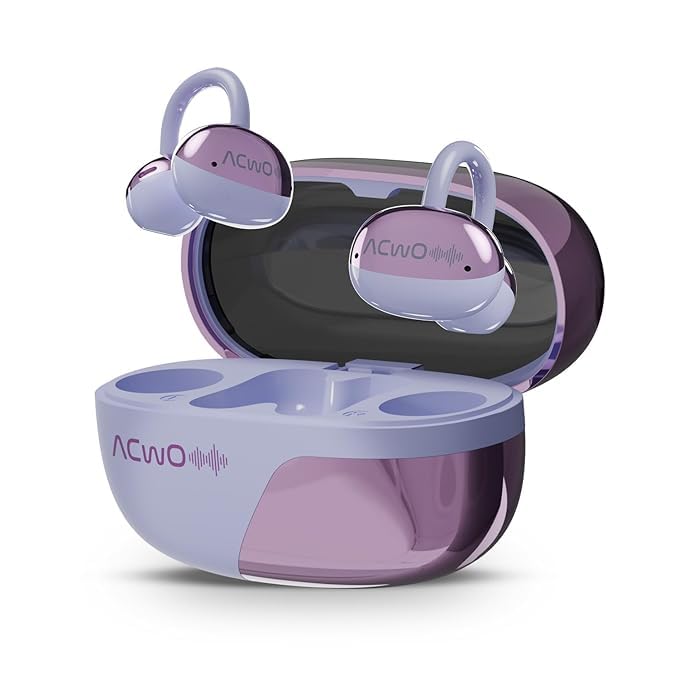
Figure 4: ACwO DwOTS Flow charging case with earbuds inserted.
2. Memasangkan dengan Perangkat
The ACwO DwOTS Flow earbuds use Bluetooth 5.3 for wireless connectivity.
- Buka casing pengisi daya. Earbud akan otomatis masuk ke mode berpasangan.
- Pada perangkat Anda (ponsel pintar, tablet, laptop), aktifkan Bluetooth.
- Pencarian untuk "ACwO DwOTS Flow" in the list of available Bluetooth devices.
- Select "ACwO DwOTS Flow" to connect. Once connected, a voice prompt will confirm successful pairing.
Konektivitas Ganda: These earbuds support connecting to two devices simultaneously. After pairing with the first device, follow the pairing steps for the second device. The earbuds will intelligently switch between devices.

Figure 5: Illustration of ACwO DwOTS Flow connected to two devices simultaneously.
Petunjuk Pengoperasian
Mengenakan Earbud
The open-ear design ensures comfort and allows you to remain aware of your surroundings. Gently place the earbuds over your ears, ensuring a stable and comfortable fit.

Figure 6: ACwO DwOTS Flow earbuds demonstrating comfortable and stable fit.

Figure 7: Diagram illustrating the open-ear listening concept for environmental awareness and balanced audio.
Pemutaran Audio
Enjoy X-Fidelity Acoustics with balanced highs, mids, and deep bass.

Gambar 8: Internal view highlighting the premium dynamic drivers for enhanced sound quality.
Manajemen Panggilan
The integrated AI-ENC (Environmental Noise Cancellation) microphone ensures clear calls by reducing background noise.
- Menjawab/Mengakhiri Panggilan: Sentuh area kontrol sentuh pada salah satu earbud sekali.
- Tolak Panggilan: Tekan dan tahan area kontrol sentuh pada salah satu earbud selama 2 detik.
Music & Gaming Modes
Switch between modes to optimize your audio experience.
- Mode Musik: Provides rich, balanced audio for general listening.
- Mode Permainan: Offers dynamic sound with reduced latency for an immersive gaming experience.
- Beralih Mode: Refer to the product's quick start guide or packaging for specific touch control gestures to switch between Music and Gaming modes.
Environmental Awareness Mode
This mode allows you to hear your surroundings clearly while enjoying audio, enhancing safety in various environments. This is a core feature of the open-ear design.
Pemeliharaan
- Pembersihan: Gunakan kain lembut dan kering untuk membersihkan earbud dan wadah pengisi daya. Hindari penggunaan bahan abrasif atau bahan kimia keras.
- Tahan Air: The earbuds are IPX5 water resistant, meaning they can withstand splashes and sweat. Do not submerge them in water. Ensure they are dry before placing them back in the charging case.
- Penyimpanan: Simpan earbud dalam wadah pengisi dayanya saat tidak digunakan untuk melindunginya dan menjaga dayanya tetap terisi.
Penyelesaian Masalah
| Masalah | Solusi yang mungkin |
|---|---|
| Earbud tidak dapat dipasangkan |
|
| Tidak ada suara atau volume rendah |
|
| Poor call clarity (AI-ENC Mic) |
|
| Earbud tidak mengisi daya |
|
Spesifikasi
| Fitur | Detil |
|---|---|
| Nama Model | DwOTS Flow |
| Merek | ACwo |
| Teknologi Konektivitas | Nirkabel (Bluetooth) |
| Versi Bluetooth | 5.3 |
| Bentuk Lubang Suara | Telinga Terbuka |
| Fitur Pengendalian Kebisingan | AI-ENC Noise Reduction |
| Daya Tahan Baterai | Hingga 50 Jam (dengan casing pengisi daya) |
| Pengisian Cepat | Pengisian daya 10 menit untuk waktu bermain 2.5 jam |
| Tingkat Tahan Air | Tingkat IPX5 |
| Jenis Penggerak Audio | Driver Dinamis |
| Metode Kontrol | Suara (Note: Typically includes touch controls, refer to product packaging for specific gestures.) |
| Perangkat yang Kompatibel | Cellphones, Tablets, Laptops, Gaming Consoles |
| Dimensi Produk | Ukuran 4.5x6x2.8 cm |
| Berat Barang | 150 gram |
| Bahan | Plastik |
| Negara Asal | India |
Garansi dan Dukungan
For warranty information, technical support, or service inquiries, please refer to the warranty card included with your product or visit the official ACwO websitus. Anda juga dapat menghubungi penjual secara langsung untuk mendapatkan bantuan.


