Perkenalan
Thank you for choosing the LogiLink BT0070 BT 6.0 Gaming Headset. This manual provides essential information for the proper setup, operation, and maintenance of your headset. Please read these instructions carefully before using the product to ensure optimal performance and longevity.
The LogiLink BT0070 is a versatile wireless gaming headset designed for clear communication and immersive audio experiences. It features a 360° microphone, comfortable ear pads, an adjustable headband, and a long-lasting battery.
Informasi Keselamatan
- Jangan biarkan headset terkena suhu ekstrem, kelembapan, atau zat korosif.
- Hindari menjatuhkan atau membenturkan headset ke benda keras.
- Jangan mencoba membongkar atau memodifikasi headset. Hal ini akan membatalkan garansi dan dapat menyebabkan kerusakan.
- Jauhkan headset dari air dan cairan lainnya.
- Gunakan hanya tegangan pengisian yang ditentukan.tage dan saat ini.
- Mendengarkan dalam waktu lama dengan volume tinggi dapat menyebabkan kerusakan pendengaran. Sesuaikan volume ke tingkat yang aman.
Isi Paket
Silakan periksa paket untuk item berikut:
- LogiLink BT0070 Gaming Headset
- Kabel Pengisian Daya USB
- Kabel Audio AUX 3.5mm
- User Manual (dokumen ini)
Produk Selesaiview
Familiarize yourself with the components of your LogiLink BT0070 Gaming Headset.

Gambar: Lebihview of the LogiLink BT0070 headset highlighting its adjustable headband, adjustable microphone, soft memory earmuffs, and flexible design for various head shapes.
- Ikat kepala yang dapat disesuaikan: Allows for a customized and comfortable fit.
- Mikrofon yang Dapat Diatur: A 360° noise-isolating microphone for clear voice communication.
- Soft Memory Ear Pads: Dirancang untuk kenyamanan maksimal selama sesi bermain game yang panjang.
- Tombol Kontrol: (Specific button functions will be detailed in the Operating section).
- Port AUX 3.5 mm: Untuk koneksi kabel ke perangkat.
- Port Pengisian Daya: Untuk mengisi ulang baterai internal.
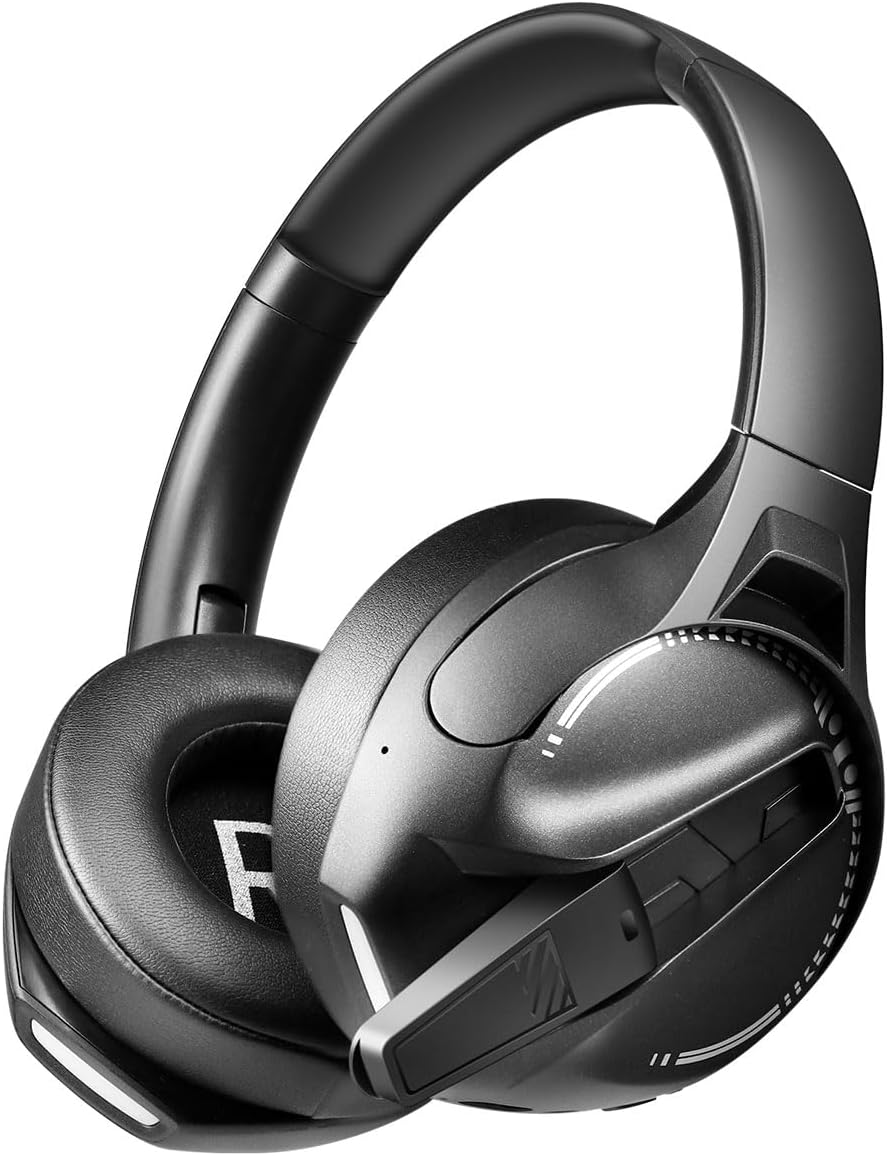
Gambar: Samping view of the LogiLink BT0070 headset, showing the extended microphone arm and ear cup design.

Gambar: Depan view of the LogiLink BT0070 headset, showcasing desain keseluruhannya.
Pengaturan
1. Mengisi Daya Headset
Before first use, fully charge the headset. Connect the USB charging cable to the headset's charging port and the other end to a compatible USB power source (e.g., computer USB port, USB wall adapter).

Gambar: Illustration of power adapter requirements. Use a 3.0-3.0W power adapter. Note that a power adapter is not included with the headset.
- A full charge typically takes approximately [X] hours (specific time not provided, refer to product packaging or LED indicator).
- The LED indicator on the headset will change color or turn off once charging is complete.
- Ensure the power source provides 3.0-3.0W for optimal charging.
2. Menghidupkan/Mematikan
- Untuk menghidupkan: Tekan dan tahan tombol Daya selama sekitar 3 detik hingga indikator LED menyala.
- Untuk mematikan: Tekan dan tahan tombol Daya selama sekitar 5 detik hingga indikator LED mati.
3. Pemasangan Bluetooth
To connect your headset wirelessly to a device:
- Pastikan headset dimatikan.
- Press and hold the Power button for approximately 5-7 seconds until the LED indicator flashes rapidly (usually blue and red), indicating pairing mode.
- Pada perangkat Anda (smartphone, laptop, dll.), aktifkan Bluetooth dan cari perangkat baru.
- Select "LogiLink BT0070" from the list of available devices.
- Once paired, the LED indicator on the headset will typically flash slowly or turn solid blue.
4. Wired Connection (3.5mm AUX)
For a wired connection, use the included 3.5mm AUX audio cable:
- Plug one end of the 3.5mm audio cable into the AUX port on the headset.
- Colokkan ujung lainnya ke jack audio 3.5 mm pada perangkat Anda.
- The headset will operate in passive mode, drawing no power from its battery.
5. Menyesuaikan Kesesuaian
For optimal comfort and sound quality, adjust the headset to fit your head:
- Extend or retract the adjustable headband until the ear cups comfortably cover your ears.
- Ensure the soft memory ear pads create a good seal around your ears.
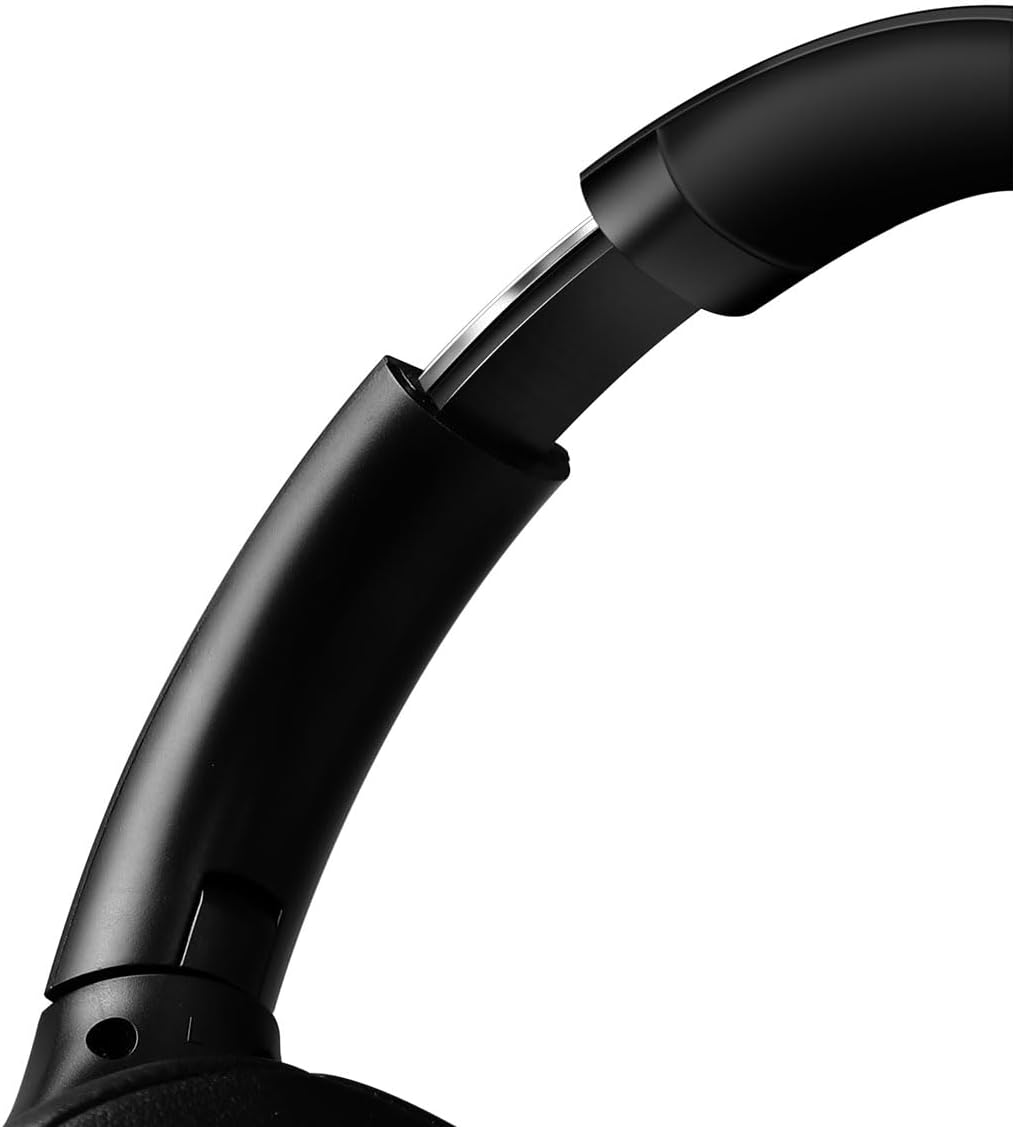
Gambar: Jarak dekat view of the adjustable headband mechanism, demonstrating how to customize the fit.
Mengoperasikan Headset
1. Kontrol Dasar
The headset features intuitive controls, typically located on the ear cups:
- Tombol Daya: Press and hold to power on/off. Short press for [X function, e.g., play/pause, answer call - specifics not provided, common functions listed].
- Volume Naik/Trek Berikutnya: Tekan sebentar untuk menaikkan volume. Tekan lama untuk lagu berikutnya.
- Volume Turun/Trek Sebelumnya: Tekan sebentar untuk mengecilkan volume. Tekan lama untuk memutar lagu sebelumnya.
- Tombol Multifungsi (MFB): (Often combined with Power button) Single press to Play/Pause music or Answer/End calls. Double press to Redial last number.
2. Penggunaan Mikrofon
The integrated 360° noise-isolating microphone is designed for clear communication.
- Menyesuaikan Mikrofon: Posisikan mikrofon dekat dengan mulut Anda untuk pengambilan suara yang optimal.
- Bisukan/Aktifkan suara: (Specific button for mute not provided, common methods listed) Look for a dedicated mute button on the headset or use your device's software controls.
3. Peredam Kebisingan Aktif (ANC)
Headset ini dilengkapi fitur Active Noise Cancellation untuk mengurangi kebisingan sekitar.
- Mengaktifkan ANC: (Specific button for ANC not provided, common methods listed) Look for a dedicated ANC button or a combination press on existing buttons.
- When ANC is active, you may notice a slight change in audio characteristics.

Gambar: Users experiencing immersive audio with the LogiLink BT0070 headset, emphasizing its 3D surround sound capabilities for gaming.
Pemeliharaan
1. Pembersihan
- Bersihkan headset dengan kain lembut, kering, dan bebas serat.
- Jangan gunakan pembersih abrasif, alkohol, atau pelarut kimia.
- Clean the ear pads gently to remove any buildup.
2. Penyimpanan
- Simpan headset di tempat yang sejuk dan kering, jauhkan dari sinar matahari langsung dan suhu ekstrem.
- Jika menyimpan untuk jangka waktu lama, pastikan baterai terisi sebagian (sekitar 50%) untuk menjaga kesehatan baterai.

Gambar: The LogiLink BT0070 headset shown in a folded configuration, suitable for compact storage or transport.
3. Perawatan Baterai
- Hindari mengosongkan baterai sepenuhnya secara sering.
- Isi daya headset secara teratur, meskipun tidak digunakan, untuk menjaga kesehatan baterai.
Penyelesaian Masalah
Jika Anda mengalami masalah dengan headset Anda, lihat masalah dan solusi umum berikut:
| Masalah | Solusi yang mungkin |
|---|---|
| Headset tidak menyala. | Ensure the headset is fully charged. Press and hold the Power button for the required duration. |
| Tidak dapat dipasangkan melalui Bluetooth. | Ensure the headset is in pairing mode (rapidly flashing LED). Turn off and on your device's Bluetooth. Move closer to the device. Clear previous Bluetooth connections on your device. |
| Tidak ada suara atau volume rendah. | Check headset and device volume levels. Ensure the headset is properly connected (Bluetooth or AUX). For Bluetooth, check audio output settings on your device. |
| Mikrofon tidak berfungsi. | Ensure the microphone is not muted. Check microphone input settings on your device. Ensure the microphone is positioned correctly. |
| Kualitas suara buruk. | Ensure the headset is within Bluetooth range. Check for interference from other wireless devices. For wired connection, ensure the 3.5mm cable is fully inserted. |
Spesifikasi
Key technical specifications for the LogiLink BT0070 Gaming Headset:
| Fitur | Detil |
|---|---|
| Model | BT0070 |
| Teknologi Konektivitas | Bluetooth 6.0, AUX 3.5mm |
| Komunikasi Nirkabel | Bahasa Indonesia: Bluetooth |
| Jenis Headset | Di Atas Telinga |
| Diameter Penggerak | 40 mm |
| Impedansi | 32 Ohm |
| Mikropon | 360° Noise-isolating, Omnidirectional |
| Kontrol Kebisingan | Peredam Kebisingan Aktif |
| Daya Tahan Baterai | Hingga 50 jam |
| Warna | Hitam |
| Berat Barang | 500 gram |
| Dimensi Produk | Ukuran 16.8x17.8x7.5 cm |
| Kompatibel dengan | Smartphone & Laptop |
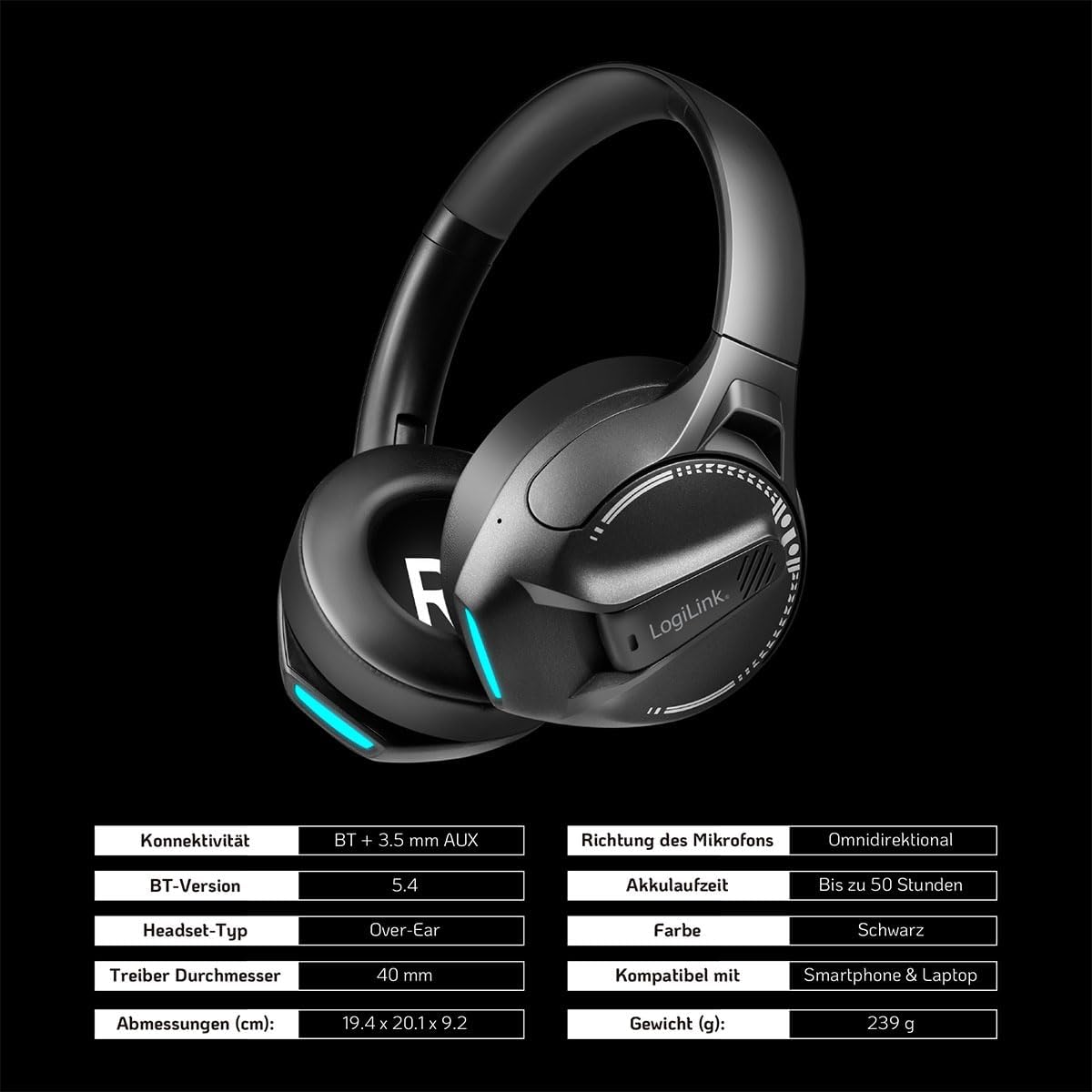
Gambar: Visual representation of key specifications for the LogiLink BT0070 headset, including connectivity, battery life, and dimensions. Note: The image lists Bluetooth version 5.4, while the product title specifies 6.0.
Garansi dan Dukungan
LogiLink products are designed and manufactured to the highest quality standards. For warranty information and technical support, please refer to the warranty card included with your product or visit the official LogiLink weblokasi.
Harap simpan bukti pembelian Anda untuk klaim garansi.


