1. Pendahuluan
This manual provides detailed instructions for the safe and effective operation of your FOXWELL NT630 Plus diagnostic tool and FOXWELL BC521 12V 5A battery charger, tester, trickle charger, and desulfator. Please read this manual thoroughly before use and retain it for future reference.
The FOXWELL BC521 is a versatile 4-in-1 device designed for 12V lead-acid batteries (AGM, GEL, EFB, Flooded). It charges, tests, desulfates, and maintains batteries. The FOXWELL NT630 Plus is a professional diagnostic scanner for ABS and SRS systems, capable of reading and clearing codes, displaying live data, and performing specific tests.
2. Informasi Keselamatan
Always observe the following safety precautions to prevent injury or damage to the devices or vehicle:
- Kenakan pelindung mata dan pakaian pelindung saat bekerja dengan baterai.
- Pastikan ventilasi yang memadai saat mengisi daya baterai untuk mencegah penumpukan gas.
- Do not smoke or allow sparks or flames near batteries.
- Avoid touching battery terminals or cables with bare hands.
- Keep the devices away from water, oil, and extreme temperatures.
- Jangan mencoba membongkar atau memodifikasi perangkat tersebut.
- Refer to your vehicle's service manual for specific safety procedures related to your vehicle.
3. Isi Paket
Verifikasi bahwa semua item ada dalam paket Anda:
- FOXWELL NT630 Plus Diagnostic Tool
- FOXWELL BC521 Battery Charger/Tester
- OBD-II Connection Cable (for NT630 Plus)
- Bateraiamps (Red and Black, for BC521)
- Power Cord (for BC521)
- User Manual (dokumen ini)
4. Produk Lebihview
4.1 FOXWELL BC521 Battery Charger/Tester
The BC521 combines multiple functions for 12V lead-acid batteries. It features an intuitive display and control buttons for selecting modes and viewstatus baterai.

Image: FOXWELL BC521 Battery Charger and Tester with its main menu displayed and battery clamps. This device offers multiple functions including quick charging, standard charging, maintainer mode, battery test, cranking test, and alternator test.
4.2 FOXWELL NT630 Plus Diagnostic Tool
The NT630 Plus is designed for advanced vehicle diagnostics, specifically for Anti-lock Braking System (ABS) and Supplemental Restraint System (SRS) issues. It connects to your vehicle's OBD-II port.

Image: FOXWELL NT630 Plus Diagnostic Tool with its screen displaying diagnostic options, connected to a vehicle's OBD-II port. The device is used for reading and clearing codes, live data, and bidirectional tests.
5. Pengaturan
5.1 Setting up the FOXWELL BC521 Battery Charger/Tester
- Hubungkan ke Baterai: Ensure the vehicle ignition is off. Connect the red positive (+) clamp ke terminal positif baterai dan kabel negatif (-) berwarna hitamamp ke terminal baterai negatif.
- Hubungkan ke Daya: Plug the BC521's power cord into a standard AC outlet (100-240V).
- Inisialisasi Perangkat: The BC521 will power on and perform a self-check. The display will show the current battery status.
5.2 Setting up the FOXWELL NT630 Plus Diagnostic Tool
- Temukan Port OBD-II: Port OBD-II biasanya terletak di bawah dasbor di sisi pengemudi.
- Hubungkan Kabel: Plug the NT630 Plus's OBD-II cable into the vehicle's OBD-II port.
- Nyalakan: The NT630 Plus will power on automatically once connected to the vehicle.
6. Petunjuk Pengoperasian
6.1 Operating the FOXWELL BC521 Battery Charger/Tester
The BC521 offers charging, testing, and maintenance functions. Use the navigation buttons on the device to select desired options.
6.1.1 Mode Pengisian Daya
Select the appropriate charging current (1A, 3A, or 5A) based on your battery's capacity and charging requirements. The 8-stage smart charging process optimizes battery performance and longevity.
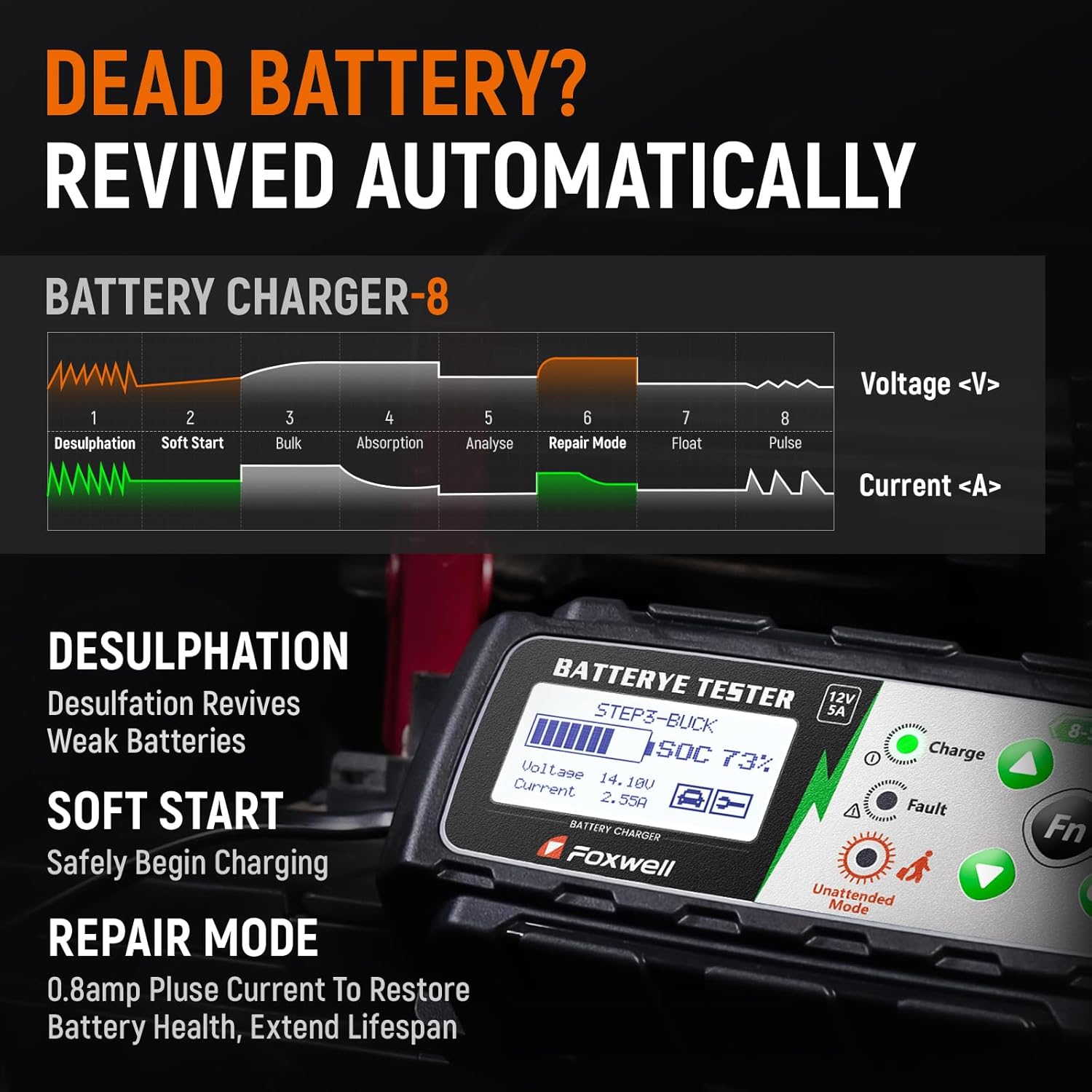
Gambar: Diagram yang menggambarkan angka 8tage smart charging process of the FOXWELL BC521, including Desulfation, Soft Start, Bulk, Absorption, Analyse, Repair Mode, Float, and Pulse stages, showing voltage dan kurva saat ini.
- Desulfasi: Revives weak batteries by breaking down lead sulfate crystals.
- Mulai Lunak: Gradually begins charging to protect the battery.
- Jumlah besar: Charges the battery at maximum current until approximately 80% capacity.
- Penyerapan: Charges at a decreasing current to bring the battery to 100%.
- Menganalisa: Tests the battery's ability to hold a charge.
- Mode Perbaikan: Applies a pulsed current (0.8A) to restore battery health and extend lifespan.
- Mengambang: Maintains the battery at full charge with a constant voltage.
- Detak: Memonitor volume bateraitage and provides a pulse charge when needed to maintain optimal charge.

Image: Comparison display of battery health before and after using the FOXWELL BC521, showing improvements in health percentage, charge, internal resistance, and CCA values.
6.1.2 Pengujian Baterai
The BC521 provides accurate real-time diagnostics for 12V batteries.
- Tes Baterai: Cek voltage, State of Health (SOH), and internal resistance.
- Tes Engkol: Evaluates the battery's ability to start the engine.
- Alternator Test: Assesses the vehicle's charging system performance.
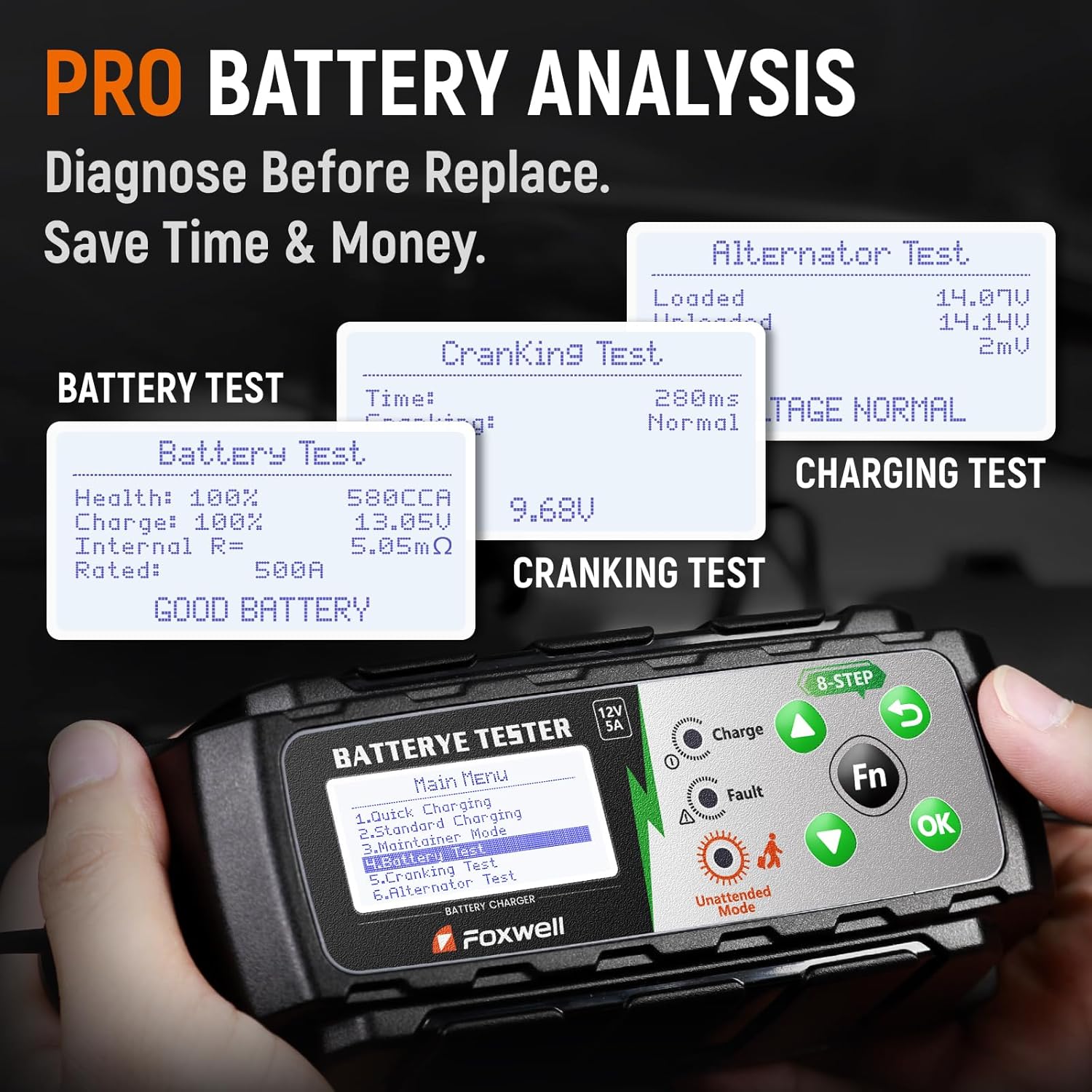
Image: Screenshots from the FOXWELL BC521 showing results for Battery Test (Health, Charge, Internal Resistance, Rated CCA), Cranking Test (Time, Voltage), and Alternator Test (Loaded, Unloaded voltagdan).
6.2 Operating the FOXWELL NT630 Plus Diagnostic Tool
Once connected to the vehicle's OBD-II port, the NT630 Plus will display the main menu. Use the directional buttons and 'OK' button to navigate.
6.2.1 Fungsi Diagnostik Dasar
- Baca Kode: Mengambil Kode Masalah Diagnostik (DTC) dari modul kontrol kendaraan.
- Hapus Kode: Erases DTCs from the vehicle's memory. Ensure the underlying issue is resolved before clearing codes.
- Data Langsung: Displays real-time sensor data from the vehicle, useful for diagnosing intermittent issues.
- Bidirectional Test (for ABS): Allows the tool to send commands to vehicle components to test their functionality (e.g., cycling ABS solenoids).
- S-M-O-G Test: Performs various tests related to emissions monitoring systems.
6.2.2 Diagnostik ABS & SRS
The NT630 Plus specializes in diagnosing issues within the Anti-lock Braking System (ABS) and Supplemental Restraint System (SRS, airbags).

Image: FOXWELL NT630 Plus screen showing a list of common ABS and SRS diagnostic capabilities, including checking wheel speed sensor issues, ABS control module faults, wiring/connection faults, brake fluid levels, sensor malfunction locations, and damaged clock spring checks.
- Wheel Speed Sensor Issues: Identifies faults with individual wheel speed sensors.
- ABS Control Module Fault: Diagnoses problems within the ABS control unit.
- Wiring or Connection Faults: Helps pinpoint electrical issues in the ABS/SRS circuits.
- Low or Contaminated Brake Fluid: Can indicate issues related to brake system health.
- Sensor Malfunction Location: Provides specific location of faulty sensors.
- Damaged Clock Spring Check: Verifies the integrity of the clock spring, crucial for airbag functionality.

Image: FOXWELL NT630 Plus screen displaying real-time graphical data for engine revolutions per minute (RPM) and front right wheel speed, indicating its capability to quickly detect and monitor wheel sensors.
7. Pemeliharaan
- Pembersihan: Bersihkan perangkat dengan kain lembut dan kering. Jangan gunakan pembersih abrasif atau pelarut.
- Penyimpanan: Store the devices in a dry, cool place, away from direct sunlight and extreme temperatures.
- Perawatan Kabel: Periksa kabel secara berkala untuk mengetahui adanya kerusakan. Jangan menekuk atau menjepit kabel secara berlebihan.
- Pembaruan Perangkat Lunak: Check the FOXWELL official website periodically for software updates for the NT630 Plus to ensure optimal performance and compatibility with new vehicle models.
8. Penyelesaian masalah
8.1 FOXWELL BC521 Troubleshooting
- Perangkat tidak menyala: Ensure the power cord is securely plugged into an AC outlet and the battery clampKabel-kabel tersebut terhubung dengan benar ke terminal baterai.
- Pengisian daya tidak dimulai: Verify battery clamps are making good contact. The battery might be severely discharged; try a lower amperage setting or the repair mode.
- Pesan kesalahan ditampilkan: Refer to the device's screen for specific error codes or messages. Common errors include reverse polarity connection (ensure red to positive, black to negative) or a faulty battery.
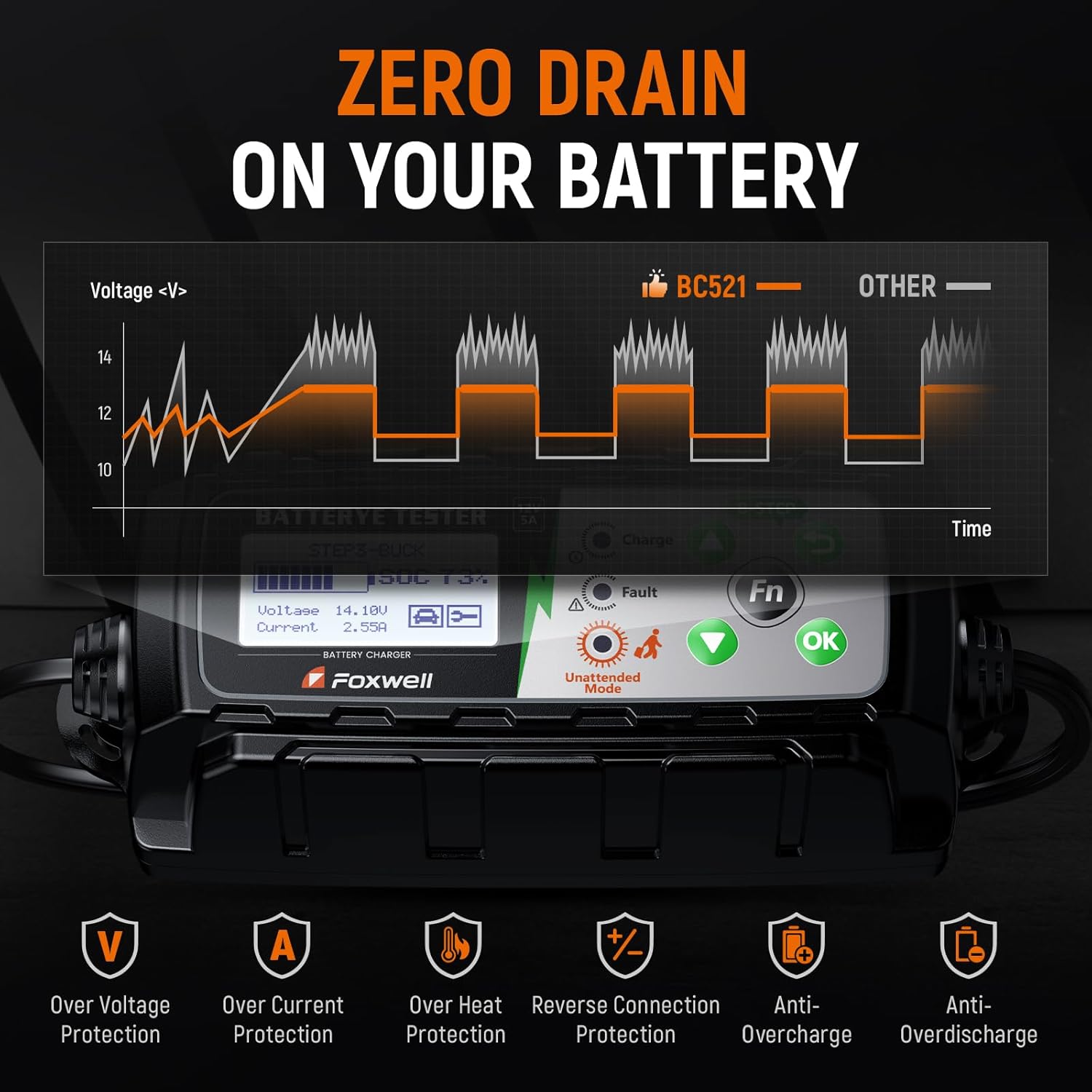
Image: FOXWELL BC521 displaying icons for various protection features including Over Voltage Protection, Over Current Protection, Over Heat Protection, Reverse Connection Protection, Anti-Overcharge, and Anti-Overdischarge, which help prevent common issues.
8.2 FOXWELL NT630 Plus Troubleshooting
- Perangkat tidak menyala: Ensure the OBD-II cable is securely connected to the vehicle's OBD-II port. The vehicle's ignition should be in the ON position (engine off).
- Kesalahan komunikasi: Check the OBD-II cable for damage. Ensure the vehicle's battery has sufficient charge. Try connecting to a different vehicle to rule out a vehicle-specific issue.
- No codes found: If the check engine light is not on, there may be no active codes. Some issues might be pending codes or historical codes that require specific menu navigation to view.
9. Spesifikasi
| Fitur | Spesifikasi |
|---|---|
| Nama Produk | FOXWELL NT630 Plus + FOXWELL BC521 |
| BC521 Input Voltage | Tegangan 100-240VAC, 50/60Hz |
| BC521 Output Voltage | Tegangan DC 12V |
| BC521 Charging Current | Selectable 1A / 3A / 5A |
| BC521 Battery Types | 12V Lead-Acid (AGM, GEL, EFB, Flooded) |
| BC521 Charging Stages | 8-Stage Pengisian Cerdas |
| NT630 Plus Vehicle Connection | Standard 16-pin OBD-II port |
| NT630 Plus Diagnostic Focus | ABS, SRS (Airbag) Systems |
| Suhu Operasional | 0°C hingga 60°C (32°F hingga 140°F) |
| Suhu Penyimpanan | -20°C hingga 70°C (-4°F hingga 158°F) |
10. Garansi
FOXWELL products are covered by a limited warranty against defects in materials and workmanship. The warranty period typically begins from the date of purchase. Please retain your proof of purchase for warranty claims. For specific warranty terms and conditions, refer to the warranty card included with your product or visit the official FOXWELL weblokasi.
11. Dukungan
For technical assistance, product inquiries, or service, please contact FOXWELL customer support. You can typically find contact information on the official FOXWELL websitus atau melalui pengecer tempat Anda membeli produk tersebut.
Weblokasi: www.foxwelltech.com (Mantanample, mohon verifikasi resminya weblokasi)
E-mail: Merujuk pada sumber resmi webSitus untuk email dukungan.
Telepon: Merujuk pada sumber resmi webSitus untuk nomor telepon dukungan.


