1. Pendahuluan
Thank you for choosing the OLIXIS 50-Inch L-Shaped Desk. This versatile desk is designed to maximize your workspace, offering a spacious and functional surface for office work, gaming, or studying. Its robust construction and thoughtful features ensure durability and convenience. Please read this manual carefully before assembly and use to ensure proper setup and longevity of your desk.
2. Fitur Produk
- AmpRuang Kerja: Configure the desk in an L-shaped layout to create a large surface area, accommodating multiple monitors and various equipment.
- Konstruksi Kokoh & Tahan Lama: Built with a robust metal frame for excellent stability. The desktop features a waterproof surface for easy cleaning and long-term use.
- Desain yang Dapat Dibolak-balik: The L-shape can be assembled with the longer side on either the left or right, adapting to your room layout. The CPU shelf can also be installed on either side.
- Smart Storage Solutions: Includes a side storage bag for accessories and a built-in CPU stand to keep your computer tower elevated for better ventilation and off the floor.
- Instalasi Mudah: Designed for straightforward assembly with clear instructions and a helpful video guide.
3. Isi Paket
Harap pastikan bahwa semua komponen yang tercantum di bawah ini ada sebelum memulai perakitan. Jika ada bagian yang hilang atau rusak, silakan hubungi dukungan pelanggan.

Gambar 3.1: Semua komponen termasuk dalam paket.
Komponen:
- A, B, C: Desktop Panels (x1 each)
- D, E, F: Leg Frames (x1 each)
- G: Crossbars (x2)
- H, I, J: Support Bars (x1, x1, x2 respectively)
- K, L: X-shaped Stabilizer Bars (x1 each)
- M: Side Storage Bag (x1)
Perangkat keras:
- 1: Sekrup (x21)
- 2: Sekrup (x8)
- 3: Sekrup (x1)
- 4: Sekrup (x2)
- 5: Sekrup (x2)
- 6: Sekrup (x1)
- 8: Kunci Allen (x1)
4. Petunjuk Penyiapan dan Perakitan
Assembly typically requires 2 people. Please follow the steps carefully. It is recommended to tighten screws by 50% initially, then fully tighten all screws once the desk is assembled.
Panduan Video Perakitan:
Video 4.1: Official OLIXIS 50-Inch L-Shaped Desk Assembly Guide.
Perakitan Langkah-demi-Langkah:
- Assemble Desktop Panels: Connect panels A, B, and C using the provided screws. Ensure they form the L-shape correctly.
- Pasang Palang: Secure Crossbars G to the underside of the desktop panels. Pay attention to the orientation of the holes. Tighten screws by 50%.
- Install Leg Frames: Attach Leg Frames D, E, and F to the desktop panels. Ensure the holes align for proper attachment. Tighten screws by 50%.
- Connect Stabilizer Bars: Attach the X-shaped Stabilizer Bars K and L to the leg frames. These provide additional stability. Tighten screws by 50%.
- Install CPU Shelf: Attach the CPU shelf to the desired side (left or right) of the desk. This shelf is reversible. Tighten screws by 50%.
- Attach Side Storage Bag: Secure the Side Storage Bag M to the side of the desk using the designated attachment points.
- Pengencangan Akhir: Once all components are in place and aligned, fully tighten all screws to ensure maximum stability.

Figure 4.1: The CPU stand provides elevated storage for your computer tower.

Figure 4.2: The desk's reversible design allows for flexible placement in any corner.
5. Petunjuk Pengoperasian
The OLIXIS L-Shaped Desk is designed for straightforward use. Place your computer, monitors, and other equipment on the spacious desktop. Utilize the side storage bag for documents, notebooks, or small accessories, and the CPU stand for your computer tower.
Kapasitas Berat:
The desk has a maximum weight recommendation of 264 pon. Avoid exceeding this limit to prevent damage or instability.

Gambar 5.1: Meja menyediakan ample space for gaming setups and multiple monitors.
6. Pemeliharaan
To maintain the appearance and longevity of your OLIXIS L-Shaped Desk, follow these simple care instructions:
- Pembersihan: Bersihkan permukaan meja dan rangka logam dengan cairan pembersih.amp kain. Hindari bahan kimia keras atau pembersih abrasif yang dapat merusak lapisan akhir.
- Tumpahan: Promptly clean any spills to prevent staining, especially on the wooden surfaces.
- Inspeksi: Periksa semua sekrup dan sambungan secara berkala untuk memastikan semuanya tetap kencang. Kencangkan kembali jika perlu untuk menjaga stabilitas.
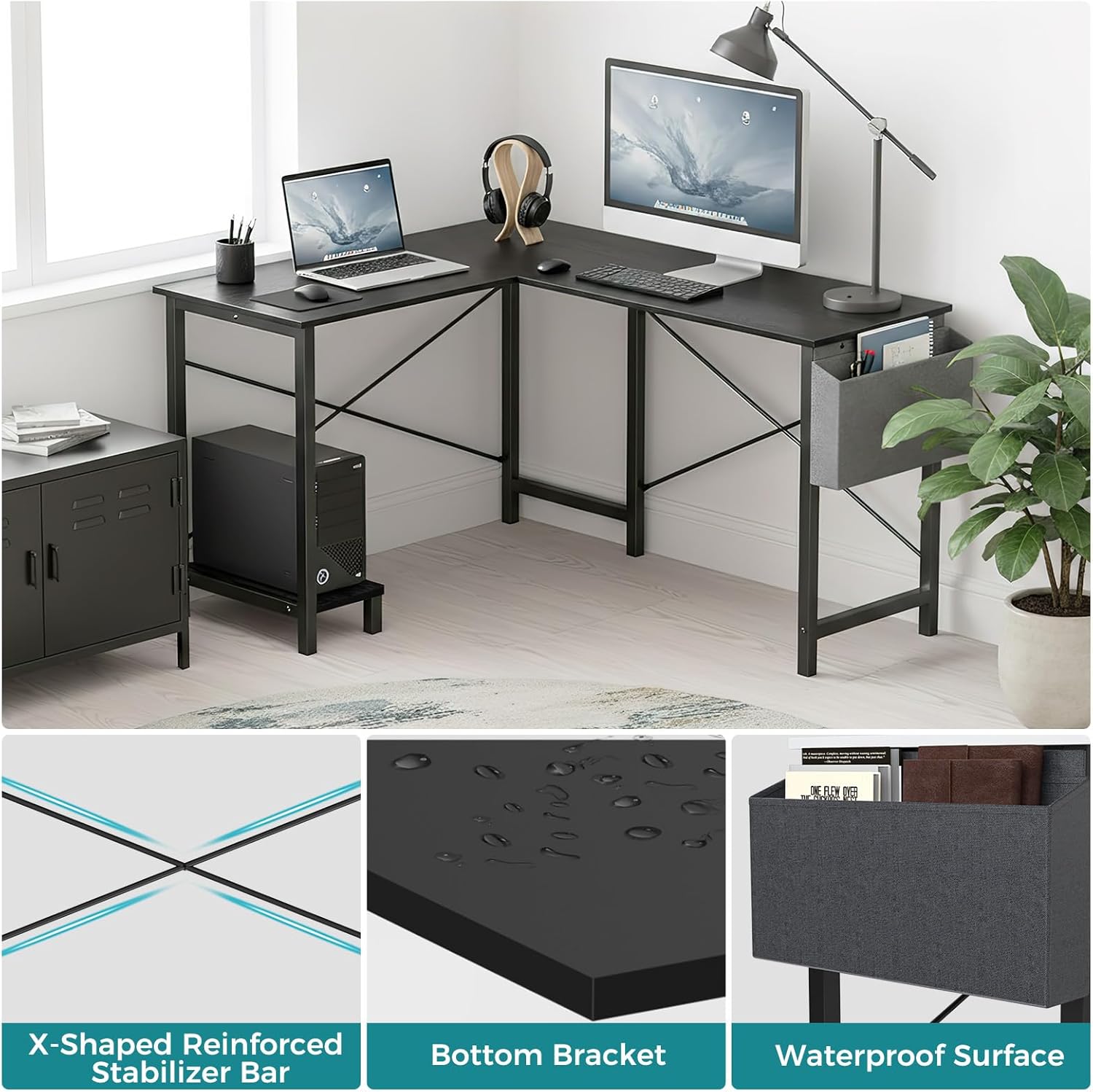
Figure 6.1: Key features like the waterproof surface simplify maintenance.
7. Penyelesaian masalah
If you encounter any issues with your OLIXIS L-Shaped Desk, please refer to the following common solutions:
- Meja Goyang: Ensure all screws are fully tightened. Check that the desk is placed on a level surface. Adjust the foot pads if available.
- Kesulitan Merakit: Re-check the assembly video and instructions. Ensure all parts are oriented correctly, especially the crossbars and leg frames. Do not force parts together.
- Bagian yang hilang: Refer to the 'Package Contents' section. If any parts are missing, contact OLIXIS customer support for assistance.
8. Spesifikasi
| Merek | OLIXIS |
| Nomor Model | OLYMHJ3-DL02-49IN-BK |
| Dimensi Produk | 50"Panjang x 43.3"Lebar x 29.53"T |
| Berat Barang | 32.85 pon |
| Rekomendasi Berat Maksimum | 264 pon |
| Jenis Bahan | Logam, kayu |
| Warna | Hitam |
| Fitur Khusus | Reversible, Side Storage Bag, Built-in CPU Stand |
| Perakitan yang Diperlukan | Ya |
| Jumlah Orang yang Direkomendasikan untuk Pertemuan | 2 |
| Petunjuk Perawatan Produk | Bersihkan dengan Damp Kain |

Figure 8.1: Detailed dimensions of the OLIXIS L-Shaped Desk.
9. Garansi & Dukungan
The OLIXIS L-Shaped Desk comes with a Garansi Terbatas. For specific details regarding warranty coverage, terms, and conditions, please refer to the warranty card included in your package or contact OLIXIS customer support.
For any questions, technical assistance, or to report missing/damaged parts, please visit the official OLIXIS store on Amazon or contact their customer service directly.
OLIXIS Store: Visit OLIXIS Store


