1. Pendahuluan
Thank you for choosing the Thomson 24-inch HD LED Smart TV, model 24HT2S15. This manual provides essential information to help you set up, operate, and maintain your new television. Please read it thoroughly before use and retain it for future reference.

Gambar: Depan view of the Thomson 24-inch HD LED Smart TV, showcasing its frameless design and key features like HD resolution and Dolby Audio.
Fitur Utama:
- TiVo OS with Voice Control: Intuitive interface combining live TV and streaming apps, personalized recommendations, and voice commands.
- Tampilan Nirkabel: Mirror your smartphone, tablet, or laptop screen to the TV.
- Audio Dolbi: Enhanced sound experience with improved dialogue, detail, and surround effects.
- HDR10: Sharper contrast and realistic colors for an immersive viewpengalaman ing.
- Kendali Jarak Jauh dengan Lampu Latar: Easy navigation in low light with direct access buttons for popular streaming services.
- Adjustable Side Feet: Flexible positioning options for the TV.
- Penyetel Tiga Kali Lipat: Integrated tuners for cable, satellite, and antenna reception.
2. Apa yang ada di dalam kotak
Saat membongkar kemasan, pastikan semua barang berikut ada:
- Thomson 24-inch HD LED Smart TV (Model 24HT2S15)
- Kontrol Jarak Jauh
- Adaptor Daya
- Panduan Pengguna
- Kartu Garansi
- Adjustable Side Feet (2x)
If any items are missing or damaged, please contact your retailer or Thomson customer support.
3. Pengaturan
3.1 Pembongkaran dan Penempatan
Carefully remove the TV from its packaging. It is recommended to have two people for this process. Place the TV on a stable, flat surface or mount it on a wall using a compatible VESA mount (not included).
Pastikan ventilasi memadai di sekitar TV. Jangan halangi lubang ventilasi.
3.2 Memasang Dudukan
If you are not wall-mounting the TV, attach the included side feet:
- Letakkan TV menghadap ke bawah di atas kain lembut dan bersih untuk mencegah kerusakan layar.
- Sejajarkan setiap dudukan dengan lubang sekrup yang sesuai di bagian bawah TV.
- Secure the stands using the provided screws. The feet are adjustable from 30 cm to 60 cm distance.

Image: The Thomson 24-inch Smart TV showing its dimensions, including a screen diagonal of 60 cm (24 inches), width of 53 cm, and height of 37 cm with the stand. The adjustable stand feet are also illustrated.
3.3 Menghubungkan Periferal
Connect your external devices to the TV's ports. Refer to the diagram below for port locations.

Gambar: Detail view of the rear connection panel of the Thomson 24-inch Smart TV, illustrating various ports including 2x USB 2.0, Antenna input, Satellite input, 3x HDMI 1.4 (one with ARC), Service port, Headphone jack, AV IN, Digital Optical Audio Out, and LAN port.
- Kekuatan: Connect the power adapter to the TV and then to a wall outlet.
- Antena/Satelit: Connect your antenna or satellite cable to the respective input.
- HDMI: Gunakan kabel HDMI untuk menghubungkan perangkat seperti pemutar Blu-ray, konsol game, atau set-top box. HDMI 1.4/ARC mendukung Audio Return Channel (ARC).
- Kabel USB: Masukkan drive USB untuk pemutaran media atau pembaruan perangkat lunak.
- LAN: Hubungkan kabel Ethernet untuk koneksi internet kabel.
- Masuk: Untuk perangkat lama yang menggunakan video komposit dan audio stereo.
- Headphone: Hubungkan headphone untuk mendengarkan secara pribadi.
- Output Audio Optik Digital: Hubungkan ke sistem suara eksternal untuk audio digital.
3.4 Menyalakan Daya Awal dan Pengaturan Pertama Kali
- Hubungkan TV ke stopkontak.
- Tekan tombol daya pada remote control atau TV.
- Follow the on-screen instructions to select your language, country, and perform channel scanning for your triple tuner (cable/satellite/antenna).
- Hubungkan ke jaringan Wi-Fi Anda dengan memilihnya dari daftar dan memasukkan kata sandi.
- Complete the TiVo OS setup, including signing in or creating an account.
4. Mengoperasikan TV Anda
4.1 Fungsi Kontrol Jarak Jauh
The backlit remote control provides easy access to all TV functions, even in dim lighting. It includes dedicated buttons for popular streaming services.

Image: The Thomson Smart TV remote control, highlighting its backlit buttons, voice control microphone, and direct access buttons for Netflix, YouTube, Prime Video, Disney+, and Canal+.
- Tombol Daya: Menghidupkan/mematikan TV.
- Tombol Angka: Pilih saluran secara langsung.
- Papan Navigasi (Atas/Bawah/Kiri/Kanan/OK): Navigasi menu dan pilih opsi.
- Kembali/Keluar: Kembali ke layar sebelumnya atau keluar dari menu.
- Volume Naik/Turun: Sesuaikan tingkat volume.
- Saluran Atas/Bawah: Ganti saluran TV.
- Bisu: Membungkam atau mengaktifkan suara.
- Rumah: Access the TiVo OS home screen.
- Tombol Kontrol Suara: Activate voice commands (microphone icon).
- Tombol Akses Langsung: Launch Netflix, YouTube, Prime Video, Disney+, Canal+ instantly.
4.2 Sistem Operasi TiVo dan Fitur Pintar
The TiVo OS provides a unified platform for live TV and streaming content. Explore personalized recommendations and access your favorite apps.

Image: The Thomson Smart TV screen showing various streaming application icons like Netflix, YouTube, Disney+, Prime Video, Plex, DAZN, Canal+, and Pluto TV, indicating integrated smart TV capabilities.
- Akses Aplikasi: Navigate to the home screen to find and launch pre-installed apps or download new ones from the app store.
- Kontrol Suara: Press the voice control button on your remote and speak commands to search for content, launch apps, or control TV functions.
- Tampilan Nirkabel: Use the Wireless Display feature to mirror content from your compatible smartphone, tablet, or laptop directly to your TV screen.

Image: An illustration demonstrating the voice control feature of the Thomson Smart TV, showing a remote control with a microphone icon and examples of voice commands like "Open Netflix" or "Play movies with Tom Hanks."

Image: The Thomson Smart TV displaying content mirrored from a smartphone, illustrating the Wireless Display and Google Cast features for seamless content sharing.
4.3 Peningkatan Gambar dan Suara
- HDR10: Experience improved contrast, brightness, and color accuracy with HDR10 content. This technology enhances both bright and dark scenes for a more dynamic picture.
- Audio Dolbi: Enjoy rich, clear, and powerful sound. Dolby Audio optimizes dialogue, enhances detail, and provides an immersive surround sound experience.

Image: A side-by-side comparison of picture quality, demonstrating the enhanced contrast and color vibrancy of HDR10 on the right compared to standard SDR on the left, with a building and landscape scene.

Image: An illustration depicting sound waves emanating from a TV screen, with the Dolby Audio logo prominently displayed, signifying enhanced audio quality for an immersive viewpengalaman ing.
5. Pemeliharaan
5.1 Membersihkan TV Anda
- Layar: Usap layar secara perlahan dengan kain lembut dan bebas serat. Untuk noda membandel, usap layar dengan lembut.ampBilas kain dengan air atau pembersih layar khusus. Jangan pernah menyemprotkan cairan langsung ke layar.
- Kabinet: Bersihkan lemari dan dudukan TV dengan kain kering yang lembut.
- Kontrol Jarak Jauh: Bersihkan remote control dengan kain lembut dan kering.
Peringatan:
- Selalu cabut kabel TV sebelum membersihkan.
- Jangan gunakan pembersih abrasif, lilin, atau pelarut.
5.2 Pembaruan Perangkat Lunak
Your Smart TV may receive software updates to improve performance and add new features. It is recommended to enable automatic updates or check for updates periodically through the TV's settings menu to ensure optimal functionality and security.
6. Penyelesaian masalah
Jika Anda mengalami masalah dengan TV Anda, lihat masalah umum dan solusi berikut:
| Masalah | Kemungkinan Penyebab | Larutan |
|---|---|---|
| Tidak ada daya | Kabel daya terputus; masalah stopkontak | Pastikan kabel daya tersambung dengan aman. Uji stopkontak dengan perangkat lain. |
| Tidak ada gambar, tetapi ada suara | Incorrect input source; faulty cable | Check the input source (e.g., HDMI 1, Antenna). Ensure cables are connected correctly. |
| Tidak ada suara, tetapi gambar ada | Volume dimatikan atau terlalu rendah; masalah pada sistem audio eksternal. | Unmute the TV or increase volume. Check audio settings and external audio connections. |
| Kontrol jarak jauh tidak berfungsi | Baterai habis; ada halangan; remote belum dipasangkan | Replace batteries. Remove any obstructions. Re-pair the remote if necessary (refer to TV settings). |
| Tidak dapat terhubung ke Wi-Fi | Kata sandi salah; masalah router; TV terlalu jauh dari router | Verify Wi-Fi password. Restart your router. Move TV closer or use a wired LAN connection. |
| Fitur pintar tidak merespons | Network issue; temporary software glitch | Check internet connection. Restart the TV by unplugging it for a minute and plugging it back in. |
If the problem persists after trying these solutions, please contact Thomson customer support.
7. Spesifikasi
Detailed technical specifications for the Thomson 24HT2S15 Smart TV:
| Fitur | Detil |
|---|---|
| Merek | Bahasa Indonesia: Thomson |
| Nomor Model | 24HT2S15 |
| Ukuran Layar | 24 inci (60 cm) |
| Teknologi Tampilan | DIPIMPIN |
| Resolusi | 768p (1366 x 768 piksel) |
| Tingkat Penyegaran | 60Hz |
| Rasio Aspek | 16:9 |
| Teknologi Konektivitas | Ethernet, HDMI, USB, Wi-Fi |
| Fitur Khusus | Parental Controls, TiVo OS, Voice Control, HDR10, Dolby Audio |
| Dimensi Produk (dengan dudukan) | 8P x 53l x 37H cm (approx. 8 x 53 x 37 cm) |
| Berat | 3.33 kg |
| Komponen yang Termasuk | Power Adapter, User Manual, Warranty Card, Remote Control |
| Bahasa yang Didukung | French, English, Italian, Spanish, German |
| Kelas Efisiensi Energi | E |
| Informasi Produk EPREL | https://eprel.ec.europa.eu/qr/1969520 |
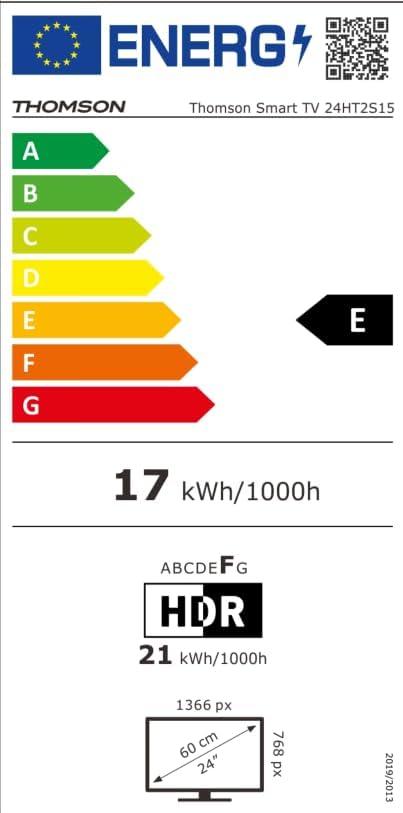
Image: The EU Energy Label for the Thomson Smart TV 24HT2S15, showing an energy efficiency class of E and energy consumption of 17 kWh/1000h for SDR and 21 kWh/1000h for HDR.
8. Garansi dan Dukungan
8.1 Informasi Garansi
Thomson products are covered by a 3-year warranty. For detailed information regarding warranty claims, returns, or defective products, please refer to the warranty card included in your package or visit the Thomson support weblokasi.
For specific information on purchases made via Amazon, consult Amazon's help pages regarding returns and defective products.
8.2 Dukungan Pelanggan
If you require further assistance or have questions not covered in this manual, please contact Thomson customer support:
- Pabrikan: Sungai kecilview Jerman
- E-mail: kontak@streamview.com
- Weblokasi: www.aliranview.com
- Telepon: +4318900066
Please have your model number (24HT2S15) and purchase details ready when contacting support.


