Perkenalan
Manual ini memberikan petunjuk lengkap untuk penggunaan yang aman dan efektif. AMPBANK M256 Thermal Camera. The M256 is a compact thermal imager designed for use with Android smartphones, tablets, and PCs, offering a 256x192 IR resolution and a temperature range of -4°F to 842°F (-20°C to 450°C). Please read this manual thoroughly before operating the device.
Informasi Keselamatan
Selalu perhatikan tindakan pencegahan keselamatan berikut untuk mencegah cedera atau kerusakan pada perangkat:
- Do not point the camera directly at intense heat sources, such as the sun or lasers, as this may damage the sensor.
- Jangan biarkan perangkat terkena suhu ekstrem, kelembapan tinggi, atau lingkungan korosif.
- Hindari menjatuhkan atau membenturkan perangkat dengan keras.
- Use only the provided accessories or those approved by AMPBANK.
- Jauhkan perangkat dari jangkauan anak-anak.
- Refer to local regulations for proper disposal of electronic devices.
Isi Paket
Verifikasi bahwa semua item ada dalam paket Anda:
- 1 lembar AMPKamera Pencitraan Termal BANK M256
- 1 x Multifunctional Adapter Cable (19.7-inch / 50cm USB extension cable)
- 1 x Kain Pembersih
- Panduan Pengguna 1 x Quick
- 1 x Tas Pembawa
- 1 x Kotak Kemasan

Gambar: Isi dari AMPBANK M256 Thermal Camera package, including the camera, adapter cable, cleaning cloth, quick user guide, carrying bag, and packing box.
Produk Selesaiview
Itu AMPBANK M256 is a compact, plug-and-play thermal imaging camera designed to extend the capabilities of your Android smartphone or PC. It features a USB-C connector for direct attachment to compatible devices.

Gambar: Depan view dari AMPBANK M256 Thermal Camera, showing its compact green and black design with a USB-C connector.
Fitur Utama:
- Resolusi Tinggi: 256x192 IR resolution for clear thermal images.
- Kisaran Suhu Luas: Mengukur dari -4°F hingga 842°F (-20°C hingga 450°C).
- Konsumsi Daya Rendah: Operates efficiently at 0.35W.
- Kompak dan Portabel: Weighs only 30g, easily fits in a pocket.
- Konektivitas Serbaguna: Compatible with Android smartphones/tablets and PCs via USB-C.
Pengaturan
1. App Installation (Android)
- Locate the "ThermCam" application on the Google Play Store.
- Download and install the application on your Android smartphone or tablet.
- Ensure your device supports OTG (On-The-Go) functionality for external device connection.

Image: Screenshot showing the ThermCam app available on Google Play, indicating where to download the required software for the thermal camera.
2. Menghubungkan Perangkat
- For direct connection: Plug the USB-C connector of the M256 thermal camera directly into the USB-C port of your Android smartphone or tablet.
- For extended connection: Use the provided 19.7-inch (50cm) USB extension cable. Connect one end to your smartphone/tablet and the other end to the M256 camera. This offers greater flexibility during use.
- Once connected, open the "ThermCam" app. The app should automatically detect the camera and display the thermal image.

Image: A hand holding a smartphone with the AMPBANK M256 Thermal Camera connected to its USB-C port, displaying a thermal image on the phone screen.

Gambar: The AMPBANK M256 Thermal Camera connected to a laptop and a tablet using the 19.7-inch USB extension cable, demonstrating its versatility.
3. Instalasi Perangkat Lunak PC
- For PC usage, download the "TCView 2.0" software from the official AMPBANK weblokasi.
- Install the software on your Windows PC.
- Connect the M256 camera to your PC using the USB-C extension cable.
- Launch the TCView 2.0 software to begin thermal imaging on your PC.
Operasi
1. Basic Temperature Measurement
- Once the app is open and the camera is connected, the thermal image will appear on your screen.
- The app displays real-time temperature readings.
- Adjust the camera's position to focus on the area of interest.

Image: A person using the AMPBANK M256 Thermal Camera with a smartphone to inspect a wall, showing the thermal image and temperature readings on the phone screen.
2. Measurement Modes and Color Palettes
- The ThermCam app offers various measurement modes, including Dot, Garis, Dan Pesawat, for precise temperature monitoring.
- Select from 10 different color palettes to visualize temperature changes. Different palettes can highlight specific temperature variations more clearly.

Image: A smartphone screen displaying various color palettes and measurement settings within the ThermCam app, demonstrating customization options for thermal imaging.
3. 3D Thermal Analysis
- Utilize the advanced 3D editing features within the app or PC software for detailed temperature analysis from multiple perspectives.
- This feature assists in identifying subtle temperature anomalies and patterns.
4. Notifikasi Cerdas
- Configure smart alerts for high and low temperatures. The app will notify you when temperatures exceed or fall below predefined thresholds.
- This is useful for monitoring critical equipment or areas.
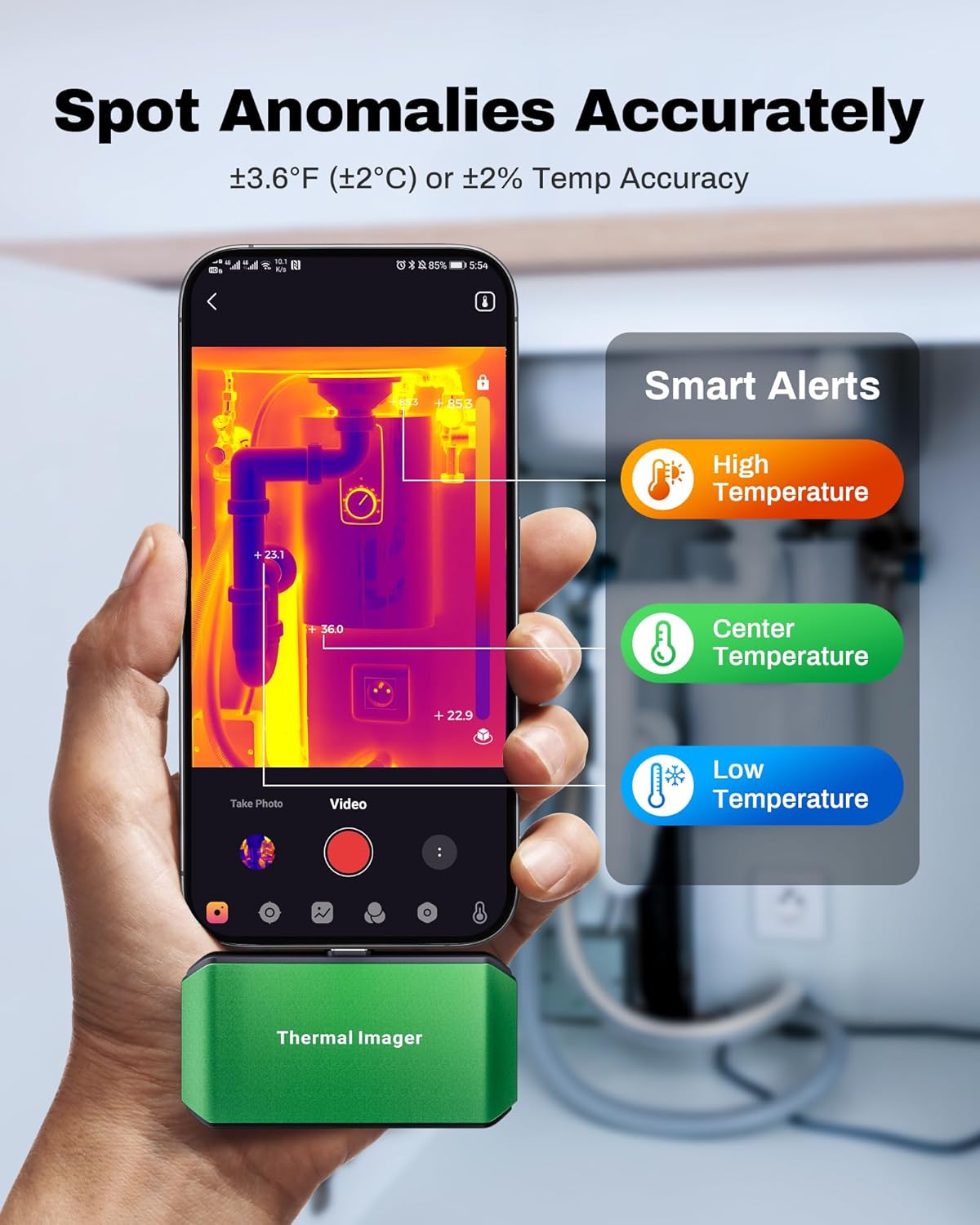
Image: A smartphone screen showing the ThermCam app with "Smart Alerts" for high, center, and low temperatures, indicating the camera's ability to detect anomalies.
5. Pengambilan Foto dan Video
- Capture still thermal images or record thermal videos directly through the app.
- These captures can be used for documentation, analysis, or sharing.

Image: Screenshots from the ThermCam app demonstrating options for video recording and photo capturing of thermal images.
6. Generating Professional Reports
- The ThermCam app and TCView 2.0 software allow you to generate professional field reports.
- Customize data, add watermarks, and adjust settings for seamless sharing of your thermal analysis.

Image: A smartphone screen displaying the ThermCam app's interface for generating professional reports, including options to customize data and share.
Pemeliharaan
- Pembersihan: Use the provided cleaning cloth to gently wipe the camera lens and body. Do not use abrasive cleaners or solvents.
- Penyimpanan: When not in use, store the thermal camera in its protective carrying bag to prevent dust and damage. Store in a cool, dry place away from direct sunlight.
- Pembaruan Perangkat Lunak: Regularly check the Google Play Store or AMPBANK website for updates to the ThermCam app or TCView 2.0 software to ensure optimal performance and access to new features.
Penyelesaian Masalah
| Masalah | Kemungkinan Penyebab | Larutan |
|---|---|---|
| Camera not detected by smartphone/PC. |
|
|
| Pembacaan suhu yang tidak akurat. |
|
|
| Aplikasi mengalami kerusakan atau macet. |
|
|
Spesifikasi
| Fitur | Detil |
|---|---|
| Model | Pesawat M256 |
| Resolusi IR | 256x192 piksel |
| Kisaran Suhu | -4°F hingga 842°F (-20°C hingga 450°C) |
| Akurasi Suhu | ±3.6°F (±2°C) or ±2% |
| Sensitivitas Termal (NETD) | <40mK |
| Tingkat Penyegaran | frekuensi 25Hz |
| Konsumsi Daya | 0.35W |
| Konektivitas | USB Tipe C |
| Kesesuaian | Android Smartphones/Tablets, Windows PC |
| Ukuran | 2.8 x 1.65 x 0.55 inci (70 x 44 x 14 mm) |
| Berat | 30 gram (0.07 pon) |
| Pabrikan | AMPBANK |

Image: A visual summary of the AMPBANK M256 Thermal Camera's key features and specifications, including resolution, temperature range, and power consumption.
Garansi dan Dukungan
AMPBANK products are designed for reliability and performance. For warranty information, technical support, or service inquiries, please refer to the official AMPBANK websitus atau hubungi departemen layanan pelanggan mereka.
Harap simpan bukti pembelian Anda untuk klaim garansi.
Sumber Daya Daring: Kunjungi AMPBANK Store on Amazon untuk informasi dan dukungan produk tambahan.


