1. Pendahuluan
The darkFlash C280 is an E-ATX full-tower PC gaming case designed for high-performance builds. It features a 270° panoramic tempered glass display, offering an unobstructed view of internal components. This case supports a wide range of motherboard formats, including reverse/back-connect motherboards, and provides extensive cooling flexibility with support for up to 10 fans and 360mm radiator configurations. Its builder-friendly design includes tool-free access and efficient cable management options.
2. Isi Paket
Please verify all components are present upon unboxing:
- darkFlash C280 PC Case (Black)
- Accessory Kit (screws, standoffs, cable ties)
- Panduan Pengguna
- ARGB Fan Controller & Remote (if included with specific model variant)
- Magnetic Dust Filters (pre-installed)
Video: Selesaiview of the darkFlash C280 E-ATX PC Gaming Case, demonstrating its features and design.
3. Spesifikasi
| Fitur | Detil |
|---|---|
| Nama Model | C280 Black |
| Jenis Kasus | Menara Penuh |
| Kompatibilitas Papan Induk | E-ATX, ATX, Micro ATX, Mini ITX (including reverse/back-connect motherboards) |
| Dimensi (P x L x T) | 443 x 277 x 426mm (17.44 x 10.91 x 16.77 inci) |
| Bahan | 0.7mm SPCC Steel, Plastic, Tempered Glass |
| Dukungan Panjang GPU | Hingga 420mm |
| Penyangga Ketinggian Pendingin CPU | Hingga 155mm |
| Dukungan Panjang PSU | Hingga 240mm |
| Dukungan Penggemar | Up to 10x 120mm or 4x 140mm fans |
| Dukungan Radiator | Up to 360mm configurations |
| Ruang Penggerak | 3x SSD + 2x HDD |
| Port masukan/keluaran | USB 3.0 x1, USB 2.0 x2, HD Audio/Mic, Power/Reset (Optional USB-C) |

Image: Internal layout diagram illustrating motherboard, CPU cooler, and GPU length compatibility.
4. Pengaturan dan Instalasi
4.1. Melepas Panel
The darkFlash C280 features tool-free side panels for easy access. Gently pull the tempered glass side panel from the top edge to detach it. Repeat for the steel side panel if necessary. Exercise caution when handling tempered glass.

Image: Illustration of removing the tempered glass side panel for internal access.
4.2. Instalasi Motherboard
Install your E-ATX, ATX, Micro ATX, or Mini ITX motherboard onto the pre-installed standoffs. Secure the motherboard with the provided screws. Ensure proper alignment with the I/O shield.
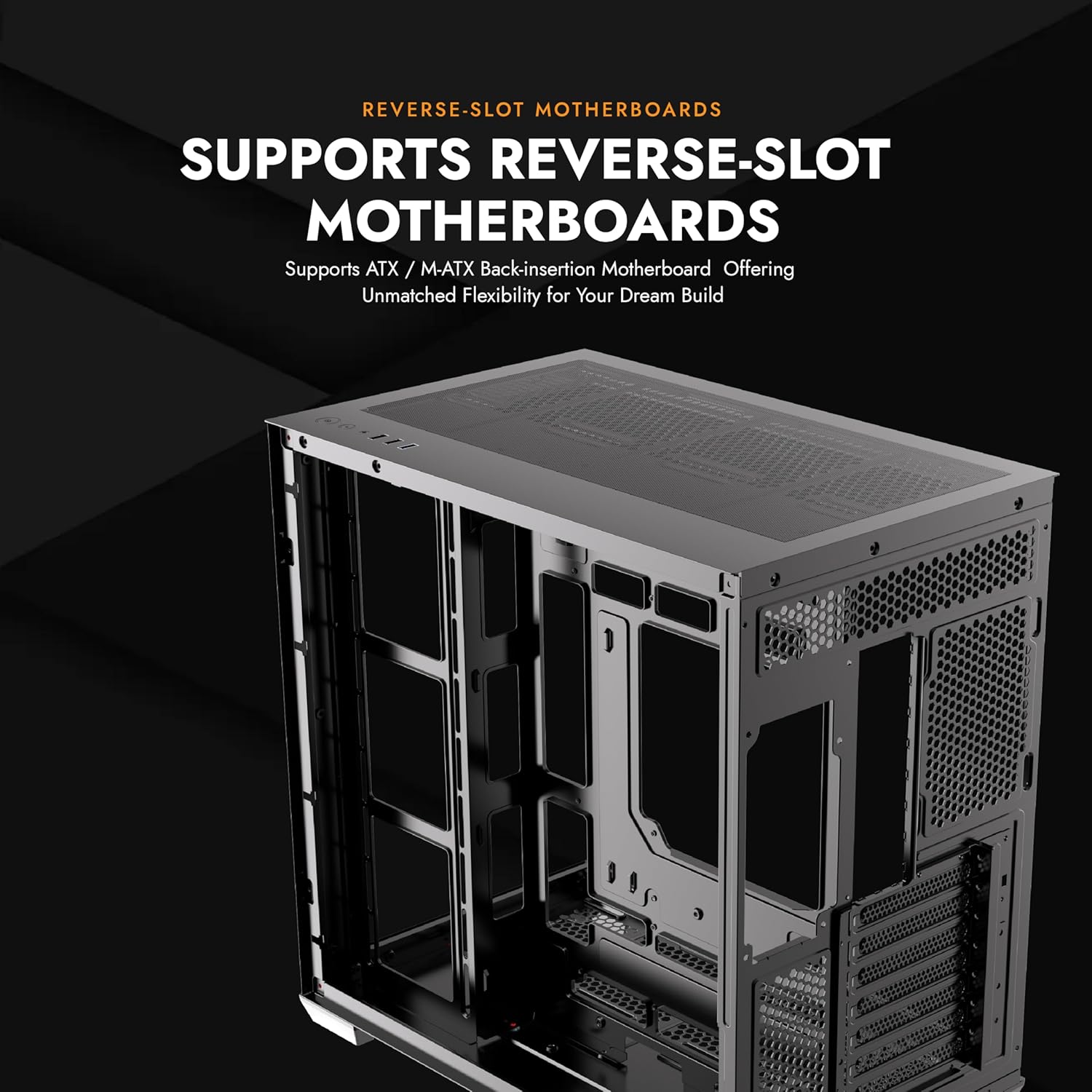
Image: Motherboard installation area within the C280 chassis.
4.3. Instalasi Komponen
- Kartu Grafis (GPU): Install your GPU into the appropriate PCIe slot. The case supports GPUs up to 420mm in length. Vertical GPU mounting is supported, but may require a separate bracket (not included).
- Pendingin CPU: Install your CPU cooler. The case accommodates CPU coolers up to 155mm in height.
- Unit Catu Daya (PSU): Install the PSU in the designated bottom mount area. The case supports PSUs up to 240mm.
- Drive Penyimpanan: Utilize the 3x SSD and 2x HDD drive mounts.

Image: Vertical GPU mounting option in the C280 case.
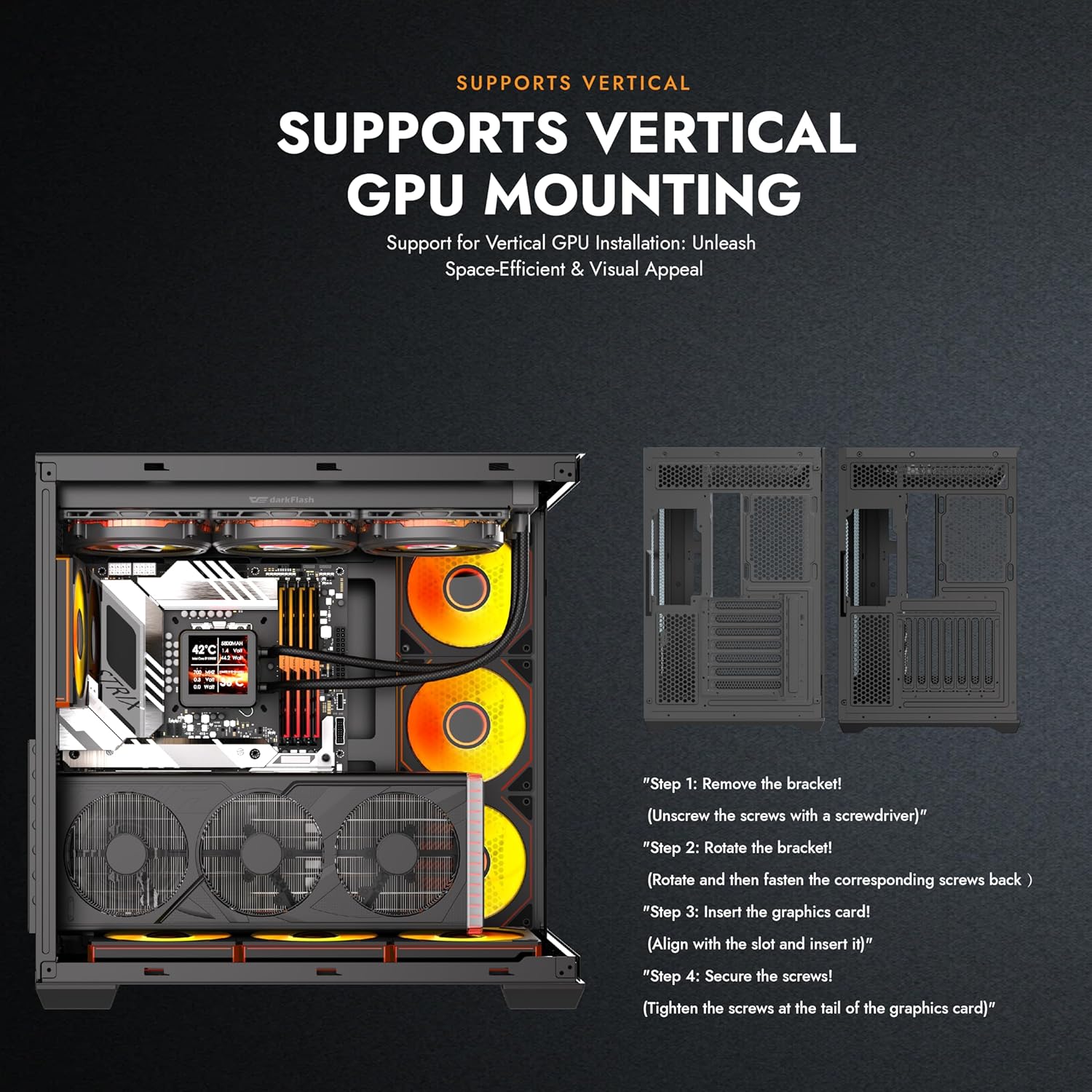
Image: Multifunction bracket for SSD and HDD installation.
4.4. Pemasangan Sistem Pendingin
The C280 offers extensive cooling options:
- Penggemar: Supports up to 10x 120mm or 4x 140mm fans.
- Radiatornya: Compatible with 360mm radiator configurations.

Gambar: Meledak view demonstrating the modular cooling architecture and airflow paths.
4.5. Manajemen Kabel
Memanfaatkan ample space behind the motherboard tray and the provided cable ties to route and secure cables for a clean build and optimized airflow. The reverse connection motherboard compatibility further aids in cable routing by moving I/O and power connections to the rear.
5. Petunjuk Pengoperasian
Once all components are installed and connected, close the side panels. Connect your peripherals, monitor, and power cable to the PSU. Press the power button on the top I/O panel to start your system.
5.1. Panel I/O Depan
- Tombol Daya: Menghidupkan/mematikan sistem.
- Tombol Reset: Mulai ulang sistem.
- HD Audio/Mic Jacks: Untuk menghubungkan headphone dan mikrofon.
- Port USB 3.0 (x1): Transfer data berkecepatan tinggi.
- Port USB 2.0 (x2): Transfer data standar.
- USB-C Port (Optional): For compatible devices, offering convenient connectivity.

Image: Top I/O panel with power, reset, audio, and USB ports.
6. Pemeliharaan
6.1. Pembersihan Filter Debu
The darkFlash C280 is equipped with dual quick-release dust filters located on the top and bottom of the case. Regularly clean these filters to maintain optimal airflow and prevent dust buildup inside your system.
- Lepaskan filter debu magnetik dengan hati-hati.
- Clean the filters using compressed air or by rinsing with water (ensure they are completely dry before re-installation).
- Re-attach the magnetic filters to their respective positions.
Image: Magnetic dust filter for easy removal and cleaning.
7. Penyelesaian masalah
- Sistem tidak menyala:
- Pastikan PSU terhubung dengan benar ke stopkontak dan sakelar daya pada PSU berada pada posisi 'ON'.
- Pastikan semua kabel daya (24-pin ATX, CPU, GPU) terhubung dengan aman ke motherboard dan komponen.
- Check that the front panel power switch cable is correctly connected to the motherboard's header.
- Poor airflow/High temperatures:
- Ensure all installed fans are spinning correctly.
- Clean the dust filters regularly (refer to Section 6.1).
- Verify proper fan orientation for optimal intake and exhaust.
- Check for any obstructions to airflow within the case.
- Tempered glass panel difficult to remove/install:
- Apply gentle, even pressure when removing or installing. Avoid excessive force.
- Ensure the case is on a flat, stable surface when handling glass panels.
8. Garansi dan Dukungan
darkFlash products are manufactured to the highest quality standards. For specific warranty details, please refer to the warranty card included with your product or visit the official darkFlash website. For technical support or inquiries, please contact darkFlash customer service through their official channels.
Resmi Weblokasi: www.darkflash.com
Toko Amazon: Toko Resmi darkFlash


