1. Petunjuk Keselamatan Penting
Harap baca semua petunjuk keselamatan dan pengoperasian dengan saksama sebelum menggunakan televisi ini. Simpan petunjuk ini untuk referensi di masa mendatang.
- Kekuatan: Ensure the TV is connected to a power supply with the correct voltage. Unplug the TV during lightning storms or when unused for long periods.
- Ventilasi: Jangan halangi lubang ventilasi. Pastikan ada ruang yang cukup di sekitar TV untuk aliran udara yang lancar.
- Air dan Kelembaban: Jangan biarkan TV terkena hujan atau kelembapan. Jangan letakkan benda berisi cairan, seperti vas, di atas TV.
- Panas: Jauhkan TV dari sumber panas seperti radiator, ventilasi pemanas, kompor, atau peralatan penghasil panas lainnya.
- Pembersihan: Cabut TV sebelum membersihkannya. Gunakan kain yang lembut dan kering. Jangan gunakan pembersih cair atau aerosol.
- Penempatan: Place the TV on a stable, flat surface. Avoid placing it in direct sunlight or near strong magnetic fields.
- Pelayanan: Jangan mencoba untuk memperbaiki produk ini sendiri. Rujuk semua servis ke personel servis yang berkualifikasi.
2. Isi Paket
Pastikan semua barang yang tercantum di bawah ini termasuk dalam paket Anda. Jika ada barang yang hilang atau rusak, hubungi pengecer Anda.
- Blaupunkt Smart TV 32" HD LED (Model 32HCT6000S)
- Kontrol Jarak Jauh
- Kabel listrik
- Dudukan (2 buah)
- User Manual (dokumen ini)

3. Pengaturan
3.1 Memasang Dudukan
Untuk memasang dudukan ke TV Anda, ikuti langkah-langkah berikut:
- Letakkan TV dengan hati-hati menghadap ke bawah pada permukaan yang lembut dan bersih untuk mencegah kerusakan layar.
- Align each stand foot with the corresponding screw holes on the bottom rear of the TV.
- Kencangkan setiap kaki penyangga menggunakan sekrup yang disediakan. Pastikan sekrup dikencangkan dengan kuat.
- Angkat TV dengan hati-hati ke posisi tegak pada permukaan yang stabil.

3.2 Pemasangan di Dinding (Opsional)
The Blaupunkt 32HCT6000S TV is compatible with VESA wall mounts. The VESA mounting pattern for this model is not explicitly stated in the provided data, but typically for a 32-inch TV, it would be 100x100mm or 200x200mm. Consult your wall mount's instructions and ensure it is suitable for the TV's weight (4 kg).
- Peringatan: Wall mounting should be performed by qualified personnel using appropriate mounting hardware.
- Remove the stand feet before wall mounting.
- Ensure the wall can support the weight of the TV and the mount.
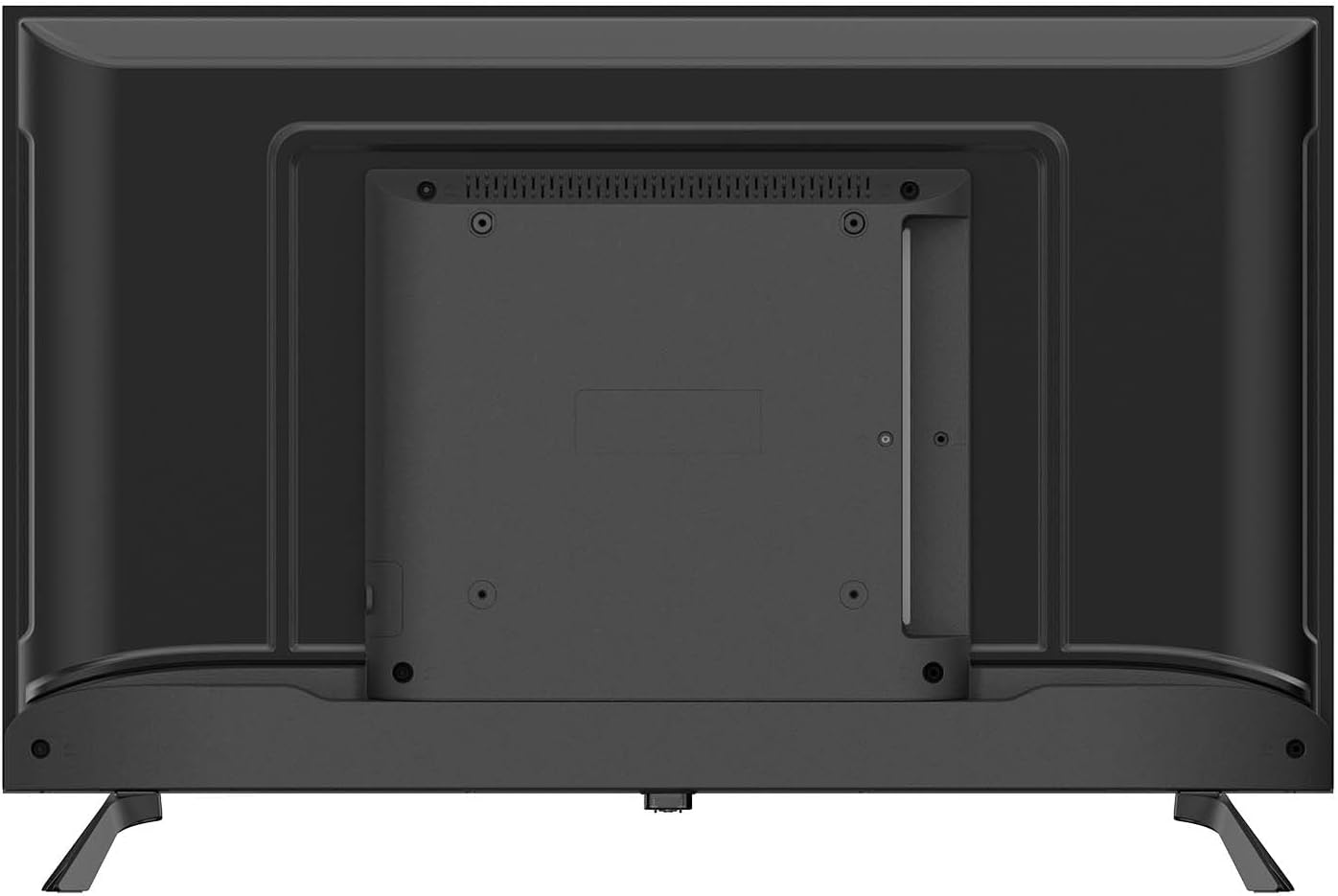
3.3 Menghubungkan Periferal
Hubungkan perangkat eksternal Anda ke TV menggunakan port yang tersedia:
- HDMI (x2): Untuk menghubungkan perangkat berdefinisi tinggi seperti pemutar Blu-ray, konsol game, atau set-top box.
- USB 2.0 (x2): Untuk menghubungkan perangkat penyimpanan USB untuk memutar media fileatau untuk pembaruan perangkat lunak.
- RJ-45 (Ethernet) (x1): Untuk koneksi internet kabel.
- CI+ (Common Interface Plus) (x1): For inserting a CAM (Conditional Access Module) and smart card to access encrypted digital TV services.
- AV Masuk (x1): Untuk menghubungkan perangkat lama menggunakan kabel video komposit dan audio stereo.
- Optical SPDIF Output (x1): For connecting to an external audio system or soundbar for digital audio output.
- Antenna Input (DVB-C/T/T2/S2): For connecting an aerial or satellite dish for digital television reception.

3.4 Sambungan Daya
After connecting all desired peripherals, plug the power cable into the TV's power input, then plug the other end into a suitable wall outlet. The TV is designed for 240 Volt power supply.
4. Initial Setup and Operating
4.1 First Time Power On
When you power on the TV for the first time, a setup wizard will guide you through the initial configuration:
- Pemilihan Bahasa: Choose your preferred language for the TV menu.
- Koneksi jaringan: Connect to your home network via Wi-Fi (2.4G or 5G) or Ethernet. Follow the on-screen prompts to enter your Wi-Fi password if necessary.
- Pemindaian Saluran: The TV will automatically scan for available digital channels (DVB-C/T/T2/S2). This may take several minutes.
- Zona Waktu dan Tanggal: Atur zona waktu dan tanggal yang benar.
4.2 Operasi Dasar
- Daya Hidup/Mati: Tekan tombol daya pada remote control atau pada TV itu sendiri.
- Pemilihan Saluran: Use the 'CH+' / 'CH-' buttons to change channels or enter channel numbers directly.
- Kontrol Volume: Use the 'VOL+' / 'VOL-' buttons to adjust the volume.
- Sumber Masukan: Press the 'SOURCE' button on the remote to select between HDMI, AV, TV, or other connected inputs.
- Navigasi Menu: Use the arrow keys and 'OK' button on the remote to navigate through the TV's menus and settings.
4.3 Smart TV Features (Tizen OS 8.0)
Your Blaupunkt Smart TV runs on Tizen OS 8.0, providing access to a variety of smart features:
- Aplikasi: Access pre-installed apps like Netflix and YouTube. You can download additional apps from the Tizen app store.
- Pencerminan Layar: Share content from your compatible smartphone or tablet directly to the TV screen.
- Bluetooth 5.1: Connect Bluetooth-enabled devices such as headphones, soundbars, or game controllers wirelessly.
- AirPlay: AirPlay functionality will be available after November 2025, allowing seamless streaming from Apple devices.
- EPG (Panduan Program Elektronik): View program schedules for digital channels.
- Kunci orang tua: Set restrictions on channels or programs based on age ratings.
- Pengatur Waktu Tidur: Configure the TV to automatically turn off after a set period.
4.4 Kontrol Jarak Jauh
The included infrared remote control allows full control over your TV's functions. Ensure there are no obstructions between the remote and the TV's IR sensor. Insert two AAA batteries (not included) into the remote control, observing the correct polarity.
5. Pemeliharaan
5.1 Membersihkan TV
- Layar: Usap layar secara perlahan dengan kain lembut dan bebas serat. Untuk noda membandel, usap layar dengan lembut.ampbilas kain dengan air atau pembersih layar khusus (jangan semprotkan langsung ke layar).
- Casing: Gunakan kain lembut dan kering untuk membersihkan TV casing. Avoid using abrasive cleaners, waxes, or solvents.
- Selalu cabut TV dari stopkontak sebelum membersihkan.
5.2 Penyimpanan
If you need to store the TV for an extended period:
- Unplug the TV and disconnect all cables.
- Remove the stand if possible and pack it separately.
- Store the TV in its original packaging in a dry, dust-free environment.
- Hindari suhu dan kelembapan ekstrem.
6. Penyelesaian masalah
Jika Anda mengalami masalah dengan TV Anda, lihat masalah umum dan solusi berikut:
| Masalah | Solusi yang mungkin |
|---|---|
| Tidak ada daya | Periksa apakah kabel daya terpasang dengan benar ke TV dan stopkontak. Coba stopkontak lain. |
| Tidak ada gambar, tetapi ada suara | Pastikan sumber input yang benar telah dipilih. Periksa sambungan kabel ke perangkat eksternal. |
| Tidak ada suara, tetapi gambar ada | Periksa level volume dan status bisu. Pastikan sistem audio eksternal terhubung dengan benar dan menyala. |
| Kontrol jarak jauh tidak berfungsi | Periksa dan ganti baterai. Pastikan tidak ada penghalang antara remote dan sensor IR TV. |
| Tidak dapat terhubung ke Wi-Fi | Pastikan router Wi-Fi Anda menyala dan berfungsi. Masukkan kembali kata sandi Wi-Fi dengan hati-hati. Coba restart TV dan router Anda. |
| Kualitas gambar buruk | Check antenna/cable connections. Adjust picture settings (brightness, contrast, sharpness). |
Jika masalah berlanjut setelah mencoba solusi ini, hubungi dukungan pelanggan.
7. Spesifikasi
Detailed technical specifications for the Blaupunkt 32HCT6000S Smart TV:
| Fitur | Spesifikasi |
|---|---|
| Model | 32HCT6000S |
| Ukuran Layar | 32 inci |
| Teknologi Tampilan | LED HD |
| Resolusi | 1366 x 768 piksel (720p) |
| Rasio Aspek | 16:9 |
| Tingkat Penyegaran | 60Hz |
| Viewsudut ing | 178° |
| Kecerahan Panel | 200–240 cd/m² |
| Sistem Operasi | Sistem Operasi Tizen 8.0 |
| Keluaran Suara | 2 x 6W |
| Teknologi Audio | Dolby Digital Plus, NICAM/Stereo |
| Bahasa Indonesia: Bluetooth | 5.1 (and compatible older versions) |
| Wifi gratis | IEEE 802.11 ac/b/g/n, 2T2R, 2.4G + 5G |
| Port HDMI | 2 |
| Port USB 2.0 | 2 |
| Ethernet (RJ-45) | 1 |
| Slot CI+ | 1 |
| AV Masuk | 1 |
| Keluaran SPDIF Optik | Ya |
| penyetel | DVB-C / T / T2 / S2 |
| Power Consumption (in use) | 26W |
| Kelas Energi | E |
| Daya siaga | ≤ 0.5W |
| Dimensions with Stand (W x D x H) | Ukuran 720x198x478 mm |
| Dimensi tanpa dudukan (L x D x T) | Ukuran 720x82x424 mm |
| Berat Bersih | 4.0 kg |
| Kompatibilitas Pemasangan | VESA compatible (Mounting on table) |
8. Garansi dan Dukungan
Your Blaupunkt Smart TV is covered by a manufacturer's warranty. Please refer to the warranty card included in your package or visit the official Blaupunkt websitus untuk mengetahui syarat dan ketentuan garansi secara terperinci.
For technical support, troubleshooting assistance, or service inquiries, please contact Blaupunkt customer service. Contact information can typically be found on the manufacturer's websitus atau dalam dokumentasi garansi Anda.


