Perkenalan
Thank you for choosing the Fastrack StreetStyle 5.0 Quartz Analog Watch. This manual provides detailed instructions for setting up, operating, and maintaining your watch to ensure optimal performance and longevity. This watch combines a classic analog display with a modern digital interface, offering precise timekeeping and a range of useful functions for your daily activities.
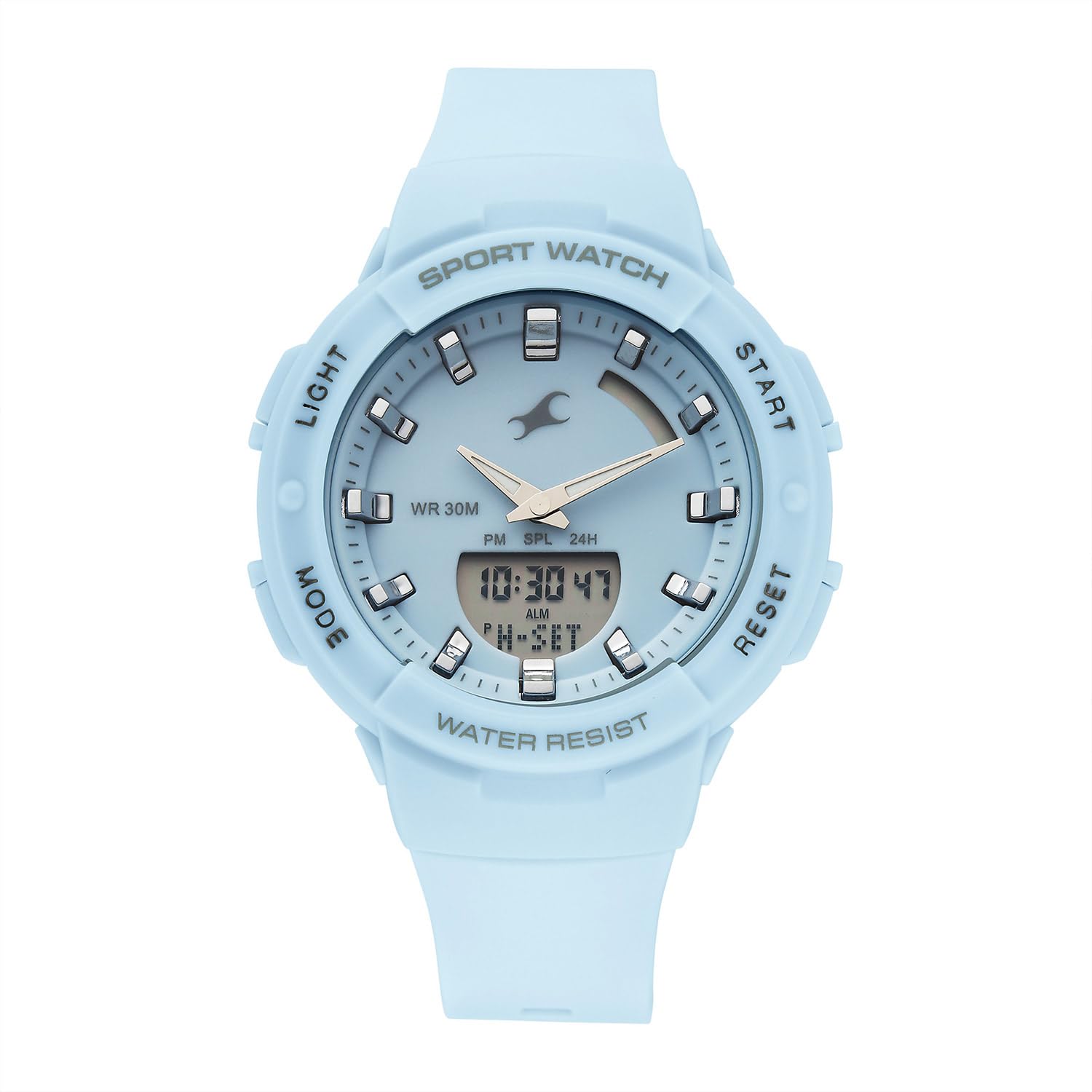
Depan view of the Fastrack StreetStyle 5.0 watch, showcasing the blue dial, analog hands, and digital display. The four control buttons (LIGHT, MODE, START, RESET) are visible on the sides of the case.
Pengaturan
Your Fastrack StreetStyle 5.0 watch comes with a pre-installed battery. Before first use, ensure any protective films are removed from the watch face and back case.
Pengaturan Waktu Awal
- Identifikasi Tombol: Your watch features four buttons: LAMPU (kiri atas), MODE (kiri bawah), AWAL (kanan atas), dan MENGATUR ULANG (kanan bawah).
- Masuk ke Mode Pengaturan Waktu: Tekan tombol MODE button repeatedly until the digital time display starts flashing, indicating you are in setting mode.
- Sesuaikan Waktu: Gunakan AWAL button to increase the flashing value (hours, minutes, seconds). Use the MENGATUR ULANG button to cycle through the different values (hours, minutes, 12/24-hour format).
- Tetapkan Tanggal dan Hari: Lanjutkan menekan MENGATUR ULANG button to move to date, month, and day settings. Adjust these values using the AWAL tombol.
- Keluar dari Mode Pengaturan: Setelah semua pengaturan sudah benar, tekan tombol MODE button to exit the setting mode. The digital display will stop flashing, and the analog hands will automatically synchronize with the set digital time.
Petunjuk Pengoperasian
Menggunakan Lampu Latar EL
To illuminate the digital display in low-light conditions, press the LAMPU button (top left). The backlight will remain active for a few seconds.
Fungsi Alarm
- Mode Alarm Akses: Tekan tombol MODE button repeatedly until 'ALM' or the alarm time is displayed.
- Setel Waktu Alarm: Saat dalam Mode Alarm, tekan MENGATUR ULANG button to select the hour or minute digit you wish to adjust. Use the AWAL tombol untuk mengubah nilai.
- Aktifkan/Nonaktifkan Alarm: Tekan tombol AWAL button while in Alarm Mode to toggle the alarm ON/OFF. An alarm icon will appear when activated.
- Hourly Berpadu: Some models allow setting an hourly chime. Refer to the display for an 'SIG' or chime icon and use the AWAL button to toggle it.
- Keluar dari Mode Alarm: Tekan tombol MODE button to return to the regular time display.
Fungsi Stopwatch
- Akses Mode Stopwatch: Tekan tombol MODE button repeatedly until 'STW' or '00:00:00' is displayed.
- Mulai/Berhenti: Tekan tombol AWAL Tekan tombol untuk memulai penghitungan waktu. AWAL lagi untuk berhenti.
- Waktu Putaran/Split: Saat stopwatch berjalan, tekan tombol MENGATUR ULANG button to record a lap or split time. The stopwatch will continue running in the background.
- Atur ulang: Saat stopwatch dijeda, tekan tombol MENGATUR ULANG tombol untuk mengatur ulang stopwatch ke '00:00:00'.
- Keluar dari Mode Stopwatch: Tekan tombol MODE button to return to the regular time display.
Fungsi Waktu Dunia
Your watch includes a World Time function for tracking time in different global cities.
- Access World Time Mode: Tekan tombol MODE button repeatedly until 'WT' or a different city code is displayed.
- Pilih Kota: Gunakan AWAL button to cycle through available city codes/time zones.
- Exit World Time Mode: Tekan tombol MODE button to return to the regular time display.
Pemeliharaan
Membersihkan Jam Tangan Anda
To maintain the appearance of your watch, wipe it regularly with a soft, dry cloth. For stubborn dirt, a slightly damp Kain lap dapat digunakan, diikuti dengan kain kering. Hindari penggunaan pembersih kimia, pelarut, atau bahan abrasif, karena dapat merusak lapisan dan segel jam tangan.
Tahan Air
Jam tangan ini dinilai untuk WR 30M (3 ATM) water resistance. This means it is suitable for everyday use and can withstand splashes or brief immersion in water. It is bukan suitable for swimming, showering, or diving. Avoid operating buttons when the watch is wet to prevent water ingress.

Belakang view of the Fastrack StreetStyle 5.0 watch, showing the stainless steel back case with engraved brand logo, model number (68054PP02), and water resistance rating (WR 30M).
Penggantian Baterai
The watch is powered by a button-cell battery. When the display dims or the watch stops functioning, it's time for a battery replacement. It is recommended to have the battery replaced by an authorized service center to ensure proper sealing and maintain water resistance.
Penyimpanan
When not in use, store your watch in a cool, dry place away from direct sunlight, extreme temperatures, and strong magnetic fields. Keeping it in its original packaging or a watch box can help protect it from dust and scratches.
Penyelesaian Masalah
- Jam Tangan Tidak Berfungsi: Periksa apakah baterai perlu diganti. Pastikan tidak ada tombol yang macet.
- Tampilan Waktu yang Salah: Re-enter the time setting mode and adjust the time as per the 'Initial Time Setting' instructions.
- Analog Hands Not Synchronized: If analog hands do not match the digital time after setting, try resetting the watch (if a reset function is available, otherwise consult service).
- Layar Digital Redup atau Kosong: This usually indicates a low battery. Replace the battery.
- Pengawasan Air Dalam: If you notice condensation or water droplets inside the watch, stop using it immediately and take it to an authorized service center.
For issues not covered here, please contact Fastrack customer support.
Spesifikasi

Diagram illustrating the case size of the Fastrack StreetStyle 5.0 watch, indicating a 41 mm case diameter for reference.
| Fitur | Detil |
|---|---|
| Merek | Jalur Cepat |
| Nama Model | StreetStyle 5.0 |
| Nomor Model | 68054PP02W |
| Jenis Tampilan | Analog-Digital |
| Pergerakan | Kuarsa |
| Tahan Air | 30 Meter (3 ATM) |
| Dimensi Kotak (PxLxT) | 50 x 41 x 17 Milimeter |
| Berat Barang | 200 gram |
| Baterai Termasuk | Ya |
| Negara Asal | India |
Garansi dan Dukungan
Your Fastrack StreetStyle 5.0 watch is covered by a manufacturer's warranty against manufacturing defects. Please refer to the warranty card included with your purchase for specific terms, conditions, and duration. Keep your purchase receipt as proof of purchase for warranty claims.
For technical assistance, service, or warranty claims, please contact Fastrack customer support or visit an authorized Fastrack service center. You can find contact information and service center locations on the official Fastrack weblokasi: www.fasttrack.in


